


Replacing your home thermostat safely is achievable for most DIY homeowners by following proper safety protocols, using the correct tools, and completing twelve essential installation steps that include turning off power at the breaker, labeling wires correctly, and verifying system compatibility. This straightforward project typically takes 30-60 minutes and works with low-voltage wiring, making it significantly safer than standard household electrical work when appropriate precautions are followed.
Understanding whether thermostat replacement is safe for your skill level requires evaluating your comfort with basic electrical work and your HVAC system’s complexity. Most modern thermostats use 24-volt wiring, which poses minimal shock risk compared to 120-volt household circuits, yet still demands respect and proper safety equipment including a voltage tester and careful adherence to power shutoff procedures.
Gathering the right tools and materials before starting your thermostat replacement ensures a smooth installation process without mid-project trips to the hardware store. Beyond basic screwdrivers and wire labels, smart thermostat installations may require additional considerations such as C-wire compatibility and Wi-Fi setup capabilities that differ from traditional programmable models.
Avoiding common installation mistakes protects both your safety and your expensive HVAC equipment from damage. Next, let’s explore whether DIY thermostat replacement is the right choice for your specific situation and what safety measures you must implement.
Is Replacing a Thermostat Safe for DIY Homeowners?
Yes, replacing a thermostat is safe for DIY homeowners because it involves low-voltage wiring (typically 24 volts), requires only basic tools, and follows straightforward installation steps when proper safety precautions are observed.
Understanding the voltage difference is crucial to assessing safety. Most residential thermostats operate on 24-volt circuits that control your HVAC system, which is substantially different from the 120-volt or 240-volt power running through your home’s outlets and major appliances. This lower voltage significantly reduces the risk of serious electrical shock, though it doesn’t eliminate the need for caution entirely.
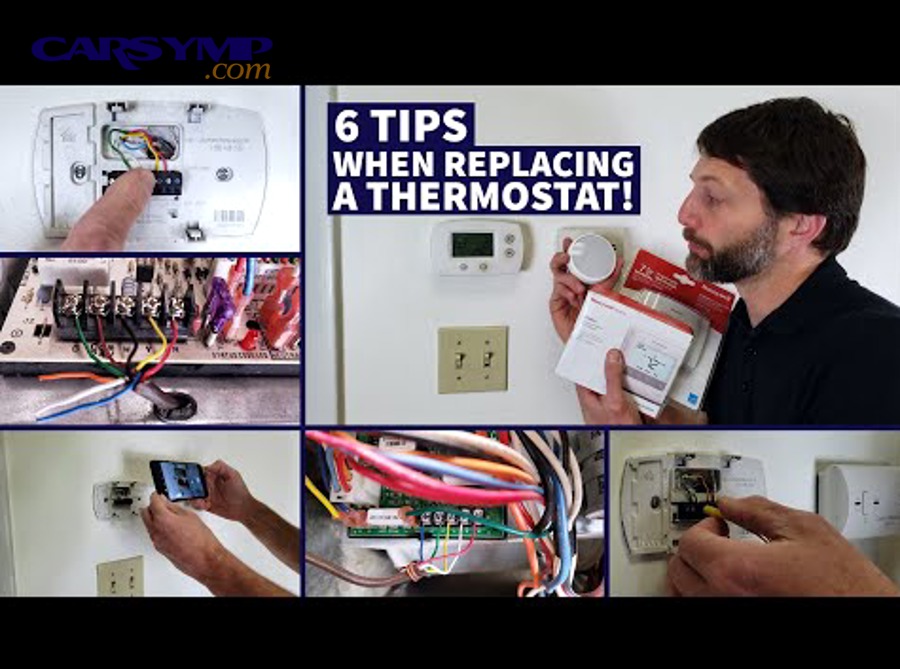
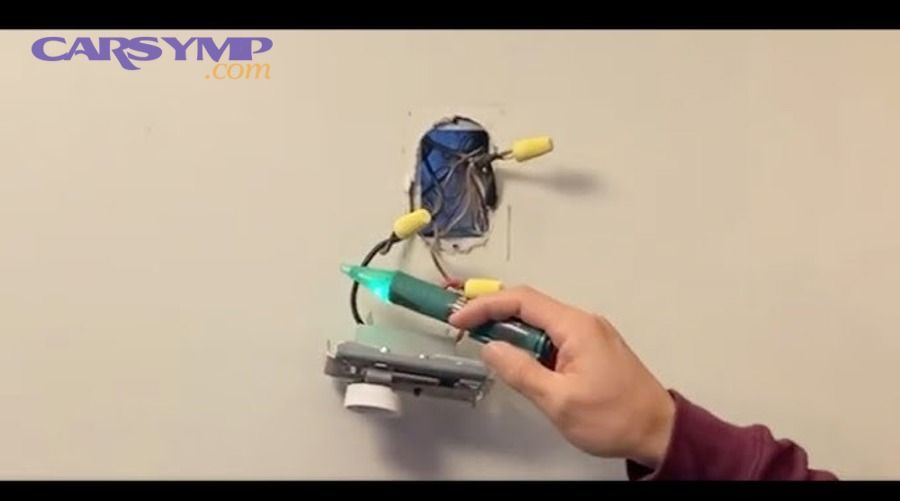
The safety of DIY thermostat installation hinges on three critical factors. First, you must turn off power to your HVAC system at the circuit breaker before touching any wires, creating a completely de-energized work environment. Second, using a voltage tester or multimeter to verify power is truly off adds an essential confirmation step that protects against mislabeled breakers or unexpected power sources. Third, following the manufacturer’s instructions precisely ensures you connect wires correctly and avoid damaging sensitive electronic components in both the thermostat and your heating and cooling equipment.
However, certain situations warrant professional installation rather than DIY approaches. If you discover thick wires instead of the thin 18-24 gauge wires typical of thermostat installations, you may have a high-voltage system requiring a licensed electrician. Similarly, homes with complex multi-zone HVAC systems, heat pumps without clear wiring diagrams, or situations where you cannot locate the correct circuit breaker should prompt you to contact an HVAC professional. Additionally, if your municipality requires permits for thermostat installation or if you feel uncomfortable working around any electrical components, hiring a professional provides peace of mind and ensures code compliance.
Your skill level assessment should be honest and realistic. Successful DIY thermostat replacement requires the ability to follow detailed instructions, basic hand-eye coordination for making wire connections, and the patience to photograph and label wires methodically. If you have successfully completed other basic home improvement projects like installing light fixtures, ceiling fans, or outlet covers, you likely possess the fundamental skills needed.
According to data from the Electrical Safety Foundation International, nearly 30,000 non-fatal electrical shock incidents occur annually in the United States during household projects, with many preventable through proper safety protocols. This statistic underscores why even “simple” electrical projects demand serious attention to safety procedures, proper tool usage, and knowing your limitations.
What Tools and Materials Do You Need to Replace a Thermostat?
You need seven essential tools for thermostat replacement: a screwdriver set, voltage tester, level, wire labels, drill with bits, pliers, and optionally wire strippers, plus your new thermostat with its included mounting plate and installation hardware.
To begin, let’s examine why each tool serves a critical function in the installation process. The voltage tester stands as your most important safety device, providing definitive confirmation that power is disconnected before you touch any wires. A screwdriver set with multiple heads handles both Phillips and flathead screws you’ll encounter on thermostat faceplates, mounting brackets, and terminal connections. The level ensures your new thermostat hangs perfectly straight, which matters both aesthetically and functionally for devices with mercury switches or digital displays designed to be viewed at specific angles.
What Safety Equipment is Essential for Thermostat Installation?
The voltage tester or multimeter represents your primary safety equipment, allowing you to confirm zero electrical current before touching wires, preventing shock hazards and accidental short circuits.
Specifically, a non-contact voltage tester provides the simplest operation by alerting you to live wires without requiring direct contact. You simply hold the tester near wire terminals, and it beeps or lights up if voltage is present. More advanced users might prefer a multimeter, which not only detects voltage but also measures the exact voltage level, helping identify whether you’re working with standard 24-volt thermostat wiring or unexpected higher-voltage circuits.
Beyond electrical testing, protective eyewear shields your eyes from debris when drilling mounting holes or removing old wall plates that may have accumulated dust and insulation particles. Work gloves protect your hands when handling sharp wire ends or working around wall openings where metal lath or rough edges might be present. While low-voltage work doesn’t require the heavy-duty electrical gloves needed for high-voltage applications, basic work gloves still provide sensible protection.
A flashlight or headlamp illuminates the work area behind your thermostat, where wire connections and wall cavities remain shadowed. Proper lighting helps you identify wire colors accurately, read terminal labels clearly, and spot potential issues like damaged insulation or loose connections that might otherwise go unnoticed.
Do You Need Special Tools for Smart Thermostat Installation?
Smart thermostat installation requires the same basic tools as traditional models, plus a smartphone or tablet for Wi-Fi configuration and potentially a C-wire adapter kit if your system lacks continuous power wiring.
More specifically, the C-wire (common wire) provides constant 24-volt power that smart thermostats need to maintain Wi-Fi connections, run color touchscreens, and operate continuously without draining batteries. Many older homes have only four thermostat wires (typically red, white, green, and yellow), lacking the fifth blue or black C-wire that modern smart devices require. In these situations, you have three options: install a C-wire adapter (often included with premium smart thermostats), run a new wire from your furnace to the thermostat location, or choose a smart thermostat model specifically designed to operate without a C-wire.
Your smartphone becomes an essential tool for smart thermostat setup, as initial configuration, Wi-Fi network connection, and ongoing programming typically occur through dedicated manufacturer apps. Before starting installation, download the appropriate app for your thermostat model (Nest, ecobee, Honeywell Home, etc.), create an account if required, and ensure your home Wi-Fi password is readily available. Many manufacturers now include QR codes on their devices that streamline the pairing process when scanned with your phone’s camera.
Additional smart-specific tools might include a small stepladder for reaching your thermostat location while simultaneously consulting your smartphone screen, and possibly a wire fishing tool if you need to run a new C-wire through walls. Some installations benefit from having a second person available to assist with holding the thermostat level while you mark mounting holes or to check HVAC system responses while you adjust settings.

How Do You Check if Your New Thermostat is Compatible With Your HVAC System?
Your new thermostat is compatible with your HVAC system when it matches your system’s voltage (typically 24V), supports your heating and cooling type (gas furnace, heat pump, or electric), and has terminals for all your existing wires.
To better understand compatibility, you must first identify what type of HVAC system you currently have. Different heating and cooling systems send different signals through thermostat wiring, and installing an incompatible thermostat can result in non-functional equipment or, worse, damaged control boards that require expensive repairs.
What is a C-Wire and Does Your System Need One?
A C-wire (common wire) is a continuous 24-volt power supply wire that connects your thermostat to your HVAC system’s transformer, and your system needs one if you’re installing a smart or Wi-Fi-enabled thermostat that requires constant power for its advanced features.
Specifically, the C-wire completes the electrical circuit that powers your thermostat independently of your heating and cooling calls. Traditional thermostats with simple mechanical switches or basic digital displays could “steal” tiny amounts of power through other wires when the system ran, but smart thermostats with color touchscreens, Wi-Fi radios, and always-on processors draw too much current for this approach to work reliably.
To identify whether you have a C-wire, remove your current thermostat faceplate and examine the wires connected to the base. Look for a wire (often blue or black, but sometimes other colors) connected to a terminal labeled “C” or “Common.” If you see this connection, your system already has C-wire capability. If the C terminal is empty but you see an extra unused wire bundled behind your thermostat, that wire might already run back to your furnace and simply needs to be connected at both ends to become functional.
When no C-wire exists, you have several solutions. Many smart thermostat manufacturers include a C-wire adapter (sometimes called a “power extender kit” or “common maker”) that installs at your furnace and allows your existing wiring to provide the necessary power. Alternatively, an HVAC professional can run a new wire from your furnace to your thermostat location, though this may involve fishing wire through walls and costs between $150-300 for professional installation. Some newer smart thermostats from brands like Honeywell and Emerson offer models specifically engineered to operate without a C-wire using advanced power management, though these may have limited features compared to C-wire models.
How Do You Identify Your HVAC System Type?
You identify your HVAC system type by examining your current thermostat wiring, checking your outdoor and indoor equipment, and consulting your system’s documentation to determine whether you have a gas furnace, heat pump, electric resistance, or oil heating system.
More specifically, the number and color of wires at your thermostat provides immediate clues about your system complexity. A basic heating-only system might have just two wires (typically red and white), while a complete heating and cooling system usually has four or five wires. Systems with heat pumps typically require additional wires for reversing valve control, and multi-stage systems with both standard and auxiliary heating might have seven or more connections.
To physically inspect your equipment, locate your indoor air handler or furnace (usually in a basement, attic, or utility closet) and look for identifying information on the unit’s label. Gas furnaces have visible burners and a flue pipe venting combustion gases outside. Electric furnaces have large heating elements but no flue. Heat pumps have an outdoor compressor unit that runs during both heating and cooling, unlike air conditioners that only operate when cooling. Oil heating systems have a distinctive fuel tank and oil burner assembly.
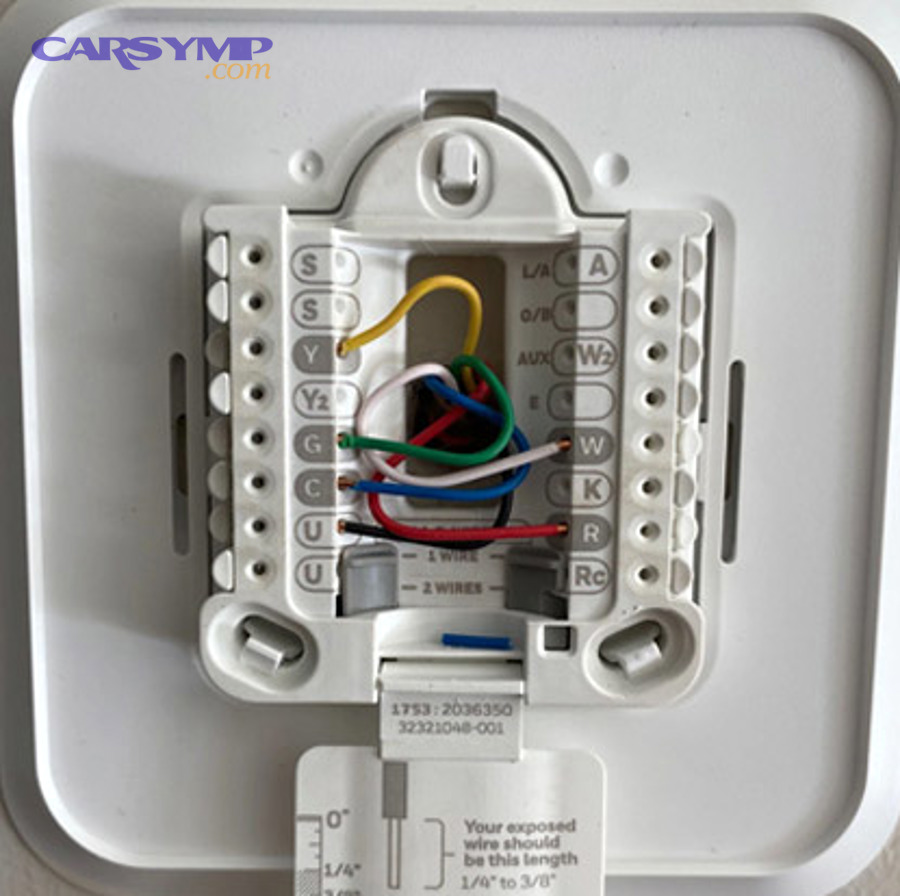
Your thermostat’s existing terminal labels also reveal system type. Standard configurations include:
- R (Red wire): Power from transformer
- W (White wire): Heat call signal
- Y (Yellow wire): Cooling call signal
- G (Green wire): Fan control
- C (Blue/Black wire): Common/return power
Heat pump systems add:
- O or B (Orange/Blue wire): Reversing valve control
- E or AUX (Brown wire): Emergency or auxiliary heat
Multi-stage systems include:
- W2: Second-stage heating
- Y2: Second-stage cooling
Before purchasing your new thermostat, photograph your current wiring and compare it against compatibility charts provided by thermostat manufacturers. Most major brands (Nest, ecobee, Honeywell, Emerson) offer online compatibility checkers where you input your wire configuration and receive immediate confirmation of which models will work with your system. This five-minute verification step prevents the frustration of purchasing an incompatible device.
What are the 12 Essential Steps to Replace Your Thermostat Safely?
The 12 essential steps to replace your thermostat safely include turning off power at the breaker, removing the old thermostat, labeling all wires, installing the new wall plate with proper leveling, connecting wires to correct terminals, and testing all system functions before completing installation.
Let’s explore each phase of the installation process with the detailed attention that ensures both safety and success. The following steps build upon each other sequentially, so completing them in order prevents common mistakes and protects your HVAC equipment.
Step 1-3: How Do You Safely Prepare for Thermostat Replacement?
Safe preparation requires turning off power to your HVAC system at the circuit breaker, verifying zero voltage with a tester, and photographing your existing wiring before touching any connections.
Step 1: Locate and Turn Off the Correct Circuit Breaker
Begin by finding your home’s main electrical panel and identifying the circuit breaker controlling your HVAC system. Look for labels reading “Furnace,” “HVAC,” “Air Handler,” or “Heat/AC.” If breakers aren’t clearly labeled, you may need to test by turning off suspected breakers one at a time and checking if your thermostat display goes dark. Once identified, flip the breaker to the “OFF” position. For added safety with critical systems, some electricians recommend placing a piece of tape over the breaker with a note indicating work in progress, preventing family members from accidentally restoring power.
Some HVAC systems have a secondary disconnect switch located near the furnace or air handler, often mounted on or beside the unit in a gray metal box. Switching this to “OFF” provides an additional layer of safety by cutting power at the equipment itself rather than just at the panel.
Step 2: Verify Power is Completely Off
Never assume the breaker you switched actually controls your thermostat. Use your voltage tester or multimeter to confirm zero voltage at the thermostat wires. Remove your current thermostat’s faceplate to expose the wire terminals. Touch your voltage tester probe to the wires or hold a non-contact tester near them. The tester should remain silent and unlit. If it beeps or lights up, power is still present—return to your breaker panel and shut off the correct circuit.
This verification step takes only seconds but prevents potentially dangerous shocks and protects sensitive electronic components in your new thermostat from voltage spikes during installation. Even experienced electricians follow this “test before touch” protocol on every job.
Step 3: Remove Old Thermostat Faceplate and Document Wiring
Gently pull the old thermostat’s faceplate away from its wall mount. Most models snap off easily, though some have small tabs on the bottom or sides that need pressing. With the wiring exposed, immediately take multiple clear photographs from different angles using your smartphone. Capture close-up shots showing exactly which colored wire connects to which labeled terminal. These photos serve as your insurance policy if wire labels fall off or you encounter confusion later.
Pay special attention to any jumper wires (short wires connecting two terminals together). These intentional connections matter for your new installation and must be replicated exactly. Note whether any terminals have multiple wires connected to them, as this occurs in some multi-zone or complex systems.
Step 4-6: How Do You Properly Remove the Old Thermostat?
Proper removal involves labeling each wire with its terminal letter, carefully disconnecting wires while preventing them from falling into the wall, and removing the old mounting plate without damaging the wall surface.
Step 4: Label All Wires with Terminal Letters
Most new thermostats include small adhesive labels printed with letters (R, W, Y, G, C, etc.). Before disconnecting any wire, wrap the corresponding label around each wire about an inch from its end. The label should match the terminal letter the wire currently connects to, NOT the wire’s color. For example, if your red wire connects to the “RC” terminal, label it “RC” even though red wires typically connect to “R” terminals. This distinction matters because not all systems follow standard color coding.
If your thermostat didn’t include labels, use small pieces of masking tape and a permanent marker to create your own. Write clearly and ensure labels won’t slip off the wires. For extra security, take another photo after labeling and before disconnection.
Some HVAC professionals use an alternative labeling method: they draw a simple diagram on paper showing wire colors, terminal letters, and any special notes about jumpers or doubled wires. This belt-and-suspenders approach provides redundancy if physical labels become separated from wires.
Step 5: Disconnect Wires Without Losing Them in the Wall
Thermostat wires can easily slip back into the wall cavity when disconnected, creating significant frustration as you attempt to fish them back out. Prevent this problem by gently pulling a few extra inches of wire out from the wall before disconnecting them. Older thermostats with screw terminals require loosening small screws to release wires; newer models often use push-button connectors where you press a tab to release each wire.
As you disconnect each wire, bend it slightly away from the wall or wrap it around a pencil held horizontally across the wall opening. Another effective technique involves taping the wires temporarily to the wall surface above or beside the thermostat location. Some installers clip a clothespin onto the wire bundle, creating a physical stop that cannot fit through the wall hole.
Handle wires gently to avoid breaking the thin copper conductors inside. If you notice any wires with cracked or brittle insulation, mark them for potential replacement. Damaged wire insulation can cause short circuits when bare wires touch.
Step 6: Remove Old Wall Plate and Assess Wall Condition
Unscrew the old thermostat’s wall plate (also called the base plate or mounting plate) from the wall. Behind it, you’ll find a hole through which wires pass from your HVAC system. Examine the wall surface for damage, old screw holes, or areas where paint has peeled. If your new thermostat’s base plate is smaller than your old one, exposed areas may be visible and require touch-up painting or patching.
Check whether the existing mounting holes align with your new thermostat’s screw positions. Many modern thermostats use standard mounting patterns, but older mercury-bulb thermostats or unique vintage models might have completely different hole placements. If holes don’t align, you’ll need to drill new ones and possibly use drywall anchors for secure mounting.
This is also the ideal time to consider whether your thermostat’s current location is optimal. Thermostats should be mounted on interior walls away from direct sunlight, drafts, doorways, windows, and heat sources like lamps or appliances that could cause false temperature readings. If your current location is problematic and you have DIY electrical experience, running wires to a better location might be worth considering—though this significantly increases project complexity.
Step 7-9: How Do You Install the New Thermostat Wall Plate?
Installing the new wall plate requires using a level to ensure proper alignment, marking and drilling mounting holes with appropriate anchors, and securing the plate firmly without overtightening screws.
Step 7: Level and Mark New Mounting Holes
Hold your new thermostat’s base plate against the wall, threading the labeled wires through its central opening. Position the plate at the appropriate height (typically 52-60 inches from the floor, which allows comfortable viewing and adjustment while standing). Place your level on top of the base plate and adjust until the bubble centers perfectly.
While holding the plate level (this is where a helper proves valuable), use a pencil to mark the mounting screw hole locations through the plate’s pre-drilled holes. Mark lightly but clearly so you can see the spots after removing the plate. If your plate has multiple mounting options or adjustable slots, choose positions that avoid old screw holes if possible, as this provides stronger anchoring.
Double-check your level before marking. A crooked thermostat appears unprofessional and may cause functional issues with older thermostats containing mercury switches that rely on precise leveling to operate correctly. Even digital thermostats benefit from level installation for optimal display viewing angles.
Step 8: Install Drywall Anchors If Needed
If your wall is drywall (rather than plaster over wood lath) and your new mounting holes don’t align with wall studs, you’ll need drywall anchors to provide secure mounting. Drill pilot holes at your marked locations using a drill bit sized according to your anchor manufacturer’s specifications—typically 3/16-inch for standard plastic anchors.
Gently tap plastic anchors into the drilled holes using a hammer until they sit flush with the wall surface. The anchors expand behind the drywall as you drive screws into them, creating a secure hold. Over-drilling creates loose holes that won’t hold anchors properly, while under-drilling makes anchors difficult to install and risks cracking the drywall.
If your previous thermostat mounted to the same locations and held securely, you may be able to reuse those holes. However, if old holes are stripped or enlarged, shift your new mounting position slightly or use larger anchors to compensate. Toggle bolts provide the strongest hold in drywall but require larger holes and more installation effort—reserve these for heavy thermostats or situations where you need maximum security.
Step 9: Secure Wall Plate to Wall
Thread your labeled wires through the wall plate opening once more, ensuring no labels slip off during this process. Align the plate’s mounting holes with your drilled anchors or existing holes, then insert screws and tighten them gradually. Alternate between screws rather than fully tightening one before starting another—this ensures even pressure and maintains proper plate alignment.
Tighten screws firmly but not excessively. Over-tightening can crack plastic base plates, strip drywall anchors, or warp the mounting surface so the thermostat faceplate won’t snap on properly. The plate should sit flush against the wall without gaps or wobble, but you shouldn’t need to force screws or apply maximum strength.
After securing the plate, verify once more with your level that it remains perfectly horizontal. Slight adjustments are still possible by loosening screws slightly, shifting the plate, and re-tightening. Once satisfied, give each screw a final snug turn and proceed to wiring.
Step 10-12: How Do You Connect and Program Your New Thermostat?
Connecting your new thermostat requires matching each labeled wire to its corresponding terminal, securing the thermostat faceplate, restoring power at the breaker, and completing initial programming according to manufacturer instructions.
Step 10: Connect Labeled Wires to New Terminals
Your new thermostat’s base plate has terminals labeled with letters matching your wire labels. Beginning with the R wire (power), insert each wire into its matching terminal. Terminal connection methods vary by thermostat model:
- Screw terminals: Loosen the terminal screw, wrap the bare wire clockwise around the screw post (matching the direction the screw tightens), and tighten firmly. The wire should wrap 3/4 to full turn around the post with no bare copper visible outside the terminal area.
- Push-in terminals: Strip wire insulation back about 1/4 inch if needed, press the terminal release button, insert the bare wire fully into the terminal hole, and release the button. Tug gently on the wire to confirm it’s locked in place.
- Spring-loaded terminals: Push the wire straight into the terminal opening until you feel resistance, then push slightly harder until the spring mechanism grips the wire. Again, test with a gentle tug.
Connect wires exactly as labeled, not by color. Your labels should match your photos from earlier. If you have any jumper wires (short wires connecting two terminals), replicate those connections on your new thermostat. If you have unused wires bundled behind your old thermostat, leave them bundled and tucked safely behind your new one unless manufacturer instructions specify otherwise.
Take extreme care not to allow bare wire ends to touch each other or the metal wall plate while working. Even with power off, creating the habit of preventing shorts protects you when you restore power.
Step 11: Attach Faceplate and Restore Power
With all wires securely connected, carefully align your thermostat’s faceplate with the mounted base plate. Most modern thermostats simply snap onto the base—align the bottom edge first, then press the top until you hear or feel it click into place. Some models require sliding the faceplate down onto the base from above, while others use small screws to secure the faceplate.
Before restoring power, do a final visual inspection. Look through any visible gaps to confirm no wires are pinched, no bare copper touches metal surfaces, and all connections appear secure. If your thermostat uses batteries (either as primary power or backup), insert them according to the polarity markings (+ and -) in the battery compartment. Many battery-powered thermostats won’t power on until batteries are installed, even if wiring is correct.
Return to your circuit breaker panel and flip the HVAC system breaker back to the “ON” position. If you switched off a secondary disconnect near your furnace, restore that power as well. Return to your thermostat and watch for it to power on. Most digital thermostats display a welcome screen, initialization sequence, or setup wizard within a few seconds of power restoration.
If the thermostat doesn’t power on, don’t panic. Verify batteries are installed correctly if applicable, check that the faceplate is fully seated on the base, and confirm power is truly restored at the breaker. If problems persist, turn power back off and review your wire connections methodically.
Step 12: Complete Programming and System Testing
Follow your thermostat’s specific setup instructions, which vary significantly between models. Basic programmable thermostats typically require setting the current time, day of the week, and your preferred temperature schedule for weekday and weekend periods. Smart thermostats involve additional steps: connecting to your Wi-Fi network, creating or logging into a user account, and potentially configuring smart features like geofencing, learning schedules, or integration with other smart home devices.
During initial setup, you’ll likely need to tell the thermostat what type of heating and cooling system you have. Consult your notes or photos from the old thermostat if you’re unsure—options typically include gas furnace, electric furnace, heat pump, or oil furnace, plus whether you have air conditioning. This configuration ensures the thermostat sends appropriate signals to your HVAC equipment.
After completing basic programming, test your system’s operation in both heating and cooling modes. Set the thermostat several degrees above the current temperature and switch to “Heat” mode. Within a few minutes, you should hear your furnace ignite and feel warm air from vents. Then set the temperature several degrees below current temperature, switch to “Cool” mode, and verify cold air begins flowing and the outdoor compressor unit starts running.
Listen for unusual sounds during these tests. Normal operation includes the gentle click of relays engaging, the whoosh of the furnace igniting, and the hum of the blower motor. Concerning sounds include rapid clicking (indicating a possible short circuit), grinding, or complete silence when the system should be running.
According to research from the American Society of Heating, Refrigerating and Air-Conditioning Engineers (ASHRAE), properly installed and programmed thermostats can reduce home heating and cooling costs by 10-30% compared to manual temperature management, with the greatest savings achieved through consistent use of setback schedules that reduce conditioning when the home is unoccupied.

What are the Most Common Mistakes When Replacing a Thermostat?
The most common thermostat replacement mistakes include skipping the power shutoff step, relying on wire colors instead of terminal labels, failing to check system compatibility, improper leveling of the mounting plate, and not testing all HVAC functions after installation.
In addition, understanding these frequent errors helps you avoid costly damage and installation failures. Each mistake carries specific consequences ranging from minor inconvenience to expensive HVAC system repairs, so learning from others’ experiences protects both your safety and your wallet.
What Happens if You Skip the Power Shutoff Step?
Skipping the power shutoff step risks electrical shock, can cause short circuits that damage your thermostat or HVAC control board, and may create dangerous sparks when wires accidentally touch during installation.
Specifically, even though thermostat wiring operates at relatively low 24 volts, accidental wire contact can still produce harmful results. When two wires touch with power flowing, they create a direct short circuit that sends maximum current through the circuit. This surge can instantly destroy the transformer in your furnace, blow fuses in your HVAC control board, or damage the electronic components in your new thermostat before you even complete installation.
The Thermostat replacement cost estimate for transformer replacement alone typically ranges from $150-400 when performed by an HVAC technician, easily exceeding what you would have paid for professional thermostat installation in the first place. Control board damage can cost $200-600 in parts plus labor, as these circuit boards contain sensitive electronics that cannot tolerate voltage spikes or short circuits.
Beyond equipment damage, live wires present a shock hazard. While 24-volt shocks rarely cause serious injury to healthy adults, they can be startling enough to cause falls from ladders, trigger cardiac events in individuals with heart conditions, or cause involuntary muscle contractions that result in dropping tools or striking nearby objects. Children, elderly individuals, and those with pacemakers face elevated risks from even low-voltage electrical contact.
The few minutes required to locate and switch off the correct breaker, then verify with a voltage tester, represents minimal investment compared to these potential consequences. Experienced DIYers develop the automatic habit of de-energizing circuits before any electrical work, treating it as non-negotiable as wearing a seatbelt when driving.
Why Should You Never Rely on Wire Colors Alone?
Wire colors are not standardized across all HVAC installations, meaning different installers or manufacturers may use different color conventions, so labeling by terminal letter ensures correct connections regardless of color variations.
More specifically, while loose industry conventions suggest red for power, white for heat, and yellow for cooling, these guidelines aren’t universal requirements. An installer might have run out of yellow wire and substituted orange. A previous homeowner might have completed a repair using whatever wire colors were available. Some thermostat cable manufacturers use different color assortments in their bundled cables.
The terminal letters (R, W, Y, G, C, etc.), however, maintain consistent meanings across virtually all residential HVAC systems. The “R” terminal always provides 24-volt power from the transformer. The “W” terminal always calls for heat activation. This standardization means that matching your labeled wires to the same letter terminals on your new thermostat guarantees correct operation, regardless of whether your “heat” wire is white, brown, or purple.
Real-world examples illustrate this danger. A homeowner replacing their thermostat might notice their old white wire connected to the “Y” terminal (cooling call) rather than the expected “W” terminal (heating call). If they ignore their label and connect the white wire to “W” on their new thermostat based on color assumptions, their air conditioner will never receive a cooling signal—the thermostat will send heat calls to the cooling system, resulting in complete malfunction.
Similarly, multi-wire installations may have two red wires (one for heating transformer power, one for cooling transformer power, labeled “RH” and “RC”). Connecting these incorrectly based on color matching can create crossed circuits that damage equipment.
The solution remains simple and foolproof: photograph first, label by terminal letter not color, connect by label. This three-step process eliminates confusion and works correctly every time, even with unconventional wire colors.
How Do You Test if Your New Thermostat is Working Properly?
Your new thermostat is working properly when it powers on with a clear display, successfully activates both heating and cooling systems, maintains accurate temperature readings within ±1°F, and responds correctly to all mode and fan settings.
Especially important is systematic testing of each function rather than assuming everything works because the display illuminates. A methodical testing approach reveals potential issues while you still have tools handy and the installation fresh in your mind, rather than discovering problems later when you actually need heating or cooling.
What Should You Do if Your Thermostat Isn’t Turning On?
If your thermostat isn’t turning on, first verify the circuit breaker is switched to “ON,” check that batteries are installed correctly if required, confirm the faceplate is fully seated on the base plate, and examine all wire connections for looseness or shorts.
To begin troubleshooting, return to your circuit breaker panel and verify the HVAC breaker is fully in the “ON” position. Sometimes breakers trip during installation due to momentary short circuits when wires touched during connection. A tripped breaker sits in a middle position between “ON” and “OFF” and must be pushed fully to “OFF” before it can reset to “ON.”
Check any secondary disconnect switches at your furnace or air handler as well. These safety switches may have been turned off for maintenance and forgotten, or someone might have shut them off not knowing you were working on the thermostat. These switches typically look like standard light switches mounted in gray electrical boxes near the HVAC equipment.
For battery-powered thermostats, remove the batteries and verify you installed them matching the polarity markings (+ and -) in the battery compartment. Try fresh batteries even if the ones you installed are new—occasionally batteries from the package are dead or too low to power the device. Some thermostats require batteries solely for backup power during outages and won’t function without both wiring AND batteries installed correctly.
Remove the thermostat faceplate and ensure it’s properly seated on the base. Many modern thermostats use multi-pin connectors where the faceplate must align precisely with the base to establish electrical contact. If the plate is even slightly misaligned or not fully pressed onto the base, the connection fails and the thermostat appears dead. Remove and reseat the faceplate, listening and feeling for the click that indicates proper connection.
Examine your wire connections at the base plate terminals. Use a small flashlight to look closely at each terminal. Wires should be firmly secured with no looseness when you gently tug them. Look for any bare wire portions touching other terminals or the metal plate—these short circuits prevent proper operation and may have tripped breakers or blown fuses. If you find a short, turn power off, correct the wire position, and restore power.
If these basic checks don’t resolve the issue, consult your thermostat’s troubleshooting section in the manual. Some models have specific reset procedures involving button combinations or removing power for a set period. Others may have diagnostic modes that help identify connection problems.
How Do You Verify Heating and Cooling Functions Work Correctly?
Verify heating and cooling functions by setting your thermostat to “Heat” mode at a temperature 5°F above current room temperature, confirming your furnace activates within 2-3 minutes, then switching to “Cool” mode at 5°F below current temperature and confirming your air conditioner starts running.
More specifically, begin with heating system verification. Set your thermostat to “Heat” mode and adjust the temperature setpoint significantly above (at least 5 degrees) the current room temperature displayed. This ensures the thermostat recognizes a clear demand for heating. Within 1-3 minutes, you should hear your furnace ignite. Walk to a supply vent and feel for warm air beginning to flow. The blower fan may take 30-60 seconds after ignition to start, as most furnaces include a delay that prevents blowing cold air until the heat exchanger warms.
Listen for normal furnace operation sounds: the click of the gas valve opening, the whoosh or roar of burners igniting, and the ramp-up of the blower motor. Concerning sounds include repeated clicking without ignition (possible igniter or gas valve problem), loud banging (possible delayed ignition), or complete silence (thermostat not sending signal or furnace receiving power).
After confirming heat works, allow the furnace to run for several minutes, then set the thermostat back to a temperature below the current reading. The furnace should shut off within 30-60 seconds. This confirms the thermostat successfully sends both “call for heat” and “stop heating” signals.
Next, test cooling by switching the thermostat to “Cool” mode and setting the temperature at least 5 degrees below current room temperature. The air conditioning system typically takes slightly longer to start than heating—up to 3-5 minutes due to built-in delay timers that protect the compressor from rapid cycling. Walk outside and verify your outdoor condenser unit is running (you’ll hear the compressor and see the fan spinning). Check indoor vents for cool air flow.
If you have a heat pump rather than separate heating and cooling systems, testing becomes more complex. Heat pumps should provide both heating and cooling using the same outdoor unit, with the reversing valve changing refrigerant flow direction. When testing a heat pump, verify the outdoor unit runs in both heating and cooling modes, and confirm it produces appropriately warm or cool air for each setting. Understanding Overheating vs no-heat thermostat diagnosis helps identify whether issues stem from the thermostat or the HVAC equipment itself.
Test fan control by switching your thermostat fan setting from “Auto” to “On.” In “Auto” mode, the fan runs only when heating or cooling. In “On” mode, the fan should run continuously, circulating air even when not conditioning it. This confirms the thermostat’s fan control signal works independently of heating and cooling calls.
For systems with emergency heat (common with heat pumps), test this function by switching to “Emergency Heat” mode. The backup heating system (typically electric resistance coils) should activate, providing heat even if the primary heat pump is non-functional. This mode should only be used temporarily during primary system failures, as emergency heat costs significantly more to operate. Monitoring Temp gauge behavior after thermostat change can reveal whether your system responds properly to temperature calls.
According to testing protocols from the Air Conditioning Contractors of America (ACCA), proper thermostat installation verification should include temperature accuracy testing using a separate, calibrated thermometer placed near the thermostat. Readings should match within 1-2 degrees Fahrenheit. Larger variations suggest thermostat location issues (near drafts, sunlight, or heat sources) or calibration problems requiring professional attention.
Should You Choose a Smart, Programmable, or Manual Thermostat for Your Home?
Choose a smart thermostat if you want remote access and automated learning for optimal savings, a programmable thermostat if you maintain consistent schedules and prefer lower costs, or a manual thermostat if you have simple heating needs and want the most affordable, reliable option.
Moreover, understanding the distinct advantages and limitations of each thermostat type helps you align your purchase with your actual lifestyle, technical comfort level, and budget priorities rather than simply choosing the newest technology available.
What Are the Key Differences Between Smart and Programmable Thermostats?
Smart thermostats offer Wi-Fi connectivity for remote control via smartphone apps, learning algorithms that adjust automatically to your patterns, and integration with voice assistants, while programmable thermostats provide scheduled temperature changes based on manually entered programs without internet connectivity or automation.
Specifically, smart thermostats represent the premium tier of temperature control technology. Models from Nest, ecobee, Honeywell Home, and similar manufacturers connect to your home Wi-Fi network, allowing temperature adjustment from anywhere using smartphone apps. Leaving work early? Adjust your home’s temperature from your car so it’s comfortable when you arrive. Forgot to set vacation mode? Change it remotely from your hotel. This convenience appeals particularly to people with irregular schedules or those who frequently adjust temperatures based on real-time needs.
Learning algorithms distinguish premium smart thermostats from basic Wi-Fi models. Nest’s learning thermostat, for example, observes your temperature adjustments over one to two weeks, then creates automatic schedules matching your preferences. If you typically lower temperature at 10:30 PM and raise it at 6:30 AM on weekdays, the thermostat learns this pattern and begins making adjustments automatically. Ecobee’s models use occupancy sensors to determine when rooms are occupied and adjust accordingly, potentially saving energy when sensors detect an empty home.
Energy usage reporting provides another smart thermostat advantage. Most models track your heating and cooling runtime, estimate energy costs, and offer recommendations for additional savings. Monthly reports show usage trends, compare your consumption to similar homes, and identify opportunities for schedule optimization. This data visibility helps justify the higher upfront investment through documented savings over time.
Voice assistant integration allows control through Amazon Alexa, Google Assistant, or Apple HomeKit. Simply ask, “Alexa, set the temperature to 72 degrees,” or “Hey Google, what’s the temperature upstairs?” This hands-free control particularly benefits elderly users, people with mobility limitations, or anyone juggling armfuls of groceries who can’t easily reach the thermostat.
The table below compares key features across thermostat types:
| Feature | Manual Thermostat | Programmable Thermostat | Smart Thermostat |
|---|---|---|---|
| Price Range | $20-$50 | $40-$150 | $120-$300 |
| Remote Access | No | No | Yes (via app) |
| Scheduling | Manual adjustment only | 7-day programming | Automatic learning or manual |
| Wi-Fi Required | No | No | Yes |
| Energy Reports | No | Limited | Detailed analytics |
| Installation Complexity | Simplest | Moderate | Most complex (C-wire often needed) |
| Estimated Annual Savings | Baseline | 10-15% vs manual | 15-25% vs manual |
Programmable thermostats occupy the middle ground, offering scheduled temperature changes without internet connectivity requirements. You manually program schedules for weekdays and weekends, setting different temperatures for wake, leave, return, and sleep periods. Once programmed, these thermostats automatically adjust temperatures daily without smartphone apps or learning algorithms. They cost significantly less than smart models ($40-150 versus $120-300), require no ongoing connectivity or accounts, and reduce energy consumption compared to manual thermostats.
Manual thermostats provide the simplest, most affordable option. You physically adjust temperature settings as needed, just like turning a traditional dial or pressing up/down buttons. These work well for rental properties, vacation homes with infrequent use, or individuals who prefer straightforward, tactile controls without programming complexity. However, they offer no energy savings from scheduled setbacks unless you remember to manually adjust temperatures when leaving home or going to bed.
According to research from the Environmental Protection Agency’s ENERGY STAR program, households can save an average of $180 annually by properly using a programmable thermostat with effective setback schedules of 7-10 degrees for 8 hours daily, though actual savings vary based on climate, home insulation, and HVAC system efficiency.
When Should You Avoid DIY Installation and Hire a Professional?
Avoid DIY thermostat installation and hire a professional when you have high-voltage wiring (thick cables instead of thin wires), complex multi-zone systems, absence of required C-wire with no adapter solution, or local building codes requiring licensed contractors for thermostat work.
Specifically, high-voltage systems require licensed electricians rather than DIY installation. If you remove your old thermostat and discover thick cables (similar to standard household electrical wiring) instead of thin 18-24 gauge thermostat wire, you likely have a line-voltage system operating at 120 or 240 volts. These systems, common with electric baseboard heaters or some commercial equipment, carry serious shock and fire hazards that demand professional expertise. Working with line-voltage systems without proper licensing violates electrical codes in many jurisdictions and voids homeowner insurance coverage if problems arise.
Multi-zone HVAC systems with separate temperature control for different areas of your home involve more complex wiring configurations than standard single-zone installations. These systems may have zone control panels, damper motors, and multiple thermostats interconnected through control wiring. Incorrect installation can cause zone conflicts where competing temperature demands damage equipment or create comfort problems. Professional HVAC technicians understand zone system logic and ensure all components work together correctly.
If your system lacks a C-wire and your chosen smart thermostat doesn’t include a power adapter kit, professional installation may be necessary. While C-wire adapter installation isn’t extraordinarily complex, it requires accessing your furnace control board, identifying the correct transformer connection points, and sometimes making low-voltage wiring decisions that impact system safety. Incorrectly installed adapters can blow fuses, damage transformers, or create intermittent power issues that are difficult to troubleshoot. HVAC professionals install these adapters routinely and understand the specific requirements of different furnace brands.
Some municipalities require building permits and licensed contractor installation for HVAC work including thermostat replacement. These regulations exist in areas with strict electrical codes or where homeowner insurance policies mandate professional installation for liability coverage. Check your local building department’s requirements before beginning DIY work. Permit costs typically range from $50-150, and required professional installation adds $100-300 to project costs, but compliance protects you from code violations that could complicate future home sales or insurance claims. Understanding thermostat replacement cost estimate helps you budget appropriately whether choosing DIY or professional installation.
Heat pump systems, particularly older models or those with unusual configurations, may benefit from professional installation. Heat pumps use reversing valves, defrost cycles, and auxiliary heating that require specific thermostat settings and wire configurations. Incorrect installation can leave your system without backup heat during cold weather or cause excessive use of expensive emergency heat instead of efficient heat pump operation.
If you feel uncomfortable at any point during DIY installation—whether because of unfamiliar wire configurations, unexpected equipment complications, or simply uncertainty about proceeding safely—stop work and consult a professional. The cost difference between DIY installation (free labor, plus thermostat cost) and professional installation ($100-300 for labor) is relatively small compared to the potential costs of damaged HVAC equipment ($500-2000 for control board or transformer replacement) or incorrectly functioning systems that waste energy for months before you discover the problem.
How Much Money Can You Save With a Thermostat Upgrade?
You can save approximately 10-30% on heating and cooling costs annually by upgrading from a manual thermostat to a programmable or smart model and using effective temperature setback schedules, with actual savings depending on climate, home insulation, and consistent use of automated features.
To illustrate with specific examples, consider a household spending $1,800 annually on heating and cooling with a manual thermostat and no temperature adjustments when the home is unoccupied. Upgrading to a programmable thermostat and implementing an 8-hour daily setback of 8°F in winter and 7°F in summer could reduce annual costs by $180-270 (10-15% savings), paying for the $75-150 thermostat investment within one year.
Smart thermostats potentially increase these savings through more aggressive optimization. A Nest Learning Thermostat study conducted by Nest Labs across multiple climate zones found average savings of 10-12% on heating and 15% on cooling compared to pre-installation usage. For the same household spending $1,800 annually, this translates to roughly $216-270 in yearly savings, recovering the $200-250 thermostat cost in approximately one year while providing ongoing savings for the device’s 10+ year lifespan.
However, these savings figures assume proper utilization. A programmable thermostat that remains un-programmed saves nothing compared to manual adjustment. According to a study by the American Council for an Energy-Efficient Economy (ACEEE), approximately 47% of programmable thermostat owners never program their devices or override programmed settings so frequently that automated savings disappear. Smart thermostats address this problem through automatic learning and geofencing that requires no manual programming or discipline to achieve savings.
Geographic location significantly impacts potential savings magnitude. Homes in extreme climates (very hot summers, very cold winters) with high annual HVAC usage see larger absolute dollar savings from the same percentage reduction. A Phoenix household spending $2,400 annually on cooling-dominated costs saves more dollars (though the same percentage) than a San Diego household spending $800 annually in mild climate conditions.
Utility company rebate programs can reduce the effective cost of thermostat upgrades substantially. Many electric and gas utilities offer $25-100 rebates on ENERGY STAR certified programmable thermostats and $50-150 rebates on qualifying smart thermostats. Some utilities even provide free thermostats to customers enrolled in demand response programs that allow the utility to make minor temperature adjustments during peak usage periods in exchange for bill credits. Check your utility provider’s website or call their energy efficiency department to identify available programs before purchasing your new thermostat.
The payback calculation becomes compelling when you consider the full ownership period. A $200 smart thermostat saving $240 annually generates $2,400 in total savings over a 10-year lifespan, representing a 1,200% return on investment. Even at more conservative savings estimates of $150 annually, the 10-year return exceeds 750%—far better than most investment vehicles and requiring only a one-hour installation effort.
What Should You Do With an Old Mercury Thermostat?
Old mercury thermostats must be disposed of through hazardous waste collection programs rather than regular trash because they contain toxic mercury that can contaminate soil and water if the glass vial breaks in landfills, with most communities offering free recycling through ThermostatRecyclingCorp.org or household hazardous waste facilities.
Specifically, mercury thermostats manufactured before approximately 2000 typically contain a small glass capsule holding 3-4 grams of liquid mercury. This silvery metallic substance serves as a tilt switch that completes electrical circuits as the bimetallic coil expands and contracts with temperature changes. While enclosed mercury poses minimal risk, broken thermostats release mercury vapor and allow the toxic element to contaminate the environment.
Mercury exposure causes serious health effects including nervous system damage, kidney problems, and developmental issues in children and fetuses. Environmental mercury accumulates in water systems where bacteria convert it to methylmercury, which concentrates in fish tissues and eventually enters the human food chain. Keeping mercury out of landfills protects both immediate environmental health and long-term ecosystem safety.
The Thermostat Recycling Corporation (TRC), an industry-sponsored stewardship program, operates thousands of collection sites across the United States specifically for mercury thermostat recycling. Visit ThermostatRecyclingCorp.org and enter your ZIP code to locate the nearest collection location—options typically include HVAC contractor offices, municipal recycling centers, and home improvement retailers. Most collection sites accept mercury thermostats free of charge, and some utilities or municipalities offer small financial incentives ($5-10) for proper recycling.
When transporting your old mercury thermostat to a collection site, keep it in a sealed plastic bag to contain mercury if the glass vial breaks during transport. Handle the thermostat gently and keep it upright to minimize breakage risk. Never disassemble the thermostat, attempt to remove the mercury ampule, or break it open to examine the mercury—intact disposal ensures safe recycling.
If you accidentally break a mercury thermostat, follow EPA cleanup procedures: evacuate the room for 15 minutes with windows open, never use a vacuum cleaner (which vaporizes mercury and spreads contamination), and carefully collect visible mercury beads using stiff paper or tape. Place all materials including broken glass in a sealed container, then contact your local environmental health department for disposal guidance. Some situations may require professional mercury cleanup services, particularly for large spills in confined spaces.
Some modern digital thermostats also require special recycling due to circuit boards containing small amounts of toxic materials like lead solder, though these pose far less risk than mercury models. Check with your local electronics recycling program or retailer take-back programs that accept electronic waste. Many communities include thermostats in e-waste collection events held quarterly or annually.
According to data from the Thermostat Recycling Corporation, approximately 800,000 mercury thermostats are recycled annually in the United States, but an estimated 5-8 million mercury thermostats remain in use or stored in homes. Proper disposal of these remaining units over coming years represents a significant environmental protection opportunity as homeowners upgrade to more efficient modern technology.
By following these 12 essential steps and understanding both the technical requirements and safety considerations of thermostat replacement, DIY homeowners can successfully upgrade their HVAC control systems while saving money on professional installation costs. Remember that while most thermostat installations are straightforward enough for homeowners with basic DIY skills, certain situations—including high-voltage systems, complex multi-zone configurations, or simply encountering unexpected complications—warrant calling an HVAC professional. The modest investment in professional help when needed protects your expensive heating and cooling equipment and ensures optimal system performance for years to come. Whether you choose to tackle the installation yourself or hire a contractor, upgrading from an old manual thermostat to a modern programmable or smart model represents one of the most cost-effective home improvements available, with energy savings typically recovering your investment within the first year while providing enhanced comfort and control throughout the device’s decade-plus lifespan.