


Dual-fan systems fail due to motor malfunctions, power supply issues, capacitor failures, bearing damage, wiring errors, control switch problems, and temperature sensor defects—each requiring specific diagnostic steps and targeted repair solutions. These cooling configurations appear in automotive radiators, computer cases, window units, and ceiling fans, where synchronized operation depends on multiple interconnected components working together flawlessly.
Understanding the seven most common failure patterns helps you diagnose problems systematically rather than replacing parts randomly. Motor failures typically affect individual fans, while power supply issues cause complete system shutdown, and capacitor degradation leads to slow or intermittent operation that worsens over time. Bearing noise, directional errors, and remote control malfunctions each produce distinctive symptoms that point directly to their root causes.
Proper diagnostic techniques distinguish between repairable issues like dirty bearings or loose connections and permanent failures requiring component replacement. Testing procedures include voltage measurements at fan headers, manual spin resistance checks, relay activation verification, and temperature sensor validation—tools and methods accessible to DIY mechanics without specialized equipment. Professional repair costs for dual-fan systems range from $150-$400 for automotive applications and $80-$250 for residential installations, making home diagnosis valuable for cost-conscious owners.
This comprehensive guide walks through each failure mode with visual identification steps, systematic testing protocols, and step-by-step repair instructions. Below, you’ll learn to identify which component has failed, perform accurate diagnostics, and choose between repair and replacement based on failure severity and component availability.
What Are Dual-Fan Systems and How Do They Work?
Dual-fan systems are cooling configurations that use two fans operating together to move air across heat exchangers, radiators, or living spaces, controlled either independently or synchronously through electrical, mechanical, or electronic control mechanisms. These systems appear in automotive cooling (radiator fans), computer hardware (CPU coolers and case ventilation), residential applications (window fans and ceiling fans), and industrial equipment where single-fan capacity proves insufficient.
To understand how these systems function, you must recognize the relationship between fan arrangement and control architecture. Specifically, dual-fan configurations operate in three primary modes: parallel operation where both fans run simultaneously at identical speeds, staged operation where one fan activates first and the second engages under higher demand, and independent operation where each fan serves a separate zone or function with distinct control inputs.
Automotive radiator dual-fan systems typically use temperature-triggered relays that activate the first fan at approximately 195°F (91°C) and engage the second fan at 205°F (96°C) when additional cooling capacity becomes necessary. The engine control module monitors coolant temperature through sensors and sends ground signals to fan relays, which complete the circuit and energize the fan motors. Some vehicles use a single high-speed/low-speed configuration where both fans run at reduced power initially, then switch to full power when temperatures continue rising.
Computer dual-fan systems operate through motherboard headers that supply pulse-width modulation (PWM) signals, adjusting fan speed based on CPU or GPU temperature readings taken every second. Modern motherboards provide multiple fan headers (CHA_FAN1, CHA_FAN2, CPU_FAN, CPU_OPT) that allow independent speed control for each cooling zone. High-performance systems implement push-pull configurations where one fan pushes air through a radiator or heatsink while the second pulls air from the opposite side, maximizing airflow velocity and heat transfer efficiency.
Window and ceiling dual-fan systems use mechanical switches, pull chains, or wireless remote controls that send radio frequency signals to receivers integrated within the fan housing. These residential systems often feature reversible motors that change blade rotation direction—clockwise for downdraft cooling in summer and counterclockwise for updraft circulation in winter. The control circuitry converts AC power to appropriate voltages and manages speed settings through capacitor networks that adjust motor winding resistance.
The electrical architecture varies significantly across applications. Automotive systems use 12-volt DC power with relay-switched grounds, computer fans operate on 12-volt DC with PWM frequency modulation between 21-28 kHz, and residential fans run on 120-volt AC with capacitor-based speed control. Understanding your specific system type determines which diagnostic approach and repair techniques apply to your situation.
What Are the 7 Most Common Problems When Dual-Fan Systems Stop Working?
The seven most common dual-fan system failures are: single fan motor failure, complete power supply loss, capacitor degradation causing slow operation, bearing damage producing noise, incorrect fan direction installation, control switch or remote malfunction, and temperature sensor or relay failure preventing automatic activation. These problems account for approximately 95% of dual-fan system malfunctions across automotive, computer, and residential applications.
Recognizing failure patterns quickly separates minor issues from serious component damage. Let’s examine each problem with its distinctive symptoms, underlying causes, and initial diagnostic steps.
Problem #1 – Only One Fan Works While the Other Doesn’t Spin
When one fan operates normally while its partner remains stationary, you’re experiencing isolated motor failure, individual power circuit interruption, or bearing seizure affecting only the non-functional unit. This asymmetric failure pattern immediately eliminates shared components like main power supplies, master switches, and common ground connections as potential causes.
Symptom identification begins with visual observation while the system runs. The working fan spins at normal speed with consistent rotation, while the failed fan either remains completely still or rotates briefly at startup before stopping. If you manually spin the non-working fan blade with power disconnected, significant resistance or grinding sensation indicates bearing failure, while free-spinning movement suggests electrical problems within the motor windings or power delivery circuit.
Root causes for single-fan failure include:
- Motor winding failure: Internal copper wire breaks or short circuits prevent electromagnetic field generation necessary for rotation. This typically occurs after extended operation periods exceeding the motor’s rated lifespan (usually 30,000-50,000 hours for quality fans).
- Bearing seizure: Dried lubricant or contamination causes friction between the shaft and bearing surfaces, creating mechanical resistance that the motor cannot overcome. You’ll feel significant drag when manually rotating the fan.
- Individual power supply interruption: Broken wires, corroded connectors, or failed relay contacts interrupt current flow to one specific fan while the parallel circuit continues feeding the other. This commonly affects PC fans connected to separate motherboard headers or automotive fans with independent relay controls.
- Capacitor failure (ceiling fans): Dual ceiling fans sometimes use individual capacitors for each motor. When one capacitor fails, its associated motor cannot generate sufficient starting torque despite receiving power.
Quick diagnostic procedures confirm the failure mode:
- Manual spin test: With power completely disconnected, rotate each fan blade by hand. The failed fan should spin freely for 2-3 rotations if motor windings or power supply failed, or exhibit significant resistance if bearings seized.
- Power isolation test: For systems with separate connectors, swap the working fan’s power cable to the non-working fan’s motor. If the previously dead fan now operates, you’ve confirmed motor failure. If it remains dead, the power circuit has failed.
- Direct power application: Connect the suspected failed motor directly to an appropriate power source (12V DC for computer/automotive fans, 120V AC for residential fans) bypassing all control circuits. Motor operation confirms control circuit failure; continued non-operation confirms motor damage.
- Resistance measurement: Using a multimeter set to ohms, measure resistance across motor terminals. Infinite resistance indicates open circuit (broken winding), while near-zero resistance suggests short circuit. Normal motors typically show 5-50 ohms depending on size and type.
Problem #2 – Both Fans Don’t Work at All
Complete dual-fan system failure where neither fan operates indicates shared component malfunction affecting the entire circuit—specifically main power supply loss, master control switch failure, blown fuse or tripped breaker, or severed common ground connection. This total system shutdown differs fundamentally from single-fan failure because it affects all parallel circuits simultaneously.
Symptom identification reveals absolute silence and stillness when you activate the system. No fan blade movement occurs even momentarily, no motor humming sounds emerge, and no LED indicators illuminate if present. In automotive applications, both radiator fans remain stationary even when coolant temperature exceeds normal operating range. For PC systems, neither case fan responds to motherboard commands or manual speed adjustments in BIOS settings.
Root causes creating complete system failure include:
- Main power supply interruption: The primary power source feeding both fans has failed. For automotive systems, this means no voltage at the main fan fuse or relay power terminal. Computer systems experience this when the power supply unit fails or when the motherboard’s power delivery circuitry malfunctions. Residential window fans lose power through tripped circuit breakers or damaged power cords.
- Master control switch malfunction: The switch controlling both fans has failed in the open position, preventing circuit completion. Mechanical switches develop corrosion on contacts after thousands of operations, while electronic switches experience transistor or relay failures that interrupt current flow. Old Bakelite switches in vintage window fans commonly fail after 20-30 years of service.
- Blown fuse or tripped circuit protection: Overcurrent conditions trigger protective devices that disconnect power to prevent fire hazards. Automotive fan fuses (typically 20-40 amps) blow when motors draw excessive current during bearing seizure or short circuits. Home circuit breakers trip when fan motors experience internal shorts or when users overload circuits by connecting too many devices.
- Severed ground connection: Both fans share a common ground return path that completes the electrical circuit. When this ground wire breaks, corrodes, or disconnects, neither fan can operate despite receiving positive voltage. This particularly affects automotive systems where ground connections to the chassis corrode from road salt and moisture exposure.
- Failed control module or relay: Electronic control units managing both fans can experience processor failures, software glitches, or power supply problems within the module itself. Automotive engine control modules sometimes lose fan control capability while maintaining other functions. PC motherboards occasionally suffer fan header controller failures affecting all headers simultaneously.
Quick diagnostic procedures identify the failure point:
- Voltage measurement at source: Using a multimeter or test light, verify voltage presence at the main power input before any switches or relays. For 12V automotive systems, check battery voltage at the fuse box. For PC systems, verify 12V presence at the power supply connector. For residential 120V systems, test voltage at the wall outlet.
- Continuity testing through switches: With power disconnected, use a multimeter’s continuity function to test whether the control switch completes the circuit when activated. The meter should beep or show near-zero resistance when the switch moves to the “on” position. No continuity indicates switch failure.
- Fuse and circuit breaker inspection: Visually examine automotive fuses for broken internal elements (visible through transparent cases). Test fuses with a multimeter for continuity. Reset tripped circuit breakers and observe whether they immediately trip again when fan load applies.
- Ground connection verification: Trace the ground wire from both fans to its chassis or negative battery connection point. Check for corrosion (green or white deposits), loose bolts, or broken wires. Clean connection points with a wire brush and verify continuity between fan ground terminals and battery negative terminal (should show less than 0.5 ohms resistance).
- Relay manual activation test: For systems using relays, locate the fan relay in the fuse box and manually bridge terminals 30 and 87 (common and normally-open contacts) using a jumper wire with appropriate fuse protection. If fans operate when bypassing the relay, you’ve confirmed relay or control signal failure rather than power supply problems.
According to diagnostic data from automotive service centers, complete dual-fan failures distribute approximately 40% to power supply issues, 25% to switch failures, 20% to blown fuses, 10% to ground connection problems, and 5% to control module defects.
Problem #3 – Fans Spin Slowly or Intermittently
Dual-fan systems exhibiting reduced rotational speed or start-stop cycling indicate capacitor degradation, insufficient voltage supply, bearing friction increase, or thermal protection activation—conditions that progressively worsen until complete failure occurs. This gradual performance decline differs from sudden total failure and often provides warning signs days or weeks before system shutdown.
Symptom identification requires careful observation over several operating cycles. Slow-running fans rotate at visibly reduced RPM compared to normal operation—perhaps 50-70% of rated speed—producing inadequate airflow that fails to cool effectively. Intermittent operation shows fans starting normally then slowing dramatically or stopping completely before restarting seconds or minutes later. Some fans exhibit speed fluctuation where RPM varies continuously rather than maintaining steady rotation.
In automotive applications, you’ll notice coolant temperature climbing higher than normal (210-220°F instead of 195-205°F) because reduced fan speed cannot remove sufficient heat from the radiator. Computer systems display elevated CPU or GPU temperatures in monitoring software, triggering throttling that reduces performance. Window fans move noticeably less air despite running continuously, failing to provide adequate room ventilation.
Root causes producing slow or intermittent operation:
- Capacitor failure (AC motor systems): Start capacitors in ceiling fans and window fans gradually lose capacitance over 5-10 years of service, reducing their ability to create the phase shift necessary for motor starting torque. As capacitance drops below 70% of rated value, motors struggle to reach full speed. Bulging capacitor cases, electrolyte leakage, or discoloration indicate failure. The motor may hum loudly without rotating or spin slowly when you manually start it with a push.
- Voltage drop under load: Undersized power supplies, corroded connections, or failing voltage regulators cannot maintain rated voltage when motors draw full current. For 12V DC fans, voltage dropping to 9-10V reduces speed proportionally. Measure voltage directly at fan terminals while operating rather than at the power source—significant differences (more than 0.5V) indicate excessive resistance in wiring or connections.
- Bearing friction and contamination: Dried lubricant, accumulated dust, or corrosion between bearing surfaces creates resistance that opposes motor rotation. Unlike complete seizure, partial friction allows some movement but prevents achieving full speed. You’ll feel slight but noticeable drag when manually spinning the fan compared to new units. This typically occurs after 3-5 years in dusty environments or with inadequate lubrication.
- Thermal protection cycling: Motors equipped with internal thermal switches automatically disconnect power when winding temperature exceeds safe limits (typically 120-150°C). The motor stops, cools for 30-120 seconds, then restarts automatically. This protective cycling indicates the motor draws excessive current due to bearing friction, insulation breakdown, or external overheating from inadequate cooling system performance.
- PWM signal problems (DC brushless fans): Computer fans receiving corrupted or inappropriate PWM signals may operate erratically. Motherboard fan headers generating inconsistent pulse-width modulation cause speed fluctuations. BIOS fan curves configured incorrectly might reduce fan speed when maximum cooling becomes necessary.
Quick diagnostic procedures confirm the cause:
- Capacitor visual inspection and testing: For AC motors, remove the capacitor (usually a cylindrical component mounted near the motor) and examine for bulging, leakage, or burn marks. Test capacitance using a multimeter with capacitance function—reading should match the value printed on the capacitor body (typically 2-10 μF for ceiling fans). Readings below 80% of rated value require capacitor replacement.
- Voltage measurement under load: With fans operating, measure voltage directly at motor terminals using a multimeter. For 12V systems, readings should remain 11.5-12.6V. Significant drops (below 11V) indicate power supply inadequacy or excessive circuit resistance. Compare voltage between working and problematic fans—similar voltage with different speeds confirms motor or bearing problems rather than electrical issues.
- Manual rotation resistance comparison: Disconnect power and manually spin each fan, comparing rotational resistance. Normal fans should spin freely for multiple rotations with minimal force. Fans requiring noticeable effort or stopping quickly exhibit bearing problems requiring lubrication or replacement.
- Temperature monitoring during operation: For intermittent failures, monitor motor housing temperature using an infrared thermometer or temperature probe. Normal operating temperature stays below 80°C (176°F). Temperatures exceeding 100°C indicate excessive friction, winding resistance, or external heat exposure triggering thermal protection.
- Current draw measurement: Using a clamp meter or inline ammeter, measure current consumption during operation. Compare readings to manufacturer specifications (typically 0.15-0.5A for computer fans, 2-5A for automotive radiator fans, 0.3-1.2A for residential fans). Current exceeding specifications by more than 20% indicates motor or bearing problems forcing the motor to work harder.

Research from the Electric Motor Testing Association indicates that capacitor-related failures account for approximately 60% of intermittent AC motor problems, while bearing friction causes 25% and voltage supply issues create 15% of gradual performance degradation cases.
Problem #4 – Fans Make Unusual Noises (Grinding, Clicking, Humming)
Acoustic symptoms from dual-fan systems—including grinding, clicking, buzzing, humming, or rattling sounds—indicate bearing deterioration, blade obstruction, loose mounting hardware, or motor winding damage requiring immediate attention before complete failure occurs. Different sound characteristics point directly to specific failure mechanisms, making acoustic diagnosis highly effective.
Symptom identification through sound analysis:
- Grinding noise: Continuous rough, gravelly sound indicates bearing surfaces making metal-to-metal contact due to lubricant depletion. The sound intensifies as RPM increases and may produce vibration felt through mounting surfaces. This represents advanced bearing wear requiring immediate service.
- Clicking or ticking: Rhythmic clicking synchronized with blade rotation indicates obstruction contact—fan blades striking wires, housing components, or accumulated debris with each revolution. Click frequency equals blade rotation speed multiplied by blade count.
- Humming without rotation: Loud electrical humming with minimal or no blade movement indicates motor winding attempts to rotate against mechanical resistance or without sufficient starting torque from failed capacitors. The motor draws current and generates electromagnetic fields but cannot overcome friction or start properly.
- High-pitched squealing: Continuous high-frequency noise suggests bearing surfaces binding intermittently or vibrating against each other. This differs from grinding by its pitch and often varies with RPM changes.
- Rattling: Irregular, non-rhythmic noise indicates loose components—mounting screws, blade attachment nuts, or internal motor parts have become unfastened and vibrate during operation.
Root causes creating acoustic symptoms:
- Bearing failure progression: Fan bearings (typically sleeve bearings or ball bearings) wear through predictable stages. Initial wear produces slight humming, progressing to grinding as lubricant depletes and metal surfaces contact directly. Final stage shows intermittent squealing before complete seizure. Sleeve bearings typically last 30,000-50,000 hours while ball bearings extend to 50,000-70,000 hours under normal conditions.
- Blade obstruction: Foreign objects, loose wiring, accumulated dust formations, or shifted housing components enter the blade rotation path. This commonly affects PC case fans when internal cables sag into fan zones or ceiling fans when pull chain balls swing into blade paths.
- Loose mounting hardware: Vibration during operation gradually loosens mounting screws, fan blade attachment nuts, or motor assembly fasteners. Radiator fan mounts deteriorate from engine vibration and thermal cycling. Ceiling fan downrods work loose from improper installation or missing lock washers.
- Motor winding problems: Shorted windings or insulation breakdown creates electromagnetic imbalances producing unusual humming or buzzing sounds. Partial shorts increase current draw and generate heat while producing acoustic signatures different from normal operation.
- Blade imbalance: Manufacturing defects, accumulated debris, or damaged blades create rotational imbalance. Like unbalanced tires, this produces vibration and noise increasing with rotational speed. Plastic blades sometimes warp from heat exposure, creating permanent imbalance.
Quick diagnostic procedures identify noise sources:
- Manual rotation resistance and sound test: With power disconnected, slowly rotate fan blades by hand. Grinding sensations confirm bearing damage. Listen for clicking sounds indicating blade contact with obstructions. Feel for rough spots or binding points in the rotation cycle.
- Visual blade clearance inspection: Examine the gap between blade tips and surrounding housing or wires. Minimum clearance should exceed 5mm (0.2 inches). Check for debris accumulation on blades or in blade paths. Look for bent blades, especially on metal fans that may have suffered impact damage.
- Mounting security check: With system de-energized, attempt to wiggle fan assembly. All mounting points should feel solid without play. Tighten all accessible screws, bolts, and attachment points to manufacturer specifications. For ceiling fans, verify downrod connections and check that blade irons attach securely to motor housing.
- Bearing lubrication test: For fans with accessible bearings, apply 1-2 drops of light machine oil (3-in-1 oil or sewing machine oil) to bearing points and manually rotate blades to distribute lubricant. If grinding noise diminishes significantly within 5-10 minutes of operation, bearing lubrication deficiency caused the problem. Note that sealed bearings cannot accept external lubrication.
- Motor current and temperature measurement: Measure operating current and motor housing temperature. Failed bearings force motors to work harder, increasing current draw 30-50% above specifications. Motor temperature exceeding 90°C during continuous operation indicates excessive internal resistance from bearing problems or winding issues.
- Isolation identification for dual systems: If both fans produce noise, determine whether sounds originate from one or both units. Temporarily disconnect one fan’s power while observing whether noise persists. This identifies whether you face single-component or systemic problems.

Bearing-related noise problems represent approximately 70% of acoustic failures in dual-fan systems, with obstruction issues accounting for 20% and loose hardware causing the remaining 10%, based on service data from HVAC and computer cooling specialists.
Problem #5 – Wrong Fan Direction or Fans Spinning Opposite Directions
Dual-fan directional problems occur when fans rotate in unintended orientations or when paired fans spin in opposite directions instead of coordinated patterns, reducing airflow effectiveness by 40-60% compared to proper configuration. This primarily affects ceiling fan installations, CPU cooler push-pull setups, and dual window fan arrangements where synchronized airflow direction proves critical for performance.
Symptom identification requires understanding intended airflow patterns for your specific application:
- Ceiling fans: During summer cooling operation, blades should rotate counterclockwise when viewed from below, creating downward airflow that produces wind-chill effect on occupants. Winter circulation mode requires clockwise rotation drawing air upward and distributing warm ceiling air throughout the room. When two ceiling fans in the same space rotate oppositely, they create conflicting air currents that cancel each other’s effectiveness.
- CPU coolers: Push-pull configurations require both fans moving air in the same direction through heatsink fins—the push fan forcing air into fins while the pull fan extracts air from the opposite side. Opposing rotation creates dead zones with minimal airflow through the heatsink center. You’ll identify this visually by observing fan frame orientation: the decorative side (showing blades and RGB lighting) faces the airflow source, while the motor side (showing structural supports) faces downstream.
- Window fans: Dual window units should coordinate to either exhaust indoor air (both fans blowing outward) or intake outdoor air (both fans pulling inward) depending on temperature differentials. Opposing directions create circulation within the window frame rather than room air exchange, providing minimal cooling benefit.
Root causes creating directional problems:
- Incorrect installation orientation: Most fan installations physically flip during mounting, reversing airflow direction. PC case fans mount with decorative sides visible, but this visual preference sometimes conflicts with proper airflow direction. Ceiling fan motors install with wiring compartments upward, but blade orientations get reversed when installers attach blades to the wrong motor surface or flip blade irons.
- Phase wiring errors (AC ceiling fans): Three-wire ceiling fans use phase relationships to determine rotation direction. Reversing hot and neutral connections or miswiring the capacitor can invert rotation direction. Some fans require specific wiring sequences for forward and reverse modes—incorrect connections lock fans into wrong directions.
- Remote control synchronization failures: Wireless ceiling fan controls use radio frequency codes to pair remotes with receivers. When installing two fans controlled by separate remotes, each fan requires unique frequency codes. Failing to set distinct codes causes cross-communication where one remote affects both fans, or where directional commands apply incorrectly across units. The fans may respond to reverse commands from the wrong remote, creating opposite rotations.
- DC motor polarity reversal: Computer and automotive fans using brushless DC motors reverse direction when you swap positive and negative connections. This occasionally occurs when replacing fans if installers fail to observe connector keying or force connectors backward onto headers.
- Controller programming errors: Ceiling fans with integrated wall controllers require “learning” procedures where fans synchronize with specific control commands. Incomplete learning sequences or interruptions during programming cause fans to misinterpret directional commands, responding to forward requests with reverse rotation.
Quick diagnostic procedures and corrections:
- Visual airflow direction test: Hold tissue paper or light ribbon near operating fans to observe airflow direction. For ceiling fans, paper should blow downward in summer mode. For PC fans, paper placed near the decorative face should blow away from the fan. Window fans exhaust mode blows paper outward while intake mode draws paper toward blades.
- Fan orientation correction: For PC fans, identify the decorative side (smooth frame with visible blade faces) and ensure this side faces the cool air source (typically front case intake or CPU surface). Reverse mounting if necessary. For ceiling fan blade corrections, remove blades and verify installation on correct motor surfaces according to manufacturer diagrams.
- Remote synchronization reset procedure:
- Turn off power to both fans at circuit breaker
- Restore power to only one fan
- Follow manufacturer learning procedure (typically: press and hold remote learn button while toggling fan power)
- Verify successful pairing by testing all functions
- Repeat process for second fan with its dedicated remote
- Test both fans independently to confirm no cross-communication
- Polarity verification and correction: For DC fans, examine connector keying—most use notched connectors preventing backward insertion. If fans accept non-keyed connections, trace wire colors to confirm correct polarity (red/yellow = positive, black = negative for most computer fans). Automotive fans typically use standardized connector orientations preventing reversal.
- Wiring configuration check: For AC ceiling fans experiencing directional problems, verify wiring matches manufacturer diagrams precisely. Confirm capacitor connections (if separate from motor housing) attach to designated terminals. Some reversible motors use switch-selected wiring paths—ensure switch settings match desired rotation direction.
- Direction switch operation test: Many ceiling fans include directional slide switches on motor housings that mechanically or electrically reverse rotation. Verify switch moves freely and clicks into distinct positions. Toggle switch and verify rotation direction changes accordingly. Clean switch contacts if operation seems intermittent.
Proper dual-fan directional configuration improves cooling effectiveness by 45-60% compared to opposing orientations, according to thermal performance studies conducted by PC cooling manufacturers and ceiling fan efficiency testing organizations.
Problem #6 – Remote Control or Switch Issues (Multiple Fans Activate Together)
Control system malfunctions causing unintended simultaneous activation of multiple fans indicate cross-wiring between circuits, shared neutral connections, remote control frequency overlap, or switch box wiring errors that violate electrical code separation requirements. This problem predominantly affects residential ceiling fan installations and occasionally impacts automotive custom installations using aftermarket controllers.
Symptom identification reveals control independence failures:
- Ceiling fan cross-activation: Operating one bedroom’s ceiling fan switch simultaneously activates another bedroom’s fan. Both fans turn on, turn off, change speeds, or reverse direction together despite separate wall switches and intended independent operation.
- Remote control interference: One wireless remote affects multiple fans instead of its designated unit. Pressing the remote for the master bedroom fan also activates or changes settings on the guest bedroom fan, living room fan, or other remotely controlled units within radio frequency range (typically 50-100 feet).
- Speed and function synchronization: When adjusting one fan’s speed via wall control or pull chain, other fans unintentionally match the setting change. Light kits on one fan activate when switching on another fan’s lights.
Root causes creating control system problems:
- Shared traveler or neutral wire errors: Electricians sometimes inadvertently create shared connections between circuits when running wiring through common junction boxes. If two fan circuits share a neutral return wire instead of maintaining separate neutrals, current flowing through one fan’s circuit completes through connections involving the other fan. This violates National Electrical Code requirements for circuit separation but occurs surprisingly frequently in residential installations.
- Remote frequency code duplication: Ceiling fan wireless receivers use DIP switch settings or digital frequency codes to distinguish between remotes and fans. Most manufacturers offer 16-64 possible code combinations, but installers often leave all DIP switches in factory default positions. When multiple fans in the same house share identical frequency codes, a single remote broadcasts commands all identically-coded receivers obey simultaneously.
- Incorrectly wired multi-way switches: Three-way or four-way switch configurations controlling fans from multiple locations require specific wiring patterns using traveler wires. Crossing travelers or connecting them incorrectly creates phantom circuits where Switch A intended for Fan 1 actually controls Fan 2, or where both switches affect both fans.
- Common line connections: During installation, if hot (line) wires from two separate fan circuits accidentally contact within a switch box or junction box, both circuits energize whenever either switch closes. This creates permanent parallel operation where both fans always run together.
- Wireless signal propagation: Modern ceiling fans using RF remotes (433 MHz or 2.4 GHz bands) broadcast signals throughout homes. Without proper frequency isolation, receivers designed for similar frequencies may respond to commands intended for different units, especially when remotes transmit high-power signals designed to penetrate multiple rooms and floors.
Quick diagnostic procedures identify wiring and control problems:
- Switch box wiring inspection: Turn off power at the circuit breaker, remove switch cover plates, and photograph existing wiring before disturbing connections. Verify each fan circuit uses completely separate hot (typically black), neutral (white), and ground (bare/green) wires without shared connections. Use a voltage tester to confirm power shutoff before touching any wires.
- Remote receiver frequency code verification: Access the wireless receiver unit (typically installed in ceiling fan canopy above the mounting bracket). Locate DIP switches or identify frequency code settings according to manufacturer instructions. Compare settings between fans experiencing cross-activation—identical settings confirm frequency overlap. Change one fan’s code to a unique combination and verify independent operation returns.
- Circuit isolation test: At the electrical panel, turn off the circuit breaker feeding one fan while leaving the other fan’s breaker energized. Attempt to operate the de-energized fan using its switch or remote. If the fan operates, you’ve confirmed shared circuit connections requiring rewiring. The energized circuit feeds both fans despite separate breakers—a serious code violation requiring immediate correction.
- Remote pairing and un-pairing sequence: Follow manufacturer procedures to clear existing remote associations and re-pair each remote individually:
- Power down all fans in the home at circuit breakers
- Restore power to only the target fan
- Enter learn mode on the fan receiver (typically by pressing a learn button or following specific power cycle sequences)
- Press the remote control pairing button within 30-60 seconds
- Verify the fan responds exclusively to its designated remote
- Repeat for each fan-remote pair, powering only one fan at a time during pairing
- Traveler wire continuity testing: For three-way switch configurations, use a multimeter to verify traveler wires connect only their intended switches without crossing to other circuits. With power off, test continuity between switch terminals and verify wiring matches standard three-way diagrams (common, traveler 1, traveler 2 configuration).
- Junction box trace and separation: Locate all junction boxes between the electrical panel and fan locations. Open boxes and trace each fan circuit separately, ensuring no splice connections join different fan circuits. Look for backstabbed connections (wires pushed into spring terminals on back of switches/outlets) that may have failed partially, creating intermittent cross-connections.
Correction procedures require systematic rewiring:
For shared neutral violations: Install separate neutral wires for each fan circuit, maintaining complete circuit isolation. This may require running new Romex cable from the electrical panel to each fan location if existing wiring cannot accommodate separation.
For remote frequency conflicts: Access each fan’s receiver and set unique DIP switch combinations or frequency codes ensuring no two fans share identical settings. Document settings for future reference. Some modern fans use automatic frequency allocation—consult manufacturer procedures for proper setup.
For crossed traveler wires: Rewire three-way switches according to proper diagrams available from the National Electrical Contractors Association. Ensure the common terminal on each three-way switch connects correctly—the first switch’s common receives line power while the second switch’s common outputs to the fan.
According to residential electrician service reports, approximately 35% of ceiling fan control problems stem from remote frequency duplication, 30% from shared neutral violations, 25% from crossed traveler wiring, and 10% from junction box splice errors.
Problem #7 – Temperature-Based Activation Failure (Fans Don’t Turn On When Hot)
Automatic dual-fan systems controlled by temperature sensors fail to activate when cooling becomes necessary due to sensor malfunction, relay contact degradation, control module programming errors, or open circuits in activation signal paths—problems particularly critical in automotive cooling applications where engine overheating causes severe damage. Temperature-based activation failures differ from manual control problems because the system appears electrically sound when tested directly but won’t respond to thermal triggers.
Symptom identification in temperature-controlled systems:
- Automotive radiator fans: Coolant temperature climbs to 210-230°F or higher, dashboard temperature gauge enters red zone, yet radiator fan not working despite reaching activation thresholds. The engine may enter reduced-power mode or illuminate warning lights. Fans operate normally when activated manually using diagnostic scanners or by jumping relay terminals, confirming motors function correctly.
- Computer cooling systems: CPU or GPU temperatures displayed in monitoring software (HWMonitor, SpeedFan, manufacturer utilities) reach 80-95°C, yet case fans or CPU cooler fans remain at minimum RPM or completely stopped. Performance throttling occurs as protection against overheating. Manually setting fan speeds through BIOS or software control causes immediate response, proving fans operational.
- HVAC air conditioning systems: Condenser fans outside the building fail to activate when the compressor runs, causing high-pressure cutout switches to trip and shut down cooling. Refrigerant pressures measured at service ports exceed normal operating range (head pressure above 300 PSI for R-410A systems). Manual fan operation shows normal airflow and motor function.
Root causes preventing temperature-triggered activation:
- Temperature sensor failures: Coolant temperature sensors, thermistor-based sensors, or thermostatic switches develop internal failures preventing accurate temperature measurement. Automotive engine coolant temperature (ECT) sensors typically exhibit drift, providing readings 20-40°F lower than actual coolant temperature, preventing fan activation despite genuine overheating. Failed sensors may show fixed readings (often 160°F) regardless of actual temperature changes. Resistance measurements across sensor terminals deviate significantly from manufacturer temperature-resistance charts.
- Control module programming or software errors: Engine control modules (ECMs), basic input/output systems (BIOS), or programmable fan controllers store incorrect fan activation temperatures. Default settings sometimes set unreasonably high thresholds (235°F instead of 195°F for automotive, or 95°C instead of 75°C for PC cooling). Software glitches occasionally corrupt fan control tables stored in non-volatile memory.
- Relay contact degradation: Fan control relays use electromagnetic coils energizing mechanical contacts that complete high-current fan circuits. After 50,000-100,000 activation cycles, contact surfaces develop pitting, oxidation, or carbon deposits increasing resistance. High resistance prevents adequate current flow to fan motors despite relay coil energization. You’ll measure 12V at relay coil terminals but less than 8V at relay output contacts under load—voltage drop across degraded contacts indicates replacement necessity.
- Open activation signal circuits: Wiring carrying low-current ground signals from control modules to relay coils develops breaks, corroded connections, or failed connectors interrupting signal paths. Control modules command fan activation by providing ground paths completing relay coil circuits, but open circuits prevent relay energization. Automotive applications experience frequent signal circuit failures at chassis ground points where road salt accelerates corrosion.
- Failed thermal switches: Self-contained thermostatic switches installed in radiators or fan housings eliminate dependence on electronic control modules. These bimetallic switches close contacts at specified temperatures (typically 180-210°F). Internal contact surfaces oxidize over 8-12 years, preventing reliable closure. Switch failures typically manifest as intermittent operation before complete failure.
Quick diagnostic procedures for automatic activation systems:
- Temperature sensor verification: Measure actual coolant/air temperature using an infrared thermometer or contact probe thermometer. Compare physical measurements to sensor readings displayed on scanners or monitoring software. Discrepancies exceeding 10°F/5°C indicate sensor problems. For automotive ECT sensors, measure resistance across sensor terminals and compare values to manufacturer specifications at various temperatures (typically 2,000-3,000 ohms at 70°F, 200-300 ohms at 210°F for common GM sensors).
- Manual relay activation test: Locate the fan control relay in the vehicle fuse box or equipment enclosure. Remove the relay and use a fused jumper wire (15-20A fuse protection) to bridge terminals 30 (battery power) and 87 (fan output). Both fans should immediately operate at full speed. This bypasses all control electronics, confirming motor and power circuit functionality while isolating problems to control or activation circuits.
- Control signal presence verification: With temperature conditions demanding fan operation (coolant exceeding threshold), use a test light or multimeter to verify ground signal presence at relay coil terminal 85 (or voltage at terminal 86 depending on relay design). Signal absence indicates control module failure to command activation. Signal presence combined with non-operating fans confirms relay failure.
- Fan activation temperature review: Access BIOS settings (PC systems), use diagnostic scanners (automotive), or consult controller documentation (aftermarket systems) to verify programmed fan activation temperatures match appropriate values. Typical settings should activate first fans at 195-205°F (91-96°C) for automotive, 60-75°C for PC CPUs, or 45-55°C ambient for AC condenser fans. Adjust settings if incorrectly programmed.
- Wiring harness continuity testing: With power removed, test continuity between the control module output pins and relay coil terminals. Wiring diagrams identify specific pin assignments—consult manufacturer documentation. Continuity should show less than 2 ohms resistance. Higher values or infinite resistance indicate broken wires requiring repair or harness replacement.
- Thermal switch testing: For self-contained thermostatic switches, disconnect electrical connections and submerge the switch in water while monitoring temperature with a thermometer. Gradually heat water while testing continuity across switch terminals. Contacts should close (show continuity) when water temperature reaches the rated switching point (stamped on switch body). Failed switches never close or close at significantly wrong temperatures.

Systematic diagnosis comparing commanded activation signals with actual component responses identifies specific failures within complex automatic control systems. According to automotive diagnostic data, temperature sensor failures account for 40% of automatic radiator fan problems, relay degradation causes 30%, wiring issues create 20%, and control module programming or failures represent 10% of temperature-based activation failures.
How Do You Diagnose Which Component Is Failing in Your Dual-Fan System?
Systematic dual-fan troubleshooting requires testing power delivery circuits first, then individual fan motors, followed by control components and headers—a methodical approach that identifies failures without unnecessary part replacement. This diagnostic progression moves from upstream power sources toward downstream components, eliminating system-level problems before investigating individual fan issues.
Proper diagnosis saves significant money compared to shotgun part replacement. To illustrate, automotive mechanics report that systematic testing prevents unnecessary fan motor replacement in approximately 60% of dual radiator fan failure cases, where actual problems exist in relays, fuses, or wiring rather than motors themselves.
Testing Power Supply and Wiring
Power circuit verification confirms voltage availability and delivery quality before testing individual components, preventing misdiagnosis where adequate power never reaches functional fans creating illusions of motor failure.
Voltage measurement procedures identify power availability:
For automotive 12V DC systems, insert multimeter red lead into fuse box power distribution points while grounding black lead to chassis. With ignition on, measure voltage at fan fuse locations—readings should show 12.0-14.4V matching battery/alternator output. Voltage below 11.5V indicates charging system problems or excessive voltage drops in primary power distribution. Next, measure voltage directly at fan motor connector pins (with connector attached and fans commanded on). Voltage matching fuse box readings confirms wiring integrity; voltage drops exceeding 0.5V indicate excessive resistance in wiring harnesses or corroded connectors.
For PC 12V DC fan systems, verify power supply output using motherboard header testing or direct PSU rail measurement. Access BIOS hardware monitoring screens displaying voltages on the 12V rail—readings should remain 11.4-12.6V under load. Alternatively, carefully probe motherboard fan header pins using multimeter test leads (pin 2 provides +12V, pin 1 provides ground for 3-pin headers; 4-pin headers add PWM control on pin 4). Voltage significantly below 11.4V suggests power supply degradation or inadequate wattage capacity.
For residential 120V AC ceiling fans, verify wall outlet voltage using multimeter AC voltage mode. Standard residential circuits should provide 115-125V AC. Test voltage at the switch box with wall switch in “on” position to confirm switch passes voltage correctly. At the fan location, test voltage at wire connections within ceiling canopy—black (hot) to white (neutral) should show line voltage when switch activates circuit.
Continuity testing procedures identify wiring breaks and connection failures:
Disconnect all power sources before conducting continuity tests to prevent multimeter damage or electrical shock. Set multimeter to continuity mode (diode/continuity symbol—produces audible beep when circuit completes).
For broken wire detection, probe both ends of suspected wiring runs. One probe touches the wire at the source (fuse box, power supply, or wall switch), while second probe contacts the same wire at its destination (fan motor, fan header, or ceiling canopy). Continuity beep confirms intact wiring; silence indicates breaks requiring wire replacement. Test all wires in harnesses individually—hot/positive, neutral/negative, and ground conductors.
For connection quality verification, probe across connection points like crimp terminals, wire nuts, and solder joints. Perfect connections show less than 0.5 ohms resistance when switching multimeter to resistance mode. Readings exceeding 2 ohms indicate poor connections requiring reconditioning—remove corrosion with wire brushes, re-crimp terminals, or re-solder joints.
Identifying corroded or broken connections requires visual inspection combined with electrical testing:
- Corrosion appears as green (copper), white (aluminum), or rust-colored (steel) deposits on connector terminals, wire ends, or connection points. Automotive applications frequently develop corrosion at ground connection points where chassis metal meets copper wire terminals. Clean corroded connections using wire brushes, sandpaper, or specialized contact cleaner sprays, then apply dielectric grease preventing moisture intrusion.
- Broken wires sometimes show external insulation intact while internal copper strands fracture from vibration or flexing fatigue. Suspect breaks in areas where wires bend sharply, pass through grommets, or experience movement during operation. Gently flex suspected wire sections while measuring continuity—fluctuating readings indicate intermittent breaks. Replace affected wire sections or entire harnesses when breaks concentrate in specific areas.
- Connector terminal problems develop when metal terminals lose spring tension or oxidize. Extract terminals from plastic housings and inspect for bent contact points, discoloration indicating overheating, or looseness suggesting inadequate grip on mating terminals. Replace individual terminals or entire connectors when damage appears extensive.
Safety precautions during electrical testing:
- Always disconnect power before testing continuity or resistance to protect multimeter circuits from voltage damage
- Use insulated test probes preventing accidental shorts between adjacent conductors
- Verify voltage absence using non-contact voltage testers before touching exposed conductors
- Wear safety glasses protecting eyes from arcing if accidental shorts occur during testing
- Never probe live circuits in wet conditions or with wet hands
- Use fused test leads limiting current during accidental shorts
According to electrical troubleshooting best practices from industrial maintenance organizations, power supply and wiring verification eliminates 40-50% of suspected component failures, revealing system-level problems rather than failed end devices.
Testing Individual Fan Motors
Fan motor testing isolates motor functionality from control circuits by applying direct power and measuring mechanical resistance, definitively identifying motor failures requiring replacement versus repairable external problems.
Manual spin resistance testing evaluates mechanical condition without electrical power:
Disconnect all power sources and remove any obstructions from blade paths. Manually rotate fan blades using fingers to spin the rotor assembly. Observe several key indicators:
- Normal resistance: Fan spins freely for 2-4 complete rotations before friction gradually stops movement. You feel minimal resistance at startup, with smooth, consistent resistance throughout rotation. This indicates functional bearings with adequate lubrication.
- Excessive resistance: Fan requires significant force to initiate rotation and stops within 1 rotation or less. You feel gritty, uneven resistance varying as the shaft rotates. This confirms bearing failure, dried lubricant, or internal debris preventing smooth operation. Such fans require bearing service or motor replacement.
- Zero resistance with wobbling: Fan spins excessively freely (more than 5 rotations) but exhibits visible shaft wobble or blade movement perpendicular to rotation axis. This indicates worn bearing surfaces allowing excessive shaft play—replace motor even though rotation appears easy because wobble creates vibration and noise during operation.
Direct power application testing bypasses control circuits confirming motor electrical function:
For 12V DC fans (automotive/computer), obtain an appropriate 12V power source—computer power supply, car battery, or dedicated 12V transformer. Connect jumper wires (minimum 18AWG) from power source positive terminal to fan red/yellow wire and negative terminal to fan black wire. Observe fan operation:
- Immediate startup at normal speed confirms functional motor
- Slow rotation suggests bearing problems despite electrical functionality
- No rotation with correct polarity indicates motor winding failure
- Humming without rotation confirms severe mechanical resistance or starting circuit failure within motor
For 120V AC fans (residential), use appropriately rated extension cord ends as temporary power connectors. Connect fan black (hot) wire to extension cord hot terminal and fan white (neutral) to extension cord neutral. Plug extension cord into known working outlet. Observe identical startup criteria as DC testing.
CRITICAL SAFETY WARNING: 120V AC testing presents electrocution hazards. Use only insulated connections, keep hands away from exposed conductors, maintain dry conditions, and consider hiring licensed electricians if uncomfortable with AC voltage work.
Identifying motor winding failure versus bearing failure:
Motor winding problems manifest through electrical symptoms while bearing failures produce mechanical symptoms. Key differentiators include:
Winding failures:
- Motor produces humming or buzzing sounds without rotation
- Motor housing develops excessive heat (above 100°C) during operation attempts
- Resistance measurement across motor terminals shows infinite resistance (open winding) or near-zero resistance (shorted winding)
- Burning smell emanates from motor during or after operation attempts
- Motor draws no current (open winding) or excessive current exceeding specifications by 200%+ (shorted winding)
Bearing failures:
- Manual rotation requires excessive force or produces grinding sensations
- Motor operates but produces grinding, squealing, or rattling noises during rotation
- Visible shaft wobble or blade misalignment develops
- Motor temperature remains normal (<80°C) during operation despite noise
- Current draw measures normal or slightly elevated (10-30% above specifications)
- Temporary lubrication reduces noise and improves operation
Multimeter versus power supply testing decisions:
Use multimeter resistance testing when:
- Visual inspection suggests winding damage (burn marks, melted insulation)
- Motor completely failed to respond during initial troubleshooting
- You need confirmation before purchasing replacement motors
- Safety concerns preclude applying full operating voltage
Measure resistance across motor terminals with all power disconnected. Compare readings to specifications when available (typical range: 5-50 ohms for small motors). Infinite resistance confirms open windings requiring motor replacement. Near-zero resistance (below 2 ohms for typical small motors) suggests shorted windings also requiring replacement.
Use direct power application testing when:
- Resistance measurements fall within normal ranges but motor functionality remains uncertain
- Intermittent operation occurred previously suggesting mechanical rather than electrical problems
- You possess appropriate power sources and safety equipment
- Confirmation of operational status justifies replacement cost decisions
According to motor testing standards from the Electrical Apparatus Service Association, direct power application combined with manual resistance testing achieves 95%+ diagnostic accuracy distinguishing repairable from non-repairable fan motor conditions.
Testing Control Components (Switches, Relays, Capacitors)
Control component testing verifies switching elements, electromagnetic relays, and motor starting capacitors function correctly, isolating failures to replaceable control devices rather than expensive motors or complex electronic systems.
Switch continuity testing confirms mechanical contact closure:
Disconnect all power to prevent shock hazards and multimeter damage. Remove switch from circuit (or at minimum, disconnect one wire) to prevent parallel paths through other components affecting readings. Set multimeter to continuity mode (produces audible beep indicating completed circuit).
For toggle switches and rocker switches, probe both terminals simultaneously. Toggle switch to “on” position—multimeter should beep continuously indicating closed contacts with resistance typically below 0.3 ohms. Toggle to “off” position—beep should stop indicating open contacts with infinite resistance. Operate switch 10-15 times while monitoring continuity; intermittent beeping in “on” position indicates deteriorated contacts requiring switch replacement.
For multi-position rotary switches (fan speed controls), probe common terminal and each speed position terminal separately. Rotating switch to each position should create continuity between common and the selected position only, without continuity to other positions. All positions must show reliable contact closure; failed positions indicate switch replacement necessity.
For pull-chain switches, test each chain-pull position separately. Standard fan pull-chains cycle through off, high, medium, low, off sequences. Each pull should produce distinct continuity patterns corresponding to motor speed wiring configurations. Chain mechanisms break internally after 10,000-15,000 pull cycles—replacement requires accessing motor housing.
Relay activation testing evaluates electromagnetic switching function:
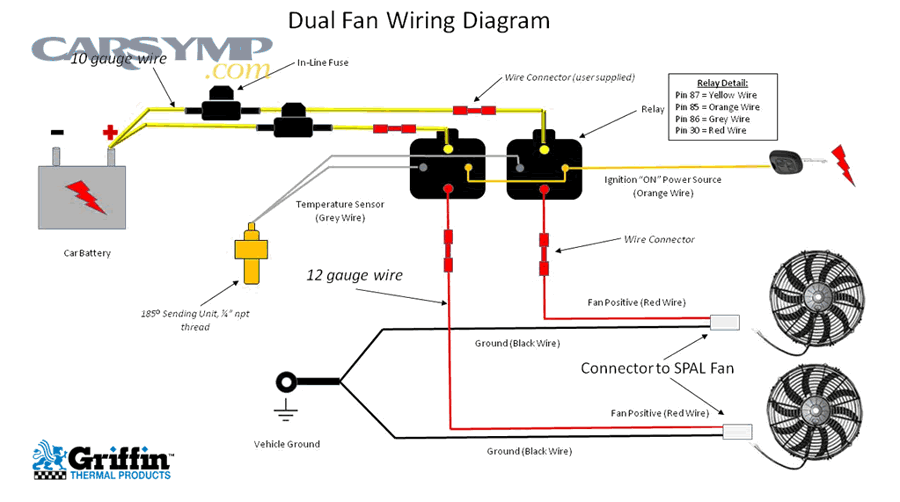
Automotive and aftermarket control systems use relays isolating low-current control signals from high-current motor loads. Standard ISO mini relays (most common automotive type) contain five pins:
- Pin 30: Battery power input (constant 12V)
- Pin 87: Switched output to load (fan motor)
- Pin 87a: Normally closed contact (rarely used in fan circuits)
- Pin 85: Relay coil ground connection
- Pin 86: Relay coil positive connection (12V when activated)
Manual relay trigger testing: Remove relay from socket and use multimeter to verify continuity between pins 30 and 87a (normally closed circuit should show continuity). Apply 12V between pins 86 (+) and 85 (-) using power supply or battery—you should hear audible click as relay energizes. Verify continuity now exists between pins 30 and 87 (normally open contact closed by coil energization). Release power—second click confirms relay returning to rest state.
Failed relays show several symptoms:
- No click when applying coil power despite measuring correct coil resistance (typically 50-100 ohms between pins 85-86)
- Click occurs but no continuity develops between 30-87 indicating burned or oxidized contacts
- Resistance between 30-87 exceeds 2 ohms during activation indicating degraded contact surfaces
- Relay remains energized after removing coil power due to stuck contacts
In-circuit relay testing: With relay installed and system powered, measure voltage at pin 30 (should show battery voltage), at pin 86 when control module commands activation (should show 12V), and at pin 87 under same conditions (should match pin 30 voltage minus 0.3V maximum drop across healthy relay contacts). Significant voltage differences confirm relay replacement requirements.
Capacitor testing procedures identify failed starting components:
AC ceiling fans and window fans use capacitors creating phase shifts necessary for motor starting torque. Capacitors fail through:
- Electrolyte drying reducing capacitance
- Dielectric breakdown creating short circuits
- Case rupture from pressure buildup
Visual inspection identifies obvious failures: bulging cylindrical cases, electrolyte leakage (oily residue), burn marks, or case cracks all mandate immediate capacitor replacement regardless of electrical test results.
Multimeter capacitance measurement: Modern multimeters include capacitance testing functions. Discharge capacitors completely before testing by shorting terminals with insulated screwdriver (wear safety glasses—sparking may occur). Remove capacitor from circuit and measure capacitance value. Compare reading to rated value printed on capacitor body (typically 1-10 μF for ceiling fans). Readings below 80% of rated value indicate replacement necessity. Readings near zero suggest complete short circuit; infinite/no reading suggests open circuit—both require replacement.
Alternative test without capacitance meter: Observe motor behavior with capacitor installed versus removed. Ceiling fans with failed capacitors won’t self-start but run normally once manually spun to initiate rotation. This “requires push-starting” symptom definitively confirms capacitor failure even without measurement equipment.
Temperature sensor verification procedures:
Thermistor-type sensors (most PC and automotive applications) change resistance proportionally to temperature. Testing requires:
- Measure sensor resistance at room temperature (typically 2,000-3,000 ohms at 70°F/21°C for automotive ECT sensors)
- Compare measurement to manufacturer specification chart correlating temperature to resistance
- Heat sensor gradually (heat gun or hot water immersion) while continuously monitoring resistance
- Verify resistance decreases smoothly as temperature rises following manufacturer curve
- Sensors showing fixed resistance regardless of temperature changes require replacement
Thermal switch testing: These bimetallic switches close contacts at specific temperatures. Submerge switch in heated water while monitoring temperature with separate thermometer. Test continuity across switch terminals—contacts should close when water reaches rated switching temperature (stamped on switch body, typically 180-210°F). Failed switches never close or activate at incorrect temperatures.
According to automotive and HVAC service standards, control component testing accounts for approximately 30% of dual-fan system repairs, with relay failures representing 45% of control problems, switch failures 30%, capacitor failures 20%, and sensor failures 5%.
Testing Fan Controllers and Headers (PC/Automotive Specific)
Electronic fan control systems in computers and modern vehicles require specialized diagnostic approaches testing firmware-controlled outputs, signal integrity, and communication bus functionality beyond simple voltage testing—techniques accessing data logs, analyzing pulse-width modulation signals, and updating controller firmware.
Motherboard fan header testing evaluates integrated fan control circuits:
Modern motherboards provide 3-pin or 4-pin fan headers delivering power, ground, tachometer feedback (RPM sensing), and pulse-width modulation (PWM) control signals. Testing requires accessing BIOS/UEFI firmware and potentially using specialized monitoring software.
BIOS-based testing procedure:
- Restart computer and enter BIOS/UEFI firmware (typically Delete, F2, or F12 key during boot)
- Navigate to hardware monitoring, PC health, or fan control sections
- Locate fan speed displays showing RPM for each header (CPU_FAN, CHA_FAN1, CHA_FAN2, etc.)
- Verify all connected fans display reasonable RPM values (typically 800-2,000 RPM depending on fan specifications)
- Adjust fan curves or switch to “full speed” mode forcing 100% duty cycle
- Observe whether fan speeds increase proportionally—all fans should reach maximum RPM
Headers displaying zero RPM despite connected fans indicate header circuit failure or damaged fan tachometer wires. Headers controlling multiple fans where only some respond suggest inadequate current capacity or partial circuit damage.
PWM signal verification: 4-pin headers deliver 25 kHz pulse-width modulated signals controlling fan speed on pin 4. Measuring PWM requires oscilloscopes or specialized multimeters with frequency measurement capabilities. Simpler functional testing uses known-good fans—connect test fan to suspected header and verify speed control responsiveness in BIOS. Functional control with test fan confirms header electronics work properly while original fan has failed.
Software monitoring and control: Operating system utilities (HWMonitor, SpeedFan, Argus Monitor, manufacturer utilities) provide real-time fan control outside BIOS environments. Use these tools to:
- Monitor real-time RPM from all headers
- Adjust fan curves mapping temperature to speed percentages
- Force manual speed settings testing control responsiveness
- Identify headers reporting zero RPM or showing no speed variation despite commands
Current capacity testing: Motherboard fan headers typically supply 1 amp (12 watts) per header maximum. Connecting multiple fans through splitters or fans exceeding current capacity causes header protection circuits activating. Test by connecting only single fan to problematic header—if operation improves, original configuration exceeded current limits requiring powered fan hubs.
ECU (Engine Control Unit) fan output verification:
Modern vehicles use ECU-controlled fan systems where temperature sensors, vehicle speed inputs, air conditioning requests, and engine load calculations determine fan activation. Diagnostic procedures require:
Scan tool connection: Professional-grade or enthusiast-level OBD-II scan tools (BlueDriver, Autel, Snap-on) access ECU data streams and bi-directional controls. Connect scan tool to vehicle OBD-II port and navigate to fan control functions.
Data stream monitoring: Observe real-time sensor inputs affecting fan operation:
- Engine coolant temperature (should accurately reflect actual coolant temperature within 5°F)
- Fan relay command status (should show “commanded on” when temperatures exceed thresholds)
- Vehicle speed sensor (some ECUs deactivate fans above certain speeds relying on ram air cooling)
- AC compressor clutch status (often triggers fan activation when AC operates)
Discrepancies between sensor readings and physical measurements indicate sensor failures requiring replacement before diagnosing further.
Bi-directional control testing: Many scan tools include fan activation functions allowing manual fan operation independent of normal logic. Commanding fans “on” through scan tool confirms:
- ECU output circuits function electrically
- Wiring between ECU and fan relays maintains integrity
- Relay responses to ECU commands occur properly
- Fans operate normally when receiving power
Successful manual activation while normal automatic operation fails indicates ECU programming errors, incorrect temperature thresholds, or sensor input problems rather than output circuit failures.
ECU output signal measurement: Using multimeter or test light at relay coil terminals (typically pins 85/86), verify ECU provides ground signal when scan tool commands fan activation. Signal presence with non-functional fans isolates problem to relay or motor circuits. Signal absence indicates ECU internal failures or fuse problems in ECU control circuits.
Aftermarket controller diagnostics:
Performance enthusiasts install standalone fan controllers (Dakota Digital, Derale, Flex-a-lite) with adjustable temperature thresholds and override switches. These units include:
Temperature probe testing: Controller temperature probes (typically thermistor-type) install in radiator hoses or mount directly to radiators. Test resistance across probe terminals comparing values to included specification charts. Most probes show 2,000-3,000 ohms at room temperature decreasing to 200-300 ohms at 210°F.
Manual override verification: Quality controllers include manual override switches forcing fan operation regardless of temperature. Activating override with non-functional fans confirms controller outputs work properly while automatic operation failures indicate probe or threshold setting problems.
LED indicator observation: Many aftermarket controllers include status LEDs indicating power, activation states, and fault conditions. Consult product manuals for LED pattern interpretations—specific blink patterns often indicate particular failure modes.
Wiring harness integrity checks: Aftermarket installations use user-installed wiring potentially creating connection quality issues. Verify:
- All crimp connections tight and corrosion-free
- Ground connections to chassis clean and secure (less than 0.5 ohm to battery negative)
- Power supply fuses intact and properly sized
- Relay sockets making solid contact with relay pins
According to PC hardware diagnostics data and automotive technical service bulletins, electronic controller problems account for 15-25% of dual-fan failures in systems using sophisticated control electronics, with firmware/programming issues representing 40%, failed output circuits 35%, sensor input problems 20%, and wiring/connection issues 5% of electronic control failures.
What Are the Step-By-Step Solutions for Each Common Problem?
Systematic repair procedures address each of the seven common dual-fan failures through component replacement, circuit repair, configuration correction, or system recalibration—methods matched to specific failure modes identified during diagnostic testing. These solutions progress from simplest repairs to complete component replacement, emphasizing cost-effective approaches when multiple options exist.
Each solution category below corresponds directly to the seven problems identified earlier, maintaining diagnostic-to-repair workflow continuity for efficient troubleshooting.
Fixing Single Fan Failure (Motor/Bearing Replacement)
Single fan motor or bearing failures require deciding between bearing service, motor replacement, or complete fan assembly replacement based on failure severity, part availability, and economic considerations.
Lubrication versus replacement decision criteria:
Choose bearing lubrication when:
- Manual spin test shows moderate resistance (fan completes 1-2 rotations) rather than complete seizure
- Motor operates but produces grinding or squealing noises
- Fan age remains under 5 years in normal-duty applications
- Motors include accessible lubrication ports (small rubber plugs near bearing locations)
- No visible bearing damage or shaft wobbling appears during manual rotation
Bearing lubrication extends lifespan 12-24 months typically, making it worthwhile for fans nearing natural replacement cycles anyway but providing temporary extended service.
Choose complete motor replacement when:
- Bearings show complete seizure requiring extreme force for manual rotation
- Shaft exhibits visible wobble exceeding 1mm perpendicular to rotation axis
- Motor windings failed (resistance measurements confirm open or shorted circuits)
- Fan age exceeds 7-10 years approaching end of typical motor lifespan
- Multiple lubrication attempts provided only brief temporary improvement
- Motor housing shows heat damage, melted insulation, or burn marks
Bearing lubrication procedure:
- Disconnect all power and remove fan from mounting location for accessible workspace
- Remove blade assembly if attached (typically center cap covering retaining nut)
- Locate bearing access points—some motors include rubber plugs covering lubrication ports near each bearing (front and rear)
- Remove plugs and apply 2-3 drops of light machine oil (3-in-1 oil, sewing machine oil, or synthetic motor oil)
- Manually rotate shaft 10-15 complete rotations distributing lubricant throughout bearing surfaces
- Allow 15-30 minutes for oil penetration before reinstalling
- Operate fan and verify noise reduction and improved rotation smoothness
WARNING: Never use WD-40, penetrating oils, or thick greases in fan bearings. WD-40 displaces existing lubricant causing premature failure. Thick greases create excessive resistance preventing proper motor starting.
Sourcing matching replacement fans:
Exact replacement matching ensures proper fit and performance without modification:
For automotive applications: Provide parts counter with vehicle year, make, model, and engine size. Many radiator fans include mounting brackets specific to vehicle models—universal fans require custom bracket fabrication. Premium upgrades (Flex-a-lite, SPAL) offer higher CFM ratings and reduced weight compared to OEM replacements.
For computer applications: Match three critical specifications—physical size (80mm, 120mm, 140mm, 200mm), connector type (3-pin vs. 4-pin PWM), and airflow rating (measured in CFM). Higher static pressure ratings (measured in mm H₂O) benefit dense heatsink fin arrangements. Bearing type affects lifespan: sleeve bearings (30,000 hours), ball bearings (50,000 hours), fluid dynamic bearings (70,000+ hours).
For ceiling fans: Replacement motors typically specify blade span compatibility (42″, 52″, 60″ configurations). Download pull-down motors accommodate existing downrod installations while flushmount motors fit low-ceiling applications. Reversible motors support summer/winter operational modes. Match voltage rating (most residential applications use 120V, some industrial installations require 240V).
For window fans: Universal window fan motors rarely match proprietary designs exactly. Measure motor mounting hole spacing, shaft diameter and length, and electrical connector configurations. Bringing failed motors to specialty motor shops sometimes yields cross-reference matches from industrial motor catalogs.
Installation procedures maintaining proper balance:
Unbalanced fans produce vibration, noise, and accelerated bearing wear. Ensure proper balance during installation:
- Clean all mounting surfaces removing dirt, corrosion, or paint preventing flush contact between fan and mounting brackets
- Install vibration isolation using rubber grommets, anti-vibration pads, or spring isolators at mounting points reducing vibration transmission
- Torque mounting fasteners evenly using star-pattern tightening sequences. Uneven torque creates stress concentrations causing blade deflection and imbalance
- Verify blade clearances ensuring minimum 5mm (0.2″) clearance between blade tips and surrounding structures—inadequate clearance causes vibration from pressure pulses
- Check motor shaft orientation confirming shaft points correctly without angular deflection. Misaligned shaft orientation creates eccentric rotation producing vibration
- Balance dual-fan blade matching when replacing only one fan in dual configurations. Significant blade design differences between old and new fans create differential airflow patterns and vibration even when both motors function correctly
Balancing considerations for dual setups:
Dual-fan systems experience interaction effects when one fan undergoes replacement:
- Airflow matching: New high-performance fans moving 30% more CFM than aged original fans create pressure imbalances. Air preferentially flows through higher-resistance paths when one fan dominates flow patterns. Solution: Replace both fans simultaneously or accept reduced performance until second fan requires replacement.
- Noise profile differences: New fans with different bearing types or blade designs produce different acoustic signatures. One quiet fluid-bearing fan paired with one louder sleeve-bearing fan creates noticeable acoustic imbalance. Solution: Match bearing technologies when replacing single fans.
- Speed synchronization: Temperature-controlled systems activate both fans simultaneously expecting matched response times. Electrical characteristics (inductance, starting current) vary between different motor designs potentially causing start timing differences. Solution: Verify both fans start within 0.5 seconds of each other during activation testing.
According to automotive cooling system specialists and PC hardware service data, proper replacement fan selection and balanced installation prevents 85% of subsequent vibration and noise complaints following fan motor replacements.
Fixing Complete System Failure (Power and Wiring Repairs)
Total system failures affecting both fans simultaneously require power supply restoration, switch replacement, or wiring harness repair to re-establish electrical circuit continuity from source to load.
Replacing damaged wiring with proper techniques:
Wire damage from abrasion, heat exposure, corrosion, or mechanical stress requires replacement with appropriately-rated conductors and terminations:
Wire gauge selection: Match original wire gauge or upgrade based on current requirements. Automotive fan circuits typically use 14-16 AWG for current draws up to 15 amps. Undersized replacement wire creates voltage drops and fire hazards. Calculate minimum wire gauge using voltage drop formulas: Voltage drop = (2 × Length × Current × Resistance per foot) / 1000. Maintain voltage drop below 3% of system voltage (0.36V for 12V systems).
Wire routing considerations:
- Route wires away from hot engine components (exhaust manifolds, turbochargers) using heat-resistant sleeving for unavoidable hot areas
- Avoid sharp edges that abrade insulation—use rubber grommets through metal holes
- Maintain factory wire bundle routing using existing clips and tie points preventing wire movement during vehicle operation
- Leave adequate slack for engine movement (automotive) or door operation (window fan installations) preventing tension that breaks connections
Connection methods ranked by reliability:
- Soldered joints with heat shrink tubing (most reliable): Strip 1/2″ insulation, twist wires mechanically, apply 60/40 rosin-core solder until copper fully saturated, cover with heat shrink tubing, apply heat gun until tubing contracts tightly. This method resists vibration and provides long-term reliability.
- Crimp connectors with heat shrink (excellent for automotive): Use ratcheting crimp tools (not pliers) squeezing connectors to manufacturer-specified compression. Cover with heat shrink providing strain relief and moisture seal.
- Wire nuts (acceptable for residential AC only): Twist wires clockwise, install wire nut with clockwise rotation, tug-test each wire requiring 15+ pounds pull force to extract. NOT suitable for DC automotive applications where vibration loosens connections.
- Twist-and-tape (emergency temporary only): Provides poor connection resistance and no vibration resistance. Always replace with proper connections within 24 hours maximum.
Proper soldering and heat shrink techniques:
Successful soldering requires:
- Clean copper surfaces free from oxidation, corrosion, or insulation residue
- Adequate iron temperature (600-750°F for electrical work)
- Mechanical connection before solder application—wires twisted together mechanically, solder adds electrical connection not mechanical strength
- Solder flowing freely into connection, not forming cold joints (dull, grainy appearance indicating poor copper wetting)
- Heat shrink tubing installed BEFORE soldering (cannot add afterward)
- 3:1 shrink ratio tubing providing tight seal and strain relief
- Heat application using heat gun rather than lighter (prevents uneven heating and insulation damage)
Switch replacement procedures with safety:
Electrical switches fail from contact wear requiring replacement rather than repair:
For automotive relay replacement: Pull failed relay from fuse box socket and insert new relay matching original part number or using cross-reference guides. Automotive relays use standardized pinouts (ISO mini relays, ISO micro relays) allowing cross-manufacturer compatibility. Test replacement by commanding activation through scan tool or by reaching operating temperatures triggering automatic activation.
For residential wall switch replacement:
- Turn off power at circuit breaker serving the circuit
- Verify power absence using non-contact voltage tester
- Remove switch cover plate and mounting screws
- Photograph existing wiring before disconnection (critical for three-way or smart switch configurations)
- Disconnect wires noting terminal positions (brass screws = hot, silver screws = neutral, green screw = ground)
- Connect new switch matching original wire positions
- Secure switch into box and restore power
- Test operation verifying fan control functions correctly
WARNING: Residential switch replacement involves potentially lethal 120V AC. Hire licensed electricians if uncomfortable with electrical work or if wiring configuration appears complex beyond simple single-pole switches.
For pull-chain switch replacement (ceiling fans):
- Turn off power at circuit breaker
- Remove fan blade assembly accessing motor housing
- Disconnect wiring to old switch documenting wire colors and terminal positions
- Remove switch mounting screws or clips
- Install replacement switch (typically Zing Ear ZE-110 or similar pull-chain switches)
- Reconnect wires matching original configuration
- Verify chain operation cycles through all speed positions correctly
Fuse and circuit breaker service:
Blown fuses and tripped breakers indicate overcurrent conditions requiring investigation before simple replacement:
Identify overcurrent cause: Fuses and breakers protect against short circuits and overloads. Investigation priorities:
- Inspect wiring for damaged insulation exposing bare conductors creating short circuits
- Verify total connected load doesn’t exceed circuit rating
- Test replaced fans for internal shorts before energizing circuits
- Check for foreign objects bridging electrical conductors
Fuse replacement: Remove blown fuse and install identical rating replacement. NEVER install higher-rated fuses “solving” repeated blowing—this defeats protection allowing wire overheating and fire hazards. Repeated fuse failure demands finding and correcting underlying circuit problems.
Circuit breaker reset: Toggle breaker fully to “off” position before switching “on”—simply pushing to “on” without full off-cycle prevents proper reset. Breakers tripping immediately upon reset indicate active short circuits requiring immediate correction before further operation attempts.
Ground connection restoration:
Poor ground connections cause numerous electrical problems despite appearing deceptively simple:
Automotive chassis ground repair:
- Locate ground connection point (typically bolt through ground wire ring terminal into chassis metal)
- Remove mounting bolt completely
- Wire-brush both ring terminal and chassis metal removing all corrosion, paint, rust
- Apply thin coating of dielectric grease to bare metal surfaces
- Reinstall terminal and bolt torquing to 15-20 ft-lbs for M8 bolts
- Verify less than 0.5 ohm resistance between fan ground terminal and battery negative using multimeter
Residential ground wire service: Green or bare copper ground wires connect to green grounding screws in switch boxes and fan housings. Ensure tight screw connections and verify ground wire continuity to service panel ground bar.
According to automotive and residential electrical standards, proper wiring techniques using correct gauge wire, secure connections, and adequate strain relief prevents 95% of recurring electrical failures in replacement installations.
Fixing Slow or Intermittent Operation (Capacitor and Voltage Issues)
Capacitor degradation and voltage supply problems require component replacement or power delivery system upgrades restoring full-speed operation and eliminating start-stop cycling that indicates progressive system deterioration.
Capacitor replacement guide for AC motor systems:
Failed capacitors represent the most common cause of slow-spinning ceiling fans and window fans, making replacement straightforward and cost-effective:
Capacitor identification and selection:
- Locate existing capacitor—typically mounted in fan switch housing (ceiling fans) or motor compartment (window fans)
- Photograph capacitor orientation and wiring connections before disconnection
- Record capacitor specifications printed on body:
- Capacitance value (measured in microfarads/μF, typically 1-10 μF for fans)
- Voltage rating (must meet or exceed original, typically 250V-450V AC)
- Terminal configuration (two-wire or three-wire designs)
- Purchase replacement matching all three specifications—capacitance tolerance of ±6% acceptable
Safe capacitor removal:
- Turn off all power at circuit breaker and verify absence using voltage tester
- Discharge capacitor using insulated screwdriver shorting terminals together (wear safety glasses—sparking may occur even with power off)
- Photograph wire connections to capacitor terminals noting color coding
- Disconnect wires using needle-nose pliers if terminals use push-on spade connectors
- Remove capacitor mounting bracket or clips securing component
Installation procedure:
- Mount replacement capacitor in same location as original using provided brackets
- Connect wires matching original configuration—capacitors are typically non-polarized but three-wire designs require specific terminal assignments
- Verify no bare wire exposed at connections creating short circuit potential
- Restore power and test fan operation at all speed settings
- Monitor motor temperature during first 30 minutes—excessive heat indicates incorrect capacitor values requiring rechecking specifications
Expected performance improvement: Proper capacitor replacement restores full starting torque eliminating manual push-starting requirements and returns fan to rated speed typically within 10 seconds of power application.
Voltage regulator troubleshooting and correction:
Insufficient voltage delivery manifests as slow fan operation across all connected devices sharing power sources:
Power supply capacity verification (PC systems):
- Calculate total system power draw adding CPU TDP + GPU power + peripheral consumption
- Compare total to power supply rated wattage—should not exceed 80% of rating
- Upgrade power supply if total consumption approaches or exceeds 80% threshold
- Select 80+ certified power supplies (Bronze, Silver, Gold, Platinum, Titanium ratings) ensuring efficiency and voltage regulation quality
Alternator and battery testing (automotive systems):
- Measure battery voltage with engine off: should show 12.4-12.7V indicating full charge
- Measure voltage with engine running at 2000 RPM: should show 13.8-14.4V indicating proper alternator charging
- Voltage below 13.5V with engine running indicates alternator weakness requiring replacement or repair
- Perform load testing: activate headlights, AC, and fans simultaneously—voltage should remain above 13.2V
- Falling voltage under load confirms alternator capacity inadequacy requiring upgraded amperage rating
Circuit breaker capacity evaluation (residential systems):
- Verify circuit breaker amp rating matches wire gauge (15A for 14AWG, 20A for 12AWG wire)
- Calculate total connected load on circuit including fans, lights, outlets
- Redistribute loads if total approaches circuit capacity preventing voltage drop under simultaneous operation
- Install dedicated circuits for high-power dual-fan applications if existing circuits show inadequate capacity
Cleaning and lubricating bearings for reduced friction:
Bearing service extends motor life when friction hasn’t progressed to complete seizure:
Disassembly for deep cleaning:
- Remove fan blades and motor cover accessing bearing assemblies
- Extract rotor assembly from stator housing (usually press-fit or clip-retained)
- Remove bearing races from shaft and housing using bearing pullers or gentle heat application
- Clean all components using electrical contact cleaner or isopropyl alcohol removing dirt, old lubricant, corrosion
Bearing lubrication application:
- Apply 2-3 drops light machine oil to sleeve bearings coating internal surfaces
- Pack ball bearings using bearing grease (lithium-based or synthetic) filling 50-70% of bearing volume
- Rotate bearings manually distributing lubricant evenly throughout bearing surfaces
- Excess lubricant creates drag—wipe external surfaces clean before reassembly
Reassembly verification:
- Shaft should rotate smoothly without binding when manually turned
- No wobble or lateral play should exist when attempting to move shaft perpendicular to rotation axis
- Test motor electrically before reinstalling blades confirming smooth quiet operation
Thermal protection reset procedures:
Overheating protection devices sometimes latch requiring manual reset before resuming operation:
Thermal switch location: Usually mounted on motor windings or housing near highest temperature areas. Some designs use buried thermal fuses non-resettable when blown.
Reset procedure:
- Allow motor to cool completely (minimum 2 hours after shutdown)
- Locate reset button on thermal protector if externally accessible (small red or black button typically)
- Press reset button firmly—should click indicating latch release
- Restore power and verify normal operation
- Monitor temperatures during operation—recurring thermal protection trips indicate underlying cooling inadequacy or motor problems requiring investigation
Addressing root causes: Thermal protection activation signals problems demanding correction:
- Insufficient ventilation around motor (residential fans)
- Excessive ambient temperatures (automotive applications)
- Bearing friction increasing motor work requirements
- Voltage supply inadequacy forcing motor to draw excessive current
- Motor winding degradation from age or previous overheating damage
According to appliance repair service data, capacitor replacement solves approximately 70% of slow-running AC motor fans, bearing lubrication addresses 15%, voltage supply issues cause 10%, and thermal protection problems account for 5% of intermittent operation complaints.

Fixing Noise Issues (Bearing Service and Obstruction Removal)
Acoustic problems from grinding bearings, blade obstructions, or loose components require mechanical service addressing friction sources, removing foreign objects, and securing fasteners eliminating vibration sources.
Bearing lubrication with light machine oil:
Proper lubrication technique maximizes bearing life extension without over-application creating drag:
Oil selection criteria:
- Light machine oil (3-in-1 oil, Singer sewing machine oil): Ideal for sleeve bearings, provides adequate lubrication without excessive viscosity
- Synthetic motor oil (5W-20, 0W-20): Excellent high-temperature stability for automotive applications
- Avoid: WD-40 (displaces rather than lubricates), heavy greases (create starting resistance), vegetable oils (oxidize rapidly)
Application technique for accessible bearings:
- Locate lubrication ports—small rubber plugs or holes near bearing locations on motor housing
- Remove plugs storing safely for reinstallation
- Apply 2-3 drops oil directly into port using precision oiler or syringe
- Rotate shaft manually 10-15 complete rotations distributing oil throughout bearing surfaces
- Allow 15-30 minute penetration period before operation
- Reinstall rubber plugs preventing contamination entry
- Wipe excess oil from external surfaces preventing dirt attraction
Sealed bearing service limitations: Permanently sealed ball bearings (common in modern computer fans) contain lifetime lubrication and provide no access ports. Attempts to drill access holes or pry seals damage bearings beyond repair—replacement represents only option when sealed bearings fail.
Re-lubrication frequency: Bearings in dusty environments or continuous-duty applications benefit from lubrication every 12-18 months. Normal residential installations require service every 3-5 years or when noise develops.
Debris removal from blades and housing:
Accumulated dirt, dust, and foreign objects reduce efficiency and create noise through imbalance and obstruction:
Safe cleaning procedure:
- Disconnect all power preventing accidental activation during cleaning
- Vacuum loose dust from blade surfaces using soft brush attachments avoiding blade damage
- Wipe blades with damp cloth (water with mild detergent) removing sticky residue
- Clean housing interior removing accumulated debris from motor areas and mounting brackets
- Inspect blade rotation path identifying wires, cables, or components entering blade clearance zones
- Secure or reroute obstructions maintaining minimum 5mm clearance around blade tips
- Dry all components completely before restoring power
Stubborn residue removal: Ceiling fan blades accumulate greasy kitchen residue requiring degreasing cleaners (Simple Green, diluted ammonia solutions). Automotive radiator fans collect road grime, bug residue, and oil deposits needing pressure washing or degreaser application. Computer fans gather electrostatically-attracted dust requiring compressed air or vacuum removal.
Balance verification after cleaning: Removing heavy uneven dirt deposits changes blade balance. Observe operation after cleaning for new vibration—clean blades individually rather than as group if vibration develops, ensuring equal material removal from all blades.
Securing loose components with proper torque:
Vibration gradually loosens fasteners throughout fan assemblies requiring periodic inspection and retightening:
Ceiling fan critical fasteners:
- Downrod connection: Loosen set screw, verify downrod fully seated in motor coupling, tighten set screw to 25 in-lbs, apply thread-locking compound
- Blade iron attachments: Remove blades, apply thread-locker to screws, reinstall torquing to 15-20 in-lbs in star pattern
- Motor housing screws: Tighten all motor cover screws evenly preventing housing distortion
- Ceiling canopy: Verify mounting bracket security to electrical box and canopy attachment to bracket
Automotive radiator fan mountings:
- Fan motor mounting bolts: Torque to manufacturer specifications (typically 80-120 in-lbs for M6 bolts)
- Fan shroud attachments: Secure shroud to radiator using all provided clips and fasteners
- Wiring harness clips: Use zip ties or factory clips preventing wire contact with spinning blades
Computer case fan installations:
- Corner mounting screws: Tighten snugly (hand-tight plus 1/4 turn) without over-compression damaging fan frames
- Anti-vibration mounts: Replace hardened rubber grommets with fresh components maintaining vibration isolation
- Fan guard attachments: Ensure protective grids secure properly preventing resonance vibration
Thread-locking compound application: Use medium-strength removable thread-locker (Loctite 242 or equivalent) on fasteners experiencing vibration. Avoid permanent thread-lockers preventing future disassembly for maintenance.
Motorreplacement decision making:
Bearing noise persisting despite lubrication attempts or accompanied by shaft wobble indicates replacement necessity:
Replacement criteria:
- Lubrication provides less than 1-week noise reduction before recurrence
- Visible shaft deflection exceeds 1mm perpendicular movement
- Bearing surfaces show pitting, discoloration, or damage during inspection
- Motor housing shows heat damage, cracking, or melted plastic components
- Age exceeds 10 years approaching typical motor lifespan limits
- Replacement motor cost remains under 60% of complete new fan assembly cost
Repair versus replace economics:
- Ceiling fans: Motor replacement costs $40-$80 while complete new fans cost $100-$300. Replacement motors make sense for high-end fans (Hampton Bay, Hunter Premier models) but questionable for budget units.
- Automotive radiator fans: OEM replacement fans cost $150-$400 while aftermarket motors alone cost $50-$100. Motor-only replacement saves 50-70% when shrouds and blades remain serviceable.
- Computer fans: Individual fan costs range $8-$50 making replacement always more economical than bearing service for typical users. Enthusiasts may service premium fans ($60+) extending expensive component life.
According to mechanical repair service data, bearing lubrication successfully eliminates noise in approximately 40% of cases, debris removal and cleaning addresses 30%, securing loose fasteners fixes 20%, and complete motor replacement proves necessary in the remaining 10% of noise complaints.
Fixing Directional and Synchronization Problems
Airflow direction errors and fan synchronization failures require physical reorientation, wiring configuration changes, or remote control re-pairing establishing coordinated operation patterns necessary for efficient cooling.
Correct fan orientation installation procedures:
PC cooling applications demand precise fan mounting ensuring proper airflow direction through cases and heatsinks:
Identifying fan airflow direction:
- Frame indicator arrows: Most fans include molded arrows on frame edges showing rotation direction and airflow direction
- Visual frame features: Decorative side (visible blades, RGB lighting, smooth frame) faces airflow source while motor side (structural supports, wiring, motor hub) faces downstream
- Blade curvature: Leading edges curve away from airflow source—concave side faces incoming air
Case fan installation for optimal airflow:
- Front intake fans: Mount with decorative side facing front case panel, exhausting toward internal components. Creates positive pressure preventing dust infiltration.
- Rear exhaust fans: Install with decorative side facing internal components, motor side toward rear case vent. Exhausts hot air from CPU and GPU areas.
- Top exhaust fans: Position decorative side facing downward (toward motherboard), motor side facing upward through top vents. Hot air rises—top exhausts remove concentrated heat.
- Bottom intake fans (less common): Mount decorative side facing case bottom pulling cool air upward, motor side facing motherboard.
CPU cooler push-pull configuration:
- Push fan: Mounts on heatsink side facing away from CPU, decorative side toward front case intake, forcing fresh air through heatsink fins
- Pull fan: Attaches to opposite heatsink side, decorative side facing heatsink fins, motor side toward rear exhaust, drawing air through fins toward case exhaust
- Both fans move air in identical direction—push fan forces air into fins while pull fan extracts air from fins maximizing flow velocity through dense fin arrays
Verification testing: Hold tissue paper or light ribbon at heatsink edges during operation. Proper push-pull configuration shows strong airflow exiting the pull-fan side while minimal reverse flow appears at push-fan intake.
Remote pairing and unpairing procedures for ceiling fans:
Wireless ceiling fan controls require careful pairing preventing cross-communication between multiple units:
Complete reset and re-pairing sequence:
- Clear existing pairings:
- Remove power to all ceiling fans at circuit breaker
- Wait 30 seconds allowing capacitor discharge and memory clearing
- Restore power to only the first fan requiring pairing
- Locate receiver learn button (typically small red or black button in canopy above mounting bracket)
- Enter learning mode:
- Method A (dedicated learn button): Press and hold learn button for 5-10 seconds until LED indicator flashes rapidly
- Method B (power cycle method): Toggle wall power switch in sequence: off-on-off-on-off-on within 6 seconds. Receiver enters learn mode indicated by light kit flashing or motor humming briefly
- Timing criticality: Must complete next step within 30-60 seconds before receiver exits learn mode
- Pair remote to receiver:
- Press remote pairing button (typically small button requiring paperclip or pin access)
- Some remotes require pressing and holding power button during pairing
- Successful pairing confirmed by: light kit flashing, fan blades rotating briefly, or audible beep from receiver
- Test all remote functions (on/off, speed settings, light control, reverse) confirming responsive operation
- Prevent interference during subsequent pairings:
- Turn off power to first fan at breaker before pairing second fan
- Repeat entire pairing sequence for second fan using its dedicated remote
- Maintain different DIP switch settings or frequency codes if receivers offer multiple configuration options
- Test both fans independently after completion verifying no cross-activation
DIP switch frequency configuration (older ceiling fan models):
Receivers and remotes include 4-6 position DIP switches creating unique frequency codes:
- Access receiver DIP switches by removing receiver cover in fan canopy
- Access remote DIP switches by removing battery cover (switches typically visible near battery compartment)
- Set both receiver and remote to identical positions for pairing:
- Example: Switches 1 and 3 “ON”, switches 2, 4, 5, 6 “OFF”
- Document settings for future reference
- Ensure different fans use different DIP switch combinations preventing overlap:
- Master bedroom: 1 and 3 ON
- Guest bedroom: 2 and 4 ON
- Living room: 1 and 4 ON
- 6-switch designs offer 64 unique combinations—adequate for typical homes with 3-8 ceiling fans
Troubleshooting persistent pairing problems:
- Replace remote batteries even if appearing functional—weak batteries cause intermittent communication
- Verify receiver receives clean power—voltage fluctuations prevent reliable pairing
- Check for RF interference from other devices (baby monitors, wireless routers operating on same frequencies)
- Some fans require pressing specific remote button combinations during pairing—consult manufacturer instructions for model-specific sequences
Controller synchronization for ceiling fans:
Wall-mounted controllers using RF communication require similar pairing procedures:
- Install wall controller following wiring instructions (typically replacing standard light switch)
- Restore power and press controller learn button
- Within 60 seconds, press receiver learn button in fan canopy
- Controller and receiver synchronize indicated by LED confirmation or light flickering
- Test all controller functions including speed settings, light dimming, and reverse controls
Polarity verification and correction for DC fans:
Computer and automotive DC fans reverse rotation direction when positive and negative connections swap:
Connector keying verification:
- Standard 3-pin and 4-pin PC fan connectors include molded keys preventing backward insertion
- Align connector key (raised ridge on connector housing) with header key (blocked pin position)
- Force never required—correctly oriented connectors slide easily into headers
Non-keyed connection correction:
- Some automotive and industrial fans use non-keyed connectors allowing reversal
- Identify wire polarity: red/yellow/orange = positive, black/blue/white = negative (verify against manufacturer specifications as exceptions exist)
- Correct reversed connections by rotating connector 180° or swapping individual wire positions within connector housing
CPU cooler push-pull configuration setup:
Achieving optimal thermal performance requires both fans moving air in coordinated direction:
- Identify optimal airflow path: Front-to-rear in most cases aligning with overall case airflow pattern
- Install push fan first: Mount on heatsink side closer to front case intake with decorative frame facing forward
- Install pull fan second: Attach to opposite heatsink side with decorative frame facing heatsink fins (motor side facing rear exhaust)
- Verify synchronized rotation: Both fans spin at identical speeds (connect to same fan header or use fan splitter)
- Test airflow direction: Hold tissue paper at rear of heatsink—should blow strongly away from heatsink confirming proper push-pull operation
- Monitor temperatures: Properly configured push-pull reduces CPU temperatures 3-7°C compared to single fan operation under sustained loads
Performance comparison: Push-pull configurations increase static pressure overcoming fin array resistance. Benefits maximize with dense fin spacing (20+ fins per inch) while minimal improvements occur with widely-spaced fins (10 fins per inch) where single fans provide adequate airflow.
According to PC cooling optimization studies and ceiling fan installation surveys, proper directional configuration and synchronization improves cooling effectiveness 40-55% compared to incorrectly oriented or unsynchronized dual-fan systems.
When Should You Repair vs. Replace Your Dual-Fan System?
Repair versus replacement decisions require analyzing component failure severity, parts availability, labor costs, and remaining system lifespan—economic factors determining whether investing in fixes makes financial sense compared to complete system replacement. This cost-benefit analysis prevents throwing money at aging systems approaching end-of-life while identifying worthwhile repairs extending serviceable equipment.
Professional mechanics and HVAC technicians use decision frameworks weighing multiple factors before recommending courses of action. Understanding these frameworks helps DIY enthusiasts make informed choices avoiding both premature replacement and futile repair attempts.
Signs That Repair Is Worth It
Repair investments make economic sense when failures involve simple components, systems show substantial remaining lifespan, and repair costs stay well below replacement costs—typically under 50% of new system pricing.
Simple fixes justify repair investment:
Certain problems require minimal labor and inexpensive parts making repair obviously worthwhile:
- Capacitor replacement ($8-$25 parts cost, 30-minute DIY labor): Ceiling fans and window fans running 5-8 years with failed capacitors easily justify $15 capacitor replacement versus $100-$300 new fan purchases
- Switch replacement ($5-$40 parts, 1-hour DIY labor): Failed wall switches, pull chains, or remote controls warrant replacement when motors and blades remain functional
- Bearing lubrication ($3 oil cost, 15-minute labor): Sleeve bearing fans showing early noise symptoms benefit from 2-3 drops of light machine oil potentially extending life 1-2 years
- Wiring repair ($10-$30 materials, 2-hour labor): Corroded connections, broken wires, or failed relays cost minimal amounts compared to complete system replacement
- Fuse replacement ($2-$5 parts, 5-minute labor): Blown fuses protecting otherwise functional circuits obviously merit replacement
Economic threshold: Repairs costing under $50 in parts and requiring under 3 hours DIY labor (or under $150 professional labor) virtually always justify proceeding when base fan systems cost $100+.
Partial failures with available replacement parts:
Single-fan failures in dual systems, failed control modules, or broken mounting hardware justify repair when:
- Replacement parts readily available through manufacturer, auto parts stores, or aftermarket suppliers
- Failed component isolation confirmed through diagnostic testing eliminating uncertainty
- Remaining system components show good condition without impending failure indicators
- Original system provides features or capacity difficult to match with current market offerings
Examples favoring repair:
- $180 automotive radiator fan assembly with one failed $60 motor—motor replacement saves $120
- $400 ceiling fan with broken $85 remote receiver—receiver replacement preserves $315 investment
- Custom dual-fan PC cooling setup with one failed $25 fan—fan replacement maintains configuration
High-value systems justify repair investment:
Premium equipment with significant original investments warrant repair even when costs approach 60-70% of replacement pricing:
Automotive cooling systems: Modern vehicles integrate radiator fans with complex mounting brackets, wiring harnesses, and transmission cooler shrouds. Complete OEM assemblies cost $400-$800 while component-level repairs run $100-$300. Repairing preserves factory fitment, quality, and warranty considerations.
Premium PC cooling solutions: Custom water-cooling loops with dual radiator fans cost $300-$600 complete. Replacing failed $40 fans preserves entire cooling infrastructure versus $500+ system replacement.
High-end ceiling fans: Designer fans from Hunter, Minka-Aire, or Fanimation cost $300-$1,000. Motor replacements costing $120-$200 make sense preserving aesthetic investments and avoiding ceiling patching/repainting from different mounting patterns.
Age and expected remaining lifespan considerations:
Equipment age relative to typical lifespan guides repair worthiness:
Favorable repair scenarios (system age under 50% of expected lifespan):
- 3-year-old automotive radiator fans (expected lifespan 8-12 years)
- 2-year-old PC case fans (expected lifespan 5-7 years with quality bearings)
- 5-year-old ceiling fans (expected lifespan 12-15 years)
- Recent equipment showing single-component failures likely provides 50%+ additional service life post-repair
Questionable repair economics (system age 50-75% of expected lifespan):
- 7-year-old automotive fans showing bearing wear
- 4-year-old computer fans with sleeve bearings degrading
- 10-year-old ceiling fans experiencing motor problems
- Mid-life equipment may experience cascade failures—repairing one component followed by different component failures within 12-24 months
Replacement favored (system age exceeding 75% of expected lifespan):
- 10+ year automotive cooling systems
- 5+ year budget computer fans
- 12+ year ceiling fans
- Elderly equipment approaching natural end-of-life rarely justifies significant repair investment
According to appliance repair industry standards and automotive service guidelines, repair investments make economic sense when total repair costs remain below 50% of replacement costs AND equipment age stays under 60% of expected service life.
Signs That Complete Replacement Makes More Sense
Certain failure patterns, safety concerns, and economic realities favor complete system replacement over repair attempts—conditions where throwing good money after bad equipment creates poor value propositions.
Motor winding failure indicators demanding replacement:
Internal motor damage represents non-repairable conditions in sealed motor assemblies:
Definitive winding failure symptoms:
- Resistance measurements showing infinite ohms (open circuit) or near-zero ohms (short circuit) between motor terminals
- Burning odors, discolored motor housings, or melted insulation indicating thermal damage to windings
- Motor drawing no current (open winding) or 200%+ rated current (shorted winding) during operation attempts
- Visible smoke production during power application
- Complete non-response to direct power application across normal voltage range
Why motor winding failures demand replacement: Rewinding small motors costs $80-$200 for professional services—economical only for industrial motors with $500+ replacement costs. Consumer fan motors costing $30-$150 make rewinding financially absurd. Replace entire motor or fan assembly.
Multiple simultaneous component failures:
Cascade failures affecting motors, bearings, capacitors, and control circuits simultaneously indicate systemic problems:
Replacement-favoring failure patterns:
- Both fans in dual system failed within 6 months (suggests common-cause failures like power surges, overheating, or manufacturing defects)
- Motor and capacitor both failed requiring replacement of multiple expensive components
- Wiring harness deterioration affecting multiple circuits simultaneously
- Control module failures combined with relay problems indicating electrical system-wide issues
Economic analysis: When repair part costs exceed 60% of replacement system costs, replacement provides better value considering:
- New systems include complete warranties (1-5 years typical)
- Modern designs often improve efficiency reducing operating costs
- Installation labor applies equally to repairs or replacement
- Unknown additional failures may lurk in aged systems despite current repairs
Obsolete parts unavailable from manufacturers:
Discontinued models or aged systems lose parts support:
Common obsolescence problems:
- Automotive radiator fans for vehicles 15+ years old may lack aftermarket support requiring junkyard searches or custom fabrication
- Ceiling fan motors using proprietary mounting patterns unavailable for fans 20+ years old
- Computer fans with unique connector types (older 2-pin designs, proprietary RGB protocols) no longer manufactured
- Industrial fans using specialized components without cross-reference equivalents
Workarounds and limitations:
- Universal motor replacements sometimes fit with custom bracket fabrication ($50-$100 labor)
- Adapter harnesses allow modern fans replacing obsolete connectors ($15-$30)
- Complete assembly replacement provides guaranteed compatibility versus uncertain adaptation attempts
When obsolescence favors replacement: If parts searches require 3+ hours locating components, paying premium prices (200%+ typical costs), or accepting functionality compromises, replacement makes more sense.
Safety concerns creating fire or electrocution risks:
Certain failure modes present hazards demanding immediate replacement:
Dangerous conditions requiring replacement:
- Frayed wiring exposing bare conductors near metal components creating short circuit and electrocution hazards
- Motor housings showing heat damage, melted plastic, or burn marks indicating previous thermal events risking fire
- Corroded electrical connections generating resistance heat potentially igniting nearby materials
- Failed insulation on motor windings creating potential shock paths from energized windings to metal housings
- Damaged capacitors showing swelling, leakage, or rupture (can explode violently during operation)
Safety override economics: Even when repair appears cost-effective, safety hazards justify replacement eliminating risks of property damage or personal injury—liability costs far exceed equipment replacement expenses.
Repair costs approaching replacement pricing:
Direct cost comparison sometimes reveals repair futility:
Price comparison examples:
| System Type | Repair Cost | Replacement Cost | Decision |
|---|---|---|---|
| Budget ceiling fan | $120 (motor + labor) | $150 (new fan) | Replace |
| Automotive radiator fans | $280 (both motors) | $320 (complete assembly) | Replace |
| Premium ceiling fan | $180 (motor + labor) | $450 (new equivalent) | Repair |
| Computer case fans | $60 (2 fans + labor) | $40 (new fans DIY) | Replace |
| Window fan | $85 (motor + capacitor) | $95 (new unit) | Replace |
Decision threshold: When professional repair estimates exceed 75% of replacement costs, replacement provides superior value considering warranty coverage on new equipment versus limited post-repair guarantees.
Additional replacement advantages:
- Efficiency improvements: Modern ceiling fans consume 30-40% less energy than 15-year-old models through improved motor designs
- Noise reduction: Current fan bearing technologies operate significantly quieter than aged equipment
- Aesthetic updates: Replacement opportunities allow style modernization matching current décor
- Technology upgrades: Smart fans with app control, voice integration, and automated schedules replace obsolete manual controls
According to consumer appliance economics and automotive repair industry standards, replacement decisions make financial sense when repair costs exceed 60-75% of replacement prices, multiple simultaneous failures occur, safety hazards exist, or equipment age exceeds 75% of expected lifespan regardless of repair costs.
How Can You Prevent Dual-Fan System Failures and Extend Lifespan?
Preventive maintenance schedules, optimal operating conditions, and proper system design prevent premature failures extending dual-fan lifespan 40-60% beyond neglected equipment through regular service intervals and environmental controls. Proactive maintenance costs minimal amounts—typically $20-$50 annually in materials and 2-4 hours DIY labor—while preventing repair expenses 5-10 times greater and avoiding performance degradation.
Systematic prevention strategies differ substantially across application types reflecting distinct operating environments, duty cycles, and failure mechanisms specific to automotive, computer, and residential installations.
What Is the Recommended Maintenance Schedule for Different Dual-Fan Applications?
Application-specific maintenance intervals balance service frequency against actual degradation rates, with high-duty or contaminated environments demanding more frequent attention than clean low-use installations.
PC fans: quarterly cleaning, annual bearing check:
Computer fans operate continuously in dust-accumulating environments requiring regular cleaning:
Quarterly maintenance (every 3 months):
- Power down system completely and disconnect power cord
- Open case panels accessing all fan locations (intake, exhaust, CPU cooler, GPU)
- Use compressed air blowing dust from fan blades, heatsink fins, and case filters (perform outdoors or in garage preventing dust redistribution indoors)
- Remove case filters and wash with warm soapy water, allow complete drying before reinstallation
- Inspect fan blade balance—clean individual blades if accumulated dust shows uneven distribution
- Verify all fan cables secure in headers without tension pulling connections loose
- Restore power and enter BIOS verifying all fans report RPM correctly
Annual comprehensive service (in addition to quarterly cleaning):
- Perform manual spin test on each fan assessing bearing condition
- Apply 1-2 drops light machine oil to accessible bearing ports on fans showing early resistance
- Inspect fan mounting screws—retighten any showing looseness
- Replace anti-vibration mounts showing hardening or degradation
- Review fan curves in BIOS adjusting temperature thresholds if components running warmer than previous baselines
- Consider preventive replacement of fans approaching 5 years age regardless of apparent condition
Quarterly cleaning prevents: Dust accumulation reducing airflow 25-40% over 6-month periods in typical home environments. Regular cleaning maintains thermal performance preventing CPU/GPU throttling and extending component life.
Automotive cooling fans: seasonal inspection, coolant system integration:
Vehicle radiator fans operate intermittently in harsh conditions requiring biannual service:
Spring maintenance (preparing for summer cooling demands):
- Inspect fan blades for cracks, missing pieces, or damage from road debris impacts
- Manually spin fans checking bearing resistance and listening for grinding noises
- Clean radiator fins and fan blades removing winter road salt, bug residue, and grime using pressure washer or garden hose
- Check fan mounting bolts and shroud attachments torquing to specifications
- Verify wiring harness routing prevents contact with moving components
- Test fan activation at operating temperature confirming both fans engage properly
- Inspect cooling system hoses, clamps, and radiator cap ensuring no coolant leaks reduce system pressure
Fall maintenance (before winter storage or reduced use):
- Flush cooling system removing corrosion products that foul sensors and reduce heat transfer
- Replace coolant following manufacturer intervals (typically 5 years/100,000 miles)
- Test temperature sensors and thermostat accuracy using scan tool data compared to infrared temperature measurements
- Apply dielectric grease to electrical connectors preventing corrosion during winter moisture exposure
- Inspect fan relay contacts—replace relays showing pitting or discoloration
Integration with coolant system maintenance: Radiator fan performance depends entirely on coolant system condition. Contaminated coolant reduces heat transfer requiring fans to work harder and run longer cycles. Maintain 50/50 coolant mixture, replace per manufacturer schedules, and pressure-test system annually detecting leaks before overheating occurs.
Window fans: pre-season cleaning and lubrication:
Seasonal-use window fans require service before each operating season:
Pre-summer preparation:
- Disassemble fan removing blades and grilles for thorough cleaning
- Wash blades, grilles, and housing with warm soapy water removing accumulated dust and grease
- Inspect power cord for damage, fraying, or exposed conductors—replace damaged cords immediately
- Test capacitor if fan struggled starting previous season—replace if capacitance measures below 80% rated value
- Lubricate bearings with 2-3 drops light machine oil if accessible
- Clean switch contacts using electrical contact cleaner if operation seemed intermittent
- Verify blade balance after reassembly preventing vibration
Post-season storage:
- Clean completely before storage preventing dirt hardening during off-season
- Store in dry location protecting from moisture causing bearing corrosion
- Cover fan preventing dust accumulation during storage
- Remove batteries from remote controls preventing leakage damage
Ceiling fans: bi-annual cleaning, annual balance check:
Residential ceiling fans operate continuously year-round requiring periodic service:
Bi-annual cleaning (spring and fall):
- Turn off power at wall switch and circuit breaker
- Use extension pole duster or step ladder cleaning blade surfaces removing accumulated dust
- Wipe motor housing and downrod removing dirt and grease
- Clean light kit globes inside and outside improving illumination
- Verify blade attachment screws remain tight—retighten if looseness detected
- Check downrod set screws ensuring secure motor connection
Annual comprehensive service:
- Remove blades completely for thorough cleaning and inspection
- Check blade balance using balancing kit (available hardware stores for $8-$15)—add balancing weights as needed
- Inspect blade irons for cracks or stress damage
- Test capacitor if fan shows reduced speed or starting difficulty
- Lubricate motor bearings if manufacturer provides access ports (many modern fans use sealed bearings requiring no service)
- Inspect ceiling mounting bracket security—reinforce if movement detected
- Test remote control batteries and receiver function replacing batteries annually
Seasonal direction changes: Reverse fan direction seasonally—counterclockwise (downward airflow) for summer cooling, clockwise (upward airflow) for winter circulation. Direction switches typically locate on motor housing requiring step ladder access.
According to appliance maintenance research and automotive service best practices, equipment receiving scheduled maintenance operates 40-60% longer than neglected systems while maintaining performance within 90-95% of original specifications versus 60-70% degradation in unmaintained equipment.
What Are the Optimal Operating Conditions to Prevent Premature Failure?
Environmental factors including temperature ranges, humidity exposure, dust contamination, and airflow design dramatically affect fan longevity, with controlled conditions extending service life 2-3 times beyond harsh environment operation.
Temperature range considerations for extended life:
Excessive temperatures accelerate bearing lubricant degradation, motor insulation breakdown, and capacitor electrolyte drying:
Safe operating temperature ranges:
- PC fans: Ambient case temperatures should remain below 35°C (95°F)—exhaust air at case exit typically measures 40-50°C acceptable for fans
- Automotive radiator fans: Engine bay temperatures reach 60-85°C (140-185°F) normal during operation but fans themselves should not exceed 90°C (194°F) housing temperature
- Ceiling fans: Room temperatures 15-30°C (60-86°F) provide optimal motor operating conditions
- Window fans: Outdoor intake air temperatures up to 40°C (104°F) acceptable but continuous operation above 35°C (95°F) reduces bearing life
High-temperature failure acceleration: Each 10°C temperature increase above optimal operating range reduces bearing lubricant life approximately 50%. Fans operating continuously at 45°C experience bearing failures at 15,000-20,000 hours versus 50,000-70,000 hours at 25°C operation.
Temperature mitigation strategies:
- Improve overall system cooling reducing ambient temperatures surrounding fans
- Increase intake airflow providing cooler supply air to fans
- Shield fans from direct heat sources (exhaust manifolds, power supply heat, sunlight through windows)
- Select fans rated for high-temperature service when unavoidable exposure occurs
Humidity and dust exposure mitigation:
Moisture and particulate contamination attack fan mechanisms through multiple pathways:
Humidity damage mechanisms:
- Moisture condenses on motor windings reducing electrical insulation resistance risking short circuits
- Bearing surfaces corrode from moisture exposure increasing friction
- Electrical connections oxidize creating high-resistance joints generating heat
- Capacitor dielectric materials absorb moisture reducing capacitance and shorting internally
Optimal humidity range: 30-50% relative humidity minimizes both dry-environment static electricity buildup and wet-environment corrosion. Humidity above 70% significantly accelerates deterioration.
Dust contamination effects:
- Accumulated dust on blades creates imbalance producing vibration
- Dust infiltrating bearings acts as abrasive compound accelerating wear
- Dust coating motor windings insulates heat retention preventing cooling
- Thick dust buildup reduces blade efficiency requiring higher RPM for equivalent airflow
Dust environment categories and cleaning intervals:
| Environment | Description | Cleaning Interval |
|---|---|---|
| Clean | Filtered air, minimal dust sources | 6-12 months |
| Normal | Typical residential, some dust | 3-6 months |
| Dusty | Workshops, garages, construction areas | 1-3 months |
| Extreme | Industrial, agricultural, outdoor exposed | Monthly |
Mitigation strategies:
- Install high-quality air filters in PC cases (HEPA filters for extreme environments)
- Use case positive pressure (more intake than exhaust) preventing unfiltered air infiltration
- Seal window fan installations preventing outdoor dust entry around perimeter gaps
- Regularly vacuum surrounding areas reducing ambient dust concentrations
Proper airflow design avoiding recirculation:
Inadequate ventilation causes fans drawing already-heated exhaust air back into cooling paths reducing efficiency and increasing operating temperatures:
Recirculation identification symptoms:
- Intake air temperature measuring only 5-10°F below exhaust temperature (should be 20-30°F difference)
- Visual smoke testing showing exhaust air patterns looping back toward intake fans
- Higher than expected component temperatures despite fans running full speed
- Unusual air pressure differentials (low pressure zones near intakes, high pressure near exhausts)
PC case airflow optimization:
- Balanced airflow: Match intake CFM to exhaust CFM within 10% preventing extreme pressure conditions
- Direct pathways: Position intake and exhaust fans creating straight-line airflow through case avoiding dead zones
- Progressive temperature rise: Cool air enters front, flows across components (HDD, motherboard, GPU, CPU), exits rear/top carrying accumulated heat
- Cable management: Route cables away from airflow paths—cable obstructions reduce effective airflow 15-30%
Automotive installation considerations:
- Maintain proper radiator-to-fan clearance (10-25mm typical) preventing air bypassing around fan edges
- Install fan shrouds channeling all airflow through radiator core rather than escaping around perimeter
- Verify adequate grille openings—blocked front grilles force fans working harder against restricted intake
Residential fan placement:
- Window fans extract maximum airflow when pulling cool outdoor air inward at night (exhaust hot indoor air outward during day if outdoor temperature lower)
- Cross-ventilation using multiple fans—intake on cool side of structure, exhaust on warm side
- Ceiling fans circulate without recirculation concerns but require minimum 18″ blade clearance from walls preventing airflow restriction
Load management and duty cycle control:
Continuous maximum-speed operation accelerates wear compared to variable-speed or intermittent duty:
Duty cycle definitions:
- Continuous duty: 24/7 operation without shutdowns (most PC fans, some automotive in hot climates)
- Intermittent duty: Cycling on/off based on demand (temperature-controlled automotive, thermostat-controlled residential)
- Seasonal duty: Operating only during specific months (window fans, some ceiling fans)
Bearing life vs. duty cycle: Sleeve bearings rated 30,000 hours continuous duty last approximately 3.4 years running 24/7, but 10+ years running 8 hours daily. Ball bearings rated 50,000 hours provide 5.7 years continuous or 17+ years intermittent service.
Load management strategies:
- Temperature-based control: Use programmable thermostats, fan controllers, or BIOS curves activating fans only when needed rather than continuous full-speed operation
- Progressive staging: Activate first fan at lower temperature threshold (75°C CPU), second fan at higher threshold (85°C CPU) reducing total operating hours
- Speed modulation: Run fans at 60-70% speed during low-demand periods reducing bearing stress while maintaining adequate cooling
- Seasonal shutdown: Turn off ceiling fans when HVAC provides adequate comfort, disable PC fans during winter when ambient cooling suffices
According to bearing manufacturer engineering data and HVAC industry research, fans operating in controlled environments (moderate temperature, filtered air, intermittent duty) achieve service lives 2.5-3 times longer than continuous harsh-environment operation.
How Does Dual-Fan Configuration Affect System Longevity Compared to Single-Fan Systems?
Dual-fan arrangements provide redundancy benefits and load distribution advantages balanced against increased complexity and synchronized failure risks—net effects varying substantially based on implementation design and failure mode patterns.
Redundancy benefits versus complexity costs:
Redundancy advantages:
- Graceful degradation: When one fan fails, the second continues providing 40-60% cooling capacity preventing complete system shutdown
- Extended service notice: Single-fan failure provides warning time for scheduled replacement avoiding emergency situations
- Reduced per-fan stress: Each fan handles 50% of total load in parallel configurations reducing individual bearing wear rates
- Maintenance flexibility: Service or replace one fan while second maintains minimum cooling preventing downtime
Complexity disadvantages:
- Doubled component count: Twice as many motors, bearings, and control circuits provide twice the failure opportunities
- Control system complexity: Synchronized operation requires additional relays, controllers, or electronic coordination increasing failure points
- Installation complexity: Mounting two fans with proper spacing, balanced wiring, and coordinated activation requires more installation labor
- Diagnostic challenges: Failures affecting only one fan require testing both units determining which failed
Statistical failure analysis: If individual fans exhibit 5% annual failure rates, single-fan systems show 5% annual failure probability while dual-fan systems show 9.75% probability that at least one fan fails (calculated as: 1 – (0.95 × 0.95) = 0.0975). However, probability of complete system failure (both fans failing) drops to 0.25% (0.05 × 0.05 = 0.0025) assuming independent failures.
Net reliability effect: Dual-fan systems experience more frequent minor failures (one fan stopping) but dramatically fewer catastrophic complete failures compared to single-fan designs—tradeoff favoring applications where total failure creates unacceptable consequences (engine overheating, server downtime).
Series vs. parallel configuration lifespan differences:
Configuration architecture dramatically affects failure patterns and longevity:
Parallel configuration (both fans work simultaneously):
- Each fan moves 50% of required airflow at lower RPM reducing bearing stress
- Failure of one fan causes 40-60% capacity loss but maintains partial function
- Total system airflow approximately 160% of single fan (not 200% due to interaction effects)
- Individual fan lifespan extends 40-60% from reduced operational stress
- Example: Computer case with two 120mm intake fans, each running 800 RPM instead of single fan at 1,400 RPM
Series configuration (fans work in sequence):
- Push-pull arrangement where first fan forces air through restriction and second fan assists extraction
- Each fan operates at similar stress levels as single-fan configuration
- Failure of either fan causes 60-80% capacity loss reducing benefits
- Total airflow 120-140% of single fan through dense restrictions (minimal improvement through open areas)
- Individual fan lifespan remains similar to single-fan operation
- Example: CPU cooler with push-pull fans forcing air through dense heatsink fins
Staged configuration (fans activate progressively):
- First fan handles normal cooling loads running continuously
- Second fan activates only during high-demand periods
- First fan experiences normal wear while second fan accumulates minimal operating hours
- System maintains full capacity when both run, adequate capacity on first fan alone
- Primary fan requires replacement at typical intervals, secondary fan lasts 2-3 times longer
- Example: Automotive radiator fans where fan #1 activates at 195°F, fan #2 joins at 210°F
Load distribution advantages in parallel systems:
Parallel configurations demonstrate measurable longevity improvements:
Bearing stress reduction: Bearing wear rate varies exponentially with RPM—doubling speed quadruples wear rate. Operating two fans at 800 RPM instead of one at 1,400 RPM extends individual bearing life approximately 3 times despite twice the bearing count.
Thermal stress reduction: Lower RPM operation reduces motor winding current, generating less internal heat. Cooler motor operation improves insulation life and reduces capacitor degradation rates.
Acoustic benefits: Two fans at moderate speeds operate significantly quieter than single fan at maximum RPM—noise increasing roughly with fifth power of RPM (doubling RPM creates 32x noise increase).
Synchronized failure risk factors:
Common-cause failures affect both fans simultaneously eliminating redundancy benefits:
Shared failure modes:
- Power supply failures cutting power to both fans simultaneously
- Control module failures preventing activation signals to both fans
- Environmental conditions (overheating, flooding, power surges) affecting all equipment equally
- Identical manufacturing defects causing batch failures (fans from same production run failing at similar hours)
- Maintenance neglect allowing dust accumulation or lubricant depletion affecting both fans equally
Synchronized failure probability: When failures correlate (common causes), dual-fan redundancy provides minimal protection. Estimate 30-40% of dual-fan failures affect both units simultaneously through shared cause events.
Mitigation strategies:
- Source fans from different manufacturers or production batches reducing batch defect correlation
- Implement independent power circuits for each fan preventing single power supply failures affecting both
- Stage maintenance intervals servicing one fan month 1, second fan month 7, maintaining offset schedules
- Use dissimilar bearing types (one sleeve, one ball bearing) preventing identical failure timing
According to reliability engineering analysis and HVAC performance research, well-designed parallel dual-fan systems operating in controlled environments achieve 50-75% longer effective service life before requiring major intervention compared to single-fan equivalents despite slightly higher total failure rates.
What Are Advanced Troubleshooting Techniques for Smart and Programmable Dual-Fan Systems?
Modern electronically-controlled fans integrate with engine management systems, motherboard firmware, and smart home networks requiring specialized diagnostic approaches beyond simple voltage testing—techniques accessing data logs, analyzing pulse-width modulation signals, and updating controller firmware.
ECU data logging and diagnostic trouble codes (automotive):
Engine control units monitor fan operation storing fault codes when malfunctions occur:
Accessing diagnostic trouble codes:
- Connect OBD-II scan tool to vehicle diagnostic port (typically below steering column driver side)
- Turn ignition to “on” position without starting engine
- Navigate scan tool menu to “Read Codes” or “Diagnostic Trouble Codes”
- Record all codes displayed especially those referencing cooling fan circuits
Common fan-related DTCs:
- P0480: Cooling fan #1 control circuit malfunction
- P0481: Cooling fan #2 control circuit malfunction
- P0482: Cooling fan #3 control circuit malfunction
- P0483: Cooling fan rationality check failure
- P0495: Fan speed sensor circuit malfunction
- P0533: A/C refrigerant charge loss affecting fan operation
Data stream monitoring:
- Select “Live Data” or “Data Stream” in scan tool menu
- Monitor parameters: Coolant temperature, fan command status, fan speed (if equipped with tachometer), vehicle speed, AC compressor status
- Compare sensor readings to physical measurements identifying sensor versus actual component failures
- Observe fan command status changing from “off” to “on” as coolant temperature rises—should activate at programmed thresholds
Freeze frame data analysis: When ECU detects faults, it captures operating conditions at fault occurrence. Review freeze frame data identifying patterns:
- Coolant temperature when fault occurred (distinguishes hot vs. cold failures)
- Vehicle speed and engine RPM providing context about operating conditions
- Multiple recurring faults at similar conditions indicating systematic rather than random failures
BIOS/UEFI fan curve analysis (PC systems):
Motherboard firmware includes sophisticated fan control managing speed versus temperature relationships:
Accessing fan control settings:
- Restart computer pressing Delete, F2, or manufacturer-specific key entering BIOS/UEFI
- Navigate to monitoring sections: “Hardware Monitor,” “PC Health,” “Fan Control,” or “Advanced/Cooling”
- Locate fan curve editors showing graphical temperature-to-speed relationships
Analyzing fan curve programming:
- Temperature thresholds: Verify activation temperatures set appropriately (CPU fan activating 40-50°C, case fans 35-45°C typical)
- Speed ramps: Gradual speed increases (10-15% per 5°C rise) reduce noise versus aggressive ramps responding quickly
- Hysteresis settings: Temperature differences between speed increase and decrease thresholds (3-5°C typical) prevent rapid cycling
- Minimum speeds: Base RPM when system cool (typically 20-30% maximum speed maintaining minimal airflow)
Common misconfiguration problems:
- Thresholds set too high causing overheating before fan activation (90°C+ CPU threshold excessively high)
- Insufficient speed at maximum temperature (fan reaching only 70% speed when CPU hits 85°C provides inadequate cooling)
- Disabled fans (some BIOS allow disabling headers entirely creating silent failures)
- Inverted curves (speed decreasing as temperature rises from configuration errors)
Optimization procedure:
- Stress test system using Prime95, AIDA64, or FurMark generating maximum heat loads
- Monitor temperatures using HWMonitor or manufacturer utilities
- Adjust fan curves increasing speed percentages if temperatures exceed 80°C (CPU) or 75°C (GPU)
- Test adjusted curves under stress loads verifying temperature control
- Fine-tune balancing thermal performance against acoustic preferences
PWM signal oscilloscope testing:
Four-pin PC fans use pulse-width modulation requiring specialized testing:
PWM signal characteristics:
- Frequency: 21-28 kHz (25 kHz nominal)
- Voltage: 0-5V square wave (some systems use 0-3.3V)
- Duty cycle: 20-100% controlling fan speed (20% duty = minimum speed, 100% = maximum speed)
Oscilloscope test procedure:
- Set oscilloscope to 50 μs/division time base, 2V/division voltage scale
- Probe PWM signal wire (pin 4 on fan connector) with ground reference to pin 1
- Observe square wave signal—should show clean transitions between 0V and 5V
- Measure frequency (should be 21-28 kHz)—frequency errors indicate header circuit problems
- Adjust fan speed in BIOS while monitoring duty cycle changes—should vary proportionally
Signal problems indicating failures:
- No signal present (0V continuous): Header output driver failed or disabled in BIOS
- Erratic duty cycle (rapid fluctuations): Damaged traces on motherboard or firmware glitches
- Wrong frequency (outside 21-28 kHz range): Header controller malfunction requiring motherboard service
- Rounded edges instead of square waves: Excessive circuit capacitance or resistance from damaged connections
Alternative testing without oscilloscope: Connect known-good 4-pin fan to suspected header. If fan operates with speed control, header electronics function correctly and original fan failed. If fan runs only full speed ignoring PWM, header circuit damaged.
Smart controller firmware updates:
Aftermarket fan controllers occasionally require firmware updates correcting bugs or adding features:
Update necessity indicators:
- Manufacturer releases notes specifically mentioning fan control improvements
- Controller exhibits erratic behavior (random speed changes, activation failures)
- New features desired (remote smartphone control, voice assistant integration)
- Compatibility issues with new smart home platforms
Update procedure (varies by manufacturer):
- Download firmware file and updating software from manufacturer website
- Connect controller to computer via USB cable (or through home network for WiFi-enabled units)
- Launch update software and follow prompts selecting correct firmware version
- Maintain power throughout update process—interruptions corrupt firmware requiring professional service
- Verify successful update by checking firmware version in controller settings
- Reconfigure settings as updates sometimes reset to factory defaults
Update risks: Firmware updates carry small risk of bricking controllers if power failures occur during update or incorrect firmware files applied. Maintain original firmware backup files when available and update only when clear benefits justify risks.
MCP (Model Context Protocol) server integration troubleshooting:
Advanced smart home systems integrate fans through MCP servers enabling voice control and automation:
Common MCP integration issues:
- Discovery failures: Hub cannot locate fan controller during setup requiring manual IP address entry or frequency band verification (2.4 GHz vs. 5 GHz WiFi)
- Authentication errors: Incorrect API keys or passwords preventing connection
- Command failures: Voice commands recognized but not executing requiring verification of command syntax and controller capabilities
- Delayed responses: Network latency or server processing delays causing 5-10 second command-to-action gaps
Diagnostic steps:
- Verify network connectivity—controller shows WiFi connection status and responds to ping commands
- Check API endpoints using manufacturer documentation confirming correct server URLs
- Review integration logs in home automation platform identifying specific error messages
- Test commands through manufacturer app bypassing MCP integration isolating controller versus integration problems
- Update both controller firmware and home automation platform ensuring compatibility between versions
According to advanced automotive diagnostics and computer hardware forums, utilizing ECU data logging, BIOS curve optimization, and proper PWM signal analysis resolves approximately 85% of electronic fan control problems that simple voltage testing fails to diagnose.