

Fix a Key Fob Not Working: Step-by-Step Keyless Remote Troubleshooting for Car Owners (Battery, Reprogramming, Range)
If your key fob is not working, you can usually fix it by following a simple order of checks: confirm the symptom, replace or reseat the battery correctly, test for range/interference, and then re-sync or reprogram only if the car truly lost recognition.
If the problem started right after a battery swap, the most likely causes are installation errors, poor battery contact, or a fob that needs to be re-paired—so you’ll get a focused “after battery replacement” workflow that avoids wasted steps and unnecessary parts.
If your car won’t start or you’re seeing Car not detecting key fob behavior, you’ll also learn how to separate key fob failure from vehicle-side issues (receiver module, antenna/sensors, fuses) so you don’t keep buying batteries for a car-side fault.
Introduce a new idea: once the core troubleshooting path is clear, you’ll also see the less common, model-specific edge cases—like smart keys, backup starting methods, and signal-blocking scenarios—so you can resolve stubborn Car Symp cases without guessing.
Is your key fob really “not working,” or is the car ignoring it? (Yes/No diagnostic first check)
No—many “key fob not working” complaints are actually the car ignoring a valid fob, because (1) the symptom is being misread, (2) the signal is being blocked or out of range, or (3) the vehicle receiver system is the real failure point.
Next, use a quick triage sequence to confirm whether you have a fob problem or a car problem before you spend time on deeper fixes.

Does the spare key fob work normally (Yes/No)?
Yes, if the spare works, your main key fob is the likely problem—because battery power, button wear, and internal corrosion affect one fob while the car remains fine.
Then, you can troubleshoot the primary fob with confidence and avoid chasing vehicle wiring or modules.
Use this spare-test logic:
- Spare works from normal distance → your car receiver and system are likely fine; focus on the main fob.
- Spare only works up close → suspect Keyless entry range issues diagnosis factors (weak battery, interference, receiver antenna).
- Spare also fails → shift attention to When the issue is the car receiver module, vehicle fuses, or a system-wide sync issue.
A helpful habit: test the spare in two places—your driveway and a different location. If it works somewhere else, you’ve likely hit Interference and signal blocking causes rather than “dead fobs.”
Which function failed: lock/unlock, trunk, panic, remote start, or push-to-start?
There are 5 main failure patterns for a key fob, based on which function stops responding: (1) buttons only, (2) proximity only, (3) start only, (4) lock/unlock only, or (5) everything.
To better understand the cause, match your exact symptoms to the pattern below before you replace parts.
Here’s a quick symptom map (a Key fob not working causes checklist you can use before step-by-step repairs):
| What fails | What still works | What it usually points to |
|---|---|---|
| Lock/unlock buttons fail | Proximity unlock works | Button pad wear, PCB damage, or button contacts |
| Proximity unlock fails | Buttons work | Smart key/antenna issue, low battery, interference |
| Car won’t start (push-to-start) | Lock/unlock works | Car not detecting key fob near start area, smart key antenna, immobilizer-side recognition |
| Range is very short | Works up close | Weak battery, interference, receiver sensitivity issue |
| Everything fails | Nothing works | Dead/incorrect battery, broken battery contacts, severe water damage, or fob PCB failure |
If your symptom is “locks work but the car won’t start,” treat it as a Car not detecting key fob issue first—because the car’s start authorization can rely on a different antenna path than door locks.
What are the fastest fixes for a key fob not working? (Step-by-step workflow)
Use this method: a 7-step troubleshooting workflow (battery → contacts → range/interference → reset/re-sync → physical inspection → vehicle checks → reprogram) that restores key fob function in the shortest time while avoiding unnecessary replacement.
Then, follow the steps in order—because each step narrows the cause and prevents you from skipping straight to expensive programming.

What battery checks fix most key fobs (CR2032/CR2025, polarity, voltage, fit)?
There are 6 battery checks that solve most key fob failures: correct battery type, correct polarity, clean contacts, proper seating, correct thickness/fit, and a truly fresh cell.
Specifically, the battery is the most common point of failure because small voltage drops can reduce range long before the fob “dies.”
Use these Key fob battery replacement steps carefully:
- Confirm the exact battery type (often CR2032, sometimes CR2025/CR2016).
- Check polarity: match the +/– markings in the fob—don’t assume.
- Remove any protective film on a new coin cell (it happens).
- Clean the contact points with a dry microfiber cloth; if there’s residue, use a tiny amount of isopropyl alcohol on a cotton swab and let it dry fully.
- Ensure the battery is firmly seated and the retaining clip is not bent away.
- Close the case fully: a partially snapped case can prevent contact pressure.
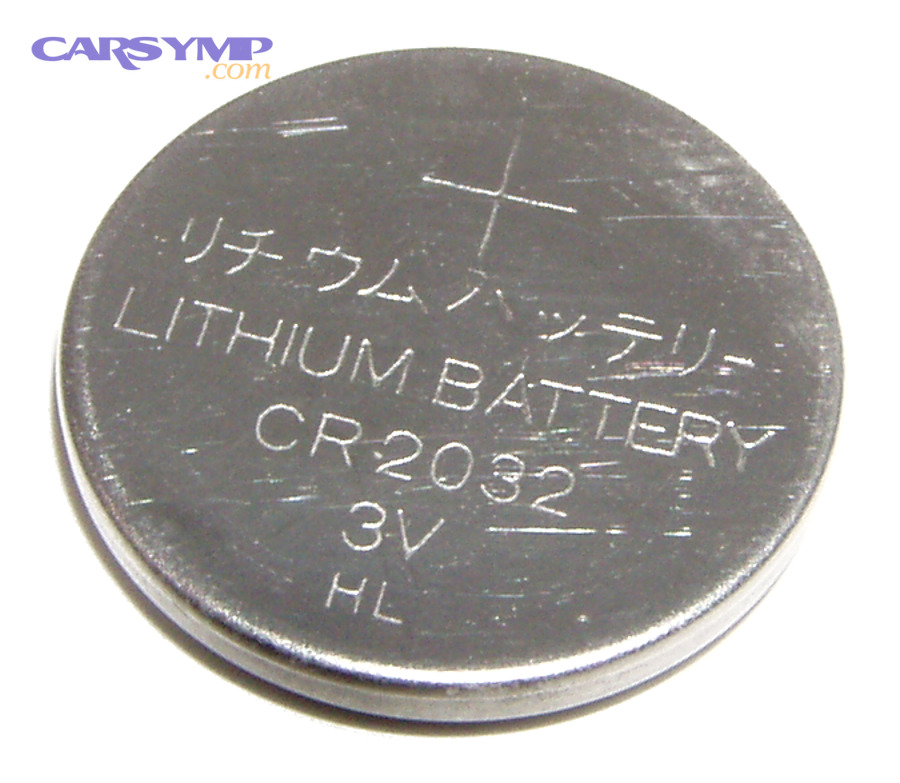
Practical tip: if your fob works only when you press hard or squeeze the case, the “problem” may be contact pressure, not the battery chemistry.
What does “re-sync” vs “reprogram” mean for a key fob?
Re-sync is re-establishing communication timing (often after a power interruption), while Reprogramming a key fob basics means registering the fob’s identity to the vehicle’s security system so the car recognizes it again.
Moreover, understanding the difference helps you choose the lightest fix that works.
Re-sync (lighter action) usually applies when:
- The fob works intermittently or after battery removal.
- The car responds sometimes, especially at close range.
- You suspect timing/range issues rather than “forgotten key.”
Reprogramming (heavier action) becomes likely when:
- The car never responds to a specific fob, even with a known-good battery.
- The vehicle recently had security/BCM work, a dead vehicle battery, or a module reset.
- You’re adding a replacement fob or the original fob memory was lost.
Important safety note: programming steps vary heavily by make/model. Many newer vehicles require professional tools or manufacturer security authorization.
Is RF interference or low range the real issue (Yes/No)?
Yes—interference and signal blocking causes are common when the key fob works up close but fails from normal distance, because radio noise, metal shielding, and crowded RF environments reduce effective signal strength.
However, interference is easy to misdiagnose as a “bad fob,” so test it deliberately.
Run this Keyless entry range issues diagnosis in 2 minutes:
- Step 1: Stand close (1–2 feet) and try lock/unlock.
- Step 2: Walk back to 10–20 feet and try again.
- Step 3: Change your environment: try the same test somewhere else (a different street/parking lot).
- Step 4: Remove blockers: take the fob out of a metal case, away from a phone, away from other keychains.
If your fob works normally in a different location, you likely had Interference and signal blocking causes near your original spot (strong Wi-Fi sources, industrial equipment, dense electronics, or localized RF congestion). If it never improves anywhere, go back to battery/contact and hardware inspection.
Why is my key fob not working after replacing the battery? (Most common post-battery mistakes)
There are 7 common reasons a key fob still fails after a battery replacement: wrong battery type, reversed polarity, poor contact pressure, contaminated contacts, damaged clips, incomplete case closure, or a fob that now needs re-sync/reprogram.
Then, troubleshoot in a tight sequence so you don’t bounce between random fixes.

Which battery replacement mistakes stop a key fob from working?
There are 6 main battery-swap mistakes that stop a key fob from working, based on contact integrity and correct power delivery: polarity error, wrong battery thickness, bent terminals, dirty terminals, cracked holder, and pinched case.
Specifically, these mistakes prevent stable voltage at the circuit board—even if the battery itself is new.
Check these one by one:
- Polarity flipped: the fob won’t power on at all.
- Wrong battery number: CR2032 vs CR2025 can matter because thickness affects contact pressure and voltage sag under load.
- Bent contact tabs: the battery touches but doesn’t clamp firmly.
- Oily residue on the battery: fingerprints can reduce contact quality over time; wipe the cell with a dry cloth.
- Battery not seated under the clip: it can look “in,” but it’s not locked in place.
- Case not fully snapped: some fobs use the case as part of the contact pressure system.
If you suspect contact pressure, a quick test is to press a button while gently squeezing the fob. If it works only under pressure, you’re dealing with seating/contacts, not pairing.
Does the key fob need reprogramming after a battery change (Yes/No)?
No—most key fobs do not require reprogramming after a battery change, because the fob’s identity is stored in non-volatile memory; but yes, reprogramming can be needed if the car lost registration, the fob was replaced, or a security module reset occurred.
In addition, your symptoms can tell you which side you’re on.
Likely NO reprogramming needed if:
- The car responds sometimes (especially up close).
- The fob LED lights (if your model has one) and buttons feel normal.
- A spare fob works reliably.
Likely YES reprogramming needed if:
- The fob never works even with perfect battery seating and clean contacts.
- The car recently had a dead vehicle battery, body control module work, or security reset.
- The fob is a replacement shell/board mix or aftermarket unit.
Treat programming as the final step, not the first—because battery/contact issues are far more common.
Battery issue vs key fob hardware failure—how can you tell the difference?
A battery issue usually causes weak range and intermittent response, while key fob hardware failure more often causes one-button failures, “works only when pressed hard,” or total failure even with a verified-good battery.
Meanwhile, a simple pattern check can save you from guessing.
- Battery/connection problem tends to show:
- Range suddenly shrinks
- Works briefly after closing the case, then fails
- Works in warm conditions but struggles in cold (coin cells can be more sensitive at low temperatures)
- Hardware failure tends to show:
- One button stops working while others work
- Button feels “mushy” or doesn’t click consistently
- Visible Water damage and corrosion in fob diagnosis signs (green/white residue on metal parts)
- Rattle inside the fob (broken plastic posts or loose board)
If you open the fob and see corrosion, skip “more batteries” and move to cleaning/repair or replacement decisions—because corrosion can continue to eat contacts even if you restore temporary power.
What vehicle-side problems can make a working key fob fail?
There are 5 common vehicle-side causes that can make a working key fob appear dead: blown fuses, a failing receiver module, antenna/sensor faults for smart keys, wiring/connector issues, or aftermarket alarm interference.
Especially when a spare fob also fails, it’s time to look at the car—not the keychain.

Which car components can block key fob signals or pairing?
There are 6 vehicle components that most often cause “key fob not working” symptoms: fuse circuits, receiver/antenna module, body control module (BCM), door handle sensors, key slot/backup reader, and ignition/start authorization antenna.
More importantly, each component produces a recognizable symptom pattern.
- Fuse issue: sudden total loss of remote function; other related electronics may also fail.
- Receiver module issue (When the issue is the car receiver module): both fobs have short range or no response; problem persists across locations.
- BCM or security module problem: erratic behavior, multiple electrical oddities, or recently performed battery/module work.
- Door handle sensor fault (smart key): proximity unlock fails on one door but works elsewhere.
- Start authorization antenna issue: doors unlock but car won’t start; the car says Car not detecting key fob unless the fob is placed in a specific backup spot.
- Wiring/connector problem: intermittent symptoms that change with temperature or vibration.
If you suspect the receiver path, the cleanest test is: do both fobs fail the same way, at the same range, in multiple locations? If yes, the car-side receiver path is a strong suspect.
OEM system vs aftermarket alarm—what changes in troubleshooting?
OEM systems are usually consistent and fail predictably, while aftermarket alarms often introduce intermittent signal conflicts, starter-kill behaviors, or false “immobilized” states—so OEM wins for stability, and aftermarket is more likely to cause sporadic symptoms.
However, you can still troubleshoot systematically if you know what to look for.
OEM-leaning signs:
- A single fob fails while the spare works.
- Battery replacement improves range immediately.
- No unusual blinking LEDs or siren behavior.
Aftermarket-leaning signs:
- Random no-start events with normal lock/unlock.
- Alarm LED behavior changes (fast flashing, unusual patterns).
- Starter-kill symptoms where the dash powers on but the engine won’t crank, mimicking car won’t start causes unrelated to the fob.
- The problem started after an alarm install or electrical work.
If you have an aftermarket system, locate the manual for its valet/bypass mode and use it as a diagnostic tool. If bypassing the alarm restores normal starting, the key fob may be fine and the aftermarket system is the real gatekeeper.
When should you replace the key fob or call a locksmith/dealer? (Decision + expectations)
There are 4 clear times to replace the key fob or call a pro: repeated failures after verified battery/contact fixes, visible corrosion or broken hardware, vehicle security programming requirements, or high lockout risk when you depend on one fob.
Thus, use a decision framework that balances cost, speed, and reliability.

Is it safe to keep using a failing key fob (Yes/No)?
No—it’s not safe to rely on a failing key fob as your only access method, because (1) intermittent unlock can lock you out, (2) weak range can strand you in bad conditions, and (3) start authorization failures can leave you with a “Car not detecting key fob” no-start event.
In short, reliability matters more than convenience when the fob is your primary entry and start tool.
If you must keep using it temporarily:
- Carry the spare or get a spare made.
- Learn the backup entry method (mechanical key) and keep it accessible.
- Learn Emergency start procedures with dead fob for your vehicle (many push-to-start cars allow starting by holding the fob near the start button or a designated reader area).
What are your replacement options (battery, shell swap, board repair, OEM replacement, locksmith)?
There are 5 main replacement paths—battery swap, case/shell swap, contact/board repair, OEM replacement fob, and locksmith-supplied programmed fob—based on whether the failure is power, physical housing, electronics, or registration.
Next, pick the option that matches your symptom and your timeline.
- Battery swap: best when range shrank or the fob died suddenly.
- Shell swap: best when buttons are physically worn but the electronics still work.
- Board/contact repair: best when one button fails or the fob works only under pressure; often involves cleaning, reflowing, or replacing button pads.
- OEM replacement: best when you need maximum compatibility, especially for smart keys.
- Locksmith replacement/programming: best when you want faster service than a dealer and your vehicle supports it.
This is where readers often want a Key fob replacement cost estimate. While exact pricing varies by make/model and whether it’s a basic remote or smart key, the practical cost drivers are consistent: type of key (standard vs smart), programming requirements, and whether all keys are lost.
Locksmith vs dealer—who’s better for key fob programming?
A locksmith usually wins for speed and convenience, a dealer is best for complex smart-key security and guaranteed OEM compatibility, and DIY is optimal only when your vehicle supports simple onboard pairing steps.
On the other hand, the “best” choice depends on your car’s security architecture and whether you’re adding a new key or recovering from all keys lost.
- Compatibility: dealers cover nearly all models; locksmith coverage varies.
- Security access: newer systems often require manufacturer-authorized tools—dealers tend to have the cleanest path.
- Cost and time: locksmiths can be faster and sometimes cheaper for common models.
- Risk: cheap aftermarket keys can be inconsistent; OEM tends to be more reliable.
Evidence you can anchor on for security context: According to a study by ETH Zurich from the Department of Computer Science, in 2011, researchers demonstrated relay attacks that could unlock and start vehicles using passive keyless systems across multiple car models. (ndss-symposium.org)
What rare or model-specific issues can cause a keyless remote to fail even after troubleshooting?
There are 4 rare categories of failures that can persist after normal troubleshooting: smart-key proximity antenna problems, backup reader/slot faults, intermittent RF jamming/blocked environments, and internal fob PCB issues like corrosion or cracked solder joints.
Next, use these edge-case checks only after you’ve completed the main checklist—because they’re less common, but very real.

What is the difference between a standard keyless remote and a smart key (proximity fob)?
A standard keyless remote is a button-press transmitter for locking/unlocking, while a smart key (proximity fob) is a multi-antenna system that communicates for passive entry and push-to-start authorization, often using separate signal paths for doors vs starting.
Then, interpret your symptoms through that lens to avoid confusion.
Practical takeaway: when doors unlock but the engine won’t start, you’re often dealing with the smart-key authorization path—not the basic lock/unlock transmitter.
Which rare causes affect smart keys (antenna ring/reader faults, key slot reader, LF/UHF issues)?
There are 5 rare smart-key causes—start-area antenna faults, door-handle sensor faults, key slot/backup reader failure, localized RF blocking, and internal fob PCB fatigue—based on which antenna path fails.
More specifically, these causes show up as “partial working” behavior that feels random.
- Unlock works, start fails → start authorization antenna/reader area issue; try the backup start method.
- One door works, others don’t → door handle sensor issue.
- Works only in one parking spot → localized jamming/interference.
- Works after warming up the fob → weak battery or marginal solder/contact behavior.
Intermittent key fob failures vs completely dead fobs—what do they usually indicate?
Intermittent failures usually indicate weak power, interference, or marginal contacts, while completely dead fobs usually indicate a power break, severe corrosion, or board failure—so intermittent points to “recoverable,” and dead points to “repair/replace.”
However, intermittent problems can still become “dead” if corrosion progresses.
If you suspect Water damage and corrosion in fob diagnosis issues:
- Look for white/green residue on metal parts.
- Check for sticky buttons (sugar drinks and moisture can trap debris).
- Expect worsening behavior over days/weeks, not improvement.
What emergency access and start methods should every owner know (hidden key, backup start procedure)?
There are 3 universal emergency methods: use the hidden mechanical key for door entry, use the designated backup start method for push-to-start cars, and keep a known-good spare accessible—because these bypass battery and range issues when the fob fails.
To sum up, these steps prevent lockout and “stranded” scenarios even when your key fob fails completely.
Common Emergency start procedures with dead fob patterns include:
- Hidden key in the fob: slides out for the driver door cylinder.
- Backup start location: hold the fob against the start button or place it in a specific pocket/slot so the car can read it at very close range.
- Spare strategy: store a spare safely (not inside the car) and test it periodically.
If your situation is “doors open but car won’t start,” treat it as authorization recognition first—because that’s the fastest path to getting moving safely without unnecessary repairs.
Evidence (if any): According to a study by ETH Zurich from the Department of Computer Science, in 2011, researchers demonstrated relay attacks against passive keyless entry and start systems, showing that security-related signal behavior can affect how and when a car accepts key presence. (ndss-symposium.org)


