


To access a blower motor on your specific vehicle, you first identify its mounting zone (passenger footwell, behind the glove box, center console side, or under-hood firewall) and then remove only the trim or fasteners that directly block the motor flange.
Next, you match your vehicle layout to a practical access path—some cars are a “drop the under-dash panel” job, while others require glove box removal, a splash shield drop, or an engine-bay reach from the passenger side.
Beyond access, you’ll want to avoid common time-wasters like fighting hidden screws, breaking plastic clips, or unplugging the wrong connector—small preparation steps and a consistent checklist prevent that.
To begin, follow the quick location logic below so you can move from “where is it?” to “I can see it” with minimal disassembly.
How do you find the blower motor location on your vehicle?
The fastest method is to trace airflow: the blower motor sits at the inlet of the HVAC case, usually on the passenger side, either inside the cabin under the dash or in the engine bay at the firewall. Next, use a simple “look-and-feel” checklist to confirm the exact access side.
What clues tell you it’s under the dash rather than under the hood?
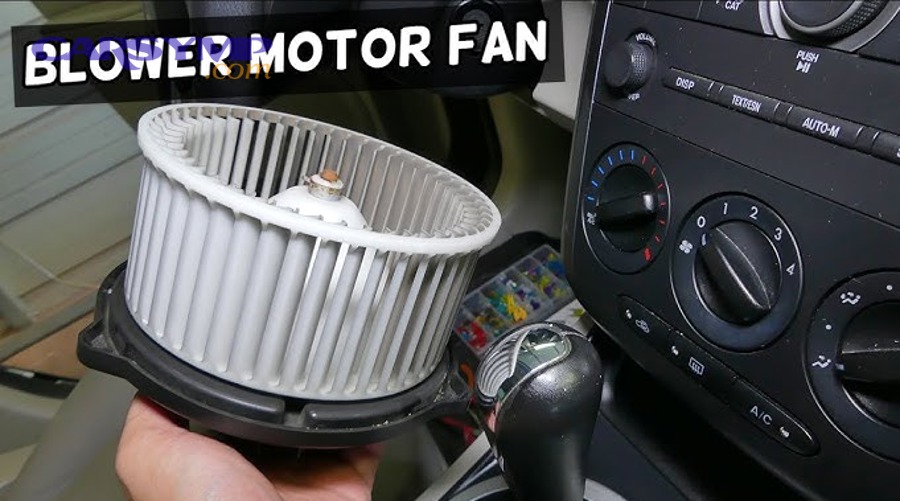
If you hear the fan loudest in the passenger footwell and feel vibration through the lower dash trim, it’s typically an under-dash mount. Next, check for a round plastic housing with several small screws and a nearby wiring pigtail coming out of the HVAC box.
To make this quick, open the passenger door, kneel at the footwell, and look upward with a flashlight along the bottom edge of the dash. Specifically, you’re hunting for a circular motor flange (often 3–6 screws) attached to a larger molded HVAC case, plus a connector with 2–4 wires.
If your vehicle uses a cabin air filter, the filter door and the blower motor often live in the same neighborhood of the HVAC case. For many designs, the filter is upstream and the blower is immediately downstream, so seeing the filter cover can hint where the motor must be.
What clues tell you it’s mounted at the firewall in the engine bay?
If the passenger footwell looks clean with no circular motor flange and the HVAC case seems “sealed” inside, some vehicles place the blower motor under the hood near the firewall. Next, scan the passenger-side firewall area for a round housing with a connector and small perimeter fasteners.
To confirm, follow the HVAC plumbing: look for the evaporator/heater case bulkhead region where A/C lines pass through the firewall. In many layouts, the blower motor sits close to that case, often slightly offset to the passenger side.
Also check for a serviceable round plastic cover that resembles a “cap” attached to the HVAC case. If you can see the perimeter screws/bolts and the wiring connector, you’ve likely found the access point.
What if you can’t see it from either side at first glance?
If it’s not visible, it’s usually hidden behind a lower trim panel, glove box, center console side cover, or a knee bolster. Next, use your vehicle category and the common access patterns in the next section to narrow the search before removing parts.
As a practical rule: if the passenger footwell has a large insulating panel or thick under-dash cover, remove that first; if the glove box area has a narrow service door or filter cover, check behind the glove box; and if you see nothing inside, move to the passenger-side firewall under the hood.
For accuracy, search your vehicle’s parts diagram in a service manual or OE-style exploded view. Those diagrams usually label the motor as part of the HVAC “blower” assembly and show whether it’s cabin-side or engine-side.
What are the most common access paths by vehicle type?
There are four common access paths, and your vehicle type usually predicts which one applies: passenger footwell under-dash, behind the glove box, center console side, or under-hood firewall. Next, use the grouping below to choose the least-destructive path before you start pulling trim.

Which access path is most common for compact cars and sedans?
Most compact cars and sedans place the blower motor under the passenger dash or behind the glove box for cabin-side servicing. Next, plan for a lower panel drop plus one small connector and 3–6 motor screws.
Specifically, many designs let you remove a felt or plastic undertray, then you’ll see the motor flange attached to the HVAC case. If the flange is not visible, the glove box usually comes out with a few screws or dampers, revealing the motor beside the filter door.
Which access path is common for SUVs, trucks, and body-on-frame vehicles?
Many trucks and some SUVs mount the blower motor at the firewall under the hood on the passenger side, especially older or service-heavy designs. Next, expect a short engine-bay reach with basic sockets and careful handling around wiring and HVAC lines.
In these layouts, you often remove a small engine-bay cover, move a harness clip, and then unbolt the motor from the HVAC case. This can be faster than under-dash work, but it can also be tighter due to intake plumbing or battery trays.
Which access path appears in minivans and vehicles with deep dashboards?
Minivans and some crossovers may hide the blower motor deeper, sometimes requiring glove box removal plus a side panel or a brace to access the last screw. Next, prepare for clip-heavy trim and limited tool swing room.
To reduce risk, use trim tools and label fasteners by location. Deep dashboards often have multiple overlapping panels, so keeping the sequence organized prevents rattles later.
Which access path is common in European-style “tight packaging” layouts?
Some European layouts place the blower motor near the center stack side or behind a more complex glove box assembly with ducting. Next, expect Torx fasteners, hidden tabs, and a need to gently reposition ducts rather than forcing them.
Here, the motor may be accessible only after removing a side kick panel and dropping a small duct section. If you meet strong resistance, stop and re-check for a hidden fastener—forced prying is how housings crack.
Below is a quick guide that helps you map vehicle type to the most likely access route and the kind of trim you’ll remove first.
This table contains typical access locations and first-removal panels so you can start in the right place and avoid unnecessary disassembly.
| Vehicle category | Most likely blower motor location | First parts to remove | Common fastener types | Typical access difficulty |
|---|---|---|---|---|
| Compact car / sedan | Passenger footwell under dash | Lower under-dash cover, hush panel | Phillips, 7–10mm, clips | Easy to moderate |
| Compact car / sedan (some models) | Behind glove box | Glove box stop/damper, glove box screws | Phillips, Torx, clips | Moderate |
| SUV / truck (many layouts) | Under hood at passenger firewall | Engine-bay cover, harness clips | 8–10mm, Torx, push pins | Easy to moderate |
| Minivan / deep dashboard | Glove box area + side panel | Glove box, side kick panel, small duct | Torx, Phillips, clips | Moderate to hard |
| European tight packaging | Center console side / glove box cavity | Side trim, duct clips, glove box | Torx, clips | Moderate to hard |
What tools and safety prep make access faster and safer?
Access is safest and fastest when you stabilize the vehicle, protect trim, and set up the right lighting and drivers before removing a single screw. Next, follow a short prep list that prevents broken clips, lost fasteners, and accidental electrical shorts.
Which basic tools cover most vehicles?
A small socket set (often 7–10mm), Phillips and flat screwdrivers, Torx bits, a trim tool, and a flashlight handle most blower motor access jobs. Next, add a short extension and a universal joint for hidden fasteners.
In practice, the biggest time-saver is having the correct bit for the screw head—Torx and small hex heads strip easily if you “make it fit.” Keep a magnetic tray or labeled bags so each panel’s fasteners stay grouped.
If you expect tight clearances, a stubby screwdriver and a small ratchet can be the difference between smooth removal and rounding a screw. A handheld mirror also helps you locate the last hidden fastener before you tug on the housing.
What safety steps matter even for “just access” work?
Disconnecting the negative battery terminal is recommended whenever you unplug HVAC electrical connectors near airbags or sensitive harness routes. Next, wait a few minutes after disconnecting so stored energy in modules dissipates.
Wear safety glasses—under-dash debris, dust, and falling clips are common. If you’re working near sharp dash braces, gloves prevent cuts that can turn a simple job into a frustrating stop.
Protect interior surfaces with a towel or fender cover, especially if you’re placing tools on the sill or center console. This also reduces the chance of creating squeaks later from scuffed or distorted trim.
How do you avoid breaking clips and cracking panels?
The key is controlled leverage: pry from clip points, not random edges, and pull panels in the direction the clips release. Next, use a trim tool rather than a metal screwdriver whenever possible.
Specifically, start at a corner where you can see the seam, insert the trim tool, and feel for the clip’s location. If the panel won’t move, stop and search for a hidden screw—many glove box and under-dash panels have one “anchor” fastener that must be removed first.
In cold weather, plastic becomes brittle; warming the cabin slightly can reduce clip breakage. Also keep spare push pins on hand—reusing stretched or snapped pins is how panels begin to rattle.
How do you access a blower motor behind the glove box?
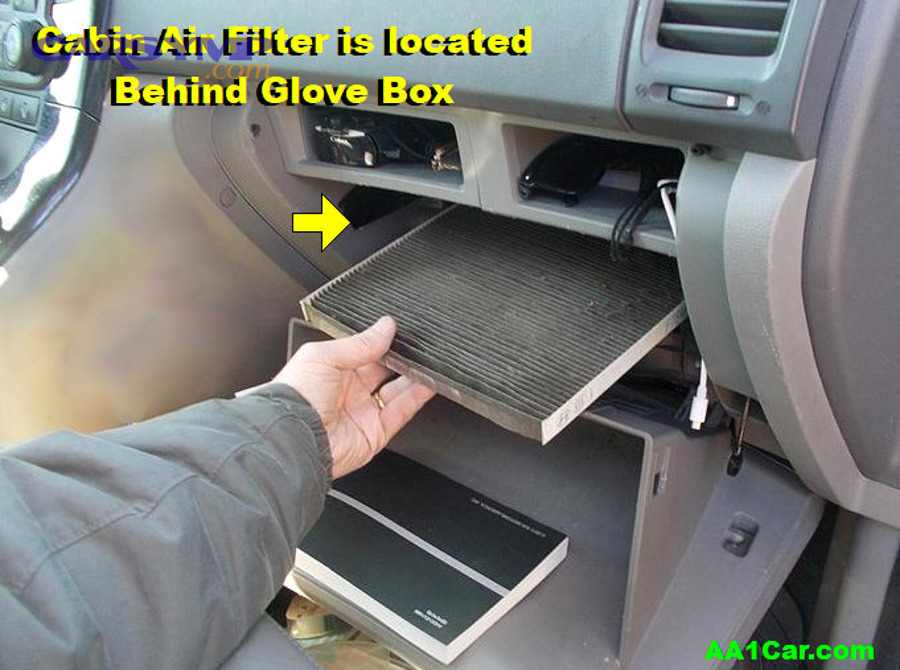
You access a glove-box-area blower motor by lowering or removing the glove box, then clearing any small ducts or braces until the circular motor flange and connector are visible. Next, work methodically so you don’t overstress the glove box damper or hinge points.
How do you drop the glove box safely?
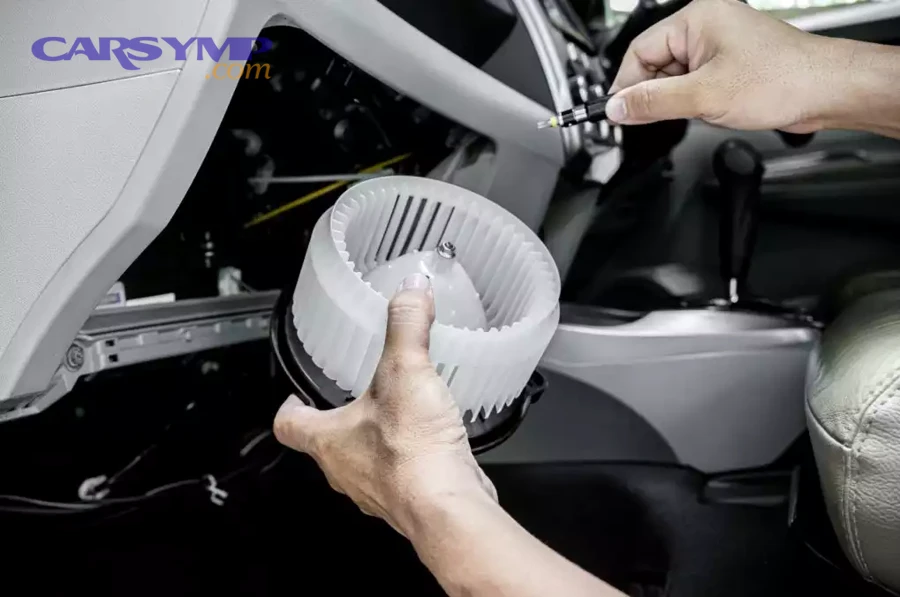
Most glove boxes drop by releasing the side stops and unhooking the damper arm, allowing the box to swing down. Next, remove any screws or hinge pins only if your design requires full removal.
To do this cleanly, empty the glove box first so contents don’t spill. Then press the glove box sides inward to bypass the stops, and gently unclip the damper (often a small plastic arm on the right side).
If screws are present, keep track of their length—some manufacturers use mixed lengths that can crack plastic if swapped. Once the glove box is down, you should see the HVAC case surface and possibly a service door or wiring harness route.
What do you remove next if the motor is still not visible?
If the motor isn’t visible, remove the lower kick panel or a small duct segment that blocks the motor flange. Next, check for a nearby filter access door because it often shares the same cavity.
In many vehicles, a small duct outlet aims toward the passenger footwell and is held by clips. Specifically, release the clips and slide the duct out rather than forcing it—ducts deform and then whistle later.
Once that path is clear, look for the circular outline of the motor assembly and a connector clipped to the housing. You may need to rotate the motor slightly to clear surrounding plastic ribs during removal, so make sure you have enough room to maneuver before undoing fasteners.
How do you make sure you’re looking at the blower motor and not another HVAC component?
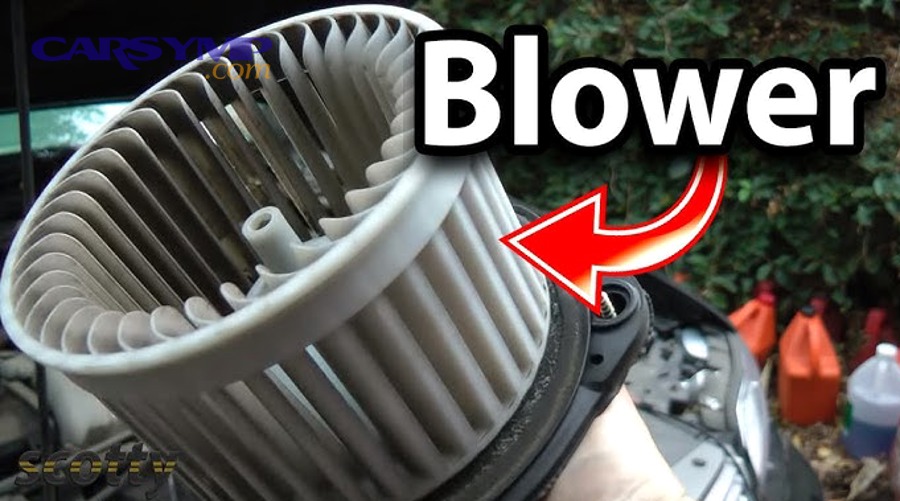
The blower motor typically has a round body with a flange and several evenly spaced screws, and it connects to a fan wheel inside the HVAC case. Next, confirm by locating the electrical connector that routes to the fan-speed control circuitry.
Unlike actuators (which are small and rectangular with gears) the blower motor area looks like a “cap” on the HVAC case. Also, the connector often has thicker gauge wires than small sensors or door actuators because the motor draws more current.
For a quick confirmation, turn the fan on at low speed (with the vehicle safely powered) and listen near the suspected housing. The strongest sound and vibration usually identify the correct component.
When the glove box is down, you may also see the intake area where debris collects. Cleaning leaves and dust from this cavity reduces noise and can prevent premature wear of the fan wheel.
According to the practical airflow principle, anything that increases intake restriction makes the fan work harder and can raise noise. Theo nghiên cứu của Tianjin University từ School of Environmental Science and Engineering, vào 07/2013, khi lưu lượng tăng từ 1000 lên 2200 m3/h thì chênh áp qua bộ lọc có thể tăng thêm khoảng 250 Pa.
How do you access a blower motor under the hood at the firewall?
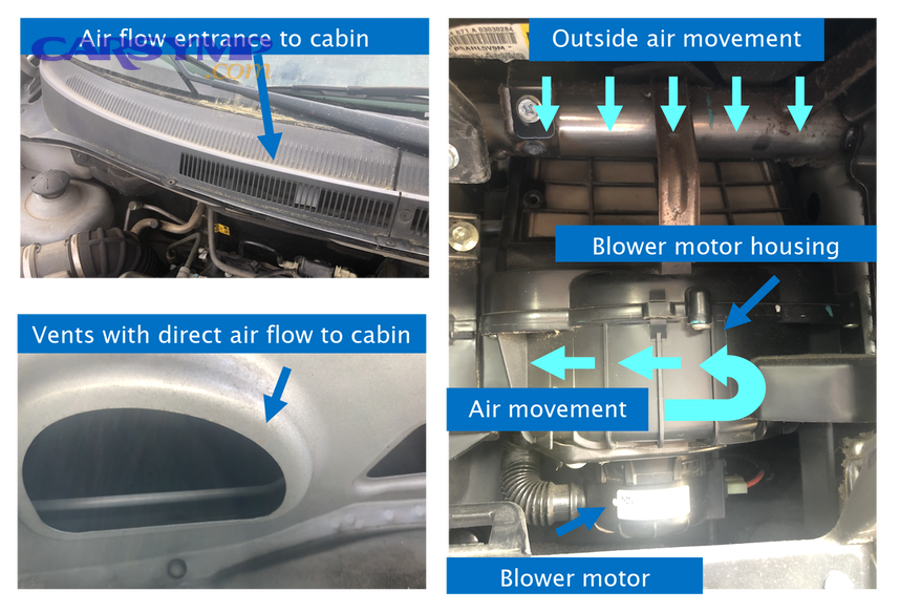
You access an under-hood blower motor by locating the round motor housing on the passenger-side firewall and removing surrounding covers or harness clips that block the fasteners. Next, create working room first, then remove electrical and mounting points without stressing HVAC lines.
Where exactly should you look in the engine bay?
Look on the passenger-side firewall near the HVAC case bulkhead where A/C lines and heater hoses pass through. Next, scan for a round plastic housing with perimeter screws and a visible electrical connector.
Many designs place the motor slightly below the cowl area. If the cowl cover or weatherstrip blocks access, remove only the pieces necessary to reach the screw heads—over-removing cowl components increases the risk of water leaks if reinstalled incorrectly.
If there’s a plastic engine cover or air intake duct blocking your reach, loosen it and move it aside. Be careful around brittle vacuum lines and harness clips, which can snap when cold.
What should you remove first to avoid fighting the last screw?
Remove obstructions before touching the motor fasteners: harness retainers, small brackets, or a splash shield lip can block tool swing. Next, test your socket/bit fit on all screws before fully removing any single screw.
This matters because some housings shift slightly as you remove fasteners, changing alignment and making the last screw harder to access. Specifically, loosening all screws first (without removing them) keeps the housing seated and prevents binding.
If one fastener is hidden behind a line or bracket, don’t pry the line—unclip the bracket or temporarily move the harness using its designed retainers. The goal is clearance, not force.
How do you protect the HVAC case seal and prevent water intrusion?
Keep the mating surfaces clean and avoid gouging the plastic HVAC case where the motor flange seals. Next, wipe debris from the flange area and ensure any foam gasket or O-ring seats evenly during reassembly.
Under-hood locations can be exposed to moisture and dirt, so take a moment to clean around the opening before pulling the motor out. Dirt falling into the case can later cause fan imbalance and noise.
If your motor uses a foam gasket, replace it if it tears. A damaged gasket can allow water or unfiltered air to enter, which may create odors and reduce long-term HVAC performance.
How do you remove the blower motor once you can reach it?
Once you can reach the motor, removal is typically: unplug the connector, remove the mounting screws, and lower or twist the motor out while protecting the fan wheel from impact. Next, focus on the tightest step—clearing the fan wheel through the opening without cracking blades.
What is the safest order of operations?
Start by unplugging the connector, then loosen all mounting screws, and finally support the motor as you remove the last fastener. Next, keep one hand on the motor body so it doesn’t drop and stress the fan wheel or wiring.
Unplugging first prevents the harness from acting like a “tether” when the motor loosens. Then, loosening all screws before removing any one screw helps you detect binding early and avoids stripping plastic threads in the HVAC case.
If screws thread into plastic, turn them slowly and stop if you feel the head climbing—plastic can heat and deform, making threads weak. A small dab of dielectric grease on the connector seal (not the terminals) can help keep moisture out for under-hood setups.
How do you maneuver the fan wheel out without damage?
Rotate the motor slightly as you lower it so the fan wheel clears braces and ducts, then pull straight out once the wheel is free. Next, move slowly—most damage happens when the wheel catches an edge and you force it.
Some vehicles have a narrow opening that requires a specific angle. Specifically, watch the wheel tips and keep them centered in the opening as you rotate and lower the motor.
If the wheel refuses to clear, check again for one hidden screw or a locking tab. Forcing the motor can crack the HVAC case lip, which then becomes a permanent air leak and a source of rattles.
What should you inspect immediately after removal?
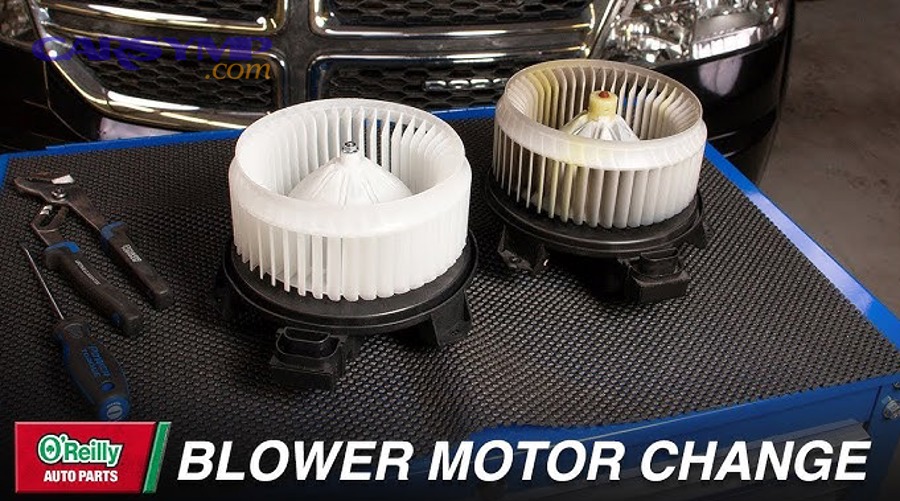
Inspect the fan wheel for cracks, missing fins, or heavy debris buildup, and check the mounting flange for gasket damage. Next, look inside the HVAC case for leaves, pens, or broken plastic that could obstruct the new motor.
Debris in the case can create a ticking sound and can overload the motor. Cleaning the cavity now is easier than diagnosing noise after reassembly.
This is also the moment to compare the old motor to the replacement unit if you’re doing blower motor replacement, ensuring the connector orientation, flange shape, and wheel depth match before you reinstall anything.
If your motor is tight in the opening, avoid lubricants on the wheel or shaft interface because oil can attract dust and cause imbalance. A clean, dry fit is typically best for long-term reliability.
How do you confirm you’ve reached the right part before reassembly?
You confirm you’ve reached the correct part by matching three signals: correct HVAC-case mounting location, correct electrical connector, and fan response to power/speed commands. Next, do a short functional check so you don’t reinstall trim and discover the wrong component was disturbed.
Which quick checks prevent rework?
Check that the connector pins are clean, the latch locks positively, and the motor spins freely without scraping. Next, verify the fan speeds respond as expected before reinstalling glove boxes and under-dash panels.
A simple tactile check helps: spin the fan wheel by hand; it should rotate smoothly with minimal wobble. Then inspect the connector for heat discoloration or melting, which indicates high resistance and can cause repeat failures.
Also confirm the motor flange seats flat against the HVAC case. If it’s cocked, the wheel may rub the housing and create noise that sounds like a bad motor even when the motor is new.
How do you avoid confusing motor problems with speed-control problems?
If the fan works on one speed but not others, the fault may be in the speed-control circuit rather than the motor itself. Next, separate “power arrives” from “motor can spin” using a basic voltage and connector check.
In real diagnosis notes, Blower resistor vs motor diagnosis helps you decide whether to remove only the motor or also inspect the nearby control element mounted in the duct for cooling. Specifically, if high speed works but lower speeds don’t, the control path is a prime suspect; if no speeds work, verify fuses, relay, and ground before condemning the motor.
Electrical symptoms can overlap with airflow restriction symptoms. Cabin filter impact on blower performance matters because a heavily restricted intake can make the system noisy and weak even when the motor is electrically healthy.
If the complaint is weak vent output, HVAC airflow weak troubleshooting should also include checking for a clogged intake, collapsed duct, or stuck blend/recirculation door—because a perfect motor can’t push air through a blocked path.
What evidence-based detail explains why restriction changes fan behavior?
Restriction increases pressure drop across the airflow path, so the system may move less air and sometimes sound louder as turbulence increases. Next, use that understanding to decide whether to clean the intake area before concluding the motor is failing.
Theo nghiên cứu của Purdue University từ School of Mechanical Engineering, vào 07/2013, khi bụi tải đạt 220 g m-2 thì chênh áp có thể tăng khoảng 8 lần (từ ~100 Pa lên ~800 Pa) trong điều kiện thử nghiệm, cho thấy tắc nghẽn có thể làm hệ thống “nghẹt” đáng kể.
While those figures come from cabin filtration research, the mechanical takeaway applies broadly: as the path becomes more restrictive, the fan’s effective airflow can drop, and noise/strain can rise. That’s why checking intake cleanliness and filter condition is a smart step before closing up the dashboard.
How do you put everything back and prevent repeat failures?
Reassembly is successful when the motor is seated evenly, the connector is fully locked, and all panels return without gaps or rattles. Next, use a prevention checklist focused on airflow cleanliness, electrical resistance, and fastener discipline.
What is the best way to tighten screws into plastic housings?
Tighten screws by hand-starting all fasteners first, then snug them in a cross pattern to seat the flange evenly. Next, stop at “snug” rather than “tight” because over-torque strips plastic threads and warps the flange.
To make this reliable, start each screw 2–3 turns by hand so you know it’s not cross-threaded. Then tighten gradually, moving across the circle rather than around it, which helps keep the motor centered and reduces the chance of wheel rub.
If a screw hole is stripped, a slightly larger fastener or a thread repair insert may be needed, but avoid improvisations that crack the HVAC case. A cracked case becomes a leak and a rattle source.
How do you prevent squeaks, rattles, and glove box misalignment?
Prevent noises by restoring every clip to its correct slot and ensuring panels seat flush before you install screws. Next, confirm glove box stops and dampers are reconnected so the box closes smoothly and doesn’t stress hinges.
Reinstall panels in reverse order, but don’t force alignment—if a panel doesn’t sit right, a clip is usually mislocated. Specifically, press near clip points rather than in the middle of a panel to avoid bending it.
After panels are back, run the fan at multiple speeds and listen for rubbing, ticking, or buzzing. If you hear contact, stop and re-check seating before you drive.
What maintenance habits reduce the chance of doing this job again soon?
Keeping the intake area clean and replacing filters on schedule reduces debris load and prevents fan imbalance that accelerates wear. Next, inspect the connector and ground integrity because electrical heat is a common repeat-failure trigger.
If you routinely park under trees, leaves and seeds can enter the HVAC intake and collect near the fan wheel. Periodic vacuuming of the cowl intake area and checking for water drains that are blocked can reduce moisture and debris intrusion.
Also, if you’ve noticed slow fan response or intermittent operation, address connector corrosion early. High resistance at the connector can heat the plug, distort terminals, and shorten motor life even if the motor itself is good.
Contextual Border: You now know the common access routes and a safe removal/reinstall flow; next are less-common layouts and troubleshooting shortcuts that help when access is unusually tight or symptoms are misleading.
Rare access cases and shortcuts for tight dashboards
What changes on right-hand-drive vehicles or mirrored HVAC layouts?
Some right-hand-drive vehicles mirror certain duct and panel layouts, but the blower motor usually still anchors to the HVAC case near the passenger-side footwell region relative to cabin airflow routing. Next, rely on the HVAC case shape and connector location rather than assuming “left vs right.”
In these cases, the glove box removal concept remains similar, but fastener locations and damper orientation may reverse. To stay accurate, remove panels slowly and check for asymmetrical braces that can hide the last screw.
How do you handle electronic speed controllers and fragile connectors?
Electronic controllers and modern connectors require gentle unlocking and straight pulls to avoid terminal damage. Next, release the locking tab fully, then wiggle minimally while pulling—never yank on wires.
If you see heat discoloration, plan to repair the connector pigtail rather than forcing a loose fit. A loose terminal increases resistance and heat, which can cascade into repeated failures and intermittent fan behavior.
When should you stop and use service information instead of guessing?
Stop and consult service information when access requires airbag-adjacent panels, steering-column area trim, or major dash braces because incorrect steps can create safety risks. Next, use the manual to confirm fastener counts, hidden clips, and safe battery disconnect procedures.
Also use service info if the HVAC case is sealed in a way that suggests the blower wheel cannot clear without moving a duct or brace. That’s usually a sign the manufacturer intended a specific sequence.
What do you do if screws strip or the housing cracks during access?
If screws strip, avoid over-sizing aggressively; reinforce the attachment carefully so the flange seats evenly without stressing the case. Next, address cracks immediately with appropriate plastic repair methods or replacement parts because leaks and rattles only worsen.
For minor damage, a controlled repair can restore sealing, but if the flange area is compromised, the safest long-term fix may be replacing the affected HVAC case component—especially if the blower wheel risks rubbing due to misalignment.
Even when your goal is only access, keeping the intake path clean pays off: reduced debris means less fan imbalance, less noise, and a clearer diagnostic picture when airflow complaints show up.
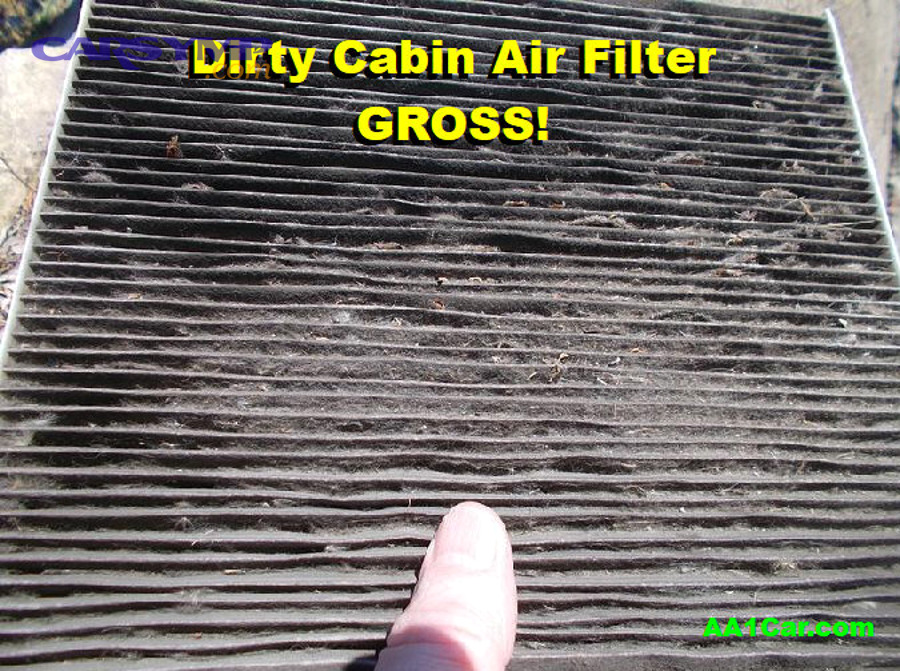
A heavily loaded filter or intake restriction can mimic motor weakness. If your vents sound louder but blow less, inspect the intake and filter path before you assume a deep electrical fault.