


If you want to program or reprogram a car key fob, the fastest path is to identify your key type (remote-only vs transponder vs smart key), confirm your vehicle supports onboard programming, then follow a proven step sequence to pair, verify, and avoid accidental key deletion.
To make that work in real life, you also need a simple “success checklist” (fresh batteries, stable vehicle voltage, correct remote, and all keys present) because most programming failures come from preventable setup issues, not the actual pairing steps.
If your vehicle doesn’t support onboard pairing—or you’re dealing with “all keys lost,” a smart key system, or an immobilizer-based start authorization—you’ll need an OBD/scan tool workflow or professional service, and choosing the right route can save money and avoid lockouts.
Introduce a new idea: once you understand the difference between remote pairing and immobilizer authorization, you’ll troubleshoot faster, spot immobilizer problems early, and know exactly When to call a locksmith vs a mechanic before you waste time on the wrong fix.
What does “key programming” and “key reprogramming” mean for car key fobs and transponder keys?
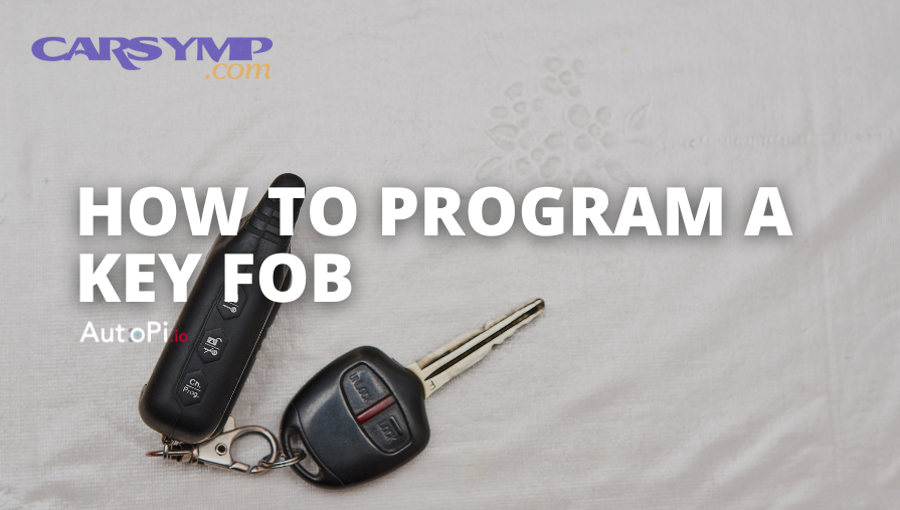
Key programming is the process of teaching your vehicle to recognize a key or remote as authorized, while key reprogramming updates, replaces, or re-learns that authorization—often after battery changes, lost keys, or module resets. More importantly, the words sound similar because two systems may be involved: remote functions (lock/unlock) and immobilizer authorization (engine start).
What’s the difference between programming a remote/fob and programming a transponder chip key?
Programming a remote/fob pairs buttons to the vehicle’s receiver (lock/unlock/trunk/panic), while programming a transponder chip key authorizes the key’s embedded chip to pass the vehicle’s immobilizer security check so the engine can start. Specifically, this is why you can see these two “split outcomes”:
- Remote works, car won’t start: remote pairing succeeded, but transponder/immobilizer authorization did not.
- Car starts, remote doesn’t work: the chip is authorized, but the remote buttons aren’t paired (or the remote section is dead).
A clean way to think about it is “two IDs”: the car may accept a button signal for convenience, but it will only start when its immobilizer recognizes the key’s security identity.
Is key reprogramming the same as resetting or relearning a key?
Reprogramming is often used as a synonym for resetting or relearning, but in practice it usually means one of three actions: re-syncing a remote, adding a new key to the system, or erasing old keys and teaching the vehicle a new authorized set. Then, the difference that matters is risk: “erase & re-add” can remove working keys if you don’t program them again in the same session.
Can you program or reprogram a car key fob yourself at home?
Yes—many vehicle owners can program a car key fob at home because (1) some cars support onboard pairing, (2) the steps are simple when you have the exact sequence, and (3) basic prep prevents most failures. However, the big constraint is your vehicle’s security design: some models allow DIY pairing, while others require scan tools or security access.

Which vehicles support onboard (in-vehicle) key fob programming without tools?
There are 3 main “signals” that a vehicle supports onboard key fob programming: (A) a procedure in the owner’s manual, (B) a known ignition/door/button sequence that enters “learn mode,” and (C) a dashboard prompt or lock-cycle confirmation after the sequence. To better understand, onboard programming is most common in:
- Many older keyless-entry systems (remote pairing only)
- Some vehicles with a menu-driven “add key/fob” function
- Certain trims where the body control module (BCM) exposes learn mode without tools
The exact procedure varies by make/model/year, so the intent isn’t to memorize one universal sequence—it’s to confirm that learn mode exists and then follow the correct steps for your vehicle.
Does “all keys lost” change the programming method?
Yes, “all keys lost” usually changes the method because the vehicle often requires stronger proof of authorization to add the first key back into the system, which typically means scan tool security access or a locksmith/dealer procedure. More importantly, many cars can add an extra key if you still have a working one, but they won’t allow the first key to be created onboard when none are already recognized.
What do you need before starting key programming or reprogramming?
There are 7 essentials you should gather before key programming: the correct key/fob, fresh batteries, all keys you want to keep, stable vehicle power, a quiet environment, the right method (onboard vs tool), and a verification plan. Next, that prep matters because programming is time-window sensitive—small interruptions often cause “no response” failures.
What checklist prevents 80% of programming failures?
The most effective checklist is simple because it removes the most common blockers before you start:
- Install a fresh fob battery (weak voltage can prevent pairing).
- Ensure the vehicle battery is stable (consider a charger if the car will be “ON” for a while).
- Bring all remotes/keys you want to keep—some systems erase old ones during programming.
- Confirm the remote is compatible (same part family/FCC ID/frequency where applicable).
- Close doors, turn off accessories, and follow timing precisely (some steps require actions within seconds).
- If using a tool, use a trusted process and avoid “erase all keys” unless you’re ready to re-add everything.
- Plan your verification: lock/unlock, trunk, panic, remote start (if equipped), and engine start (for transponder).
How do you confirm the fob/key is compatible with your vehicle?
A compatible fob/key matches your car’s required identity format—typically by part number family, FCC ID (for remotes), frequency/region, and security protocol. For example, two remotes can look identical but fail to program if the frequency or encryption protocol differs, which is why compatibility checks should happen before you attempt pairing and assume “the car is rejecting it.”
How do you program a key fob using an onboard (manual) method?
Onboard key fob programming uses a short sequence—enter learn mode, press a fob button to register, repeat for additional fobs, exit learn mode, and verify—to pair remotes without special tools. Then, the crucial detail is that the exact sequence is vehicle-specific, so you should use the correct procedure for your year/make/model rather than guessing.
What are the common steps to enter programming mode safely?
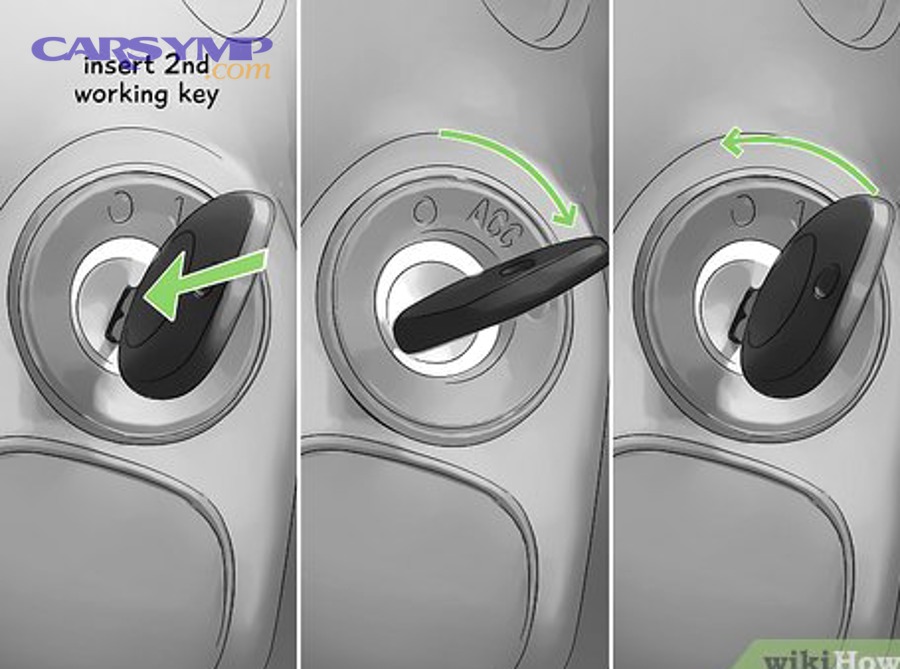
There are 4 common ways vehicles enter remote learn mode: ignition cycling, door/lock cycling, button-hold combinations, or menu-driven pairing—based on the vehicle’s BCM design. More specifically, you’ll usually see one of these patterns:
- Ignition cycles (ON/OFF repeated within a short time window)
- Door/lock actions (close/open + lock/unlock sequences)
- Existing working fob used to authorize learn mode first
- Infotainment/DIC menu “Add Remote” or “Learn Keys” flow
When you do it right, the car often confirms entry with a chime, message, or door locks cycling.
How do you verify the new fob is fully programmed after pairing?
Verification is successful when the new fob consistently performs each intended function from normal distance without intermittent failure: lock, unlock, trunk/hatch, panic, and any special features (remote start, sliding doors, tailgate). In addition, verify the car behavior that confirms pairing (lock cycle, lights flash, chime), then retest after waiting 60 seconds—because some systems appear to work briefly but fail once they exit learn mode.
How do you program or reprogram keys with an OBD scanner or locksmith tool?
Tool-based key programming follows a guided workflow—connect to the vehicle, gain security access, choose “add key” or “erase & program,” then verify—so you can program systems that don’t allow onboard pairing. However, the risk is higher because tools can change immobilizer data, which can create immobilizer problems if you select the wrong function.

What is the typical tool-based workflow (add key vs erase & re-add)?
“Add key” wins in preserving existing access, “erase & re-add” is best when keys are compromised, and “dealer-only” is optimal when the system requires proprietary security credentials. Specifically, here’s the practical difference:
- Add key: safest when you still have working keys; the system keeps existing keys and adds a new one.
- Erase & re-add (all keys): used after theft/loss or when you want to remove old keys; requires you to program every key you intend to keep during the same session.
- All keys lost: often requires security access, PIN/seed-key, or a controlled process used by locksmiths/dealers.
This is also where “Immobilizer reset procedures by brand” becomes a real-world question—because the exact immobilizer menu names, wait times, and authorization steps vary widely by manufacturer.
What mistakes should you avoid with OBD programming?
Yes, you should avoid common OBD programming mistakes because (1) erasing keys can lock you out, (2) unstable voltage can corrupt a session, and (3) incorrect security steps can trigger lockouts or failed authorization loops. Moreover, the highest-impact mistakes look like this:
- Selecting “erase all keys” without having all keys present and ready to program again.
- Programming with a weak vehicle battery—security access may take time, and voltage drops can cause failures.
- Using questionable tools or skipping on-screen prompts, especially during security access windows.
- Ignoring aftermarket wiring changes—Aftermarket alarm causing immobilizer faults is a known scenario when alarm/remote-start installs interfere with immobilizer circuits or data lines.
A practical takeaway: if you’re not sure which function you’re about to run, stop and confirm, because tool-based mistakes can create a “no start” condition that looks like a dead key but is actually an immobilizer authorization failure.
How do you troubleshoot key programming when it doesn’t work?
Troubleshooting key programming works best when you identify the symptom class (no pairing, partial functions, or no-start) and fix the simplest causes first—battery, compatibility, timing, and mode entry—before assuming a module failure. In addition, this symptom-first approach saves time because it separates remote pairing issues from immobilizer authorization issues.

If the fob won’t pair at all, what are the most likely causes?
The most likely causes are a weak fob battery, an incompatible remote, failure to enter learn mode, incorrect timing, or a vehicle that simply doesn’t support onboard pairing for that function. To illustrate, run this quick diagnostic order:
- Replace the fob battery (don’t “test later”—do it now).
- Confirm the fob matches the correct spec (part family/FCC ID/frequency/region).
- Retry learn mode with strict timing (some steps must occur within 5–10 seconds).
- Remove interference (multiple remotes nearby can confuse pairing on some systems).
- Check whether your vehicle requires all remotes to be programmed together.
If none of that works, it’s likely a method mismatch (tool-needed system) rather than “bad luck.”
If the remote works but the car won’t start, what does that indicate?
It indicates the immobilizer is not authorizing the key, meaning the transponder chip or smart-key start credential wasn’t programmed—even though the remote buttons paired successfully. More importantly, this is where many people misdiagnose: the lock/unlock behavior convinces them the key is “fine,” but the immobilizer still blocks starting, which is classic immobilizer problems behavior.
If you see a flashing security light or “key not detected” message, treat it as an authorization problem, not a remote problem.
If a security light flashes or you get a lockout, what should you do next?
If the security light flashes and the car refuses to start, you should stop repeated attempts, stabilize the battery, and follow the vehicle’s recommended wait/retry process because repeated failures can extend lockout periods. Especially with tool-based sessions, some vehicles enforce security delays during access attempts.
If you’re documenting symptoms for a site like Car Symp, log exactly what you see (security light pattern, messages, and whether the remote buttons work), because those details often pinpoint whether you’re facing a pairing issue, a transponder issue, or a module communication issue.
When should you choose a locksmith or dealer instead of DIY?
You should choose a locksmith or dealer instead of DIY when (1) you have all keys lost, (2) you have a smart key/proximity system, or (3) the vehicle requires security credentials and tool-based immobilizer authorization that DIY methods can’t access safely. Then, the decision becomes practical: cost, time, and risk.
To make that clear, the table below compares the three most common programming routes so you can pick the right one.
| Method | Best for | What you need | Main risk |
|---|---|---|---|
| Onboard/manual programming | Remote pairing on supported cars | Correct sequence + compatible fob | Wasted time if car doesn’t support it |
| OBD/tool-based programming | Many modern systems; add-key | Proper tool + stable power + correct procedure | Accidental erase/lockout |
| Dealer/locksmith service | All-keys-lost, smart keys, security access | Proof of ownership + VIN + key specs | Higher cost, scheduling time |
Is a locksmith cheaper or faster than the dealer for reprogramming?
A locksmith often wins on speed and convenience, while the dealer can be best for OEM-only systems, warranty situations, or vehicles that require manufacturer-specific security access. Meanwhile, locksmiths frequently handle mobile service and can address transponder/immobilizer authorization on-site, but some late-model systems still funnel owners to dealer-level processes depending on brand and security architecture.
What should you prepare before visiting a pro to reduce cost and delays?
You should bring the VIN, proof of ownership, your remaining keys/remotes (if any), the exact symptoms, and any part identifiers (fob part number/FCC ID) so the pro can confirm compatibility before they start. More specifically, this preparation helps avoid paying for an attempted program with the wrong fob and reduces the number of diagnostic cycles.
What edge cases can block key programming, and how do you handle them?
Edge cases block key programming when compatibility or security conditions aren’t met—such as frequency mismatches, security access requirements, aftermarket wiring interference, or immobilizer lockouts—and handling them means identifying the blocker and choosing the safest recovery method. In addition, these edge cases are why two identical-looking remotes can behave completely differently.
How do FCC ID, frequency, and region mismatches prevent a remote from programming?
They prevent programming because the vehicle’s receiver expects a specific radio frequency and protocol, and a mismatched remote can’t complete the handshake even if it physically fits and powers on. For example, some regions commonly use different frequencies (and manufacturers can change protocols across model years), so the vehicle won’t “see” the remote as a valid candidate to learn.
When you suspect a mismatch, confirm the remote identity (FCC ID/part family) rather than repeating the pairing steps.
What is immobilizer PIN/seed-key access, and when is it required?
Immobilizer PIN/seed-key access is a security process that proves the programmer is authorized to add or reset keys, and it’s required on many vehicles that restrict key creation to prevent theft. More importantly, this is where professional tools and dealer systems differ from simple DIY: security access may require credentials, timed delays, or manufacturer-specific authorization steps.
Can repeated failed attempts lock you out or damage modules ?
Yes, repeated failed attempts can lock you out because many systems enforce security delays, and you avoid it by using stable voltage, following required wait times, and stopping before you trigger repeated security failures. Especially, don’t keep cycling random sequences—once a system flags abnormal attempts, it may require a longer cool-down or a more controlled reset path.
A useful risk context: security systems and software changes can meaningfully impact theft outcomes; HLDI reported that anti-theft software upgrades cut theft rates by more than half in targeted vehicles sold without immobilizers.
What’s the difference between cloning a key and programming a key?
Cloning copies an existing key’s identity to a new key, while programming registers a new key identity with the vehicle’s system—so cloning depends on having a working key and may not replace full immobilizer authorization steps on all vehicles. However, cloning can be useful for some cases, while programming is the standard approach for adding authorized keys in many modern systems.
Evidence (if any)
According to a study by Tilburg University researchers (economics), in 2016, electronic engine immobilizers were estimated to reduce car theft by about 40%, accounting for both direct protection and displacement effects.
According to research published by the Highway Loss Data Institute (HLDI) in 2024, an anti-theft software upgrade offered for certain vehicles sold without immobilizers reduced theft rates by more than half in the analyzed claims data.