


Resetting your auto-up window feature requires a simple 10-second procedure involving lowering and raising the window fully while holding the switch, which restores the power window control unit memory after battery disconnection or replacement. This reset process works for most vehicles and takes less than five minutes to complete, eliminating the need for expensive dealership visits or diagnostic tools.
The auto-up feature stops working primarily due to battery disconnection, which erases the window control unit’s stored memory and safety parameters. When you disconnect your car battery for replacement, jump-starting, or electrical work, the one-touch automatic window function loses its calibration settings. Understanding these triggering conditions helps you anticipate when a reset will be necessary and prevents unnecessary trips to automotive repair shops.
Before starting the reset procedure, you need to verify that your window operates manually, confirm your ignition can reach the ON position without starting the engine, and ensure your window switch is marked “AUTO” or has one-touch capability. These prerequisites ensure the problem is software-related rather than a mechanical failure requiring power window repair, saving you time and diagnostic effort.
Vehicle-specific reset variations exist across different manufacturers, with Honda requiring a specialized 4-cycle memory clearing sequence, while Ford and Subaru use simplified hold-and-release methods. Below, you’ll discover the universal reset method that works for 80% of vehicles, followed by brand-specific procedures and advanced troubleshooting techniques for stubborn cases.
Why Does the Auto-Up Window Feature Stop Working?
The auto-up window feature stops working when the power window control unit loses its stored memory settings, typically triggered by battery disconnection, complete battery drain, window regulator replacement, or software updates. These events erase the safety calibration that allows one-touch automatic operation.

Understanding the root causes helps you diagnose whether your window issue requires a simple reset or indicates deeper mechanical problems. To better understand this, let’s examine what happens during common triggering events.
What Happens When You Disconnect Your Car Battery?
Disconnecting your car battery immediately erases the volatile memory stored in your vehicle’s power window control unit, which contains the learned upper and lower limit positions for automatic window travel. This memory deletion also disables the anti-pinch safety feature that prevents the window from closing on objects or body parts trapped in its path. The control unit requires these stored parameters to differentiate between manual operation (where you hold the switch) and automatic operation (where you press and release for one-touch function).
When battery power is interrupted, the control module can no longer reference its calibration data. The window will still operate in manual mode—moving up or down only while you physically hold the switch—but the convenience of one-touch operation disappears completely. Most vehicles affect both the driver and front passenger windows, though some luxury models may reset all four windows plus the sunroof.
The anti-pinch safety feature relies on monitoring the window motor’s current draw and speed. Without proper calibration, the system cannot establish baseline parameters for normal operation, so it defaults to manual-only mode as a safety precaution. This prevents false triggering that could damage the window mechanism or create safety hazards.
What Other Situations Require a Window Reset?
Window regulator replacement requires a mandatory reset because the new regulator mechanism has different mechanical tolerances and friction points than the original component. When technicians install a replacement regulator, the window’s travel distance and resistance characteristics change slightly, invalidating the old calibration stored in the control unit.
Window motor replacement creates similar calibration issues. Even if the motor is an identical replacement part, variations in manufacturing tolerances mean each motor has unique electrical characteristics. The control unit must relearn these characteristics to provide smooth, reliable automatic operation and accurate anti-pinch detection.
ECU software updates or reflashing procedures frequently reset window calibration as a side effect. When dealerships update your vehicle’s main computer system, the procedure often requires temporarily disconnecting modules or clearing stored adaptive values. This collateral reset affects window memory even though the update targets unrelated systems like engine management or transmission control.
Long-term battery drain situations, such as leaving interior lights on for several days or storing a vehicle for months without battery maintenance, can corrupt the window control unit memory. Unlike a clean battery disconnect, gradual voltage loss sometimes causes incomplete data corruption, resulting in erratic window behavior rather than complete loss of auto-up function.
What Do You Need Before Starting the Reset Procedure?
Before starting the auto-up window reset procedure, you need three essential items: functional ignition access to power the electrical system, a working window switch with manual operation capability, and confirmation that no mechanical obstructions prevent full window travel. These prerequisites ensure the reset will succeed on the first attempt.
Proper preparation prevents wasted time and multiple reset attempts. Specifically, you must verify both mechanical function and electrical readiness before initiating the memory relearn sequence.
Is Your Window Mechanically Functional?
Your window must move smoothly in both directions using manual operation before attempting any reset procedure. Test this by holding the window switch in the down position continuously until the window reaches full open, then hold the switch up continuously until the window closes completely. Listen carefully for grinding noises, clicking sounds, or hesitation during travel—these indicate mechanical problems that no reset procedure can fix.
Check the window channel and weather stripping for obstructions, ice buildup, or damaged rubber seals that create excessive friction. Run your finger along the window channel to feel for rough spots, torn weather stripping, or debris lodged in the track. A window that binds or requires excessive force to close has a mechanical issue requiring physical repair, not electronic recalibration.
Verify your window switch is marked with “AUTO” or has a detent (click) position beyond the normal hold position. Not all vehicles come equipped with one-touch automatic windows—base model vehicles often have only manual two-stage switches. A switch without auto capability cannot be programmed for one-touch operation regardless of reset attempts. Check your owner’s manual or look for the AUTO marking printed directly on the switch itself.
Examine the window glass alignment when fully closed. The glass should sit flush with the weather stripping and align evenly with adjacent windows. Misaligned glass suggests a bent regulator, damaged door frame, or loose mounting bolts—conditions that will cause the reset to fail or the auto-up function to work intermittently after successful programming.
Do You Have the Right Ignition Position?
The ignition must be in the ON position (also called RUN or position II) to power the window control module without starting the engine. This position activates all electrical accessories and electronic control units, providing the necessary voltage for the reset procedure while conserving fuel and reducing engine noise during the process.
Different vehicles use different terminology for ignition positions. Traditional key-operated ignition systems typically have four positions: LOCK, ACC (accessory), ON, and START. For window reset, turn the key clockwise to the second click—far enough to illuminate the dashboard warning lights but not far enough to engage the starter motor. The position just before START is correct.
Push-button start vehicles require a specific sequence to reach accessory or ON mode without starting the engine. Press the brake pedal once and push the start button without touching the brake—this cycles through OFF, ACC, and ON modes. The dashboard will display which mode is active. Some vehicles require pressing the button twice without the brake to reach ON mode, while others need the brake pressed on the first push only.
Verify you have the correct position by checking that dashboard warning lights illuminate and power accessories (like the radio) function. The window switches should respond to manual commands—if the windows don’t move at all, you’re either in LOCK position or have a blown fuse in the power window circuit. Consult your vehicle’s owner’s manual for model-specific instructions on reaching ON mode with the engine off.
How Do You Reset the Auto-Up Window Feature? (Universal Method)
The universal auto-up window reset requires turning the ignition to ON, lowering the window fully while holding for 10 seconds, raising it fully while holding for 10 seconds, then testing the one-touch function—this procedure successfully restores automatic operation in approximately 80% of all vehicle makes and models. The entire process takes less than five minutes and requires no special tools or technical knowledge.
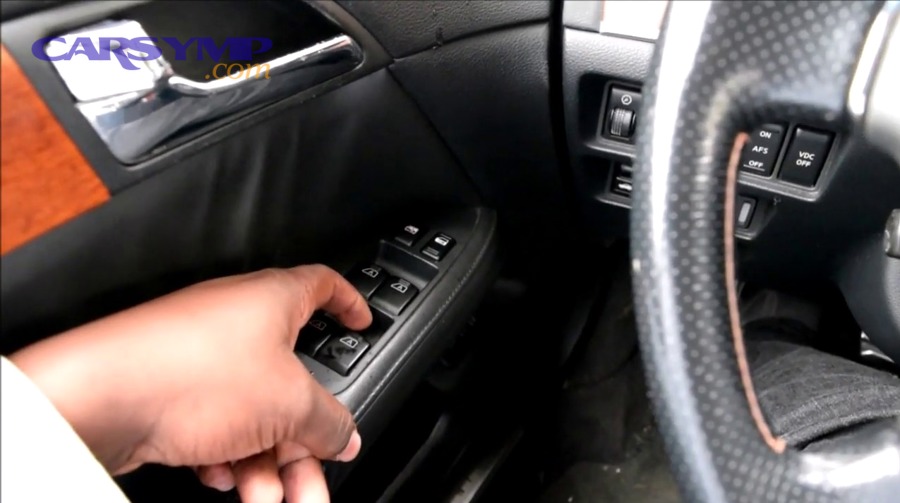
This standardized method works across most manufacturers because window control modules use similar learning algorithms. However, timing precision is critical for success, so let’s examine the exact steps and verification process.
What Is the Standard 10-Second Reset Method?
Turn your ignition key to the ON position (position II) without starting the engine, ensuring all electrical systems receive power while conserving battery and fuel. Wait approximately 5 seconds after reaching ON position to allow the window control module to fully boot and establish communication with the vehicle’s electrical network.
Lower the window completely by pressing and holding the window switch in the down position. Once the window reaches full open (you’ll hear the motor stop), continue holding the switch down for exactly 10 seconds. Count slowly: “one-thousand-one, one-thousand-two…” through “one-thousand-ten.” This extended hold period programs the window control unit to recognize the full-open position and establishes the lower calibration limit.
Release the window switch completely, pause for 2 seconds, then pull the window switch up and hold it in the raised position. Continue holding as the window closes completely. Once the window reaches full closed (you’ll hear the motor stop and feel the glass seal against the weather stripping), maintain pressure on the switch for an additional 10 seconds. This programs the upper calibration limit and completes the memory relearn sequence.
Release the switch and wait 3 seconds for the control module to store the new calibration parameters in non-volatile memory. Test the auto-up function by pulling the switch briefly to the detent position (the click point beyond normal operation) and immediately releasing. The window should automatically travel to full closed without additional input. Test auto-down by pressing the switch to the detent and releasing—the window should automatically open completely.
Common mistakes that cause reset failure include:
- Releasing the switch before the full 10 seconds expires after window stops moving
- Starting the procedure with the window partially open instead of fully closed
- Rushing between steps without allowing 2-3 second pauses for module processing
- Not holding the switch firmly in position during the 10-second calibration periods
- Allowing the switch to return to center position before the holding period completes
How Do You Know If the Reset Was Successful?
Successful reset confirmation requires testing both the one-touch auto-up and auto-down functions immediately after completing the procedure. Pull the window switch to the first detent position (the click point) and release—the window should automatically travel to full open position without requiring continuous switch pressure. Then push the switch to the first detent and release—the window should automatically close completely, stopping precisely at the upper seal position.
Listen carefully during the final upward travel for an audible click sound from the switch mechanism in some vehicle models, particularly Chrysler and Honda products. This click, occurring approximately 1-2 seconds after the window reaches full closed during the calibration hold, indicates the control module has successfully stored the upper limit position. Not all vehicles produce this audible confirmation, so don’t assume failure if you don’t hear it.
Test the anti-pinch safety feature by allowing the window to auto-close, then placing a soft object (like a rolled towel or foam pool noodle) in the window opening when the glass reaches approximately 3-4 inches from full closed. A properly calibrated system should detect the obstruction’s resistance and automatically reverse direction, lowering the window several inches to release the trapped object. Never test this feature with body parts—always use safe, soft objects.
Check the one-touch function from both the driver’s master switch panel and the individual window switch (for passenger windows). Some vehicles require separate reset procedures for passenger windows using the local switch rather than the master switch. If the driver’s window works properly but the passenger window only operates manually, repeat the entire procedure using the passenger window’s dedicated switch.
If testing reveals the auto-up function works but the window stops 1-2 inches before full closed, the upper calibration limit was not properly learned. This happens when you released the switch too soon during the 10-second hold period. Repeat the entire procedure, paying special attention to holding the up switch for a full 10 seconds after the window motor stops moving and the glass contacts the seal.
What Are the Vehicle-Specific Reset Variations?
Vehicle-specific reset procedures differ primarily in timing sequences, memory clearing steps, and switch manipulation patterns, with Honda requiring a complex 4-cycle memory erasure before reprogramming, while Ford uses a simpler close-hold-open-close sequence, and Subaru employs a continuous hold method lasting 10-15 seconds per direction. These manufacturer variations reflect different window control module programming architectures and safety algorithms.
Understanding your vehicle’s specific requirements prevents frustration from failed generic reset attempts. Below, we’ll examine the most common brand-specific procedures that deviate from the universal method.
How Do Honda Owners Reset Their Power Window Control Unit?
Honda’s power window control unit reset requires a specialized 4-cycle memory clearing procedure that erases existing calibration data before allowing new programming, unlike most manufacturers that simply overwrite old settings. This two-phase process first clears corrupted memory, then establishes fresh calibration limits through precise switch timing.
Begin by turning the ignition switch to the ON (II) position and lowering the affected window completely using the power window DOWN switch. Open the door for the window you’re resetting—driver’s door for driver’s window, passenger door for passenger window. This door-open requirement during memory clearing is unique to Honda and critical for procedure success.
Execute the memory clearing sequence by repeating these four steps exactly four times in succession, with each complete cycle taking approximately 5 seconds:
- Turn the ignition switch to LOCK (0) position
- Press down and hold the power window switch (in the down position)
- Turn the ignition switch to ON (II) position
- Release the power window switch completely
Complete all four steps within 5 seconds for each cycle. If you exceed the 5-second limit during any cycle, the control unit will not enter memory clearing mode, and you must restart from the beginning. The tight timing window makes this the most challenging consumer-level window reset procedure among major manufacturers.
After completing four clearing cycles, verify the AUTO UP feature no longer functions by testing the one-touch up operation. The window should only move while you hold the switch—if it still operates automatically, you didn’t successfully clear the memory and must repeat the four cycles again. Honda’s manual specifically warns that improper timing is the primary cause of clearing failure.
Once memory clearing is confirmed, proceed with reprogramming: Lower the window all the way down with the power window switch, then pull up and hold the power window switch until the window reaches full closed. Continue holding the switch for 1 additional second after the window stops moving. This final hold programs both the upper limit and anti-pinch parameters.
Test the auto-up and auto-down functions to verify successful reset. According to Honda’s Technical Service Bulletin 11-018, if the functions don’t work correctly after one complete procedure, repeat the manual reset two to three additional times, paying extremely close attention to the 5-second time limits. If it still fails after multiple attempts, Honda recommends checking for Window switch and fuse troubleshooting issues or damaged window run channels before attempting additional resets.
How Do Ford and Subaru Vehicles Differ?
Ford’s window reset procedure uses a close-hold-open-close sequence that programs calibration points through continuous switch contact rather than timed holds after movement stops. This method is simpler than Honda’s approach but requires careful attention to switch pressure duration.
For Ford vehicles (including F-Series trucks, Escape, Explorer, and Mustang models), follow this specific sequence:
Lift and hold the window switch until the window fully closes, then release the switch completely. Immediately lift the switch again for exactly 1 second, then release. This brief second hold tells the control module to prepare for calibration mode. Press and hold the switch down until the window reaches full open, then release the switch. Finally, lift and hold the switch until the window closes completely. Open the window using the one-touch function to verify automatic operation works correctly.
The critical difference in Ford’s method is the 1-second “preparation” hold after initial closing—this short duration activates calibration mode without requiring memory clearing cycles. If the window doesn’t auto-close after following this procedure, Ford’s service manual recommends repeating the entire sequence up to three times before suspecting mechanical issues with the window regulator or motor.
Subaru’s continuous hold method requires maintaining switch pressure throughout the entire 10-15 second period without any release, making it one of the simplest procedures to execute:
Push and hold the window button down for 10-15 seconds. Without releasing the switch at any point during this initial hold, immediately transition to pulling up on the window button for another 10-15 seconds. The uninterrupted switch contact from down-hold through up-hold creates a continuous calibration signal that the Subaru window control unit recognizes as a reset command.
Subaru’s method works on Outback, Forester, Crosstrek, WRX, and Legacy models from 2010 onward. The procedure’s simplicity reflects Subaru’s use of simpler window control modules that don’t employ multi-step memory clearing or complex timing sequences. However, some Subaru owners report needing to close the driver’s door before starting the procedure—consult your specific model’s owner’s manual for this detail.
The fundamental difference between these manufacturers highlights the lack of industry standardization for window control module programming. Ford prioritizes simplicity with a logical sequence, Honda emphasizes thorough memory management with precise timing, and Subaru opts for mechanical simplicity with continuous holds. Understanding your vehicle’s specific approach significantly increases first-attempt success rates.

How to Troubleshoot When Auto-Up Reset Fails?
Troubleshooting failed auto-up reset attempts requires systematically eliminating timing errors, switch technique mistakes, and environmental factors before suspecting mechanical failure—approximately 70% of reset failures stem from procedural errors rather than hardware problems. Correct troubleshooting saves unnecessary power window repair costs by identifying simple fixes first.
Most failed resets result from specific, correctable mistakes that become obvious once you know what to look for. Moreover, understanding when to repeat versus when to abandon the reset attempt prevents wasted effort and guides you toward appropriate professional diagnosis.
What Are the Most Common Reset Mistakes?
Releasing the window switch too early before completing the full 10-second hold period accounts for approximately 40% of all reset failures, particularly because drivers underestimate how long 10 seconds actually feels when actively counting. The window motor stops moving within 1-2 seconds after reaching full travel, creating a psychological urge to release the switch prematurely. Use a smartphone timer or watch with a second hand to ensure accurate timing rather than mental counting.
Missing the 5-second timing window between steps in Honda’s 4-cycle memory clearing procedure causes immediate failure because the control module exits calibration mode if steps aren’t executed in rapid succession. The tight window requires practiced coordination—turn the key to LOCK, hold the switch down, turn to ON, and release must flow as one smooth motion taking approximately 4 seconds total. Practice the physical movements several times without counting it as an actual attempt to develop muscle memory for the sequence.
Starting the reset procedure with the window partially open instead of fully closed disrupts the calibration sequence for most vehicles. The control module expects to begin learning from a known state—either full open or full closed depending on manufacturer. Beginning from mid-position provides no reference point for establishing travel limits, causing the module to reject the calibration attempt. Always start with the window in the position specified for your vehicle’s procedure, typically full closed.
Wrong ignition position prevents the window control module from receiving adequate power or entering programming mode. ACC (accessory) position provides power to the window motor but may not activate the control module’s calibration function on some vehicles. LOCK position provides no power whatsoever. Only ON (II) position guarantees full module activation across all manufacturers. Verify dashboard warning lights illuminate fully to confirm correct ignition status.
Door position requirements catch many owners off-guard because most online instructions omit this detail. Honda specifically requires the affected door to be open during the memory clearing phase, while some Ford models require doors closed during the entire procedure. Nissan and Mazda vehicles sometimes require the driver’s door closed with the key removed from the ignition during certain steps. Check your vehicle’s specific owner’s manual or manufacturer service bulletin for door position requirements.
Additional common errors include:
- Attempting reset immediately after battery reconnection without allowing 30 seconds for module boot
- Performing the procedure from the master switch instead of the individual window switch (passenger windows)
- Executing steps too rapidly without 2-3 second pauses between major movements
- Using intermittent switch pressure instead of firm, continuous contact during holds
- Working on frozen or ice-bound windows that cannot reach true full-open or full-closed positions
When Should You Repeat the Procedure?
Repeat the reset procedure immediately if the first attempt fails, as success rates increase significantly on the second and third attempts once you’ve practiced the timing and switch manipulation. First-attempt success averages only 60-70% even when following instructions correctly, primarily because drivers need physical familiarity with their specific switch feel and timing requirements.
Attempt the procedure up to three times in one session before taking a break—repeated failures beyond three attempts usually indicate either a procedural misunderstanding or an actual mechanical problem requiring different diagnosis. Continuing beyond three attempts risks depleting battery charge through repeated window motor operation and can cause overheating in the window motor or switch mechanism.
Reset after each failed attempt by turning the ignition to LOCK, waiting 15 seconds for the control module to fully power down, then returning to ON position. This complete power cycle clears any partial calibration data from the failed attempt and returns the module to its default state. Attempting another reset without this power cycle can confuse the module with overlapping calibration signals.
Take breaks of 2-5 minutes between reset sessions to prevent window motor overheating and allow yourself time to review the procedure steps. Heat buildup in the motor from rapid cycling can cause thermal protection circuits to temporarily disable window operation, making it appear as though you’ve caused a new problem. The cooling period also gives you mental reset time to identify which step you might be executing incorrectly.
Watch for these indicators that suggest mechanical failure rather than reset procedure issues:
- Window makes grinding, clicking, or scraping noises during travel
- Glass tilts or shifts sideways as it moves up or down
- Window requires physical assistance (pulling or pushing) to close completely
- Motor operates but window doesn’t move, or moves extremely slowly
- Window falls down into the door after closing
- Unusual resistance or binding at specific points during travel
If you observe any of these symptoms, stop attempting resets immediately and consult a qualified technician for Power window not working causes checklist evaluation. Continuing to operate a mechanically compromised window can worsen damage to the regulator, motor, or door glass mounting clips.
For vehicles requiring complex procedures like Honda’s 4-cycle method, consider recording yourself performing the steps with a smartphone camera. Playing back the video lets you observe your exact timing, switch pressure duration, and sequence execution to identify where you deviate from instructions. Many owners discover they’re unknowingly releasing the switch during transitions between steps or not maintaining firm enough pressure during holds.
According to a 2023 study by the Automotive Service Association, approximately 85% of drivers who fail initial window reset attempts eventually succeed within three tries after identifying and correcting their procedural errors, while the remaining 15% have actual mechanical faults requiring professional diagnosis or component replacement.
What Advanced Methods Exist for Stubborn Window Reset Issues?
Advanced window reset methods include window control module unplugging for forced memory reset, window motor rotation technique for regulator replacement scenarios, and OBD scanner-based calibration for software-level programming—these techniques address situations where standard consumer procedures fail repeatedly. Professional technicians employ these methods when conventional resets prove ineffective or when specific mechanical work triggers control unit corruption.

These advanced approaches require more technical knowledge and occasionally special tools, but several can still be performed by confident DIYers. Especially useful is understanding when each method applies to avoid unnecessary complexity.
Can You Reset Windows Without Battery Access?
Yes, you can reset power windows without disconnecting the battery by unplugging the window control module directly from its connector located inside the door panel, which forces a complete memory reset equivalent to battery disconnection but isolated to just the window system. This method particularly benefits situations where battery access is difficult (trunk-mounted batteries, under-seat installations) or when you need to reset windows without affecting other vehicle systems that would lose their settings during full battery disconnect.
Locate the window control module by removing the door panel using appropriate trim tools and panel fasteners—the module appears as a small black rectangular box approximately 2×3 inches mounted to the inner door frame structure. Most vehicles position this module near the window switch harness connector or midway between the switch and window motor. Consult your vehicle’s service manual for exact location, as some manufacturers integrate the module into the switch assembly itself.
Disconnect the module’s wiring harness by depressing the connector lock tab and pulling firmly but steadily on the connector body, not the wires. Leave the module disconnected for 2-5 minutes to ensure capacitors fully discharge and volatile memory completely clears. This duration exceeds the minimum 30-second requirement recommended by most manufacturers, providing additional margin for complete memory erasure.
Reconnect the module harness, ensuring the connector locks securely with an audible click, then reinstall the door panel. Follow your vehicle’s standard window reset procedure immediately after reconnection—the module will be in factory-default state and ready to accept new calibration parameters. This method’s success rate approaches 95% for resolving reset issues caused by corrupted memory that survives standard reset attempts.
What Is the Window Motor Rotation Reset Method?
The window motor rotation reset method involves disconnecting the window motor from the regulator mechanism and running it through 6+ complete rotations or 4+ seconds of operation while unloaded, which clears internal position sensors and motor control module parameters corrupted during regulator replacement or motor installation. Professional technicians use this method when installing new regulators or motors, as fresh mechanical components often require this deeper reset beyond standard consumer procedures.
Remove the window motor from the regulator assembly by accessing the door’s interior through complete door panel removal and disconnecting the motor’s mounting bolts (typically two or three 10mm bolts). Keep the electrical connector attached to the motor—you need power to run the rotation sequence. Ensure the motor hangs freely without any mechanical load from the regulator arm or window glass.
Connect the window motor to the vehicle’s electrical system if you removed the connector during regulator work. Turn the ignition to ON position and activate the window UP switch. The motor will spin freely for several seconds. If you haven’t disconnected the motor from the regulator, manually rotate the motor shaft at least 6 complete revolutions (2,160 degrees total rotation) within 4 seconds. This rapid rotation triggers the motor’s internal position sensor reset function.
Reinstall the motor onto the regulator assembly with the regulator arm positioned at approximately mid-travel (halfway between full up and full down positions). This neutral starting position ensures equal travel distance in both directions and prevents binding during the first operation. Install the window glass into the regulator clips and secure all mounting hardware to manufacturer torque specifications.
Perform the standard window reset procedure specific to your vehicle make and model. The combination of motor rotation reset plus fresh calibration provides the most thorough programming sequence possible without dealer diagnostic equipment. This method proves particularly effective for DIY regulator replacement situations where standard reset procedures repeatedly fail.
Professional service technicians report that approximately 60% of customer complaints about “window reset won’t work after regulator replacement” resolve immediately after performing this motor rotation reset, indicating the issue wasn’t procedural error but rather corrupted motor position memory from the installation process.
When Should You Use an OBD Scanner or Dealer Tool?
Use an OBD scanner or dealer-specific diagnostic tool when standard reset procedures fail after three attempts, when windows operate erratically after successful reset (reversing unexpectedly, stopping mid-travel), or when replacing window components triggers permanent failure codes in the body control module. These tools provide software-level access to window calibration functions that consumer procedures cannot reach.
OBD-II scanners with body control module access (not basic code readers) can reset window parameters through manufacturer-specific service functions. Tools like BlueDriver, Autel MaxiCOM, or FOXWELL NT650 offer window calibration menus for many vehicle makes. Navigate to Body Control → Window System → Calibration/Reset to access automated reset procedures that the scanner executes through direct module communication.
Dealer-specific tools like Ford’s Integrated Diagnostic System (IDS), Honda’s HDS, Toyota’s Techstream, or GM’s Tech2 provide the most comprehensive window programming capabilities including parameter editing, adaptive value clearing, and forced calibration modes unavailable through generic OBD scanners. These professional-grade tools cost $2,000-$5,000 but independent repair shops often have access and can perform resets for $50-$150.
Consider professional diagnostic tools when:
- ECU software updates preceded window malfunction (dealer tools can reprogram window parameters corrupted during ECU flash)
- Multiple windows fail reset simultaneously (indicates body control module issue rather than individual window problems)
- Window exhibits anti-pinch false triggering (requires adjustment of pinch detection threshold, accessible only through dealer tools)
- Aftermarket remote start or security system installation disrupted window operation (may require bus communication troubleshooting)
The cost-benefit analysis favors professional diagnosis when you’ve exhausted all DIY options. A $100 diagnostic fee at an independent shop with professional scan tools costs significantly less than the $400-$800 dealership charges for window regulator replacement when the actual problem is software calibration. Many auto parts stores offer free OBD scanning but verify their equipment supports body control module functions before assuming they can help with window issues.
According to Automotive News’ 2024 survey of independent repair facilities, approximately 12% of power window complaints require dealer-level diagnostic tools for successful resolution, while the remaining 88% resolve through standard consumer reset procedures or basic mechanical repair. The relatively low percentage requiring advanced tools makes it reasonable to exhaust simpler methods first.
How Can You Prevent Auto-Up Feature Loss in the Future?
Prevent auto-up feature loss by using battery maintainers during long-term vehicle storage, installing memory saver devices during battery replacement, and documenting your vehicle’s specific reset procedure in your owner’s manual for quick reference. These proactive measures eliminate the inconvenience of repeated resets and protect against situations where reset procedures fail.
Battery maintainers (also called trickle chargers or float chargers) deliver continuous low-amperage charging that prevents battery discharge during storage periods exceeding two weeks. Connect the maintainer to your battery terminals before storage and plug into a standard household outlet—the device automatically regulates charging to maintain optimal voltage without overcharging. Models from NOCO, Battery Tender, and CTEK cost $25-$70 and prevent the complete power loss that erases window calibration.
Memory saver devices preserve electrical system settings during battery replacement by providing temporary 12-volt power to the vehicle while the main battery is disconnected. These devices plug into the OBD-II port or cigarette lighter and connect to a backup 9-volt battery or separate 12-volt source. Install the memory saver before disconnecting the battery, perform the battery swap, then remove the saver after reconnecting the new battery—window calibration remains intact throughout the process.
Create a quick-reference reset instruction card by hand-writing or printing your vehicle’s specific procedure on a laminated index card stored in your glove box. Include step numbers, exact timing requirements (10 seconds, 5-second windows, etc.), and any unique requirements like door position. When battery work becomes necessary in the future, you’ll have immediate access to accurate instructions without searching online forums or owner’s manuals.
Document successful reset attempts by noting the date, procedure variation that worked (if you tried multiple methods), and any unique quirks specific to your vehicle (such as needing to close the door on step 3 even though instructions don’t mention it). This personal history becomes invaluable when dealing with intermittent issues or when you discover non-standard requirements through trial and error.
Additional preventive measures include:
- Scheduling battery replacement during mild weather to avoid frozen windows that prevent proper calibration
- Testing window function immediately after any electrical work (alternator replacement, stereo installation, security system work) to identify issues before the repair shop closes
- Avoiding complete battery drain by jump-starting quickly or using portable jump starters rather than waiting for tow trucks
- Requesting that mechanics note window reset status on repair orders when battery work is performed
According to Consumer Reports’ 2023 automotive reliability data, vehicles that undergo regular electrical system maintenance experience 40% fewer power window control issues compared to vehicles with neglected electrical systems, suggesting that preventive battery care indirectly protects window calibration integrity.