


Getting “inspection-ready” with OBD-II is mostly about one thing: your readiness monitors must be set to Ready, meaning your car’s computer has completed required self-tests on emissions systems while you drive. When those tests haven’t run yet, the status stays Not Ready, and many inspection programs will reject or fail the vehicle—even if the check engine light is off.
The next big piece is interpretation: you need to understand what Ready vs Not Ready actually means on an OBD2 scan, how that differs from trouble codes, and why a monitor can be Not Ready without any obvious symptoms. Once you can read the readiness screen correctly, you can stop guessing and start verifying.
Then comes the practical part: a drive-cycle checklist. Most monitors only complete when the car experiences the right conditions—cold start, steady cruise, deceleration, fuel level range, and sometimes an overnight soak. A “random drive” might work eventually, but a structured approach usually gets you to Ready faster.
Introduce a new idea: the main content below will walk you from definition → monitor types → pass/fail logic → a realistic drive-cycle checklist → the mistakes that block readiness → and how to confirm you’re truly ready before you pay an inspection fee.
What are OBD-II readiness monitors and what do they prove about emissions systems?
OBD-II readiness monitors are built-in self-test routines in the vehicle’s computer that confirm emissions-control systems have been evaluated during real driving, and they prove the system has had an opportunity to detect faults—not just that the check engine light is off.
To better understand why inspections care so much about monitor status, it helps to separate “tests completed” from “problems found.”
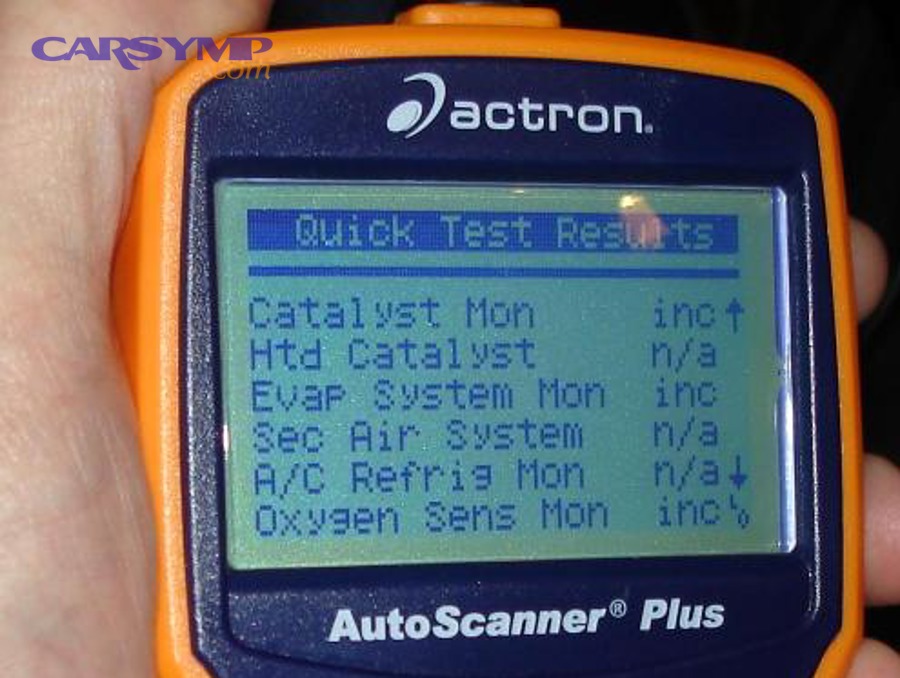
Readiness monitors exist because emissions systems are complex and can’t be fully verified in a few seconds. Instead, the powertrain control module (PCM) continuously watches sensors and runs scheduled checks when certain conditions are met (temperature, speed, fuel level, load). When a check completes, the monitor flips to Ready. When conditions haven’t occurred yet—or a test can’t finish—the monitor remains Not Ready.
Think of readiness monitors as the difference between:
- “I looked at it” (monitor completed)
- “I saw something wrong” (a diagnostic trouble code)
An inspection program using an OBD approach isn’t trying to dyno-test your car’s tailpipe on the spot. It’s asking the vehicle’s own computer: Have you run the emissions checks, and did you find anything that commands the MIL (check engine light) on?
What is the difference between readiness monitors and trouble codes (DTCs)?
Readiness monitors measure test completion, while DTCs record detected faults—so a car can have no codes but still be Not Ready, and it can be Ready while still failing due to codes.
More specifically, this is why drivers get surprised at inspection time: they fix a light (or clear a code), the light goes out, and they assume the car is ready—when the readiness system is actually “reset” and needs a drive cycle.
Here’s the clean way to keep it straight:
- Readiness monitors (I/M readiness) answer: “Has the computer completed the emissions self-test for this system since the last reset?”
- Stored (confirmed) DTCs answer: “A fault occurred and met criteria to be saved as a confirmed problem.”
- Pending DTCs answer: “A fault occurred but hasn’t met the confirmation threshold yet.” (This is where Pending codes vs stored codes explained becomes crucial: pending issues can keep monitors from completing even before the MIL turns on.)
A practical example: your EVAP system monitor often runs only when fuel level and temperature conditions are correct. If you cleared codes yesterday, the EVAP monitor may still be Not Ready today even with no DTCs.
If you’re using your scan tool wisely, you look at three screens as a bundle:
- MIL status (commanded on/off)
- Stored and pending codes
- Readiness monitors (Ready/Not Ready/Not Supported)
This bundle is the closest thing to “inspection truth” you can see at home.
Evidence: According to the Texas Department of Public Safety, “Ready” means the OBDII system has checked that emissions control system, while “Not Ready” means it has not checked it yet, and N/A/N/S indicates it is not required to check it. (dps.texas.gov)
Do readiness monitors run automatically during normal driving?
Yes—readiness monitors run automatically during normal driving, but only after the required “enable criteria” occur, which is why short trips or repeated resets can leave you Not Ready for days.
Next, it’s important to understand why “normal driving” sometimes works and sometimes doesn’t.
Some monitors are continuous, meaning the PCM evaluates them essentially all the time while the engine is running. Other monitors are non-continuous, meaning they only run once per drive cycle under a specific set of conditions (steady cruise, decel events, specific temperatures, fuel level windows, and sometimes soak times).
If your driving never hits the enable criteria—for example, you drive only short city trips, never cruise steadily, or keep the fuel tank very full—some monitors may not complete.
Evidence: Colorado’s emissions guidance explains that required OBD monitors must be set to “Ready” before inspection and that readiness monitors are set by a procedure known as a Drive Cycle, often completed by a few days of normal city and highway driving. (cdphe.colorado.gov)
Which readiness monitors matter for emissions inspection and how are they grouped?
There are two main groups of OBD-II readiness monitors—continuous and non-continuous—based on how and when the computer can run each test, and inspections focus on whether the required monitors have completed.
To illustrate what you’re seeing on a readiness screen, you need a clear “map” of monitor types.
Most drivers encounter a list that looks like: Misfire, Fuel System, Comprehensive Components, Catalyst, EVAP, O2 Sensor, O2 Heater, EGR/VVT, Secondary Air, etc. Not every vehicle supports every monitor, and some may display as Not Supported rather than Not Ready.
What are continuous monitors vs non-continuous monitors?
Continuous monitors (misfire, fuel system, comprehensive components) run all the time, while non-continuous monitors (like catalyst and EVAP) run only when specific conditions are met—so non-continuous monitors are the usual reason a car is Not Ready.
However, the key is not memorizing every monitor—it’s understanding which ones commonly stall and why.
- Continuous monitors are designed to evaluate critical emissions-impacting behaviors continuously:
- Misfire (can dump unburned fuel into the catalyst)
- Fuel system (fuel trim regulation)
- Comprehensive components (general sensor/actuator rationality)
- Non-continuous monitors are more like scheduled exams:
- Catalyst efficiency
- EVAP leak checks
- Oxygen sensor performance
- EGR/VVT operation (varies by design)
- Secondary air (if equipped)
If your scan tool shows your continuous monitors Ready quickly but catalyst/EVAP still Not Ready, that is normal—those tests usually need a longer, more specific drive pattern.
Evidence: Texas DPS notes three continuous monitors (Misfire, Fuel System, and Comprehensive Components), and explains that N/A or N/S means there is no monitor for that system. (dps.texas.gov)
Which monitors are most commonly “Not Ready” before inspection?
There are two monitors most commonly Not Ready before inspection—EVAP and catalyst—based on how strict their enable criteria are and how long they take to complete compared with continuous monitors.
In addition, O2-related monitors can lag depending on temperature, driving style, and the vehicle’s test strategy.
Why EVAP is often last:
- EVAP tests are sensitive to fuel level, ambient temperature, and sometimes require an engine-off soak.
- Many vehicles won’t run an EVAP leak test with a full tank or nearly empty tank.
- Some require stable cruise and specific purge conditions.
Why catalyst can be last:
- Catalyst efficiency checks often require the engine to be fully warmed, then held at steady speed/load long enough for the PCM to observe oxygen sensor switching behavior and catalyst storage characteristics.
A useful mindset: if your readiness screen shows only EVAP Not Ready, you’re often one “correct conditions” drive away—unless a pending fault is quietly blocking it.
Evidence: NYVIP3 explains that non-continuous monitors include the catalytic converter efficiency monitor and the evaporative system monitor, which only run at certain times rather than continuously. (nyvip3.com)
What does “Ready vs Not Ready” mean on a scan tool—and can you pass inspection if one is Not Ready?
“Ready” means the monitor’s test has completed since the last reset, while “Not Ready” means it hasn’t completed yet—and whether you can pass with one Not Ready depends on your program rules, vehicle year, and monitor allowances.
Meanwhile, the most common self-inflicted problem is trying to “game” inspection by clearing codes right before testing.
When you run an OBD2 scan, don’t treat readiness as a vague “green means good.” Treat it as a compliance checklist. Inspections generally want:
- MIL not commanded on
- No emissions-related DTCs causing failure
- Required monitors completed (Ready), with limited exceptions in some programs
Does clearing codes reset readiness monitors to “Not Ready”?
Yes—clearing codes resets readiness monitors to Not Ready, because the PCM treats the system as “unknown” until it reruns the emissions self-tests under the proper conditions.
To better understand the trap: clearing codes often makes the car look “better” for five minutes (no light), but “worse” for inspection readiness (monitors incomplete).
Clearing codes can happen through:
- Scan tool “clear codes”
- Battery disconnect (sometimes)
- Some low-voltage events
- Certain repairs or module resets
That’s why the smart sequence is:
- Repair the cause
- Clear only if appropriate
- Drive the cycle
- Re-scan readiness and codes
- Go to inspection
If you clear codes and rush to inspection, you risk paying for a failure/retest—especially if EVAP/catalyst hasn’t had time to run.
Evidence: NYVIP3 explains that readiness status indicates which non-continuous monitors have met enabling criteria and run since the last time DTCs were cleared; if a monitor has not met conditions, it remains Not Ready. (nyvip3.com)
Is “Not Supported” the same as “Not Ready”?
No—“Not Supported” means the vehicle is not required or not equipped to run that monitor, while “Not Ready” means the vehicle is equipped but the test has not completed since the last reset.
Next, this distinction matters because “Not Supported” is not something you can fix with driving; it’s simply how that vehicle is designed.
On many scan tools, you’ll see labels like:
- N/A (Not Available)
- N/S (Not Supported)
- INC (Incomplete / Not Ready)
- OK (Complete / Ready)
If you see Not Supported, don’t waste time chasing it. Focus on monitors that are supported and currently Not Ready.
Evidence: Texas DPS guidance distinguishes Not Ready from N/A or N/S, where N/A/N/S indicates the system is not required to be checked. (dps.texas.gov)
How do you get monitors to “Ready” after a reset?
You get monitors to Ready by completing a drive cycle that meets the enable criteria for each non-continuous monitor, then confirming completion with an OBD2 scan—typically in a few steps that combine a cold start, steady cruise, deceleration, and mixed driving.
Specifically, the goal is not “drive a lot,” but “drive in a way that triggers the tests.”

If you’re a DIYer, this is also where using scan tool features pays off:
- Readiness screen to see what’s incomplete
- Live data to verify temperatures and fuel trims are stable
- Using freeze frame data to diagnose issues when a monitor won’t complete (freeze frame shows conditions when a fault set)
What is a drive cycle and why does it complete readiness monitors?
A drive cycle is a specific pattern of operating conditions (temperature, speed, load, and time) that allows the PCM to run emissions self-tests, so completing a drive cycle is how non-continuous monitors flip from Not Ready to Ready.
Then, the crucial detail: drive cycles are not one universal script—manufacturers vary—but the structure is consistent.
Most monitor tests require:
- Engine warmed to operating temperature
- Period of steady cruise (often 40–60 mph range)
- Deceleration events (coast-down) without braking in some cases
- City driving with stops/starts
- Sometimes an engine-off soak (EVAP related)
If any key condition is missing, the monitor may pause and stay incomplete.
Evidence: Texas DPS explicitly states the vehicle needs to be driven through a drive cycle/drive trace to set monitors to Ready and suggests verifying readiness with a generic scan tool. (dps.texas.gov)
What is a practical drive-cycle checklist that works for most vehicles?
There are 6 practical drive-cycle steps that work for many vehicles: cold start idle, gentle warm-up, steady cruise, controlled decel, mixed city/highway, and a key-off soak—producing the expected outcome of multiple monitors completing in one or two sessions.
Below is a “most-vehicles” checklist you can adapt without pretending it fits every model perfectly.
Drive-cycle checklist (generic, safety-first):
- Cold start (engine cold, ideally after sitting overnight)
- Idle 1–2 minutes
- Avoid heavy throttle
- Gentle warm-up (city speeds)
- Smooth acceleration
- Avoid wide-open throttle
- Steady cruise (10–15 minutes if possible)
- Hold a steady speed on a safe road
- Minimal throttle movement
- Decel/coast-down events (where safe/legal)
- Lift off throttle and coast down gradually
- Avoid sudden braking unless necessary for safety
- Mixed driving (10–20 minutes)
- Stop-and-go plus short steady stretches
- Helps multiple monitors find their conditions
- Key-off soak (EVAP helper)
- Park and turn off for a period (some vehicles need a longer soak)
- Repeat the next day if EVAP is still incomplete
How to use the checklist intelligently:
- Run an OBD2 scan after each session. Don’t wait a week to check.
- If only one monitor is incomplete (often EVAP), tailor your next drive to its typical enable criteria (fuel level range and steady cruise).
Evidence: Colorado’s emissions guidance states that readiness monitors are set by a Drive Cycle and that, in most cases, a few days of normal city and highway driving will set required monitors to Ready. (cdphe.colorado.gov)
What common mistakes keep monitors from completing—and how do you fix them?
There are 6 common mistakes that keep monitors from completing: clearing codes too often, driving only short trips, incorrect fuel level for EVAP, unstable battery voltage, ignoring pending codes, and never verifying readiness with an OBD2 scan—each fixable with targeted driving and a data-first approach.
Moreover, these mistakes cost money because they lead to repeat inspections and wasted diagnostic time.
This is also where people get misled by “free scans”:
- A parts store may offer a quick read, but it might focus on code numbers, not readiness strategy.
- A shop-level diagnostic includes readiness interpretation, monitor enable criteria, and sometimes deeper data such as Mode $06 results.
That’s why it helps to understand OBD2 scan cost at shops and parts stores as a difference in service, not just price. The cheapest scan is the one that prevents your second inspection fee.
Can a pending code or weak battery prevent readiness from setting even if the MIL is off?
Yes—pending codes and weak battery/low voltage can prevent readiness from setting even if the MIL is off, because monitor tests often require stable sensor signals and electrical conditions, and the PCM may suspend a test when reliability is questionable.
In addition, pending faults can “hover” without turning the light on immediately, especially if they haven’t failed the test enough times.
Practical fixes:
- Check charging system health (battery age, alternator output, clean terminals)
- Look at live data for voltage stability during driving
- Scan for pending codes, not just stored codes (this is where “Pending codes vs stored codes explained” matters)
- Address the root cause before repeatedly resetting the system
If you want to be systematic, combine:
- Codes (pending + stored)
- Freeze frame (conditions when a fault occurred)
- Readiness screen (what’s blocked)
This is exactly where Using freeze frame data to diagnose issues becomes your shortcut: freeze frame can reveal the load, temperature, and speed conditions when a failure happened—often pointing to a vacuum leak, sensor drift, or purge problem that blocks EVAP completion.
Evidence: NYVIP3 explains that readiness status reflects whether enabling criteria have been met since codes were cleared; if conditions haven’t been met, readiness remains Not Ready—so anything preventing criteria or stable operation can stall completion. (nyvip3.com)
Which driving conditions most often block EVAP and catalyst monitors?
There are 4 driving/operating condition patterns that most often block EVAP and catalyst monitors: incorrect fuel level, insufficient steady cruise time, no safe decel/coast events, and lack of cold-start/soak conditions—so targeting these conditions is the fastest path to completion.
Next, apply the idea that each monitor has a “favorite environment.”
EVAP blockers (common):
- Fuel tank too full or too empty (many vehicles prefer a mid-range)
- No overnight soak / no cold start pattern
- Ambient temperature outside the test window on some designs
- Purge/vent behavior abnormal (sometimes shows up as pending EVAP codes)
Catalyst blockers (common):
- Engine not fully warmed
- Driving too gently or too chaotically (no stable cruise)
- Short trips only
- O2 sensor performance issues that don’t always trigger a MIL immediately
If EVAP is your last incomplete monitor, don’t keep clearing codes. Adjust fuel level into a mid-range, plan a steady cruise segment, and give the vehicle an overnight rest.
Evidence: NYVIP3 lists EVAP and catalytic converter efficiency as non-continuous monitors that run only at certain times, which is why missing conditions can leave them incomplete. (nyvip3.com)
How can you confirm you’re inspection-ready before you go (without guessing)?
You can confirm you’re inspection-ready by performing an OBD2 scan that verifies (1) required monitors are Ready, (2) the MIL is not commanded on, and (3) there are no emissions-related stored or pending codes—then rechecking after your final drive.
Thus, you replace “hope” with a repeatable pre-inspection routine.
Here’s the simple “go/no-go” checklist:
- Readiness monitors: only allowed incomplete monitors (if any) per your program
- MIL: commanded OFF
- Stored codes: none that trigger failure
- Pending codes: none that suggest an imminent MIL or blocked monitor
- Drive cycle completed: at least one full warm-up and cruise event since last reset
If you’re comparing options, this is where scan quality matters:
- A basic handheld can show readiness and codes
- An advanced scan tool can show freeze frame, Mode $06, and monitor test results
- A shop scan may include interpretation and a plan
If you’re researching DIY help, a site like carsymp.com can be useful as a starting point for symptom education, but you still want to confirm readiness on your own scan tool before inspection day.
Should you scan for readiness AND pending codes right before inspection?
Yes—you should scan for readiness and pending codes right before inspection, because readiness alone doesn’t guarantee pass and pending faults can indicate a monitor is about to fail or a MIL is about to return.
To illustrate the advantage: a readiness screen might look perfect, but a pending O2 sensor code could still lead to failure or a returning check engine light shortly after.
A strong pre-inspection scan includes:
- Readiness screen screenshot (optional, but helpful)
- Codes: stored + pending
- MIL status
- Freeze frame review if any pending code exists
This practice is also how you avoid paying twice—especially if you’ve recently repaired something and want to confirm the fix is stable.
Evidence: Texas DPS recommends using a generic OBDII scan tool to verify the monitors are “Ready” before returning the vehicle (or going for inspection). (dps.texas.gov)
What should you do if one monitor won’t set after multiple drive cycles?
If one monitor won’t set after multiple drive cycles, you should stop resetting the system, verify the monitor’s enable criteria, check for pending codes and abnormal sensor data, and then escalate to targeted diagnosis if the monitor remains blocked.
More importantly, treat a “stuck” monitor as a symptom—not a mystery.
A practical escalation ladder:
- Confirm you’re not sabotaging it
- You haven’t cleared codes again
- Battery voltage is stable
- Fuel level is in a reasonable range for EVAP
- Check for pending codes
- Even one pending EVAP, O2, or catalyst-related code can stall completion
- Use freeze frame and live data
- Freeze frame can show the environment when a fault occurred
- Live data can reveal lazy O2 sensors, abnormal fuel trims, or purge behavior
- Consider Mode $06 / test results (if your tool supports it)
- This can show “near-fail” patterns before a code becomes confirmed
- Get professional diagnosis when stuck
- This is where the difference in OBD2 scan cost at shops and parts stores becomes worth it: deeper test access and experience often identifies the specific condition blocking the monitor.
Evidence: NYVIP3 notes that readiness depends on enabling criteria being met since codes were cleared; if those criteria are not met, the monitor remains Not Ready—so repeated failures to set typically indicate criteria aren’t being met or a fault is preventing completion. (nyvip3.com)
How do inspection rules and edge cases change readiness outcomes across vehicles and programs?
Inspection rules and edge cases change readiness outcomes because programs may allow different numbers of unset monitors by vehicle year, and certain regions adopt stricter readiness requirements—so “one Not Ready is fine” is not universally true.
Besides, some vehicles and calibrations behave differently enough that a one-size-fits-all plan can mislead you.
How many “Not Ready” monitors are typically allowed—and why does it vary by model year/program?
One program may allow up to two Not Ready monitors on older vehicles while another may allow only one (or none), because readiness allowances are policy decisions tied to model year capabilities and program enforcement goals.
Next, use your local program guidance as the final authority—but it helps to understand how allowances often look in practice.
For example, NYVIP3 explains a readiness fail threshold concept by model year (older OBD-II model years vs newer) in its inspection guidance. Your location may be different, but the pattern—stricter rules for newer vehicles—is common.
Evidence: NYVIP3 states that (generally) model years 1996–2000 fail if more than 2 monitors are Not Ready, while 2001 and newer fail when more than 1 monitor is Not Ready. (nyvip3.com)
Do hybrids, diesels, and direct-injection engines have different readiness behavior?
Yes—different powertrains can have different monitor sets and enable criteria, so hybrids, diesels, and direct-injection engines may complete readiness differently even when driven similarly.
For example, hybrids may cycle the engine on/off in ways that affect when certain tests run, while some diesel aftertreatment strategies create different test conditions and timelines.
What stays consistent:
- Monitors still need enable criteria
- Clearing codes still resets readiness
- Verification still depends on scanning readiness + codes together
The practical takeaway is to be more patient with “non-standard” powertrains and to rely on scan verification rather than assuming a single drive pattern will work quickly.
Can aftermarket tuning, ECU updates, or battery replacement affect readiness monitors?
Yes—aftermarket tuning, ECU updates, and battery replacement can affect readiness monitors because they can reset memory, change test logic, or alter how quickly enable criteria are met, which can delay readiness even when the car feels normal.
In addition, certain calibrations may cause monitors to behave unexpectedly—especially if emissions-related functions have been modified.
If you’ve recently:
- Had ECU software updated
- Replaced the battery
- Installed aftermarket tuning
…plan for a readiness re-learn period and do your drive-cycle checklist before inspection day.
Evidence: California BAR explains it adopted regulations governing OBD II readiness monitors, and notes that effective October 1, 2025, California requires readiness monitors to be set for a vehicle to pass a Smog Check inspection—showing how program rules can shift and become stricter. (bar.ca.gov)
What’s the fastest safe path when you’re close to inspection day but monitors won’t set?
There are 4 fastest safe moves when inspection is close and monitors won’t set: stop clearing codes, drive a targeted checklist for the remaining monitor, scan for pending codes and freeze frame clues, and move to professional diagnosis if the monitor stays stuck—so you avoid wasting time and retest fees.
To sum up, speed comes from focus, not from random miles.
A simple decision path:
- Only EVAP Not Ready?
- Adjust fuel level to mid-range, do steady cruise, allow overnight soak, rescan.
- Catalyst Not Ready?
- Ensure full warm-up, steady cruise segment, include decel/coast events where safe, rescan.
- Any pending codes?
- Diagnose first; driving harder rarely “fixes” a failing component.
- Multiple monitors refuse to set after several attempts?
- Stop guessing; get targeted diagnostics.
Evidence: Colorado’s guidance emphasizes readiness monitors must be set to Ready before inspection and that readiness is achieved via drive cycle completion—supporting the strategy of targeted driving and verification instead of repeated resets. (cdphe.colorado.gov)