


Reading an alignment printout becomes much easier when you treat it as a simple measurement report rather than a confusing shop document. In practical terms, the printout shows what your vehicle’s wheel alignment looked like before service, what the technician adjusted, and whether the final settings now fall within the manufacturer’s acceptable range.
A good alignment report also answers a second question most car owners actually care about: what the main angles mean in real driving. That is why this guide explains toe, camber, and caster in plain language, because these three measurements are the foundation of wheel alignment and the key to understanding tire wear, steering feel, and straight-line tracking.
The next layer is learning how to compare the before and after numbers correctly. Many drivers look only for green boxes, but a useful reading method goes further than that. It helps you see whether the shop corrected the original problem, whether a value is merely acceptable or truly centered, and whether any remaining issue may come from worn or damaged suspension parts.
Finally, some printouts include advanced terms that are not essential for beginners but still matter in certain situations. Introduce a new idea: once you know how to read the basic report layout, the numbers stop looking random and start telling a clear story about how your car sits on the road.
What Is an Alignment Printout and What Does It Show?
An alignment printout is a measurement report that shows your vehicle’s wheel angles before and after adjustment, along with the factory spec range and the final result for each wheel.
To better understand the issue, it helps to see the printout as a map of your suspension geometry rather than just a receipt from the shop.
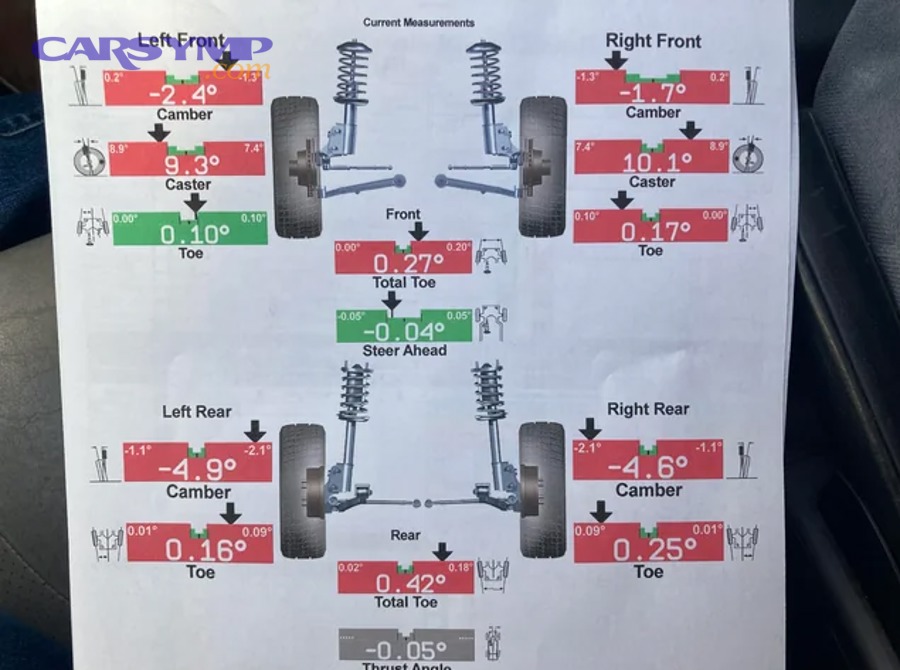
When a shop performs a wheel alignment, sensors or cameras measure how each wheel points and sits relative to the vehicle centerline. The machine then prints a report that usually includes the front axle, rear axle, left and right sides, a before column, an after column, and a colored or graphical indicator that shows whether each reading falls inside or outside the acceptable range.
For car owners, this document answers three important questions. First, what was wrong before the service? Second, what changed during the service? Third, is the car now within specification? Once you understand those three functions, the printout becomes much less intimidating.
Is an alignment printout the same as a wheel alignment report?
Yes, an alignment printout is the same as a wheel alignment report in purpose, shop usage, and customer meaning, although the layout may vary by machine brand, software design, and service center format.
More specifically, shops may call it an alignment sheet, alignment report, alignment printout, or before-and-after alignment results. These labels are slightly different, but they all refer to the same document: a record of measured alignment angles and the results of the adjustment process.
That matters because many drivers search for one phrase and receive explanations using another. If you searched for “how to read an alignment printout,” you are still looking at the same kind of information found under “how to read a wheel alignment report.” In other words, the terms act as close synonyms in automotive service language.
What sections are usually included on an alignment printout?
There are 6 main sections on most alignment printouts: vehicle information, factory specs, before measurements, after measurements, axle layout, and visual status indicators based on whether values are inside or outside the allowed range.
Specifically, most modern reports include:
- Vehicle year, make, model, and trim
- Date of service and sometimes mileage
- Front and rear alignment measurements
- Left-side and right-side readings
- Before and after values
- Spec windows or target bars
- Color indicators such as red, yellow, or green
Some systems also include technician notes, ride height notes, or warnings that certain angles are non-adjustable. That extra information can be extremely helpful. If a number stays out of spec after service, the note may explain whether the cause is a seized adjustment point, a bent component, or a worn suspension part.
A useful way to read the page is from top to bottom and from left to right. Start with the vehicle identity, confirm that the car listed is yours, then examine the front axle values, then the rear axle values, and finally compare the before and after columns. That sequence creates a clean hook from the title of this guide to the actual act of reading the report.
What Do Toe, Camber, and Caster Mean on an Alignment Printout?
Toe, camber, and caster are the three main wheel alignment angles, and each one affects how your car tracks, steers, and wears its tires in a different way.
Let’s explore the issue in simple terms, because Toe/camber/caster explained simply is exactly what most car owners need before the numbers on the page start making sense.
On a basic level, toe describes whether the wheels point inward or outward when viewed from above. Camber describes whether the wheels lean inward or outward when viewed from the front. Caster describes the tilt of the steering axis when viewed from the side. Each angle influences a different part of how the vehicle behaves on the road.
Understanding these three terms gives you a strong base for reading any wheel alignment sheet. Once you know what they do, the report becomes less like a chart of random decimals and more like a summary of how the vehicle meets the road.
What is toe on an alignment printout?
Toe is the inward or outward pointing angle of a wheel when viewed from above, and it most directly affects straight tracking, steering wheel position, and tire scrub.
To illustrate, imagine looking down at your front tires from above. If the fronts of the tires point slightly toward each other, that is toe-in. If they point away from each other, that is toe-out. Most printouts show individual toe for each side and total toe for the axle.
Toe is usually the most important number for ordinary tire wear. Too much toe-in or toe-out can scrub the tread as the tire rolls forward, which causes fast feathering or irregular wear. It can also make the steering wheel sit off-center even after suspension work. That is why many technicians focus first on toe when diagnosing obvious alignment symptoms.
If you want the simplest rule, remember this: toe often explains fast wear and steering straightness better than the other two angles.
What is camber on an alignment printout?
Camber is the inward or outward tilt of the wheel when viewed from the front, and it mainly affects edge wear, cornering contact, and how the tire loads the road surface.
For example, a wheel that leans inward at the top has negative camber. A wheel that leans outward at the top has positive camber. Slight negative camber is normal on many modern vehicles, but too much on either side can lead to uneven wear across the tread.
When camber goes too far negative, the inside edge of the tire may wear faster. When it goes too far positive, the outer edge may wear more heavily. Camber differences from left to right can also contribute to pull, depending on the vehicle and suspension design.
Many drivers confuse camber wear with inflation wear, but the alignment printout helps separate those possibilities. If the printout shows a strong camber deviation and the tire matches that pattern, the report becomes part of the diagnosis rather than just a service record.
What is caster on an alignment printout?
Caster is the forward or rearward tilt of the steering axis when viewed from the side, and it mainly affects steering stability, return-to-center, and directional control.
In practical driving terms, caster helps the steering wheel return after a turn and helps the car feel stable at speed. Positive caster generally improves straight-line stability and steering self-centering, while an imbalance from left to right may encourage the car to drift or pull.
Caster usually does not destroy tires as quickly as toe can. Instead, it changes steering feel. That is why a driver may complain that the car feels nervous, wanders, or does not return smoothly after a corner even when tire wear is not yet severe.
How are toe, camber, and caster different from each other?
Toe wins for explaining tire scrub and steering centering, camber is best for understanding edge wear and wheel lean, and caster is most useful for judging steering stability and return-to-center.
However, these angles work together rather than independently. A car can have acceptable camber and caster but still drive poorly if toe is wrong. On the other hand, toe may be corrected while a left-right caster difference still causes a subtle drift. That is why a complete wheel alignment diagnosis always considers all three.
The easiest way to compare them is to link each one to the symptom it most commonly affects:
This table summarizes the basic differences, so when you see a number out of spec, you can immediately connect it to a likely real-world effect.
| Alignment angle | Best known for | Common symptom |
|---|---|---|
| Toe | Direction of wheel pointing | Fast tire scrub, off-center wheel |
| Camber | Wheel lean | Inner or outer edge wear |
| Caster | Steering axis tilt | Poor return, drift, unstable feel |
How Do You Read the Numbers, Colors, and Spec Ranges Correctly?
You read the numbers, colors, and spec ranges correctly by checking whether each value falls inside the manufacturer’s allowed window, how close it sits to the target, and how balanced it is side to side.
Next, it is important to move beyond simply hunting for green boxes, because an alignment report can still contain useful warnings even when many values appear acceptable.
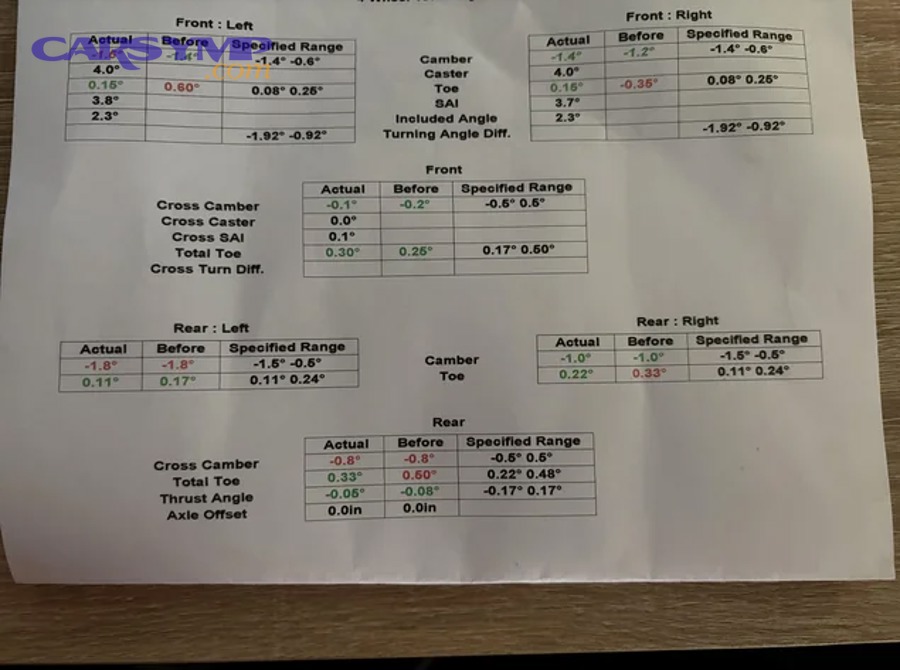
Most alignment machines show a minimum and maximum spec for each angle. The measured value is placed against that allowed range, often with color coding. In general, green means the value is within spec, red means it is out of spec, and yellow or amber often means it is near the edge or flagged as marginal depending on the software system.
The key point is that spec range and ideal value are not always the same. A wheel can land inside the allowed range but close to the limit. That may still be acceptable, yet it may not be the most balanced setup for tire life or steering feel.
Do green numbers always mean the alignment is perfect?
No, green numbers do not always mean the alignment is perfect, because a value can be within spec, near a limit, or slightly imbalanced side to side while still displaying as acceptable.
To better understand this, think of green as “pass” rather than “best possible.” If the left front camber is barely inside the allowed window and the right front camber is centered, both may show green, but they are not equally ideal. Similarly, a total toe value can look acceptable while individual left and right toe values remain uneven.
That is why a thoughtful reading method looks at three things:
- Is the value inside the allowed range?
- Is it close to the target or only barely inside?
- Does it match the opposite side reasonably well?
This extra step helps you read the report like a careful consumer instead of just treating it like a traffic light.
What do red, yellow, and green values mean on an alignment printout?
Red, yellow, and green values classify alignment readings by status: red usually means out of spec, yellow often means near a limit or caution area, and green usually means within the acceptable range.
For example, if front toe is shown in red before service and green afterward, the report suggests that the technician corrected the axle into the manufacturer’s allowed range. If rear camber stays red after service, the report indicates that a problem remains unresolved or non-adjustable.
Different alignment systems can present this with bars, arrows, numbers, or colored windows. The visual style may change, but the logic remains the same: the printout is helping you see whether each reading is bad, marginal, or acceptable.
How do factory specs and preferred ranges work?
Factory specs are the manufacturer’s acceptable minimum and maximum values, while preferred ranges refer to the more ideal center area where handling balance and tire wear may be better optimized.
More specifically, the manufacturer sets a tolerance window because real vehicles do not all leave service at one exact decimal. The alignment machine uses that tolerance to decide whether a measurement passes or fails. A skilled technician may also aim to center the adjustment within the spec when possible, especially if the vehicle has shown tire wear or pull.
This distinction matters when you compare different shops. One shop may stop once the numbers are green. Another may take more time to center values and improve left-right balance. Both reports may show a “good” result, but the better-centered one may provide better long-term behavior.
How Do You Compare the Before and After Readings?
You compare the before and after readings by identifying the original out-of-spec angles, checking what changed after service, and confirming that the final numbers now fit the spec and the symptom you wanted fixed.
Then, once the basic reading method is clear, the printout becomes a practical tool for verifying the quality of the alignment work.
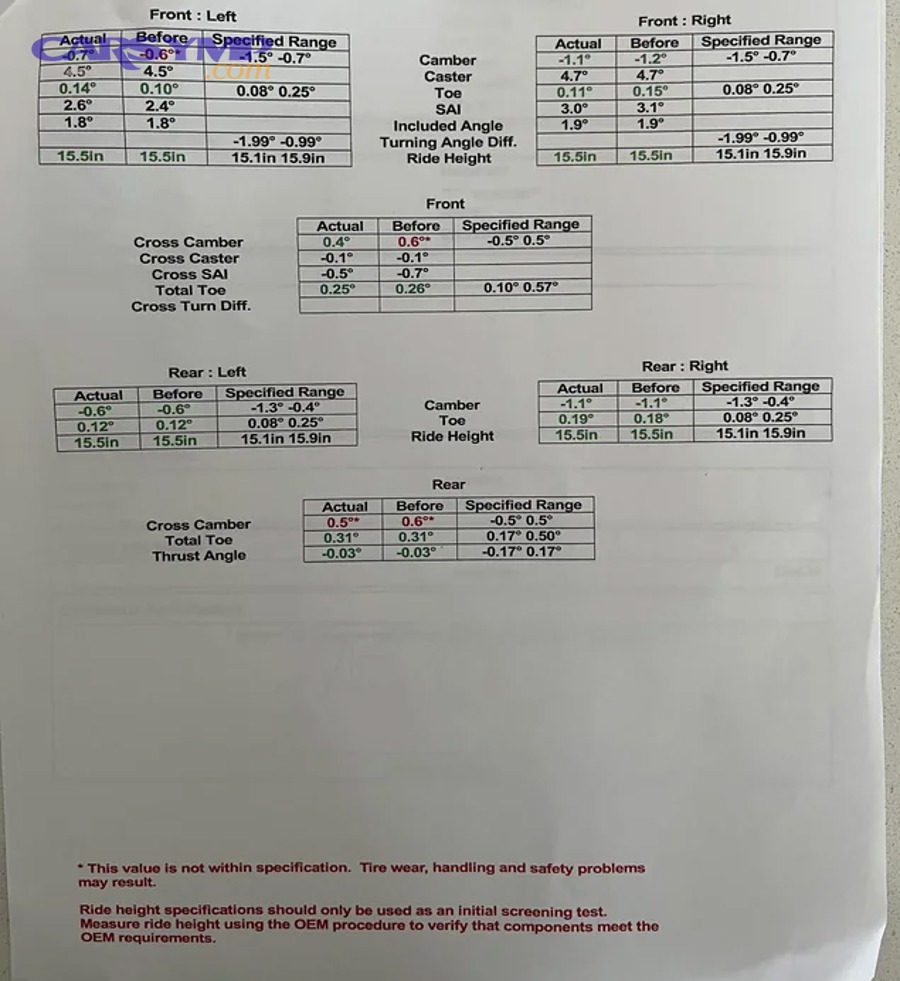
The before column tells you the condition of the car when it arrived. The after column shows the condition after the adjustments. The difference between those two columns is where the story of the repair appears.
If a vehicle came in with uneven tire wear and the front toe was far out of spec before service, you would expect that value to move materially after service. If it barely changes, the shop either could not adjust it fully or the root cause lies elsewhere.
Did the shop actually fix the alignment problem?
Yes, the shop likely fixed the alignment problem if the bad readings moved into spec, the angles most related to your symptoms improved clearly, and the after values now show reasonable balance from left to right.
Specifically, use a simple checklist:
- Find the angles that were red or clearly off before service
- See whether those angles moved toward or into spec after service
- Check whether the affected axle now matches the reported symptom
- Confirm whether any out-of-spec numbers remain after service
If your steering wheel was off-center and the front toe values became balanced after service, that is a strong sign the shop corrected the main issue. If the vehicle pulled and a strong cross-caster or camber imbalance remains, the fix may be incomplete even if several boxes turned green.
Which changes matter most when comparing before and after values?
There are 4 changes that matter most when comparing before and after values: toe correction, left-right balance, final values inside spec, and notes about non-adjustable or limited angles.
Toe usually comes first because it has the strongest direct link to rapid tread wear and steering wheel position. Left-right balance matters because a car may technically pass spec yet still feel biased if the sides differ too much. Final values inside spec matter because they tell you whether the service reached the manufacturer’s acceptable target. Notes about limited adjustments matter because they explain unresolved problems honestly.
This is also where 2-wheel vs 4-wheel alignment differences become relevant. A two-wheel alignment usually adjusts only the front angles on vehicles or situations where rear adjustment is not part of the procedure. A four-wheel alignment measures all four corners and evaluates the rear axle as part of the vehicle’s tracking path. If the rear axle influences thrust angle or the car “dog tracks,” a four-wheel approach gives a fuller picture.
What if some numbers are still out of spec after alignment?
If some numbers are still out of spec after alignment, the most common reasons are non-adjustable factory design, seized hardware, bent parts, worn suspension components, or ride height problems.
Moreover, some vehicles allow only toe adjustment from the factory. In that case, a shop may set toe correctly but leave camber or caster outside spec because the suspension has damage or because the design lacks adjustment points without aftermarket kits.
When you see a remaining red value, do not assume the alignment was done badly. Read the technician comments, ask what is adjustable on your model, and ask whether further repair is needed before the angle can be corrected fully.
What Alignment Readings Usually Match Common Driving Symptoms?
Alignment readings usually match common driving symptoms in predictable ways: toe often links to scrub wear and steering wheel position, camber often links to inside or outside edge wear, and caster or cross-angle issues often influence pull and steering feel.
In addition, connecting the report to what you feel on the road helps you understand why the numbers matter in the first place.
Many people receive a printout after service but still do not know whether it explains their complaint. The easiest way to solve that problem is to match the angle to the symptom. That turns the report from a technical sheet into a useful diagnostic reference.
Which alignment angles are most likely to cause tire wear, pulling, or an off-center steering wheel?
There are 3 main symptom groups tied to alignment angles: toe commonly causes fast wear and an off-center wheel, camber commonly causes edge wear, and caster or cross-angle imbalance commonly contributes to pull or unstable steering feel.
Specifically:
- Rapid feathered wear: often linked to incorrect toe
- Inner or outer edge wear: often linked to camber
- Drift or pull: often linked to cross-camber, cross-caster, or rear thrust issues
- Steering wheel not centered: often linked to toe imbalance or incorrect steering wheel centering during adjustment
This symptom-based reading method is very useful because it helps you decide whether the printout matches what you noticed before service. If the report shows toe errors and you had fast wear, the diagnosis makes sense. If the report looks clean but the car still vibrates, the issue may lie outside wheel alignment.
Is vibration shown on an alignment printout?
No, vibration is not usually shown on an alignment printout, because vibration usually comes from tire balance, wheel damage, tire defects, or worn rotating components rather than alignment angles themselves.
However, drivers often confuse vibration with alignment because both problems can appear after hitting a pothole or after tire service. That is why a clean alignment report should sometimes redirect attention toward wheel balancing, tire uniformity, brake hardware, hub runout, or suspension wear.
This distinction is important because it prevents misdiagnosis. A good alignment report can help by ruling out one category of issues, even when it does not directly explain the vibration complaint.
How can you tell whether the front or rear alignment is the real problem?
You can often tell whether the front or rear alignment is the real problem by comparing axle readings, checking thrust angle, and seeing whether the rear geometry is steering the vehicle off the centerline.
Meanwhile, many drivers assume that only the front wheels matter because they steer. In reality, the rear axle can change the path the car follows. If the rear wheels are not aligned properly, the vehicle may track slightly sideways, forcing the steering wheel to compensate.
That is one reason four-wheel measurement is so useful. Even on vehicles where only the front adjusts, measuring the rear helps the technician understand the car’s real centerline. In the broader debate over 2-wheel vs 4-wheel alignment differences, this is one of the most practical distinctions for everyday drivers.
How Can Car Owners Read an Alignment Printout Quickly and Accurately?
Car owners can read an alignment printout quickly and accurately by following 5 steps: identify the layout, check the before values, compare them to spec, review the after values, and match the changes to the original symptom.
To sum up the main content, a simple reading sequence is the fastest way to turn a technical report into a clear answer.

If you follow a repeatable process each time, you do not need to memorize every automotive term. You only need to know what to check first, what to compare second, and what final result matters most.
What is the easiest step-by-step way to check an alignment printout?
The easiest way to check an alignment printout is to use a 5-step method that moves from identification to interpretation and ends with a practical judgment about whether the service solved the problem.
Use this sequence:
- Confirm the vehicle information
Make sure the report belongs to your car. - Look at the before readings first
Find what was wrong before the alignment. - Compare the values to the spec range
Note which readings were outside the allowed window. - Check the after readings
See whether the problem values moved into spec. - Match the final result to your symptom
Ask whether the corrected numbers explain the complaint you had.
This method works because it mirrors the logic of the report itself. The printout begins with condition, continues with correction, and ends with result. Your reading process should do the same.
Should you ask the shop questions if the printout is unclear?
Yes, you should ask the shop questions if the printout is unclear, because the technician can explain non-adjustable angles, remaining out-of-spec values, and whether worn parts limited the final result.
More importantly, asking questions protects you from misunderstanding a partially corrected report. Good questions include:
- Which values were most important on my car?
- Are any of these angles non-adjustable from the factory?
- Why is this value still red or near the limit?
- Did worn parts affect the result?
- Do I need more repair work before a full correction is possible?
A trustworthy shop should be able to explain the report in plain language. If they cannot, the printout becomes harder to use even when the actual alignment work may have been competent.
What Other Alignment Terms Might Appear on Advanced Printouts?
Advanced alignment printouts may include terms such as thrust angle, cross camber, cross caster, SAI, included angle, and setback, which help diagnose deeper geometry issues beyond the basic toe, camber, and caster readings.
Besides the core reading process, these advanced terms expand your understanding and help explain why some reports look more complex than others.
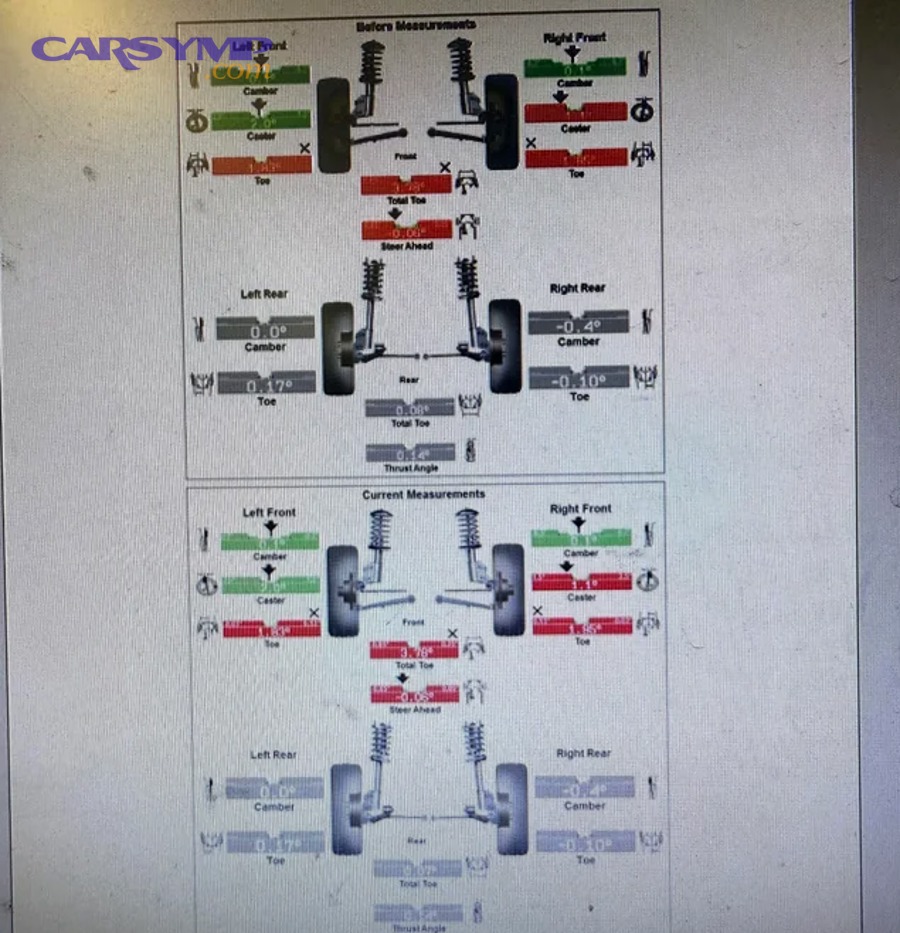
These terms appear more often on advanced machines or when the shop is diagnosing collision damage, suspension modification, or persistent pull problems. You do not need to master them first, but knowing what they roughly mean adds depth to your reading skills.
What are thrust angle, cross camber, and cross caster?
Thrust angle, cross camber, and cross caster are comparative geometry values that show how one side of the vehicle differs from the other and how the rear axle points relative to the vehicle centerline.
Specifically, thrust angle tells you whether the rear axle aims straight or slightly off to one side. Cross camber compares left and right camber values. Cross caster compares left and right caster values. These comparisons matter because a vehicle can feel wrong even when each individual side is technically near spec.
If one side differs enough from the other, the car may pull, drift, or require steering correction. That is why these comparative values often explain subtle behavior better than any single number alone.
What do SAI, included angle, and setback mean?
SAI, included angle, and setback are advanced diagnostic measurements used to identify steering axis geometry problems, damaged parts, or structural misalignment that standard adjustment alone may not fix.
SAI, or steering axis inclination, describes the inward tilt of the steering axis from the front view. Included angle combines SAI and camber in a way that can reveal bent suspension parts. Setback compares how far one front wheel sits forward or rearward relative to the other.
These values are not usually the first thing a car owner needs to study. Still, they become very useful after an accident, a hard curb strike, or a repeated pull complaint that ordinary toe adjustment does not solve.
How is a Hunter alignment printout different from other formats?
A Hunter alignment printout differs mostly in layout, graphics, and terminology display, but the core meaning of the measurements remains the same as on other alignment systems.
For example, Hunter reports often use clear bar graphics, before-and-after columns, and a visual vehicle diagram that makes the report easier for customers to scan. Another system may display the same data in a different visual style. The numbers still represent the same wheel alignment concepts.
So if you switch from one shop to another and the paper looks different, focus on the content rather than the branding. The important parts remain the measurements, the spec ranges, and the final position of the values.
Can lifted, lowered, or modified vehicles make alignment printouts harder to interpret?
Yes, lifted, lowered, or modified vehicles can make alignment printouts harder to interpret because altered ride height changes suspension geometry, may shift factory targets, and can limit how meaningful a stock-spec comparison remains.
Especially on modified vehicles, a reading that is technically outside factory spec may be expected without additional correction hardware. Likewise, a vehicle with aftermarket control arms or camber kits may have a different adjustable range than a stock model.
This is another reason to ask for explanation rather than relying only on color coding. On a modified car, the question is not just whether the printout is red or green. The real question is whether the final setup suits the vehicle’s purpose, tire life goals, and actual suspension configuration.
In short, learning how to read an alignment printout gives car owners a practical way to judge service quality, understand wheel alignment basics, and connect suspension numbers to real driving behavior. Once you can read toe, camber, caster, before-and-after values, and the meaning of the spec range, the report stops feeling technical and starts becoming useful.