


A Battery safety and tools checklist is a practical, step-by-step way to prevent sparks, acid exposure, and electrical damage while working on a vehicle’s 12V system. It helps you verify you have the right protective gear, the right hand tools, and the right procedures before you touch a terminal.
Beyond safety, a good checklist also reduces mistakes that cause avoidable problems—like stripped terminals, damaged battery sensors, or unexpected warning lights after disconnecting power. That matters whether you’re doing basic inspection, cleaning corrosion, or preparing to change car battery at home.
It also supports better decisions: choosing the correct battery type and rating for your climate and vehicle loads, and knowing when a “memory saver” is helpful versus when it can create risk. This is where planning beats guesswork.
To begin, the checklist below is organized so you can move from personal safety to vehicle protection, then into tool readiness, and finally into execution—Giới thiệu ý mới: we’ll start with the safety rules that prevent the most common battery accidents.
What should be on a battery safety checklist before you touch the terminals?
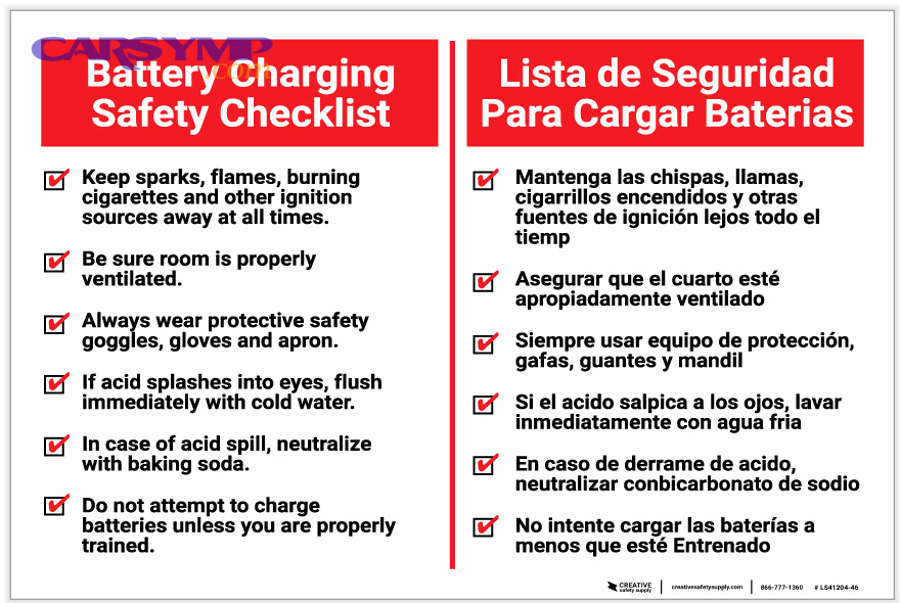
A battery safety checklist should include PPE, spark-control rules, ventilation, and a “power-down” routine, because most incidents come from short circuits, explosive hydrogen gas, and acid contact. To connect everything clearly, use the checklist in this exact order.
To begin, think of battery work as controlling three hazards: electric arc, chemical burn, and flammable gas. After that, you’ll see why the sequence matters more than the tool brand.

How do you protect yourself from acid splash and residue?
Wear eye protection and chemical-resistant gloves because battery electrolyte and corrosion residue can irritate skin and eyes, and splashes happen when brushing terminals or neutralizing buildup. Next, add clothing protection so you don’t turn a small spill into a painful burn.
Cụ thể, use ANSI-rated safety glasses or a face shield if you’re brushing heavy corrosion. Choose nitrile gloves (or similar chemical-resistant gloves) and avoid bare hands even for “quick checks.” Wear long sleeves you don’t mind staining, because corrosion dust can embed into fabric.
Besides PPE, keep a small bottle of clean water nearby for immediate rinse, and avoid touching your face while working. Tóm lại, eye/hand protection is the fastest way to reduce the worst outcomes from the smallest mistakes.
How do you prevent sparks and accidental shorts?
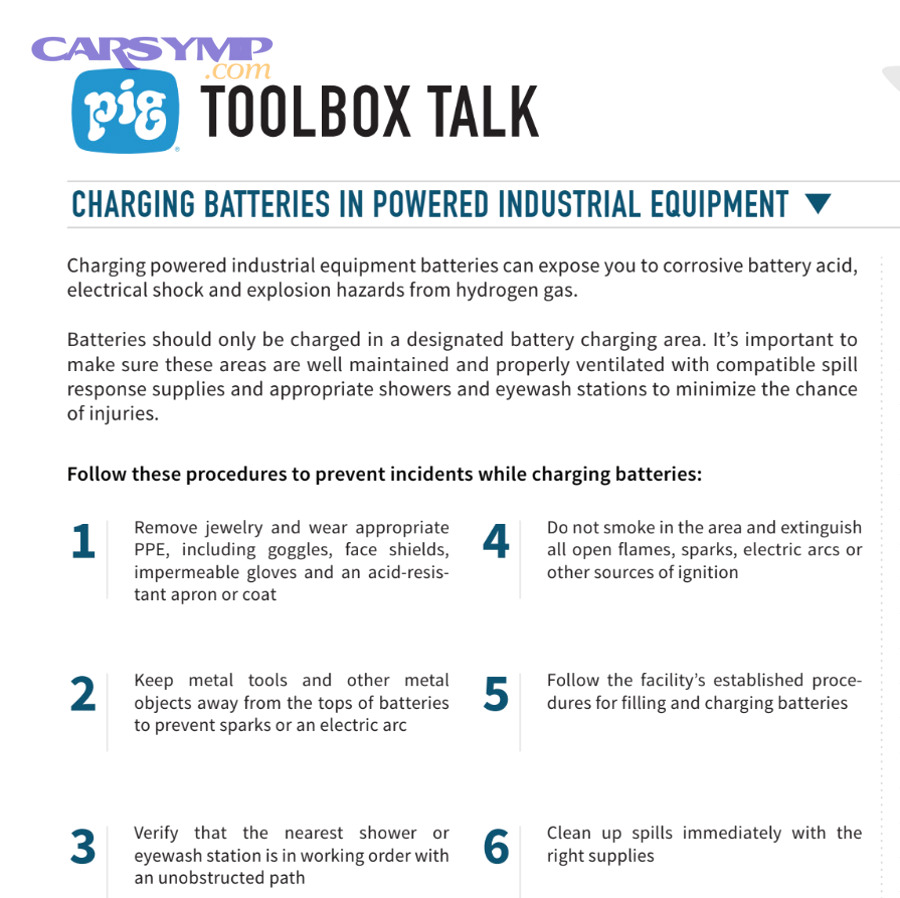
Yes, you can prevent most sparks by removing metal jewelry, using insulated tools, and disconnecting the negative terminal first, because a wrench-to-metal short can create an arc instantly. Next, you’ll reinforce this by controlling where your tools and cables sit during the job.
Cụ thể, remove rings, watches, bracelets, and necklaces. A ring bridging metal can heat dangerously fast. Use insulated-handled wrenches when possible, and keep tools from resting across the battery top where they can bridge posts.
To reduce “surprise contact,” drape a towel over nearby metal brackets when working in tight spaces. Quan trọng hơn, never allow the positive terminal tool to touch chassis metal while it’s still connected—this is the classic “shortcut” mistake that turns into an arc.
Why does ventilation matter even for a 12V battery?
Ventilation matters because lead-acid batteries can release hydrogen gas during charging and sometimes during heavy discharge, and hydrogen can ignite from a tiny spark. Next, you’ll pair ventilation with “no ignition sources” to keep the work area stable.
Để minh họa, avoid smoking, grinding metal, or using open flame near the battery. If you’re in a garage, open the door and, if needed, use a fan that’s positioned to move air past you and out of the space.
In cold climates where batteries work harder, charging events are more frequent—so the risk of off-gassing scenarios increases during troubleshooting or after jump-starting. Tổng kết lại, fresh airflow is a simple control that makes every other safety step more effective.
What is the correct “power-down” sequence before battery work?
The correct power-down sequence is: shut the engine off, remove the key, wait for modules to sleep, then disconnect the negative terminal first, because modern vehicles can keep circuits awake for minutes. Next, you’ll see how the waiting step prevents both errors and confusing symptoms.
Cụ thể, turn off lights, HVAC, and accessories. Close doors (or latch them carefully if you must keep them open), and wait 5–20 minutes for control modules to enter sleep mode. This reduces the chance of spikes and prevents draining the battery while you’re working.
If your vehicle has an AGM battery or a battery sensor on the negative cable, handle the cable carefully and avoid twisting or prying on sensor assemblies. Như vậy, the “power-down” sequence is not about patience—it’s about protecting sensitive electronics.
Which tools do you need for a battery safety and tools checklist?
You need a core set of hand tools plus safety and testing tools—wrenches, a terminal brush, a multimeter, and protective supplies—because battery jobs fail when you can’t tighten correctly, clean properly, or verify voltage. Next, you’ll group the tools by purpose so you can pack them like a kit.

What are the essential hand tools for battery terminals?
Essential hand tools include correctly sized wrenches/sockets, a torque-capable tightening method, and a terminal puller if needed, because over-tightening cracks posts and under-tightening causes intermittent no-start symptoms. Next, you’ll add cleaning tools so the connection stays stable long-term.
Cụ thể, bring a small socket set, combination wrenches, and an extension that fits your battery tray access. Many vehicles use 10mm or 13mm hardware, but do not assume—verify first. If your clamp is stubborn, a battery terminal puller is safer than prying with a screwdriver.
Use a torque wrench when specs are available (especially on vehicles with battery monitoring sensors). In other words, tightening is not “feel-based” on modern cars—it’s part of electrical reliability.
What safety supplies belong in the kit?
Safety supplies include eye protection, gloves, baking soda solution (or a dedicated neutralizer), shop towels, and a small water rinse option, because corrosion is both chemical and conductive. Next, you’ll connect those supplies to a cleaning routine that avoids spreading residue.
Cụ thể, pack nitrile gloves, safety glasses, and a few disposable towels. For neutralizing acid residue, mix a small amount of baking soda into water in a spray bottle. Keep a catch tray or cardboard under the battery area to control mess.
Also include a small flashlight or headlamp, because poor visibility increases the chance of tool slips. Tóm lại, safety supplies reduce both injury and the risk of leaving conductive grime behind.
Which testing tools prevent “replace-and-hope” mistakes?
Testing tools include a multimeter and, ideally, a battery tester, because verifying resting voltage and charging behavior prevents misdiagnosing a bad alternator as a bad battery (and vice versa). Next, you’ll use test results to decide whether replacement is actually necessary.
Cụ thể, a multimeter allows you to check:
- Resting voltage (after the car sits) to estimate state of charge.
- Cranking voltage drop to spot weak battery performance.
- Charging voltage with engine running to assess alternator output.
If you have access to an electronic battery tester, it can estimate cold-cranking capability more directly than voltage alone. Như vậy, testing tools turn battery work into a decision process, not a guessing game.
What optional tools make battery work faster and safer?
Optional tools include a battery carrying strap, fender cover, plastic trim tools, and anti-corrosion supplies, because lifting and maneuvering a battery can strain your back and damage surrounding parts. Next, you’ll see how these small items reduce the “accident chain.”
Cụ thể, use a carrying strap to keep the battery upright and stable. A fender cover protects paint from accidental contact and corrosion dust. Trim tools help remove clips cleanly when the battery is hidden under covers or intake tubing.
Finally, keep terminal caps or insulating covers nearby if your vehicle uses them—restoring factory protections is part of the checklist, not an afterthought.
How do you inspect a battery safely before deciding to replace it?
Inspect safely by using a 6-point check—case condition, terminals, cables, hold-down, voltage, and charging system—because many “dead battery” complaints come from loose connections or corrosion, not the battery itself. Next, you’ll match each check to a specific tool so the process stays quick.

What visual signs tell you the battery area is unsafe or unstable?
Unsafe signs include a swollen case, cracks, heavy leaking, or melted terminals, because these indicate internal failure or overheating risk. Next, you’ll shift from “inspection” to “stop and replace” rules so you don’t escalate danger.
Cụ thể, look for bulging sides, wetness around vents, and chalky buildup spreading across the battery top. If you see melted plastic around posts or smell a strong rotten-egg odor, do not continue with casual cleaning—prioritize replacement and investigate charging/overheating causes.
In addition, confirm the battery is firmly clamped. A loose battery can vibrate, damaging plates and stressing cables. Tóm lại, a stable, intact battery case is the baseline for any further work.
How do you check cable condition and connection quality?
Check the cables by looking for frayed strands, stiff insulation, green corrosion under insulation, and loose clamps, because hidden resistance causes slow cranking and intermittent electrical glitches. Next, you’ll use gentle movement tests to confirm clamp security without damaging posts.
Cụ thể, inspect the negative cable where it meets chassis ground and where it meets the battery clamp. Inspect the positive cable for heat damage and protective covers. If corrosion “creeps” under insulation, replacement of the cable end may be needed.
Do a light wiggle test: the clamp should not rotate on the post. If it rotates, the connection is not reliable—even if the car starts today. Như vậy, cable condition is part of diagnosis, not just aesthetics.
How do you do a quick voltage sanity-check with a multimeter?
A quick voltage check is: measure resting voltage after sitting, then measure charging voltage with the engine running, because voltage patterns suggest whether the battery or alternator is the real issue. Next, you’ll use the results to decide whether to charge, clean, or replace.
Cụ thể, measure across the posts (not the clamps) for accuracy. If the car has been off long enough, the reading gives a general snapshot. Then start the engine (if possible) and measure again to confirm the alternator is charging.
If readings are confusing, charge the battery fully and retest; a low state of charge can mask actual health. Tổng kết lại, voltage checks are a gate: they decide what you do next.
How do you clean corrosion and protect terminals correctly?
Clean corrosion by neutralizing, brushing, rinsing, drying, then protecting because corrosion is both chemical and electrical, and leftover residue invites future resistance. Next, you’ll link each step to a tool so the workflow stays consistent every time.

What is the safest order for corrosion cleaning?
The safest order is disconnect negative first, then positive, neutralize residue, brush terminals and clamps, rinse lightly, dry fully, then reconnect positive first and negative last, because this minimizes short risk while removing conductive buildup. Next, you’ll apply protection that prevents recurrence.
Cụ thể, spray baking soda solution onto corrosion and let it fizz; this reaction helps neutralize acidic residue. Use a terminal brush to clean both the post and the inside of the clamp. Wipe away slurry rather than spreading it around the battery tray.
Avoid flooding the battery area with water—use controlled rinsing. Dry thoroughly so protective sprays can adhere and so moisture doesn’t accelerate corrosion. Tóm lại, sequence keeps you safe and keeps the connection clean.
Which products help with corrosion prevention and terminal protection?
Terminal protection works best with a clean, dry connection plus an anti-corrosion spray or a thin film protectant, because protectant applied over dirt simply traps moisture. Next, you’ll choose between sprays, grease, and washers depending on your driving conditions.
Cụ thể, use battery terminal protectant spray after tightening. Some people use dielectric grease; if you do, apply it lightly around the connection perimeter rather than globbing it between metal contact surfaces. Felt washers can help in humid/salty environments when installed correctly on a clean post.
Also consider protecting exposed metal with terminal caps if your battery location is near tools or cargo. Như vậy, corrosion control is a maintenance habit, not a one-time fix.
How do you avoid damaging battery sensors while cleaning?
Yes, you can clean safely around sensors by avoiding twisting force and by not saturating sensor housings, because many vehicles have a battery current sensor integrated on the negative terminal assembly. Next, you’ll handle cables by the clamp body rather than pulling on wires.
Cụ thể, support the clamp as you loosen it, and lift straight up. If the sensor is integrated, don’t pry against it. Keep sprays and liquids controlled so they don’t seep into connectors.
If a connector must be unplugged, note its locking tab and avoid forcing it. Tổng kết lại, sensor-safe cleaning preserves charging logic and prevents warning lights after battery service.
How do you choose the correct battery size and CCA for your vehicle?
Choose correctly by matching group size, terminal layout, and CCA to your vehicle and climate because a “fits in the tray” battery can still be wrong if polarity, height, or capacity mismatch causes poor starts or cable strain. Next, you’ll break this into three checks that prevent the most common buying mistakes.
What does “group size” really control?
Battery group size controls physical dimensions and terminal placement, because the battery must fit the tray, align with hold-down hardware, and allow cables to reach without tension. Next, you’ll add a “height and clearance” check so the hood and covers fit safely.
Cụ thể, check your owner’s manual or the label on the existing battery for group size. Then verify the new battery’s length, width, and height. A taller battery can contact the hood or metal bracing, increasing short risk.
Also confirm venting provisions if your vehicle routes vent tubes. Tóm lại, group size is about fit, cable reach, and safe clearance—not “brand preference.”
How do you pick the right CCA without overbuying?
Pick CCA to meet or slightly exceed OEM spec because cold cranking amps reflect starting ability in cold temperatures, but oversized CCA alone doesn’t fix charging problems or parasitic drains. Next, you’ll use climate and driving pattern to choose wisely.
Cụ thể, if you live in a cold region or park outside overnight, choosing a battery with CCA at the higher end of the recommended range can improve winter starts. If you live in a mild climate, matching OEM spec is often sufficient.
Overbuying for CCA while ignoring reserve capacity and battery type (AGM vs flooded) can lead to mismatched performance. Như vậy, “right CCA” is balanced with the rest of the electrical system.
How do battery type and vehicle electronics affect selection?
Battery type matters because some vehicles are designed for AGM batteries and charging profiles, and switching types can reduce lifespan or cause charging issues. Next, you’ll confirm what your vehicle expects before shopping.
Cụ thể, if your current battery is AGM, replace with AGM unless your vehicle documentation explicitly allows a different type. Start-stop systems often require higher durability batteries. Vehicles with heavy accessory loads (audio, heated seats, long idling) may benefit from higher reserve capacity.
Also check terminal orientation and polarity. Reversing polarity is not a “small mistake”—it can damage electronics. Tổng kết lại, correct selection is about compatibility, not just capacity.
When should you use a memory saver, and when should you avoid it?
Use a memory saver only when it’s safe and compatible because it can preserve settings, but it can also create risk if connections are unstable or if you’re working near sensitive circuits. Next, you’ll follow a decision checklist so you don’t use it “just because.”

What does a memory saver actually preserve?
A memory saver preserves volatile settings like radio presets, clock, and sometimes module learned values, because it supplies low current through a vehicle power port or OBD connector while the battery is disconnected. Next, you’ll decide whether those conveniences are worth the added complexity.
Cụ thể, some vehicles lose window auto-up calibration, seat memory, or idle learn when power is removed. A memory saver can reduce re-learning steps, which is helpful if you’re trying to complete the job quickly.
However, the value depends on the vehicle and your comfort level. Tóm lại, preservation is a convenience tool, not a required safety tool.
When is a memory saver genuinely helpful?
It’s helpful when you’re doing a straightforward battery swap, you have stable connections, and you want to avoid reprogramming or re-learning steps, because it minimizes post-service friction. Next, you’ll verify your power source and connection method to avoid voltage drops.
Cụ thể, use a quality device designed for automotive use, and ensure the auxiliary power source is strong (jump pack or dedicated supply). Confirm the vehicle power outlet remains active with the key off—some outlets shut down, which defeats the purpose.
Also confirm you can do the swap quickly and cleanly without pulling cables hard. Như vậy, memory saver use is best for controlled, low-drama battery replacement.
When should you avoid using a memory saver?
Avoid it if you’re cleaning heavy corrosion, repairing cables, diagnosing a short, or unsure about wiring integrity, because maintaining power while you move cables can increase the chance of accidental shorts. Next, you’ll prioritize safety and stability over saved presets.
Cụ thể, if you suspect damaged insulation or loose connections, don’t keep circuits energized. If you need to remove multiple connections or access tight areas with metal tools, it’s safer to disconnect power fully and accept that you may need to reset some settings afterward.
Also avoid it if your procedure requires module resets or if the manufacturer warns against it. Tổng kết lại, if the job is “messy” or uncertain, skip the memory saver.
How do you change a car battery safely using a checklist approach?
Change a car battery safely by following an 8-step checklist—prepare PPE, power down, disconnect, remove, clean, install, reconnect, and verify—because consistency prevents the common mistakes that cause no-start, corrosion return, or warning lights. Next, you’ll focus on the most important step: correct disconnection and reconnection order.
What is the safest disconnect and reconnect sequence?
Safest sequence is disconnect negative first, then positive; reconnect positive first, then negative, because the negative cable ties the battery to chassis ground and removing it first reduces short risk. Next, you’ll apply the same logic when tightening and protecting terminals.
Cụ thể, once the negative cable is off, secure it so it cannot spring back and touch the post. Then remove the positive cable and cover it if needed. After replacement, install the new battery, secure the hold-down, connect positive and tighten, then connect negative and tighten.
Finally, confirm clamps do not rotate by hand. Như vậy, sequence is the backbone of the battery swap checklist.
How do you remove and install the battery without damaging parts?
Remove and install carefully by keeping the battery upright, lifting with stable posture, and reusing or replacing the hold-down correctly, because tilting can spill residue and a loose battery will vibrate and fail early. Next, you’ll clean the tray and inspect nearby wiring before final tightening.
Cụ thể, use a carrying strap if the battery is heavy. Don’t yank on cables to “make room.” If the battery is under a cover, remove clips gently with trim tools rather than forcing tabs.
Inspect the tray for rust, acid damage, and debris; clean as needed. Tổng kết lại, installation quality affects battery life as much as battery brand does.
What verification checks should you do immediately after installation?
Verify with three checks—start behavior, charging voltage, and accessory stability—because you want to confirm the system is healthy before you close covers and return tools. Next, you’ll connect these checks to your earlier testing tools so the loop is complete.
Cụ thể, start the engine and listen for strong cranking. Check charging voltage with the multimeter. Confirm headlights do not flicker and that basic electronics behave normally.
If warning lights appear, recheck terminal tightness and cable seating first. Tóm lại, quick verification prevents “redo work” frustration.
What should your battery safety and tools checklist look like as a printable kit list?
Your checklist should be organized into four categories—PPE, tools, cleaning/protection, and testing—because grouping reduces missed items and speeds up setup. Next, the table below gives a clear kit you can print or screenshot before any battery job.

This table contains a printable battery safety and tools kit, showing what each item is for and when you should use it.
| Category | Item | Purpose | Use When |
|---|---|---|---|
| PPE | Safety glasses / face shield | Protect eyes from acid splash and debris | Any cleaning, brushing, or removal |
| PPE | Nitrile gloves | Protect skin from residue and neutralizer | All battery handling |
| Hand Tools | Socket set + wrenches | Remove clamps and hold-down hardware | Battery removal/installation |
| Hand Tools | Terminal puller (optional) | Lift stuck clamps without prying damage | Corroded/stuck terminals |
| Cleaning | Terminal brush | Restore clean metal contact | Any corrosion present |
| Cleaning | Baking soda + water spray | Neutralize acidic residue | White/green crust present |
| Protection | Terminal protectant spray | Reduce future corrosion | After tightening clean terminals |
| Testing | Multimeter | Check voltage and charging behavior | Before and after service |
| Optional | Battery strap + fender cover | Safer lifting and paint protection | Heavy batteries/tight bays |
| Optional | Memory saver device | Maintain settings during swap | Simple swaps with stable wiring |
Contextual Border
Beyond the core checklist, the next section expands into less obvious scenarios—diagnostic edge cases, seasonal considerations, and common mistakes—so you can adapt the checklist to real-world constraints without losing safety.
What are the most common battery safety mistakes, and how do you prevent them?
The most common mistakes are skipping PPE, reversing the disconnect order, and cleaning without neutralizing, because these create the highest risk for injury and repeat corrosion. Next, each subtopic below gives a quick prevention rule you can attach to your checklist.

Why is “negative first” the rule that prevents the biggest errors?
Negative first prevents the biggest errors because once the negative cable is removed, the chassis is no longer part of an active circuit, reducing the chance your tool creates a short. Next, treat this as the non-negotiable rule that anchors every other step.
Để hiểu rõ hơn, if the positive cable is removed first while negative is still connected, a tool touching chassis metal can still complete a circuit and arc. With negative removed first, that same accidental contact is far less likely to create an energized short path.
Tóm lại, this rule is the simplest “meronym” of the whole process: a small step that protects the entire job.
How does poor cleaning technique cause repeat corrosion?
Poor technique causes repeat corrosion when residue is smeared instead of removed and when protectant is applied over dirt, because trapped moisture accelerates chemical reaction. Next, you’ll treat cleaning and protection as a paired workflow.
Cụ thể, neutralize first, then brush, then wipe away slurry. Dry completely, then apply protection after the connection is tight. If you apply protectant too early, you may contaminate contact surfaces and create resistance.
Như vậy, repeat corrosion is usually a process problem, not a “bad battery” problem.
When do you need extra caution with hybrids, EVs, or advanced electronics?
You need extra caution when the 12V battery sits near control modules or when the vehicle uses advanced battery monitoring, because careless force or incorrect reconnection can trigger faults. Next, you’ll keep the checklist flexible but strict where it matters.
Cụ thể, some vehicles have a battery sensor on the negative terminal and may require specific tightening procedures. Others may require a reset or relearn procedure after a battery swap. If the battery is in the trunk, be mindful of venting tubes and trim panels.
In all cases, if you’re unsure, use the owner’s manual for battery service notes. Tổng kết lại, modern electronics reward careful, repeatable steps.
What quick “end-of-job” checklist confirms you’re done safely?
A quick end-of-job checklist is: clamps tight, hold-down secure, tools removed, covers reinstalled, and voltage verified, because loose clamps and unsecured batteries cause the most frequent comebacks. Next, make this your final habit before closing the hood.
Cụ thể, confirm clamps don’t rotate, confirm the battery cannot move by hand, and confirm any protective covers are back in place. Then check charging voltage once more to ensure the system is stable.
Tóm lại, the job is not finished when the car starts—it’s finished when the installation is mechanically secure and electrically verified.
FAQ
Can you get shocked by a car battery?
No, a healthy 12V car battery rarely shocks like household electricity, but it can still cause severe burns and injury because a short circuit can create high current, intense heat, and sparks. Next, treat the hazard as “arc and burn risk,” not “voltage shock risk.”
Cụ thể, the danger is from metal tools bridging terminals or terminal-to-chassis contact, which can heat objects rapidly. Eye protection and negative-first disconnection reduce these risks.
Is it safe to disconnect the battery to clean corrosion?
Yes, it is safe when you follow the checklist: power down the car, wait for modules to sleep, disconnect negative first, then positive, because this removes active circuit paths. Next, neutralize and clean with controlled liquids to avoid spreading residue.
In other words, cleaning is safest when the battery is isolated and the work area is stable and dry.
Do you always need to replace the battery if you see corrosion?
No, corrosion does not always mean replacement because corrosion often comes from vapors, moisture, or loose connections and can be corrected by cleaning and tightening. Next, test the battery and charging system before deciding.
Cụ thể, if the case is swollen, cracked, or leaking, replacement is more likely. If the case is intact and tests are normal, cleaning and protection can restore reliability.
Should you reset anything after replacing a battery?
Yes, sometimes you should because some vehicles need window calibration, clock/radio reset, or idle relearn after power loss. Next, check the owner’s manual and watch for warning lights after replacement.
Đặc biệt, vehicles with battery monitoring may require specific procedures depending on design. If you used a memory saver, you may avoid some resets—but safety still comes first.