


Battery registration/coding on modern vehicles is a post-replacement “relearn” process that tells the car’s energy management system what battery is installed, so charging strategy, start-stop behavior, and battery protection logic stay accurate.
Beyond basic charging, modern modules track battery age, capacity, and state of charge to reduce electrical stress and prevent low-voltage faults—so the same physical battery swap can require a software update depending on the vehicle platform.
To make the process predictable, this guide explains how to identify whether your car needs registration, what information the car expects (type, Ah rating, serial/BEM code), and how to complete the procedure using common OBD service functions.
Tiếp theo, we’ll connect the “why” to practical steps, so you can register correctly the first time and avoid the most common post-install surprises.
What is battery registration/coding, and why do modern vehicles need it?
Battery registration/coding is a control-module update that records the new battery’s characteristics and resets battery aging calculations so the alternator and energy management system charge the battery correctly and safely.
To start, here’s a visual reminder that “battery data” is now part hardware and part software in many platforms.
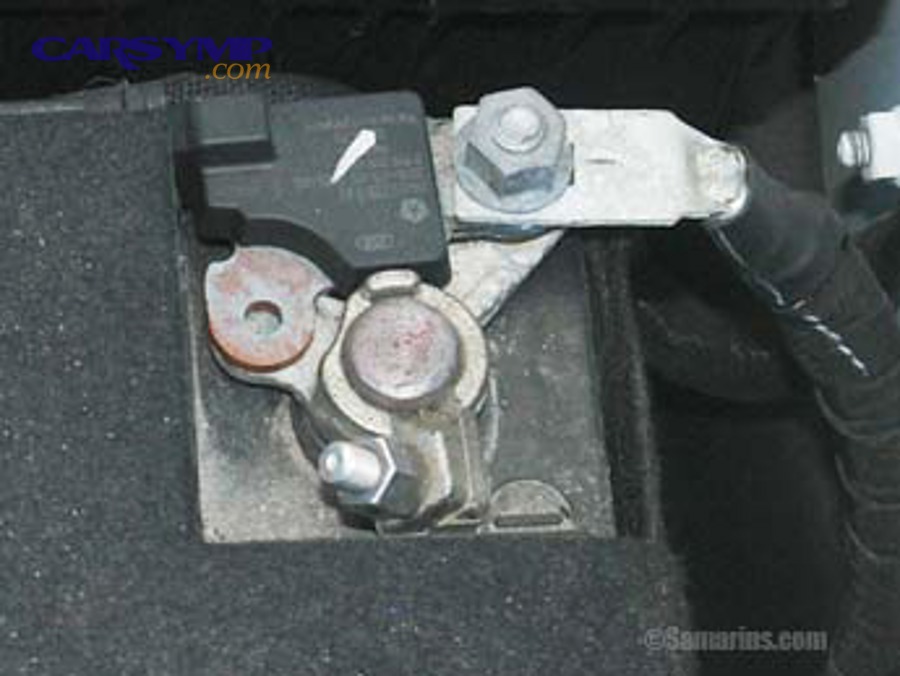
Definition: what exactly changes inside the vehicle?
In definition terms, battery registration is a service adaptation stored in one or more modules (often the Body Control Module, Battery Management Module, or a gateway) that updates battery identity and resets learned aging values.
Cụ thể, many vehicles maintain a battery “history” including estimated internal resistance, charge acceptance, and “age” counters that affect charging voltage targets and load-shedding decisions during cranking.
Macro reason #1: charging strategy is adaptive, not fixed
Modern alternator control often varies charging voltage and current based on temperature, battery type, and battery health, rather than keeping a constant output. If the car still “thinks” an old, tired battery is installed, it may overcharge or undercharge a fresh one.
Để minh họa, a vehicle that believes the battery is aged may raise charging voltage more aggressively; that might be fine for one chemistry but harmful for another, especially when combined with heat.

Macro reason #2: stop-start and power management depend on battery confidence
Start-stop systems require high confidence that the battery can restart the engine repeatedly. If registration is skipped, the system may disable start-stop, trigger warnings, or behave inconsistently because battery state calculations are misaligned with the new battery.
Quan trọng hơn, the car may shed accessories (heated seats, defrost, infotainment power limits) earlier than necessary, because it’s protecting a battery it believes is near the end of its life.
Macro reason #3: low-voltage protection prevents cascading electronic faults
When voltage dips during cranking or at idle, modern vehicles can log multiple unrelated fault codes across modules. Battery registration helps ensure the system uses correct charge acceptance and reserve calculations to prevent chronic undervoltage events.
Hơn nữa, many “mystery” electrical symptoms after a battery swap are not hardware failures—they’re power management decisions triggered by the wrong battery data.

Which vehicles require battery registration, which don’t, and how can you tell?
Yes, many modern vehicles require registration—especially those with an intelligent battery sensor or advanced energy management—while older cars without battery monitoring typically do not.
Next, use these “tell-tale” checks to decide quickly before you buy tools or schedule service.
Grouping: 3 practical categories by battery monitoring level
There are 3 main categories of vehicles by battery management complexity: (1) basic (no sensor, simple alternator), (2) monitored (sensor + energy management), and (3) coded (sensor + energy management + stored battery identity fields like BEM/serial).
Tuy nhiên, the same brand can appear in more than one category depending on model year and trim, so use the checks below.
Category 1: Basic systems (often no registration)
These vehicles usually have a simple alternator regulator and no dedicated battery sensor at the negative terminal. Swapping the battery typically works without any module update.
Để hiểu rõ hơn, if there’s no battery monitoring hardware and the scan tool has no “battery replacement” service menu, registration is unlikely.

Category 2: Monitored systems (registration often recommended)
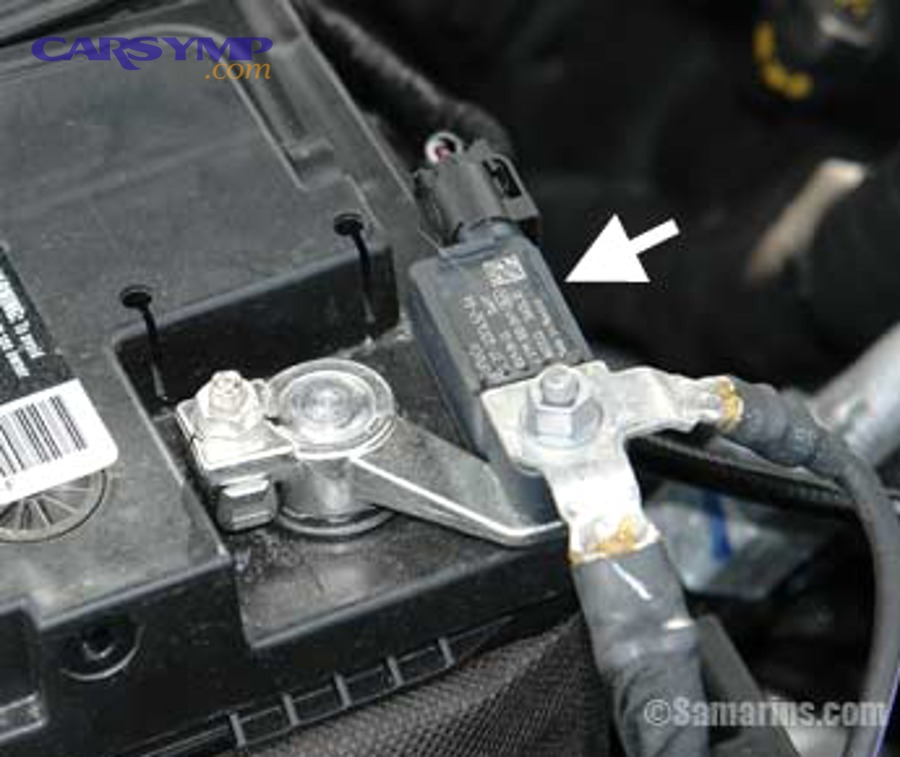
Vehicles with an intelligent sensor on the negative cable or a current sensor on the battery line commonly learn battery state and may expect a reset/relearn after replacement.
Bên cạnh đó, you might see a thick negative cable assembly with an integrated module, or wiring that routes through a sensor block rather than directly to chassis ground.
Category 3: Fully coded systems (registration/coding is required)
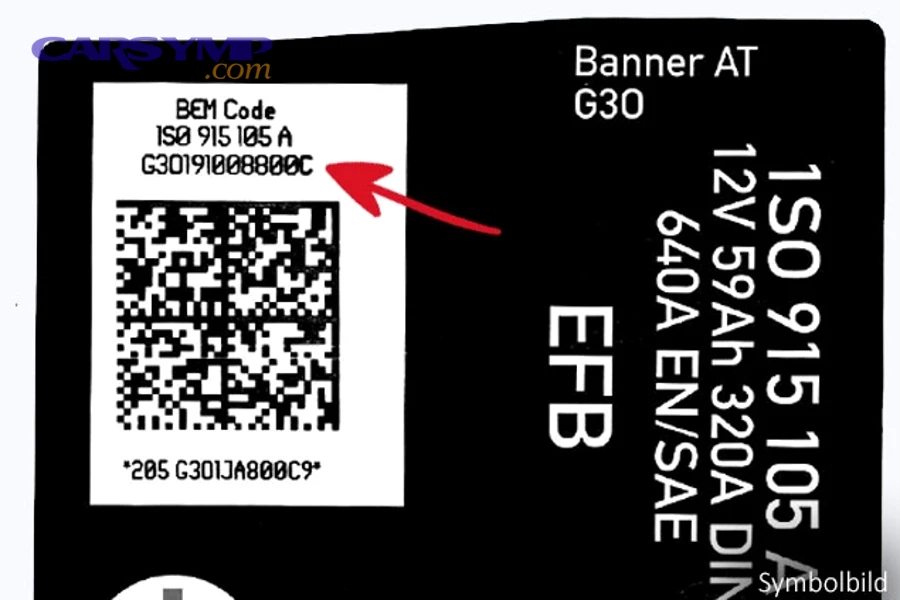
These vehicles store battery identity fields such as capacity (Ah), battery type (AGM/EFB), and a manufacturer code/serial (common in several European platforms). Skipping coding can alter charging strategy and trigger warnings.
Đặc biệt, if the replacement battery differs in type or capacity from the original, coding is more than “nice to have”—it’s how the car prevents mismatched charge profiles.

Fast self-check: what you can look for in 2 minutes
- Physical clue: a sensor module on the negative terminal/cable assembly (IBS/current sensor).
- Dashboard behavior: persistent start-stop disable, battery/charging warnings, or “energy management” messages.
- Scan tool menus: a service function labeled “Battery replacement,” “Battery registration,” “Battery adaptation,” or “Energy management reset.”
- Battery label data: OEM style codes (e.g., capacity, type, and sometimes a long serial/BEM code).
Tóm lại, if you see a sensor and your scan tool lists battery service functions, assume registration is part of the job.
What happens if you skip battery registration after replacement?
Skipping registration can still let the car start, but it often causes incorrect charging behavior, disabled start-stop, and recurring low-voltage faults because the car’s battery aging model no longer matches the new battery.
Now let’s connect “software mismatch” to real symptoms you can observe within days or weeks.

Reason #1: undercharging leads to chronic low state-of-charge
If the system assumes the old battery has low charge acceptance, it may limit charging current too aggressively. A new battery then spends too much time below ideal state-of-charge, reducing performance and lifespan.
Cụ thể hơn, repeated short trips become more punishing: the battery never fully recovers after cranking, so voltage dips increase.
Reason #2: overcharging stresses the battery and electrical system
Some strategies increase charging voltage when the car believes the battery is “old.” If a fresh battery is installed—especially a different type—this can accelerate water loss (in flooded designs), increase heat, or push AGM/EFB outside ideal ranges.
Ngược lại, correct coding lets the alternator target the right profile for the installed chemistry.

Reason #3: start-stop and comfort features become inconsistent
Start-stop may remain disabled because the car’s algorithm refuses to stop the engine unless battery reserve calculations meet strict thresholds. With wrong data, the thresholds may never be met—even if the battery is healthy.
Hơn nữa, you may notice reduced accessory behavior, like the car limiting HVAC blower speed at idle or delaying heated seat activation in cold weather.
Reason #4: fault code “noise” increases troubleshooting cost
Low voltage can create a cascade of stored codes across multiple modules (ABS, steering, airbags, infotainment). These may appear unrelated, but they share a common trigger: voltage stability during crank and load spikes.
Tổng kết lại, registration is often cheaper than chasing phantom electrical problems later.
How do you perform battery registration/coding step-by-step with OBD tools?
The most reliable method is using a scan tool’s “battery replacement/registration” service function: identify battery type and capacity, confirm any required serial/BEM code fields, run the adaptation, then verify charging and fault memory.
Để bắt đầu, the OBD port is your bridge between a physical battery swap and the car’s software record.
Step 1: confirm battery specs before you touch the scan tool
Record the new battery’s type (AGM/EFB/flooded), capacity (Ah), and cold cranking rating (CCA). If the old battery label is readable, record its type and Ah too.
Ví dụ, many cars are tolerant of a same-type, same-capacity swap; mismatches increase the need for coding accuracy.

Step 2: stabilize voltage (especially on sensitive cars)
Connect a quality charger or power supply if available, especially for vehicles known to be voltage-sensitive. A stable supply reduces the risk of module resets during coding.
Quan trọng hơn, don’t attempt coding while the battery is weak or while doors are open for long periods with interior electronics active—those loads can destabilize voltage during the procedure.
Step 3: navigate to the correct service function
Most scan tools place this under Service or Maintenance menus. Look for terms like “Battery replacement,” “Battery registration,” “Battery adaptation,” or “Energy management.”
Bên cạnh đó, some platforms separate “register new battery” (reset aging) from “code battery” (change type/capacity). If your new battery differs from old, you may need both.
Step 4: enter or select the battery parameters the car expects
Depending on platform, you may be asked to select Ah capacity, choose battery technology (AGM/EFB/flooded), and sometimes input a serial/BEM/manufacturer code. Use the battery label exactly as printed when a serial is required.
Đặc biệt, avoid “closest match” guesses when the system requires a code—incorrect entries can be worse than a simple reset in some systems.
This table helps you understand the most common parameter sets and what they influence in the charging strategy.
It’s useful when your tool offers multiple fields and you’re not sure which ones are critical for your specific swap.
| Parameter the tool asks for | What it changes inside the car | When it matters most |
|---|---|---|
| Battery type (AGM / EFB / Flooded) | Charge voltage targets, temperature compensation, charge acceptance model | When upgrading/downgrading battery technology or replacing start-stop batteries |
| Capacity (Ah) | Reserve calculation, alternator load requests, charge time assumptions | When changing capacity significantly (e.g., 70Ah → 95Ah) |
| Serial/BEM/manufacturer code | Battery identity and aging reset alignment for platforms that track battery “instance” | When the system explicitly requires a code entry or offers a “new battery” record |
| Registration/reset only | Resets battery aging counter and learned internal resistance estimates | Same-type, same-capacity replacement where coding options are limited |
Step 5: run the procedure and confirm completion
Execute the service function and wait for the tool to confirm success. Then cycle ignition as instructed (some vehicles require ignition off/on cycles or a short sleep period for modules to store the new values).
Tuy nhiên, don’t immediately start toggling accessories—let the system settle so the new baseline battery readings are stable.
Step 6: verify charging behavior and check for new faults
After registration, check for charging voltage stability (with a multimeter or scan data), clear any low-voltage history codes if appropriate, and verify that start-stop or energy management messages behave normally after a few drive cycles.
Tóm lại, verification is what turns “I ran a menu” into “the car truly accepted the new battery.”
Below is a practical video walkthrough that shows the flow of battery registration using common scan tool menus and explains why the reset matters.
How do battery type and capacity affect coding (AGM vs EFB vs flooded)?
Battery type and capacity directly influence the charging profile: AGM generally needs different voltage behavior than flooded batteries, while capacity (Ah) changes reserve calculations and how aggressively the alternator replenishes after cranking.
Hãy cùng khám phá how these differences map to real coding choices so you don’t install a battery the car can’t manage properly.
Comparison: AGM is strong for charge acceptance, flooded is simpler, EFB bridges start-stop needs
AGM is typically strong in deep cycling and charge acceptance under start-stop demands, flooded batteries are simpler and more common in basic systems, and EFB often serves as a mid-tier start-stop solution where full AGM isn’t specified.
Trong khi đó, the car’s charging strategy may assume one of these technologies; mismatching it can reduce lifespan or cause performance quirks.
Why capacity (Ah) matters more than many DIYers think
Capacity changes how the vehicle estimates usable reserve. If you install a higher Ah battery without updating the car, the system may underutilize it (charging strategy too conservative), or misjudge start-stop readiness.
Cụ thể, a car expecting 70Ah might calculate a low reserve margin earlier than it should on a 95Ah battery, disabling start-stop despite the larger battery being capable.
Upgrades and downgrades: when coding becomes non-negotiable
If you upgrade from flooded to AGM (or the reverse), coding is often essential because the vehicle’s voltage targets and charge acceptance assumptions need to change. This is common when replacing a start-stop battery with the wrong type because the replacement was “close enough” physically.
Quan trọng hơn, choosing the wrong type can create a cycle of partial charging and early failure, even if the car “seems fine” for the first few weeks.
Battery sensors and chemistry: why the negative terminal matters
An intelligent sensor on the negative cable measures current flow and helps the module estimate state of charge and battery health. That estimation depends on chemistry assumptions; AGM and flooded behave differently under load and during recovery.
Tóm lại, correct coding aligns the sensor’s math with the battery you actually installed.
How can you replace the battery safely without triggering module issues?
The safest approach is a controlled replacement: minimize voltage drop, disconnect terminals in the correct order, prevent accidental short circuits, and restore power cleanly so modules don’t log undervoltage errors or lose learned settings.
Để hiểu rõ hơn, battery replacement is both an electrical safety task and a module-stability task in modern vehicles.
Safety baseline: prepare tools and reduce electrical load
Before you change car battery, switch off the ignition, remove the key/fob from proximity if applicable, and allow the vehicle to “go to sleep” (some cars take several minutes). Turn off lights, HVAC, and unplug chargers.
Bên cạnh đó, keep doors closed when possible to reduce interior loads that can drain the battery during the swap.
Proper disconnection: avoid short circuits and protect electronics
Proper terminal removal order explained: disconnect the negative (-) terminal first, then the positive (+). When reconnecting, attach positive (+) first, then negative (-). This reduces the risk of accidental grounding and spark events.
Ví dụ, if your wrench touches chassis ground while loosening the positive clamp, you can create a direct short; removing negative first lowers that risk significantly.
Hold-downs, vent tubes, and physical fitment details that matter
Modern batteries may use vent tubes, specific hold-down brackets, and thermal shields. Reinstall these exactly—movement or poor ventilation can accelerate wear and create intermittent electrical contact issues.
Quan trọng hơn, a slightly loose clamp can mimic a “bad alternator” symptom by causing random voltage drops over bumps.
Post-install checks before coding
After installing and tightening clamps, check that the battery is secure, terminals are clean, and any sensor connectors on the negative cable are fully seated. Then start the registration/coding procedure with stable voltage conditions.
Tóm lại, clean mechanical installation is the foundation; coding is the software finish.
How do you troubleshoot problems after replacement (no-start, warnings, or weird behavior)?
Start by confirming physical connections, battery charge level, and correct battery specification; then scan for low-voltage and immobilizer-related codes, and finally confirm battery registration status where required.
Sau đây is a structured way to troubleshoot without guessing.
First 5-minute triage: the three highest-yield checks
What to do if car won’t start after replacement: (1) verify clamps are fully seated and tight, (2) confirm the battery is actually charged (new batteries can be partially charged from storage), and (3) inspect the negative sensor cable assembly for a loose connector or damaged ground path.
Cụ thể hơn, a battery can be “new” but still too low for modern electronics—especially if it sat on a shelf for months.
Scan tool reality check: power management faults vs true component faults
Use a scan tool to read codes and freeze-frame data. Look for patterns pointing to undervoltage (multiple modules logging “supply voltage too low”). If those exist, correct charging and battery data issues before replacing parts.
Tuy nhiên, if you see immobilizer/key authorization faults after a low-voltage event, resolve voltage stability first, then clear codes and re-test.
When registration is the missing link
If the car starts but shows persistent energy management warnings, start-stop stays disabled, or charging seems erratic, confirm whether a battery registration procedure exists for the platform and whether it was completed successfully.
Ngược lại, if the vehicle is in a basic category with no sensor and no registration menu, focus on physical connections, charging system output, and parasitic draw instead.
Charging system verification: alternator output and battery acceptance
Measure voltage at idle and under load. A healthy system typically shows a stable charging voltage range (exact targets vary by vehicle strategy and temperature). If voltage is unstable, inspect grounds, battery clamps, and sensor wiring before condemning the alternator.
Tổng kết lại, many “alternator failures” after a battery swap are actually clamp or ground issues that were introduced during installation.
Contextual Border: From here, we move beyond the universal process into brand-specific patterns, edge cases, and high-value FAQs that help you avoid platform-specific mistakes.
Advanced battery coding edge cases and FAQ for modern vehicles
Advanced cases usually involve IBS-equipped platforms, start-stop systems, and vehicles that store battery identity fields (type/Ah/serial) where “reset only” is not enough—so the best result comes from matching the car’s expected data exactly.
Tiếp theo, use these focused answers to solve the scenarios that cause the most confusion.
FAQ 1: Do I need coding if I replaced the battery with the same type and same capacity?
Often, a registration/reset is still recommended because it clears battery aging counters and aligns the system’s learned resistance and charge acceptance with the new battery. Even when type and capacity match, the car may continue charging as if the battery is old unless you reset that learned model.
Hơn nữa, if start-stop behavior changes after the swap, registration is one of the first items to confirm.
FAQ 2: What if I upgraded from flooded to AGM (or the reverse)?
When battery chemistry changes, you should assume coding is required if the platform supports it, because charging targets and safety assumptions differ between technologies. If your tool allows type selection, choose the installed type; if it doesn’t, consider returning to the OEM-specified type to avoid long-term mismatch.
Quan trọng hơn, a mismatch can shorten battery life and keep start-stop disabled, even if the car starts normally.
FAQ 3: Why does my scan tool ask for a serial/BEM/manufacturer code?
Some platforms store a specific battery identity so the module can treat the new battery as a “new instance,” resetting aging and tracking more accurately. If the tool requests a code, it’s usually because the platform expects that identity field as part of the registration record.
Cụ thể, if you don’t have the code (or the battery label lacks it), many tools offer a workaround like entering a random new serial (so the module recognizes it as “new”), but the best approach is using the label’s correct format when available.
FAQ 4: Can I just drive and let the car “learn it” without registration?
Some vehicles will partially adapt over time, but many won’t fully reset battery aging or charging strategy without an explicit service function. Driving may mask the issue temporarily, but it can also lead to undercharging, start-stop disablement, or repeated low-voltage faults that look like unrelated problems.
Như vậy, if your vehicle offers a battery registration service function, completing it is the simplest way to make the replacement behave like a factory-correct repair.