


Registering a new battery on modern cars is a how-to procedure that “introduces” the fresh battery to the vehicle’s Battery Management System so charging behavior resets to new-battery assumptions, especially on start-stop and sensor-managed electrical systems. In practice, it’s often called battery coding, even when the job is simply a registration/reset.
Beyond the basic reset, many vehicles also store battery type and capacity, so battery coding can matter when you switch from one technology to another (for example, EFB to AGM) or change the Ah rating. That’s why the same “new battery installed” job can be a quick scan-tool routine on one car and a data-entry process on another.
To avoid warning lights, odd start-stop behavior, or shortened battery life, you’ll want to know whether your car needs registration, which information it expects, and how to confirm the system accepted it. This guide walks through the logic, the tools, and the clean step-by-step sequence that works for most brands.
Tiếp theo, “Giới thiệu ý mới” you’ll learn the decision rules first (do you need it or not), then the exact workflow to do it safely, and finally the advanced notes that explain why some cars demand codes while others “learn” on their own.
Do modern cars really need battery registration and battery coding?
Yes—many modern cars do need it, because their charging strategy adapts to battery age, type, and state-of-charge, and the system won’t automatically “assume new” after you swap the battery. Tiếp theo, the three biggest reasons are: adaptive charging algorithms, start-stop eligibility logic, and sensor-based battery health tracking that must be reset when the battery changes.
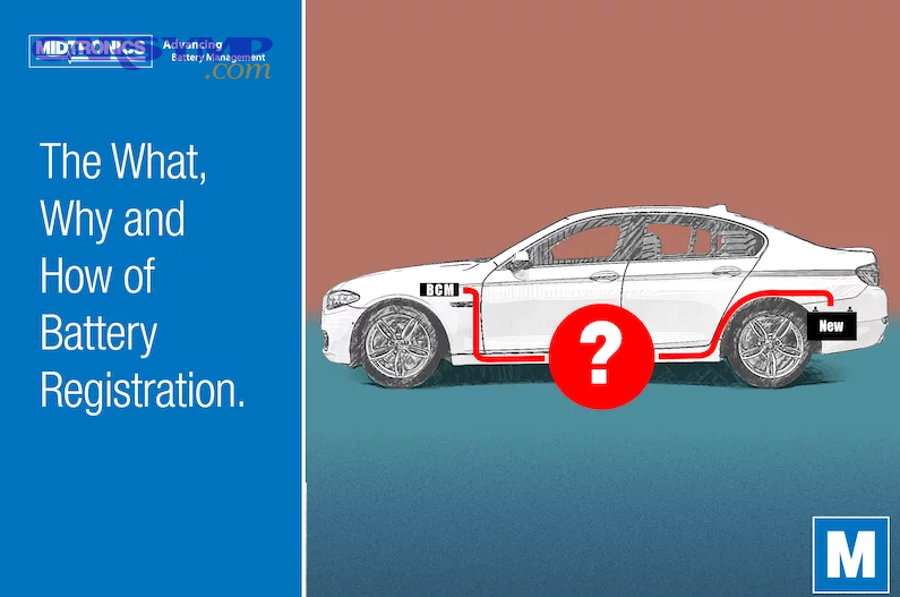
Reason 1: Adaptive charging must stop treating the battery as “old”
Modern energy management can increase or alter charging behavior as a battery ages to maintain reliable starting and stable voltage for electronics. Cụ thể, if the car still “thinks” the old battery is installed, it may overcharge or undercharge the new one, which can accelerate wear. Theo nghiên cứu của Midtronics từ Battery Tips team, vào 07/2022, battery registration is described as resetting charging parameters after a new battery is installed so the system charges appropriately again.
Reason 2: Start-stop decisions depend on the battery’s learned state
Start-stop systems are conservative: they only shut the engine off when the system believes the battery can handle restart loads and accessory demands. Để minh họa, if the battery’s “history” is not reset, start-stop may become inconsistent, disabled, or overly aggressive, depending on how the vehicle interprets the stored battery data.
Reason 3: IBS/BEM/BCM tracking needs a clean baseline
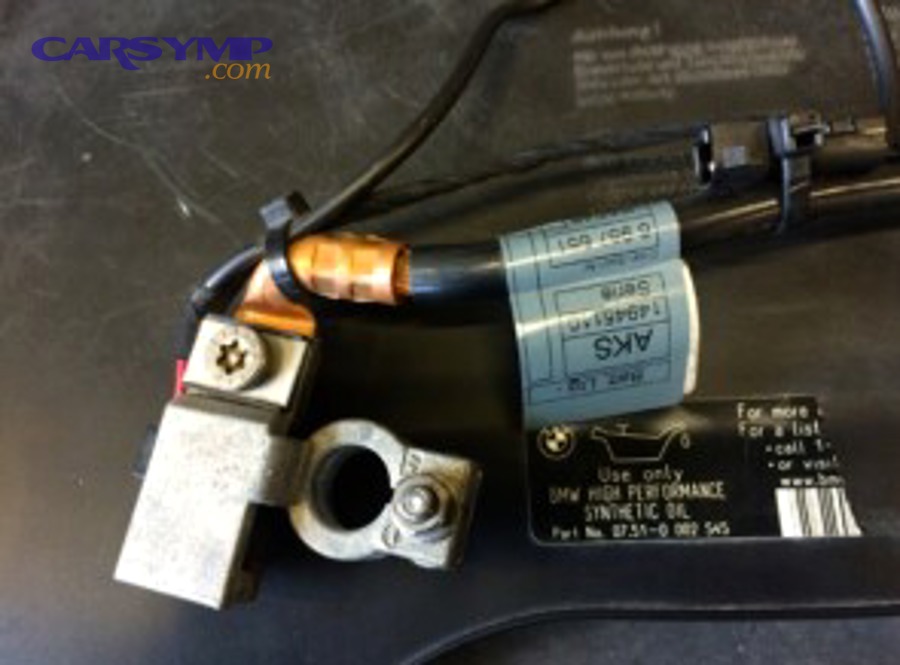
Many platforms use an intelligent sensor on the negative cable (often called IBS) plus a control module that logs battery condition. Quan trọng hơn, this is exactly why registration exists: it aligns the logged battery “identity” with what’s physically installed, so diagnostics and charge control stay coherent.
What does registering a new battery actually reset inside the car?
Battery registration is a reset-and-recalibration event that tells the vehicle the battery is new, so the Battery Management System returns to new-battery charging targets and restarts its aging/health counters. Bên cạnh đó, what gets reset varies by brand, but the common pieces are age counters, charging maps, and stored battery identity fields.
Reset 1: Battery “age” and degradation assumptions
Most systems don’t measure battery age by calendar time alone; they infer it from charge acceptance, temperature, and historical loads. Cụ thể hơn, registration wipes the learned “old battery behavior,” so the alternator control (or DC/DC strategy on hybrids) doesn’t keep compensating for an aged battery that is no longer there.
Reset 2: Charging profile and current limits
Charging profiles can be battery-technology specific (flooded vs EFB vs AGM). Tuy nhiên, if the car believes it still has an AGM when you installed an EFB, it may apply the wrong voltage and current limits; likewise, changing capacity (Ah) can shift how the car schedules charging and load shedding.
Reset 3: Start-stop thresholds and comfort-load shedding
Many vehicles prioritize starting reliability by disabling comfort features (heated seats, blower speed, infotainment behaviors) when the battery state is low. Ngoài ra, after registration, the system recalculates those thresholds under the assumption of a healthy battery, often restoring normal behavior once the car completes its post-reset monitoring cycle.
Practical meaning: “Register” is often a quick action, “Code” is data entry
In everyday shop language, people say battery coding for the whole process. Đặc biệt, on some vehicles the only required step is a registration/reset; on others you must also enter battery data like type, capacity, manufacturer, or a serial/BEM code so the module can match the charging model.
Which vehicles and battery setups most often require registration?
There are three main groups: vehicles with a full Battery Energy Management system (common on start-stop), vehicles that use an intelligent battery sensor, and vehicles that require “closed-system” battery identity inputs. Tiếp theo, you can classify your car by looking for start-stop behavior, IBS/BMS terminology in documentation, or scan-tool menus that include battery registration.

Group 1: Start-stop platforms with Battery Energy Management
Start-stop platforms place heavy cycling demands on the 12V system and often require a managed approach to keep battery health stable. Để hiểu rõ hơn, these are the vehicles most likely to expose a “battery registration” service function in their diagnostic routines. Theo nghiên cứu của Banner Batteries từ Battery knowledge content, vào các hướng dẫn về BEM/start-stop, việc đăng ký/khởi tạo được mô tả là khuyến nghị hoặc yêu cầu tùy kiến trúc hệ thống (open vs closed).
Group 2: Vehicles with an IBS (intelligent battery sensor)
An IBS typically mounts at or near the negative terminal and measures voltage/current/temperature for battery state calculations. Bên cạnh đó, the presence of this sensor is a strong clue that the car is “learning” battery behavior, which is why registration exists to reset the learned baseline after a new battery is installed.
Group 3: “Closed-system” coding that expects a serial/BEM code
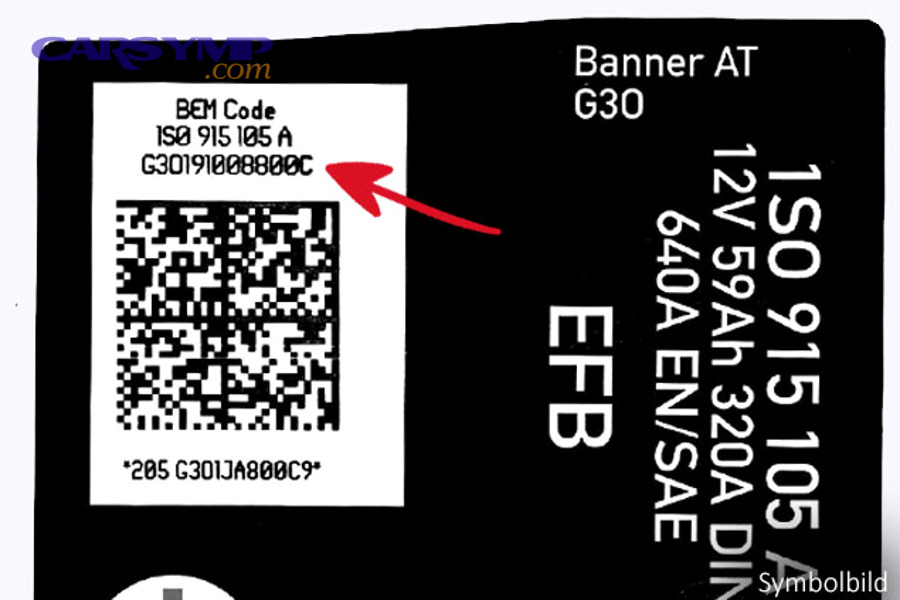
Some ecosystems treat the battery identity as a coded part of the vehicle configuration. Cụ thể, they may ask for a BEM code (two-line label) or accept a serial number entry that functions as a “new battery identity” for tracking and charging logic.
Battery technology triggers: AGM vs EFB vs flooded
Changing battery technology is one of the most important times to do battery coding, not just a reset. Quan trọng hơn, if your car originally used AGM (common with start-stop), replacing it with the wrong type can create chronic low charge acceptance, repeated warnings, or shortened service life—so matching technology and then registering is the safe baseline.
How do you register a new battery step-by-step with an OBD tool?
The reliable method is: keep voltage stable, install the correct battery, then perform the scan-tool battery service function and confirm the module stored the new battery data. Dưới đây, you’ll see a step-by-step that works across many brands and aligns with how battery registration is commonly described: a scan-tool procedure that resets charging parameters after installation.

Step 0: Prepare a stable power plan (optional but smart)
Before you disconnect anything, decide whether the car should retain memory power (radio codes, window indexing, module sleep states). Cụ thể, many DIYers use a memory saver/voltage maintainer; if you don’t, plan for window reinitialization and clock resets afterward, and avoid opening doors repeatedly during the process so modules can sleep cleanly.
Step 1: Install the battery correctly and protect the sensor cable
Install the battery with correct polarity, tight terminals, and secure hold-down hardware. Bên cạnh đó, handle the negative cable area gently—vehicles with an IBS can be sensitive to rough handling, water intrusion, and poor connections, which can mimic battery faults and confuse registration results.
Step 2: Verify the replacement battery matches key specs
Confirm physical size, terminal layout, technology (AGM/EFB/flooded), and capacity (Ah) match what the vehicle expects. Tuy nhiên, if you intentionally change capacity or technology, plan to perform battery coding (data update), not just registration, so the charging model matches reality.
Step 3: Connect the diagnostic tool and select the right function
Connect the tool to the OBD port and find the service function typically labeled Battery Registration, battery replacement, Battery Adaptation, or BMS Reset. Tiếp theo, select the vehicle profile accurately (model/year/engine) so the scan tool communicates with the correct module (often BCM, gateway, or energy management).
Step 4: Enter battery details only if prompted
Some cars only need a “register new battery” confirmation; others prompt for technology, capacity, manufacturer, and a serial/BEM identifier. Cụ thể hơn, if the tool asks for a serial number and you installed the same type/capacity, many systems accept any new/changed serial as a “new identity,” which forces the reset behavior.
Step 5: Execute registration and confirm success messages
Run the procedure and wait for the tool to confirm completion (often “adaptation successful” or “registration completed”). Ngoài ra, clear any energy-management related fault codes only after registration, because some faults are expected during voltage interruption and will resolve once the new battery is known to the system.
Step 6: Post-checks that catch 90% of problems
After the car sits and modules sleep, verify stable cranking, normal idle voltage behavior, and that start-stop behavior returns over the next few drive cycles (if equipped). Tóm lại, if warnings persist, re-check terminal tightness, confirm the battery technology is correct, and re-run the registration to ensure the module stored the new entry.
This table helps you choose the right “service function” so you don’t run the wrong routine for your car’s battery system.
| What you’re doing | What the scan tool function usually says | When it’s needed most | Typical inputs |
|---|---|---|---|
| Reset new-battery assumptions | Battery registration / BMS reset | Same type & capacity as original | Often none; sometimes confirm “new battery” |
| Update configuration data | Battery adaptation / battery coding | Changed Ah rating or AGM↔EFB | Ah capacity, technology, manufacturer/serial |
| Recover from module confusion | Energy management reset / gateway adaptation | Persistent warnings after install | May require sleep cycle + fault clear |
How is battery coding different from simple registration?
Registration tells the car “this battery is new,” while battery coding tells the car “this is the battery’s specification,” and many platforms do both in one guided flow. Bên cạnh đó, the difference matters most when you change battery type, capacity, or the system expects a BEM/serial identity to log the installation.
Registration: “new battery installed” event
Think of registration as the event trigger that resets learned aging counters and charging behavior. Cụ thể, it’s the minimum you want when the vehicle’s charging system adapts over time; without it, the vehicle may keep charging as if it has the old battery installed.
Battery coding: “battery identity and spec” update
Think of coding as configuration data entry. Quan trọng hơn, coding is what prevents mismatched charge targets when you swap technologies (AGM/EFB) or adjust capacity, and it’s also how some systems store a battery manufacturer/serial/BEM identity for tracking.
Comparison checklist for DIY decisions
If the new battery is the same technology and Ah rating, registration is often enough. Ngược lại, if anything changes—technology, capacity, or the car explicitly requests an identifier—then battery coding becomes part of doing the job correctly.
What can go wrong if you skip registering the new battery?
Yes, problems can happen—skipping registration can cause incorrect charging, start-stop issues, and electrical glitches, especially on systems designed to adapt to battery aging. Tiếp theo, the most common failures fall into three buckets: shortened battery life, warnings/comfort restrictions, and intermittent no-start or module faults.
Bucket 1: Shortened life from overcharge or undercharge
When the car charges as if the battery is old, it may push voltage/current that doesn’t match a healthy new battery’s needs, or it may avoid charging aggressively when it should. Cụ thể, both directions can accelerate wear and reduce real-world service life even if the battery is “new.”
Bucket 2: Warning lights, comfort feature shedding, and start-stop confusion
Energy management may disable comfort features temporarily to protect the electrical system when it thinks the battery is weak. Ngoài ra, start-stop may be disabled because the system believes the battery state is insufficient, or it may behave unpredictably while thresholds remain tied to old-battery data.
Bucket 3: Electrical glitches that look “random”
Some shops report fuses, module communication errors, and persistent warnings when a required registration step is skipped. Đặc biệt, Batteries Plus notes that failing to register a new battery can be associated with electrical system glitches and warnings, which is why they treat registration as important on applicable vehicles.
In real-world service conversations, this is why technicians often bundle “battery replacement” with a scan-tool reset on certain brands: the install is physical, but the car’s brain still needs the update. If you’re budgeting for service, you may see a line item like “Battery replacement cost estimate” that includes diagnostic time, coding/registration, and post-install validation. Some owners also track symptoms and DIY outcomes on resources like carsymp.com, especially when the same vehicle repeats battery warnings after a new install.
How do you confirm the registration worked and protect the new battery long-term?
Confirming success means verifying the module stored the new battery event/data and ensuring the car returns to normal charging and start-stop behavior over the next drive cycles. Dưới đây, the key is to check both “software confirmation” (scan tool status) and “behavior confirmation” (voltage, warnings, sleep current).
Confirm in the scan tool: battery history and adaptation status
Many tools show last replacement date, stored Ah, or a “registered” flag after the procedure. Tiếp theo, if your tool can read measuring blocks, look for battery state values that align with a healthy installation and ensure no “battery not registered” fault remains.
Confirm in real behavior: stable voltage and no recurring warnings
After a short drive and a sleep cycle, the car should crank strongly and stop producing repeated energy-management warnings. Bên cạnh đó, if warnings return only after sitting, treat it as a connection/sensor/capacity mismatch problem first, not as a “bad new battery” assumption.
Protect long-term: match technology, avoid deep discharge, and let the car sleep
Start-stop batteries (AGM/EFB) tolerate cycling better, but they still dislike being deeply discharged repeatedly. Quan trọng hơn, if your driving is mostly short trips, consider periodic charging or longer drives so the system can replenish charge; otherwise, even a correctly registered battery can age faster than expected.
Expectation management: service life varies by use case
Many drivers ask “How long a car battery should last” because modern vehicles have higher parasitic and accessory loads. Tóm lại, correct registration helps the system charge properly, but real longevity still depends on climate, trip length, garage/parking patterns, and whether start-stop cycling is frequent.
Supplementary: BEM codes, IBS sensors, and open vs closed systems
This section expands beyond the basic how-to and explains why some cars require data-entry codes while others “learn” the new battery automatically. Hãy cùng khám phá, these concepts help you choose the right approach when a generic scan tool offers multiple battery functions.
What a BEM code represents (and why aftermarket batteries may not have one)
A BEM code is essentially a battery identity label used by some systems to store manufacturer/part and installation-related identification. Cụ thể, Banner’s guidance explains that some vehicles/tools may request a BEM code during battery setup, and that replacement batteries from the free aftermarket may not carry the same code labeling format—so tools may generate or accept alternative entries instead.
IBS as a meronym: the small sensor that changes the whole workflow
As a part-of-system (meronym), the IBS is a single component, but it enables a full battery monitoring strategy. Ngoài ra, the sensor measures and reports battery-related values to the engine/body control electronics, which is why the system develops a “memory” of battery condition that registration must reset when the battery changes.
Open systems vs closed systems (a useful synonym pair: “learning” vs “locked”)
Some architectures are effectively open/learning: they can accept an equivalent battery and adapt with minimal coding. Ngược lại, more closed/locked ecosystems prefer a specific configuration step (or code-like identity) so the module immediately knows what was installed and can apply the correct charge model.
When the car “self-learns” after registration
Even after you register, many vehicles still take a few drive cycles to fully settle thresholds and restore certain comfort behaviors. Tóm lại, if the scan tool confirms success and the installation is correct, give the system time to re-evaluate state-of-charge and stop generating temporary protective restrictions.
FAQ
These quick answers address the most common “should I / can I / what if” questions drivers ask after installing a new battery on a modern vehicle. Tiếp theo, use them to decide whether you need a shop, a brand-specific app, or a capable bidirectional scan tool.
Can I drive if I didn’t register the new battery yet?
Sometimes yes, but it depends on how strict the platform is. Cụ thể, some systems will operate with reduced functionality or warnings until registration is done, while others can create charging mismatches that slowly reduce battery life, so it’s best to register as soon as practical.
If I replaced the battery with the same type and capacity, do I still need battery coding?
Often you only need registration (the “new battery” reset) and not full data changes. Tuy nhiên, the workflow is frequently labeled battery coding in tools and shops even when no spec changes are made, so follow the tool prompts and confirm what it actually recorded afterward.
What if my scan tool asks for a serial number or BEM code?
Follow the brand-specific guidance: some vehicles accept any new serial as a “new identity,” while others prefer a specific code format or generated entry. Bên cạnh đó, if your battery label does not include the expected code, many multi-brand tools provide alternative workflows or code generation options depending on the platform.
Is there a safe way to learn the process visually?
Yes—watching a complete walk-through helps you avoid common menu mistakes (wrong module, wrong battery type, wrong capacity). Để bắt đầu, here is a practical demonstration of registering a new battery on a BMW using a diagnostic workflow.