


Readiness monitors and inspection implications come down to one simple idea: your car must prove its emissions systems have run their self-checks recently enough to be trusted. If too many monitors are incomplete, many inspection programs treat that as “not enough evidence,” even if the car seems to drive fine.
Beyond passing an inspection, readiness data helps you plan repairs and avoid wasted trips to a testing station. It can also reveal why a vehicle that “feels fixed” still isn’t considered ready, especially after a battery disconnect or diagnostic reset.
In this guide, you’ll learn what monitors are, how inspectors interpret them, and how to move from “not ready” to “ready” with the least frustration—without relying on guesswork or last-minute tricks.
To begin, let’s define what readiness monitors really measure and why the words complete and incomplete can decide the outcome of your test.
What are readiness monitors, and what do they prove to an inspector?
Readiness monitors are built-in self-tests in the OBD-II system that confirm emissions-related components have been checked under real driving conditions. Next, understanding what each monitor is responsible for explains why an inspection may fail even when the engine runs smoothly.

Specifically, your engine computer (ECU/PCM) runs a set of tests on systems that affect emissions output. When a test runs to completion and the results are within limits, the monitor flips to a completed state. When the test has not run—or cannot run because conditions were not met—it remains incomplete.
Inspectors don’t usually need to “see” the entire test procedure. Instead, they query the vehicle’s OBD system and read a readiness summary that answers: Have you recently verified the major emissions controls?
The term “I/M readiness” is common because many programs are tied to Inspection/Maintenance rules. While your exact local process may vary, readiness is a standardized concept across OBD-II vehicles in many regions.
Which monitors run all the time versus only under certain conditions?
Continuous monitors run continuously and re-check key functions during most driving, while non-continuous monitors run only when specific enabling criteria are met. Next, knowing this difference helps you predict which monitors will set quickly and which may take days of normal use.
Typical continuous monitors include misfire monitoring, fuel system monitoring, and comprehensive component monitoring. They often complete quickly after startup because the ECU can evaluate them during many operating modes.
Non-continuous monitors commonly include catalyst efficiency, oxygen sensor function, oxygen sensor heater operation, EGR/VVT behavior (where applicable), secondary air injection (if equipped), and EVAP leak checks. These depend on temperature, speed, load, fuel level, and time since start.
Why does “ready” matter more than “no codes” for some inspections?
“No codes” only means the ECU isn’t currently storing a fault that triggers the warning light, but “ready” means the ECU has actually completed its emissions verification tests. Next, this distinction explains why a vehicle can show no warning light yet still be rejected for incomplete readiness.
If a monitor never ran, the inspection program cannot trust that the system is working—especially if the system was recently reset. That’s why readiness is often treated as proof-of-testing, not proof-of-perfection.
Which readiness monitor statuses matter most: ready, not ready, and unsupported?
The three most important states are ready (complete), not ready (incomplete), and unsupported (not equipped). Next, understanding these labels prevents you from chasing a “missing” monitor that your car was never designed to run.

Most scan tools display readiness using icons, checkmarks, or colored boxes. The terminology differs by brand, but the logic is the same.
What does “ready/complete” actually mean?
Ready means the ECU has run that monitor’s test since the last reset and has enough data to declare the test complete. Next, this is why a single successful drive cycle for one monitor may not help another monitor that needs different conditions.
Importantly, “ready” does not guarantee the component will never fail. It means it passed its most recent evaluation under the conditions the ECU requires for that specific test.
What does “not ready/incomplete” actually mean?
Not ready means the ECU has not finished that monitor’s test since the last reset or cannot complete it because enabling conditions haven’t been met. Next, the most common cause is a recent code clear, battery disconnect, ECU replacement, or a recent repair that reset memory.
Some monitors, especially EVAP, may remain incomplete simply because you haven’t driven with the right fuel level, temperature range, and soak time.
What does “unsupported/not available” mean, and why is it normal?
Unsupported means your vehicle does not run that monitor because it lacks the related hardware or strategy. Next, this is common across model years, engine families, and emissions packages, so it’s not automatically suspicious.
For example, some vehicles don’t have secondary air injection, so an AIR monitor may show unsupported. Diesel readiness sets can also differ from gasoline readiness sets. Unsupported is not the same as incomplete.
How do emissions inspections use readiness monitors instead of tailpipe tests?
Many modern programs use an OBD-based inspection that checks readiness, warning light status, and stored faults rather than measuring tailpipe gases directly. Next, seeing what the inspector’s scanner checks helps you avoid failing for a simple readiness issue.

In an OBD-focused inspection, the station connects to your diagnostic port and queries standardized OBD modes. While the details vary by jurisdiction, the process often includes these broad checks:
- MIL (Malfunction Indicator Lamp) status: whether the check engine light is commanded on.
- Stored and pending DTCs: whether emission-related faults are present.
- Readiness monitor completion: whether required monitors are complete.
- Sometimes: additional data points like calibration identifiers, depending on local rules.
This approach can be more effective than a single tailpipe snapshot because it reflects how the emissions system performs across many operating conditions.
Why does an inspector care about incomplete monitors even if the light is off?
An incomplete monitor reduces confidence that the emissions system has been verified since the last reset, even if no fault is currently triggering the light. Next, this is why last-minute resets can backfire: they erase evidence that the monitors have actually run.
Some programs allow a limited number of incomplete monitors depending on vehicle age and fuel type, but many will not accept multiple incomplete monitors, especially on newer vehicles.
How do “inspection implications” change after repairs or recent resets?
After repairs, you may have fixed the underlying problem but still need to prove it by completing readiness tests. Next, inspections often treat the period immediately after a reset as unverified, so you’ll want to complete enough driving for monitors to set before testing again.
This is why planning matters: a repair today might not equal a pass tomorrow if the EVAP or catalyst monitor still needs time and conditions to complete.
Why do monitors reset after disconnecting the battery or clearing diagnostic codes?
Monitors reset because the ECU clears its “since last reset” emissions self-test history, forcing many non-continuous tests to start over. Next, understanding what gets erased helps you decide when a reset is helpful and when it creates extra work.
When you clear codes with a scan tool, or when the battery is disconnected long enough to drop keep-alive memory, the ECU often treats that as a new baseline. It may erase adaptive fuel trims, readiness status, and certain stored history used to confirm monitor completion.
What resets readiness faster: code clearing, battery disconnect, or module replacement?
Any method that clears keep-alive memory can reset readiness, but code clearing is the most common trigger because it’s intentional and immediate. Next, module replacement or reprogramming often resets even more learned data, which can require extra driving before everything stabilizes.
Battery disconnect effects vary: some vehicles retain memory longer than others, and some resets are partial. Still, it’s safest to assume readiness may reset if power is lost.
Why do some monitors come back quickly while others stay incomplete?
Continuous monitors often complete quickly because they evaluate constantly, while non-continuous monitors need specific enabling criteria that might not occur in short trips. Next, that’s why mixed driving—cold start, steady cruise, decel, idle—matters more than simply “driving a lot.”
Short, repetitive trips can leave EVAP and catalyst incomplete for longer than you expect.
How can you check readiness monitors correctly before you schedule an inspection?
You can check readiness by connecting an OBD-II scan tool and viewing the I/M readiness screen to see which monitors are complete, incomplete, or unsupported. Next, doing this at home prevents a failed inspection trip caused only by “not ready” status.
Use a basic checklist to avoid misleading results:
- Confirm the vehicle is warmed up: many monitors won’t run on a cold engine.
- Check MIL status: if the light is commanded on, readiness alone won’t save the test.
- Read stored and pending codes: pending faults can block monitor completion even if the light is off.
- Open the readiness screen: verify how many are incomplete and which ones they are.
- Re-check after a normal drive: some monitors can flip to complete after a single correct trip.
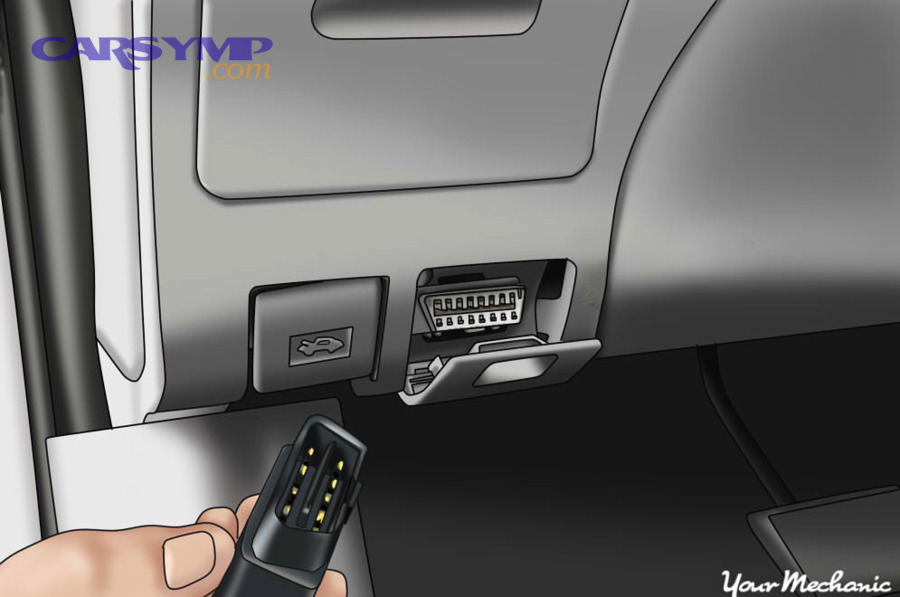
How to use an OBD2 scanner at home usually comes down to locating the diagnostic port, powering the scanner, selecting the emissions/readiness menu, and reading the monitor list without clearing anything unless you have a clear reason.
To make your results more trustworthy, avoid checking readiness immediately after you cleared codes or disconnected the battery. Instead, confirm how long it has been since a reset and interpret the monitor list accordingly.
What should you look for on the readiness screen before testing day?
Look for a majority of supported monitors marked complete, with incomplete monitors limited to what your local rules allow. Next, pay special attention to catalyst and EVAP because they commonly cause last-minute surprises.
If your scan tool provides “since DTCs cleared” information, treat that as a clock: the more recent the clear, the less likely your readiness is fully set.
Why do pending codes matter even if readiness looks good?
Pending codes indicate the ECU has detected a fault trend that can mature into a confirmed fault, potentially preventing a monitor from completing. Next, this is a key reason a monitor may stay incomplete: the ECU may refuse to mark it complete if it cannot pass its own test.
In other words, readiness is not just time—it’s successful test completion.
What is a drive cycle, and how does it turn “not ready” into “ready”?
A drive cycle is a pattern of operating conditions—cold start, steady driving, accelerations, decelerations, and idle—that enables the ECU to run non-continuous monitor tests to completion. Next, using a structured drive cycle reduces random trial-and-error driving.

There is no single universal drive cycle that perfectly fits every make and model, but most successful approaches share the same building blocks:
- Cold start: engine at ambient temperature, then idle and gentle warm-up.
- Steady cruise: consistent speed for several minutes to stabilize sensors and fuel trims.
- Controlled decel: coasting down without braking can help certain monitors evaluate conditions.
- Stop-and-go: varied load can help complete additional tests.
- Soak time: some EVAP tests require the vehicle to sit off for a period.
To see a practical walkthrough of readiness checking and “smog-ready” preparation, this video demonstrates the concept of verifying monitor status before heading to inspection:
Why does a “perfect highway drive” sometimes fail to set EVAP?
EVAP often needs specific fuel level ranges, ambient temperature windows, and soak conditions that a simple highway trip may not provide. Next, adding a cold start, mixed speeds, and an overnight soak often works better than chasing miles.
Many drivers accidentally block EVAP by topping off the tank, driving only short trips, or never letting the car sit long enough for the system to run its leak checks.
How long should you wait before re-checking readiness after a drive cycle attempt?
Re-check readiness after the vehicle has completed a full trip that includes warm-up and steady cruise, and again after a key-off soak if EVAP is still incomplete. Next, this two-step verification prevents you from misjudging progress based on one partial trip.
Some monitors can switch to complete mid-drive; others update only after the ECU sees the full enable-and-pass sequence.
Which monitors commonly block inspections, and why does EVAP take so long?
The monitors most likely to block an inspection are catalyst, EVAP, oxygen sensor, and sometimes EGR or secondary air, because they require narrow enabling conditions and must pass strict thresholds. Next, learning each monitor’s “needs” helps you get ready faster.

EVAP is notorious because it often depends on fuel level, temperature, and a quiet period where the vehicle is off. Catalyst and oxygen sensor monitors can also be sensitive to misfires, exhaust leaks, fuel trim issues, and sensor heater performance.
This table summarizes what common monitors evaluate and what typically prevents them from completing; it helps you diagnose why a specific monitor is stuck on incomplete.
| Monitor | What it evaluates | Common reasons it stays incomplete |
|---|---|---|
| Misfire | Engine misfire detection across RPM/load | Reset history; active/pending misfire faults; unstable idle |
| Fuel System | Fuel trim control and mixture correction | Reset trims; vacuum leaks; sensor issues causing unstable trims |
| Catalyst | Catalytic converter efficiency | Short trips; exhaust leaks; O2 sensor faults; thermostat issues |
| Oxygen Sensor | O2 sensor response and switching behavior | Cold operation; heater issues; fuel control problems; exhaust leaks |
| O2 Sensor Heater | Heater circuit performance (faster warm-up) | Heater fault; low voltage; poor connections; recent reset |
| EVAP | Fuel vapor containment and leak detection | Fuel too full/too low; no soak time; temperature not in range; loose cap |
| EGR/VVT (if equipped) | Exhaust gas recirculation or valve timing behavior | Conditions not met; carbon buildup; sensor/actuator faults |
| Secondary Air (if equipped) | Air injection system operation | Cold-start dependency; pump/valve faults; temperature criteria not met |
Why does EVAP often depend on fuel level?
EVAP leak tests can require a specific tank vapor space so pressure or vacuum changes are measurable and reliable. Next, keeping the tank in a mid-range (not near empty or brim-full) often increases the chance the EVAP monitor will run.
Also, avoid topping off the tank repeatedly when you’re trying to set EVAP readiness, because it can disrupt the conditions the ECU needs.
Why do catalyst and O2 monitors often “refuse” to complete after a repair?
These monitors depend on stable fuel control and sensor feedback, so even a small vacuum leak, exhaust leak, or misfire can prevent completion. Next, checking for pending codes and verifying basic live data stability can be faster than driving blindly.
If you repaired an exhaust leak or replaced oxygen sensors, expect the ECU to require fresh stable drive data before marking these monitors complete.
Can you pass inspection with one monitor incomplete, and what should you do if rules differ?
Sometimes you can pass with a limited number of incomplete monitors, but the allowance depends on local rules, vehicle year, and fuel type. Next, the safest approach is to verify your jurisdiction’s limits and aim to complete all supported monitors whenever possible.

Because inspection programs differ, treat “allowed incompletes” as a fallback, not a goal. A single incomplete EVAP monitor might be acceptable in some areas for certain model years, while other programs require near-total completion.
What’s the practical strategy if you don’t know the local limit?
Assume you need all supported monitors complete, then treat any allowance as a bonus if you discover it later. Next, this strategy reduces the risk of failing because you misapplied rules from a different state, country, or program type.
If you must test soon, focus on completing the most commonly required monitors first—typically catalyst, O2, and EVAP—because those are often the deciding factors.
What should you do if one monitor won’t set but everything else is ready?
First, confirm it’s supported and not merely “unsupported,” then check for pending codes and enabling criteria that are not being met. Next, if the vehicle is otherwise healthy, you can decide whether to wait for completion, follow a manufacturer drive cycle, or consult local rules for a limited incomplete allowance.
A single stubborn monitor is often a conditions problem, not automatically a failed component—but it can be both, so verify rather than assume.
What troubleshooting steps help when monitors won’t set even after normal driving?
If monitors won’t set, you should check for pending faults, incorrect operating conditions, and underlying issues that prevent the ECU from passing its self-tests. Next, a targeted diagnostic approach beats repeated random driving that never triggers the right criteria.

Use this progression to troubleshoot efficiently:
- Scan for pending and stored codes: even one pending code can block a monitor from completing.
- Verify temperature behavior: a thermostat stuck open can keep the engine too cool for catalyst/EVAP logic.
- Check fuel level habits: keep the tank in a mid-range to help EVAP enabling.
- Look for exhaust/vacuum leaks: small leaks can destabilize fuel trims and oxygen sensor behavior.
- Confirm battery voltage stability: low voltage can disrupt heater and monitor routines.
- Consider recent reprogramming or tune changes: some calibrations change readiness behavior.
Why can a “perfectly running” car still have stuck readiness?
Because readiness is about completing specific test routines, not about subjective drivability, a car can feel fine while the ECU still lacks the conditions or confidence to complete a monitor. Next, that’s why objective scan data—pending codes, trims, sensor activity—matters.
This is also why fixing a small vacuum leak or correcting a temperature issue can suddenly allow multiple monitors to complete in one or two trips.
When should you stop driving and diagnose instead of chasing readiness?
Stop chasing readiness if the same monitor remains incomplete after several varied trips and a soak period, especially if pending codes appear repeatedly. Next, at that point, you are likely dealing with a condition that prevents a “pass” rather than a missing opportunity to run the test.
Diagnosis saves time and reduces the risk of damaging components like the catalytic converter by driving with an unresolved misfire.
Contextual Border: Up to this point, you’ve covered the core macro context—what readiness monitors are, how inspections interpret them, and how to complete them. Next, the supplementary section focuses on advanced nuances that can surprise owners even when basic readiness looks straightforward.
Advanced inspection nuances: permanent codes, I/M history, and “ready” look-alikes
Advanced inspection outcomes can be affected by permanent codes, deeper OBD test modes, and differences between “ready,” “supported,” and “healthy.” Next, these nuances explain why some cars still fail or raise flags even after you think the basics are handled.

How do permanent trouble codes change the “reset and go” plan?
Some vehicles store permanent DTCs that cannot be erased by a normal scan-tool clear, and they disappear only after the ECU confirms fault-free operation over multiple monitoring cycles. Next, this is a common reason “clearing everything” fails as a strategy—especially for emissions-related faults.
If your scanner displays permanent codes, treat them as a sign that the vehicle must prove the repair through normal operation, not through resets. This is also where careful check engine light diagnosis matters more than quick deletes, because the system is designed to prevent inspection shortcuts.
Why can Mode $06 data show problems even when monitors look complete?
Mode $06 can expose test results and margins that indicate a system is close to failing, even if the monitor currently shows complete. Next, this helps explain why a car may pass today but soon store a code if a component is borderline.
In practical terms, readiness is a minimum requirement for many inspections, while Mode $06-type results can be an early warning for technicians and advanced DIYers who want to prevent repeat failures.
How do unsupported monitors differ from missing emissions equipment?
Unsupported monitors are normal when the vehicle is not equipped for that test, while missing emissions equipment is a hardware change that can create faults, abnormal readiness patterns, or inspection failures. Next, don’t confuse “not supported” with “not ready”—they have different meanings and different inspection implications.
If a vehicle has modified exhaust components or altered calibration, readiness behavior may not match expectations. Even if a scan tool shows limited “unsupported” items, you should verify that the vehicle still meets legal equipment requirements in your area.
How do you prove a repair without masking the original fault?
After a fix, you should confirm stable live data, absence of pending codes, and successful readiness completion rather than immediately erasing all evidence. Next, this approach reduces repeat failures and supports reliable Check engine light after repairs troubleshooting when the light returns unexpectedly.
In many cases, the best practice is simple: fix the root cause first, then drive to complete the monitors, and only then consider clearing codes if it’s necessary for verifying a new baseline. That’s the practical meaning of When to clear codes vs fix the issue—clearing is a tool, not the repair itself.
Frequently asked questions about readiness monitors and inspections
These common questions focus on real-world decisions drivers face when timing repairs, resets, and inspections. Next, use these answers as a quick reference when you’re close to testing day.

Is it safe to clear codes right before an inspection appointment?
It’s usually a bad idea because clearing codes often resets readiness, making multiple monitors incomplete and increasing your chance of rejection. Next, if the goal is to pass legitimately, you’ll get better results by fixing the cause and completing readiness through normal driving.
Why did my readiness go backward after a battery change or dead battery?
A power loss can clear keep-alive memory and reset readiness history, forcing the ECU to re-run tests. Next, plan extra driving time after battery-related work, especially if EVAP and catalyst monitors are required in your area.
What if only EVAP is incomplete and everything else is complete?
EVAP is often the last monitor to complete because it needs precise conditions and sometimes a key-off soak. Next, keep fuel mid-range, include mixed driving, and allow a soak period before re-checking readiness.
Can I drive normally until monitors set, or do I need a strict pattern?
Many vehicles will set monitors with normal mixed driving, but a structured drive cycle can speed the process when you’re on a deadline. Next, if progress stalls, add a cold start, steady cruise, controlled decel, and a soak to better match common enabling criteria.
How do I reduce the chance of failing twice in a row?
Scan for pending codes, confirm readiness is sufficiently complete, and avoid last-minute resets or battery disconnects. Next, if a monitor is stubborn, diagnose why it won’t complete instead of hoping more miles will fix it.