


Brake grinding noise is usually preventable when you treat brake inspections like a routine, not a reaction. This guide gives you a practical pad-and-rotor checklist, a simple schedule, and clear “what to do next” actions so you can stop grinding from ever reaching metal-on-metal.
Many drivers only search after hearing a grinding noise when braking, so you’ll also learn what that sound typically means, what parts are most likely involved, and how to spot the early warning signs before the rotors get chewed up and the repair bill climbs.
Safety matters, too. You’ll get urgency guidance—when it’s safe to drive to a shop, when you should park immediately, and which symptoms move grinding from “maintenance” to “don’t risk it.”
Introduce a new idea: below, we’ll turn brake grinding into a predictable inspection routine you can repeat, even if you’re not a mechanic.
Is brake grinding noise ever “normal,” or is it always a warning?
No—brake grinding noise is not “normal” in the way a minor squeak can be, because it usually signals abrasive contact (often metal-on-metal), accelerating wear, rising heat, and reduced braking margin; the exceptions are brief surface rust or debris contact that resolves quickly. More importantly, the key is to treat grinding as a time-sensitive signal because (1) damage compounds fast, (2) stopping performance can degrade unpredictably, and (3) the fix can jump from “pads” to “pads + rotors + caliper work” in one commute.
Is it safe to drive if your brakes are grinding right now?
No—if your brakes are grinding right now, it is not safe to keep driving normally, because (1) the friction material may be gone, (2) the rotor can be damaged with every stop, and (3) heat buildup can worsen control and braking consistency. To better understand the risk, separate “drive-to-service carefully” from “stop now” using a quick decision checklist:
Stop driving and park (tow recommended) if you notice any of these:
- Grinding is constant every time you brake, especially at low speeds (classic metal-on-metal pattern).
- The car pulls hard to one side when braking (possible caliper seizure or uneven braking).
- The pedal feels soft, sinks, or you must pump it (hydraulic problem—different from grinding, but urgent).
- You smell burning or see smoke from a wheel area (overheating brake).
- Steering wheel shakes violently under braking or the car vibrates aggressively (possible severe rotor issues).
- Braking distance suddenly increases or you need much more pedal effort.
You may drive slowly to a nearby shop only if all of the following are true:
- Grinding is intermittent, light, and you can clearly link it to a specific situation (like after rain or after the car sat).
- Braking still feels normal (no pull, no sinking pedal, no warning lights that indicate braking system faults).
- You can avoid highways, heavy traffic, and steep grades.
- You keep speed low and increase following distance dramatically.
This “safe-to-drive guidance with gearbox noise” style logic applies here as well: if the system that stops the vehicle is making a new harsh noise, assume the worst until inspection proves otherwise.
Is a quick inspection enough to prevent rotor damage once grinding starts?
Yes—if you catch the problem early, a quick inspection can prevent rotor damage, because (1) it confirms whether you still have pad material, (2) it reveals uneven wear that points to a caliper problem, and (3) it stops you from continuing metal-on-metal stops that carve the rotor. However, once the backing plate contacts the rotor, every brake application becomes a cutting tool. The practical takeaway is simple: grinding is knowing you’ve run out of “wait time.”
Rule of thumb for cost and damage control:
- If you still have friction material and the rotor face looks smooth: you may be able to replace pads and hardware only.
- If you see grooves you can catch with a fingernail, blue heat spots, or heavy scoring: expect rotor work.
- If one pad is worn much more than the other: suspect a caliper slide/piston problem and plan for more than just pads.
What does brake grinding noise mean (and what parts are usually involved)?
Brake grinding noise is a harsh, low-frequency “scrape/grind” sound caused by hard material (often metal) contacting the rotor, typically originating from worn brake pads, damaged rotors, seized caliper components, loose hardware, or debris contacting the rotating assembly. Specifically, the sound exists because disc brakes rely on controlled friction—when the friction material is gone or the parts are misaligned, friction turns into abrasion.

What’s the difference between squealing and grinding brakes?
Squealing usually wins as the early warning noise, while grinding wins as the late-stage damage noise; squeal commonly comes from vibration or a wear indicator, but grinding typically means the system is already chewing into metal or dragging something hard across the rotor surface. However, don’t dismiss squeal—many pads are designed to squeal before they grind, and ignoring squeal is how drivers arrive at grinding.
Quick comparison you can remember:
- Squeal: high-pitched; often intermittent; may happen lightly at certain speeds; can be wear indicator or vibration.
- Grinding: harsh/raspy; often strongest at low speed; typically repeats every stop; strongly suggests urgent inspection.
This is where “Grinding brakes causes and urgency” matters: squeal is a warning you can schedule; grinding is a warning you should treat as now.
What does “metal-on-metal” braking sound like and why does it happen?
Metal-on-metal braking sounds like a rough, gritty scrape—often accompanied by vibration—because the brake pad’s friction layer has worn away and the steel backing plate (or another metal component) is contacting the rotor. Next, here’s why it escalates: the backing plate is harder than the friction material and can gouge the rotor face, creating grooves that reduce smooth contact area, increase heat, and accelerate wear in a vicious loop.
Why it happens in real life:
- Pads were driven past their service limit.
- Inner pads wore faster than outer pads (common when caliper slides stick).
- A caliper piston doesn’t retract properly, keeping the pad dragging.
- Hardware shifted, allowing a pad or shim to rub.
Which brake components should you inspect to prevent grinding (the checklist)?
There are six main inspection areas that prevent brake grinding: pad thickness, rotor condition, caliper movement, hardware integrity, fluid signals, and driving symptoms—because grinding is rarely “mysterious” once you systematically check these six. To illustrate how prevention works, you’ll start with fast checks you can do in minutes, then move to deeper checks that reveal the real cause.

What can you check in 2 minutes without removing the wheel?
There are five quick checks you can do in 2 minutes: visible pad thickness, rotor face condition, obvious shield contact, warning indicators, and a slow roll listen test—based on what you can see and hear safely without tools. Then, use this mini-checklist:
- Pad thickness glance (wheel spokes):
Look at the outer pad if visible. You’re not measuring precisely—you’re looking for “clearly thin” vs “still substantial.” - Rotor face look:
Check for deep circular grooves, heavy rust ridges, or dark blue heat spots. - Dust shield clearance:
A bent backing plate/dust shield can scrape the rotor and mimic grinding. Look for obvious contact. - Dashboard indicators:
Some vehicles have brake wear sensors that trigger warnings when pads are near end-of-life. (Not universal.) - Slow roll listen test (safe area):
Drive at walking speed and lightly apply brakes. A repeated harsh grind that tracks wheel rotation is a strong sign you need a wheel-off inspection soon.
Safety note: If the noise is severe, skip driving tests and inspect parked—or go straight to service.
What should you check with the wheel off (pads, rotors, calipers, hardware)?
There are four main wheel-off inspection groups: pads, rotors, calipers (slides/piston behavior), and hardware—based on the parts that most commonly generate grinding. Besides, wheel-off inspection is where you actually prevent “surprise” rotor damage by catching uneven wear.
Pads (both sides—inner and outer):
- Compare inner vs outer pad thickness. If the inner is much thinner, suspect slide pin issues or piston retraction issues.
- Look for cracked, crumbling, or glazed friction material.
- Check the backing plate for shiny “fresh metal” contact marks (a sign it’s been rubbing).
Rotors:
- Feel the rotor edge for a pronounced lip.
- Inspect for deep scoring and ridges.
- Look for heat checking (fine surface cracks) or blue discoloration.
Caliper and slides:
- Verify slide pins move freely (they should glide smoothly when serviced correctly).
- Inspect boots for tears that allow corrosion.
- Look for uneven pad wear patterns that indicate the caliper isn’t applying force evenly.
Hardware:
- Confirm anti-rattle clips and shims are properly seated.
- Look for bent or missing hardware that could allow a pad to shift and rub.
- Make sure the pad “ears” sit correctly in the bracket channels.
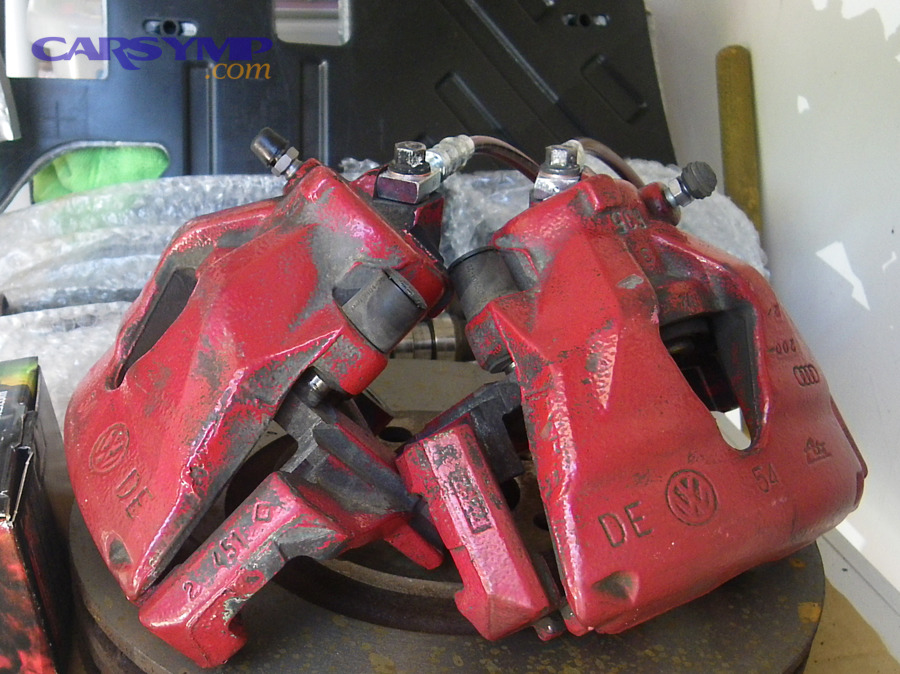
This is also where you’ll catch Caliper seized leading to grinding scenarios: one pad worn down aggressively while the other still looks usable.
How do you spot uneven pad wear before it turns into grinding?
Uneven pad wear is visible when inner and outer pads differ significantly in thickness, or when one pad shows tapered wear (thicker at one end), because caliper slides or pistons are not moving evenly. More specifically, uneven wear is the “early footprint” of future grinding—because the thinner pad hits zero first.
Common uneven wear patterns and what they imply:
- Inner pad much thinner than outer: slides stuck, piston issues, or caliper not centering.
- Outer pad much thinner than inner: less common, but can happen with bracket issues or slide binding in the opposite direction.
- Tapered pad: caliper bracket channels corroded, pad binding, or slide pins not moving evenly.
- One wheel worn far more than the other side of the car: caliper sticking on that corner, or different usage/contamination.
Preventive action: If you find uneven wear, don’t “just slap pads on.” Fix the movement problem first, or grinding returns quickly.
What rotor signs indicate you’re close to grinding (or already damaging rotors)?
There are five rotor signs that indicate high grinding risk: deep scoring, heavy lips, heat spots, cracks, and pulsation-linked surface issues—because each sign reduces smooth pad contact and increases abrasive behavior. Especially, “Rotor scoring severity and fixes” depends on what you see:
- Light surface marks: often normal; monitor and service with pads if within spec.
- Grooves you can feel with a fingernail: higher severity; rotor may need replacement or machining depending on thickness and design.
- Blue/purple discoloration: overheating; investigate sticking caliper or aggressive driving conditions.
- Heat checking/cracks: serious; typically replacement territory.
- Warp/pulsation symptoms: may indicate thickness variation; requires proper diagnosis.

How often should you inspect brakes to prevent grinding in real driving conditions?
There are three practical inspection cadences that prevent grinding: “every oil change,” “seasonally,” and “symptom-triggered,” because brake wear depends more on usage than on a single universal mileage number. Next, you’ll match your schedule to your driving reality so you catch wear before the friction material is gone.
A simple schedule most car owners can follow:
- Quick look (no tools): monthly or every fuel fill if you’re attentive.
- Routine inspection: every oil change or every few months.
- Wheel-off inspection: at least once a year, or sooner if you drive hard conditions.
What inspection schedule works for city driving vs highway driving?
City driving wins the “inspect more often” category, while highway driving is best for “slower wear,” because stop-and-go braking cycles consume pads faster than steady cruising. However, highway driving can still wear pads quickly if you ride the brakes downhill or tow frequently.
Practical guidance:
- City/stop-and-go: inspect more often; pads can disappear faster than you expect.
- Highway mostly: inspect on a routine cadence, but stay alert for corrosion/rust if the car sits or you live in wet/salty areas.
How do towing, mountains, and heavy loads change inspection frequency?
Towing and mountain driving increase heat and brake work, so they require earlier inspections because high temperatures accelerate pad wear, stress rotors, and can expose caliper issues faster. Moreover, repeated heat cycles can reveal problems like sticking calipers (one corner running hotter).
Upgrade your schedule if you:
- Tow trailers or haul heavy loads regularly.
- Drive long downhill grades.
- Commute in steep, stop-and-go hills.
Preventive habits that reduce grinding risk in these conditions:
- Use lower gears downhill to reduce brake load.
- Avoid riding the brakes—use firm, controlled braking instead of constant light dragging.
- Check for uneven wear more frequently.
What warning signs mean you should inspect immediately (before the next trip)?
There are six warning signs that mean you should inspect immediately: new harsh noise, vibration, pulling, longer stopping distance, overheating smell, and abnormal pedal feel—because these signals show that braking is no longer balanced or smooth. Besides, these are the symptoms most likely to turn into grinding fast:
- A new grinding or scraping sound that repeats every stop.
- Steering wheel shake or body vibration when braking.
- Car pulling left/right under braking.
- Brake pedal pulsation or sudden change in pedal feel.
- Burning smell after normal driving.
- Warning lights related to braking systems (where applicable).
What are the most common causes of brake grinding, and how does each one show up during inspection?
There are five common causes of brake grinding: worn pads, rotor damage, seized caliper/slides, shifted hardware, and debris/shield contact—because these are the conditions that place hard material against the rotor surface. To better understand what you’re seeing, map each cause to a visible clue and a next step.

Is worn-out brake pad material the #1 cause of grinding?
Yes—worn-out brake pad material is the #1 cause of grinding, because (1) friction material eventually reaches zero, (2) inner pads can wear faster and go unnoticed, and (3) many drivers ignore early squeal until grinding starts. However, the inspection proof is straightforward:
What you’ll see if pads caused the grinding:
- Very thin or missing friction material.
- Shiny metal marks on the backing plate.
- Rotor grooves that match the pad contact ring.
- Sometimes: a dust-heavy wheel from high wear.
What to do next:
- If the rotor is deeply scored or heat-damaged: plan on rotor replacement or machining where appropriate.
- If pads wore unevenly: identify the cause (slides/piston) before installing new pads.
Can debris or a bent dust shield cause a “fake grinding” sound?
Yes—debris or a bent dust shield can create a “fake grinding” sound, because (1) a small stone can scrape intermittently, (2) a shield can touch the rotor edge, and (3) the sound can change with turning or bumps. Meanwhile, the way you confirm it is by pattern:
Clues that point to debris/shield contact rather than pad wear:
- Noise changes when turning left vs right (rotor shifts slightly relative to shield).
- Noise is present even with minimal braking, or happens over bumps.
- Pads still show healthy thickness on inspection.
- You can see a shiny rub mark on the shield.
Fix: Reposition the shield carefully and remove debris. If you’re unsure, have a shop verify—brakes are not the place for guesswork.
How do stuck calipers or seized slide pins lead to grinding?
Stuck calipers or seized slide pins lead to grinding by keeping a pad pressed against the rotor unevenly, overheating one corner, accelerating wear to zero on one pad, and eventually causing metal contact. In addition, this is the pathway most likely to create repeat grinding if you replace pads without fixing the movement problem.
Inspection clues of a sticking caliper:
- One pad is dramatically thinner than its mate.
- Rotor shows blue/purple heat marks on that wheel.
- The wheel area smells hot after normal driving.
- The car pulls under braking or feels “draggy” rolling.
This is the classic Caliper seized leading to grinding situation: it’s not a “pads-only” story—it’s a “restore caliper function” story.
What maintenance actions prevent grinding long-term (and what mistakes make it worse)?
There are four maintenance actions that prevent grinding long-term: consistent inspections, correct pad/rotor service, caliper slide maintenance, and proper hardware/bedding practices—because grinding usually comes from neglect, friction imbalance, or misalignment. More importantly, small mistakes in brake service can create new noises or premature wear, so prevention includes “do it right” as much as “do it often.”
What’s the best preventive maintenance routine for pads and rotors?
The best preventive maintenance routine is a repeatable checklist—inspect, clean, verify movement, replace wear parts, and confirm smooth operation—because consistent process prevents “surprise grinding.” Then, apply this routine:
- Inspect pad thickness and wear pattern (inner vs outer).
- Inspect rotor condition (scoring, heat marks, cracks, lip).
- Confirm caliper slide movement (pins glide; boots intact).
- Replace hardware when replacing pads (clips/shims often matter for fit and noise).
- Clean pad bracket channels so pads slide freely (corrosion here causes binding).
- Torque wheels correctly (uneven torque can contribute to vibration complaints).
- Bed-in pads if the manufacturer recommends it, to establish stable friction transfer.
This routine is how “preventing grinding with regular inspections” becomes real life, not just advice.
Which DIY mistakes commonly cause brake noise or early grinding?
There are five common DIY mistakes that cause brake noise or early grinding: skipping hardware, ignoring slide pins, contaminating friction surfaces, reusing damaged rotors, and forcing pads to fit in corroded brackets—because each mistake disrupts smooth, even braking. Specifically, avoid these:
- Reusing old clips/shims that no longer hold pads properly.
- Not servicing slide pins (or using the wrong lubricant in the wrong place).
- Touching pad/rotor faces with greasy hands or getting lubricant on friction surfaces.
- Installing pads on rotors with severe scoring and expecting noise to vanish.
- Not cleaning bracket channels so pads bind and wear unevenly.
Should you replace pads only, or pads and rotors together to prevent repeat grinding?
Pads-only wins when the rotor is healthy, pads-and-rotors wins when the rotor is damaged, and “pads + rotor + caliper service” is optimal when movement is compromised—because the best choice depends on the failure mode, not a rule. However, you can decide logically with a simple comparison table. The table below shows what each condition usually implies and the typical next step.
| What you find during inspection | What it usually means | Typical fix direction |
|---|---|---|
| Pads worn but rotor face is smooth, no heavy grooves | Normal wear caught in time | Pads + hardware (and verify caliper movement) |
| Rotor has deep grooves or heat spots | Abrasive damage / overheating | Rotors + pads (and diagnose why) |
| One pad is much thinner than the other | Caliper/slides not moving evenly | Caliper service + pads (often rotors too if damaged) |
| Grinding occurred for more than a short period | Likely metal-on-metal contact | Expect rotor replacement plus pads |
In short, grinding brakes causes and urgency are tied to decision quality: if you fix only the symptom (pads) and ignore the cause (movement, rotor condition), repeat grinding is likely.
What edge cases can mimic brake grinding noise ?
Brake grinding “look-alikes” exist, and you can rule them out by checking duration, pattern changes with steering/brake pressure, and visible contact marks—because true grinding from worn pads typically persists and worsens, while mimics often come and go. Next, these micro-cases help you avoid misdiagnosis while still staying safe.
Is “rust grinding” after rain the same as pad-to-rotor grinding?
No—rust noise after rain is usually a short-lived surface effect, while pad-to-rotor grinding is a persistent damage signal, because light rust scrubs off after a few normal stops but metal-on-metal continues until parts are replaced. However, you should treat rust noise as a prompt to inspect if it lasts more than a brief drive or if it feels harsh and consistent.
How to tell the difference quickly:
- Rust noise: appears after washing/rain or sitting; fades after a few stops; braking feel stays normal.
- True grinding: repeats every stop; often worse at low speed; may come with vibration or pulling; does not fade.
Can hybrids/EVs develop rotor noise from light brake use, and how do you prevent it?
Yes—hybrids/EVs can develop rotor noise from lighter friction brake use, because regenerative braking can reduce pad-to-rotor cleaning action, allowing rust or surface films to build, especially in wet/salty climates. Besides, prevention is simple: include periodic friction braking (where safe) and keep up with inspections so surface issues don’t mask real wear.
Practical prevention:
- Perform occasional firm stops (in a safe area) to engage friction brakes fully.
- Avoid letting the vehicle sit wet for long periods without driving.
- Inspect rotors seasonally in high corrosion environments.
What is disc thickness variation (DTV) or rotor runout, and can it lead to noise?
Disc thickness variation (DTV) is a condition where rotor thickness differs slightly around its circumference, while runout describes lateral wobble; both can create pulsation, uneven contact, and in some cases noise, because the pad meets changing rotor geometry every rotation. Meanwhile, this matters most when you have vibration/pulsation along with noise, or when new pads don’t quiet the issue.
When to suspect it:
- You feel rhythmic pedal pulsation under moderate braking.
- The steering wheel shakes even after pad replacement.
- The issue varies with speed and braking force.
This is a “measurement” problem—shops confirm with gauges and specs, not guesswork.
Can hub-to-rotor corrosion create scraping or vibration that sounds like grinding?
Yes—hub-to-rotor corrosion can create scraping or vibration that resembles grinding, because corrosion can prevent the rotor from seating perfectly flat, contributing to runout-like behavior and uneven pad contact. More specifically, it shows up in regions with road salt or where vehicles sit for long periods.
Clues:
- Noise/vibration appears after a rotor was recently removed/reinstalled.
- You live in a high-corrosion environment and see heavy rust at the hub area.
- The sensation feels like “wobble” plus sound rather than pure scrape.
Evidence: According to a study by the University of Southampton from its environmental health research team, in 2025, brake-wear particles from certain commonly used brake pads were found to be more toxic to lung cells than diesel exhaust particles, highlighting how brake wear and maintenance choices matter beyond just noise and performance. (southampton.ac.uk)
Evidence (if any)
- The University of Southampton’s 2025 research communications and the related peer-reviewed publication summary report that brake-wear particles from some pad types can be more harmful to lung cells than diesel exhaust particles, reinforcing the value of preventing excessive wear through earlier inspection and service. (southampton.ac.uk)