


Clearing codes and getting OBD-II readiness back to “Ready” after a replacement is a repeatable workflow: confirm the repair, reset DTCs the right way, then complete the driving conditions that allow each monitor to run—so you don’t show up “Not Ready” at inspection.
If you’re unsure whether you even should clear codes, the fastest path is to understand what changes when you erase DTCs (and what doesn’t), because clearing can reset monitor status and temporarily hide useful diagnostic clues.
Once the basics are clear, the next problem is practical: most monitors won’t set from random short trips—you need a cold-start routine, a stable cruise segment, and the right fuel level for EVAP so the PCM can execute its self-tests. (nyvip3.com)
Introduce a new idea: below is a step-by-step, scanner-first method that ties code clearing to readiness completion, then finishes with troubleshooting and advanced edge cases when readiness won’t set.
Do you need to clear (reset) codes after a replacement, or will the car clear them on its own?
Yes—most of the time you should clear codes after a verified repair because it confirms the fix, resets the MIL logic cleanly, and lets you track readiness from a known baseline—while also preventing old stored data from confusing your next diagnosis.
To begin, the real question is when clearing helps and when it hurts, because the same button press that turns the MIL off can also erase freeze-frame context you may need if the problem returns.

Is clearing codes the same thing as fixing the problem?
No—clearing codes is an administrative reset, while fixing is a mechanical/electrical correction, and confusing the two is why many “repairs” come back as repeat check-engine events within a day or two.
Here’s what actually happens in the car’s logic:
- Fixing the problem removes the condition that triggers a DTC (for example, repairing a vacuum leak, replacing a failed heater circuit, or resolving an exhaust leak).
- Clearing codes tells the ECU/PCM to erase stored faults and restart monitor tracking, even if the underlying fault is still present.
So clearing can make the dashboard look better, but it does not guarantee the ECU is satisfied. If the fault is still active, the PCM will often set a code again quickly—sometimes in the same drive.
This is especially relevant after emissions work like oxygen sensor replacement, because the O2 heater and catalyst monitors may need specific conditions to run. If you clear codes immediately and then only drive short trips, you can end up with no light but Not Ready monitors, which still fails many inspections. (dmv.ny.gov)
Transition: Because “reset” and “ready” are different outcomes, the next step is to understand exactly what changes in the system when you press “Erase Codes.”
Which types of codes can you clear (stored/pending/permanent), and what changes immediately after clearing?
You can clear stored and often pending DTCs with most scan tools, but permanent DTCs follow rules that typically require successful monitor runs before the PCM drops them.
A simple, practical breakdown:
- Stored (Confirmed) DTCs: These triggered the MIL based on the PCM’s logic. Clearing usually erases them immediately.
- Pending DTCs: Early detections that have not met the “confirmed” threshold. Clearing can remove them, but they may reappear quickly if the fault remains.
- Permanent DTCs: Intended to prevent “clear-and-pass” behavior; they may remain visible until the PCM’s self-tests pass under normal driving conditions.
What changes immediately after clearing:
- The MIL (Check Engine Light) may turn off if there are no active faults.
- Readiness monitors reset to “Not Ready / Incomplete” for most non-continuous monitors. (dmv.ny.gov)
- Some vehicles may also reset adaptive values (varies by make), which can briefly affect idle quality or shift behavior.
Evidence: According to guidance published for inspection programs, clearing codes resets readiness and requires a drive cycle before the vehicle can be considered ready for an OBD inspection. (dmv.ny.gov)
What is OBD-II readiness, and why does it show “Not Ready” after codes are cleared?
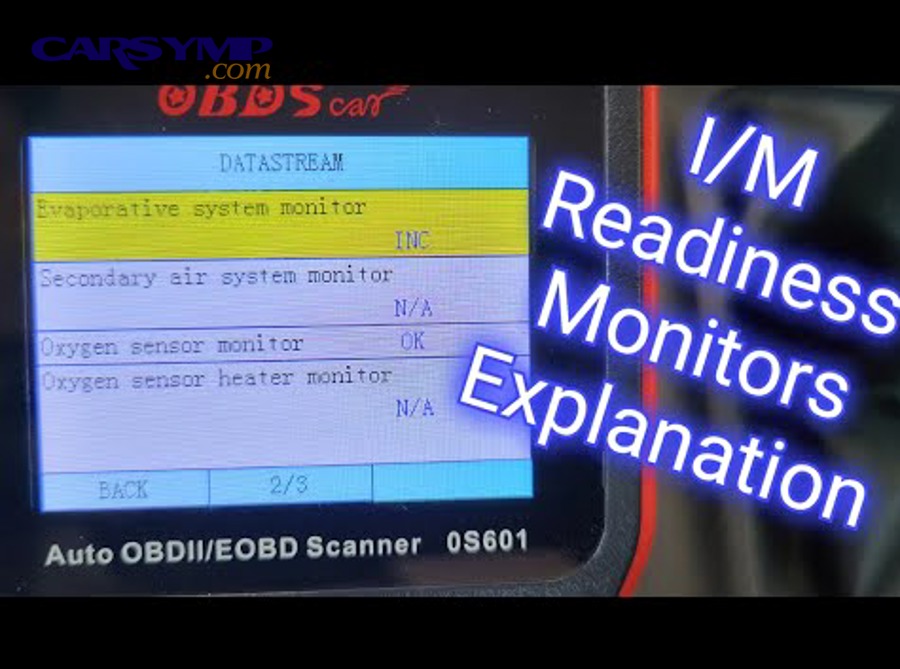
OBD-II readiness is the PCM’s “self-test completion status” for emissions systems, and it shows “Not Ready” after clearing codes because the PCM has to rerun each monitor under enabling conditions before it can mark the test complete.
Next, this matters because many owners assume “no check engine light” equals “inspection-ready,” but readiness is a separate pass/fail signal used by inspection programs. (dmv.ny.gov)
Which readiness monitors matter most after emissions repairs like O2 sensor/catalyst-related work?
There are several monitors, but after O2/catalyst-related repairs, the most commonly relevant ones are:
- O2 Sensor Monitor (upstream switching behavior)
- O2 Sensor Heater Monitor (heater circuit function and warm-up performance)
- Catalyst Monitor (converter efficiency inferred from upstream vs downstream O2 behavior)
- Fuel System / Fuel Trim Monitor (closed-loop control stability)
- Misfire Monitor (continuous)
- EVAP Monitor (often the last to complete)
The key pattern is that some monitors run continuously (misfire, fuel system, comprehensive component), while others run only when the vehicle hits the right combination of temperature, speed, load, and time. (ohioecheck.info)
This is why a “perfectly repaired” car can still show Not Ready: you haven’t provided the conditions that allow the monitor to execute and record completion.
Transition: Once you know which monitors are in play, you can connect the logic from “clearing codes” to “monitor completion” without guessing.
How do “DTC reset” and “readiness set” relate—what’s the cause-and-effect chain?
DTC reset is the starting line; readiness set is the finish line. The cause-and-effect chain looks like this:
- You repair the issue.
- You clear codes (or disconnect battery, depending on method).
- The PCM resets monitor status to “Not Ready.” (dmv.ny.gov)
- You drive under enabling conditions.
- Each monitor runs, passes, and flips to “Ready/Complete.”
- If a monitor fails, a pending code may appear; if it repeats, a stored code and MIL may return.
This is why the title’s contrast “DTC Reset vs Readiness” matters: clearing is fast, but readiness requires successful testing.
Evidence: According to official inspection guidance, monitors are computer tests used to determine whether an emission control system is operational and must be completed through driving before inspection readiness is achieved. (epa.ohio.gov)
What are the step-by-step actions to clear codes and confirm the repair before starting a drive cycle?
Use a scanner-first method with 6 steps—scan and save data, verify no active faults, clear codes, confirm MIL status, check prerequisites (fuel/temps), then start the drive cycle—so you earn “Ready” results instead of chasing repeated resets.
Then, this sequence prevents the most common DIY mistake: clearing codes, driving randomly, and hoping the car becomes ready.

What tools and settings should DIYers use (basic OBD2 scanner vs bi-directional scan tool)?
A basic OBD2 scanner is enough for readiness work if it can do these minimum tasks:
- Read stored and pending DTCs
- Clear codes
- Display I/M readiness status
- Show basic live data (helpful but not always required)
A bi-directional scan tool adds power (actuation tests, manufacturer-specific PIDs, Mode $06 access, EVAP commands), but you don’t need that level just to set readiness—especially if your goal is simply inspection readiness after a clean repair.
Practical settings to check on your scanner:
- I/M readiness list (Ready / Not Ready / Not Supported)
- MIL status and command
- Freeze-frame access (before you clear!)
- Live data highlights: coolant temp (ECT), intake air temp (IAT), fuel trims (STFT/LTFT), O2 sensor activity
This is also where you connect related maintenance costs without derailing the main intent: if the root issue was an O2 fault, you may be thinking about an O2 sensor replacement cost estimate. That cost varies widely by vehicle and sensor type (upstream vs downstream, wideband vs narrowband), but regardless of cost, the readiness workflow stays the same: verify repair → reset → complete monitors.
Transition: Tools alone don’t set readiness; enabling conditions do—so your next step is to verify prerequisites before you burn time driving the wrong route.
What prerequisites should you check first (fuel level, coolant temp, battery voltage, thermostat behavior)?
Yes—you should check prerequisites first because they (1) allow monitors to run, (2) reduce wasted drive cycles, and (3) prevent false failures from low voltage or unstable temperature.
Use this quick checklist:
- Fuel level: Aim for roughly 15%–85% (often a practical middle range like 1/4 to 3/4 tank) to help EVAP conditions. (motor.com)
- Cold soak availability: Many drive cycles start best after the car sits overnight so coolant and ambient temps are close. (obdautodoctor.com)
- Battery voltage health: Weak batteries and low charging voltage can interrupt monitor logic (especially EVAP).
- Thermostat behavior: If the engine never reaches normal temperature or fluctuates, monitors may refuse to complete.
- No active misfire / severe drivability issues: A flashing MIL or obvious misfire is a stop-and-diagnose condition.
If your repair was oxygen sensor replacement, also do a quick visual inspection:
- Wiring routing away from exhaust heat
- Connector fully seated
- No exhaust leaks upstream of the sensor (leaks can distort O2 readings)
And if you’re doing the sensor yourself, keep this practical tool note for later steps: O2 sensor socket tools and tips matter because the harness slot prevents wire damage, and the correct socket reduces the risk of rounding the hex on a stubborn sensor.
Evidence: Drive-cycle guidance commonly specifies enabling conditions such as mixed highway and stop-and-go segments, and many manufacturers require a fuel range so EVAP testing can run. (ohioecheck.info)
How do you complete a drive cycle to set readiness monitors after replacement?
Complete readiness by following a “universal” drive-cycle approach with 5 phases—cold start idle, gentle city driving, steady highway cruise, controlled coast-down decels, and a cooldown/repeat—so the PCM can execute non-continuous monitors and flip them to Ready.
Specifically, the point is not to memorize a perfect script; it is to hit the conditions that allow monitors to run, then confirm completion with the scanner. (nyvip3.com)

What is a practical “universal” drive-cycle routine most cars respond to?
There are 5 main phases of a practical universal routine: cold start, idle stabilization, mixed city, steady cruise, and deceleration events, based on how many inspection programs describe monitor enabling behavior. (nyvip3.com)
Use this routine as a real-world template (adjust for safety, traffic, and local laws):
- Cold start (best after overnight soak):
- Start engine without pressing the accelerator.
- Let it idle 2–4 minutes with accessories off if possible.
- Gentle city driving (5–10 minutes):
- Smooth acceleration, no hard throttle.
- Include a few complete stops and moderate accelerations.
- Steady highway cruise (10–20 minutes):
- Maintain a consistent speed (often 45–65 mph depending on road).
- Avoid rapid speed changes; use light throttle.
- Coast-down decelerations (2–4 events):
- Safely coast from highway speed down to lower speed without braking aggressively (where safe).
- These decel events often help certain monitors complete.
- Stop-and-go + idle segments (10–20 minutes):
- Include several 30-second idle periods and normal driving.
Why this works: monitors are triggered by stable operating windows. Hard acceleration, constant lane changes, and “short trip then shutdown” behavior often delays completion.
If you are specifically targeting an EVAP monitor, keep fuel in range and plan for a second cycle after a cooldown period; inspection guidance often notes that some monitors may require multiple drive cycles separated by cooldown. (dmv.ny.gov)
Transition: A routine is only useful if your expectations are realistic, so the next step is understanding typical completion time and which monitors are known to lag.
How long does it typically take for readiness to become “Ready,” and which monitors usually take the longest?
Readiness can flip in one longer mixed drive, but it can also take multiple days of normal use, and EVAP is frequently the last monitor to complete. (ohioecheck.info)
A practical expectation range:
- Continuous monitors (misfire, fuel system, comprehensive component): usually evaluate quickly during normal driving.
- O2 heater / O2 sensor monitors: can complete in one properly warmed drive if conditions are right.
- Catalyst: often needs steady cruise time at operating temperature.
- EVAP: may require specific ambient temp, fuel level, and cooldown/restart conditions—so it often completes later. (rangetechnology.com)
This explains many DIY frustrations: you clear codes after an oxygen sensor replacement, drive 10 minutes, see one or two monitors complete, and assume something is wrong—when the reality is you simply haven’t provided the full enabling window.
Evidence: A published drive-cycle handout for inspection readiness notes that a complete check may take several days and provides a mixed highway and stop-and-go routine as a way to help readiness complete. (ohioecheck.info)
How can you check that readiness is set and you’re inspection-ready?
You can confirm you’re inspection-ready by checking 3 things on a scanner—MIL status off, no pending/stored emissions-related DTCs, and I/M readiness showing the allowed number of monitors as “Ready/Complete” for your vehicle year and local rules.
Moreover, this is the moment you stop guessing: readiness is a data screen, not a feeling.

What should the scanner show (MIL, stored/pending/permanent codes, I/M readiness) before you go for a test?
Before you go, run this inspection-ready checklist:
- MIL status: Off (and ideally “MIL command = OFF” if your tool shows command status).
- Stored codes: None relevant to emissions systems.
- Pending codes: None—pending faults can become confirmed during the test drive to the station.
- Permanent codes: If present, understand your jurisdiction’s rules; some programs focus on readiness and MIL, but permanent codes can still cause confusion (see Supplementary section).
- I/M readiness: Most monitors show Ready/Complete, with only the allowed number as Not Ready (if your program allows any).
For example, New York’s inspection guidance describes failure thresholds based on model year (older vehicles may allow more Not Ready monitors than newer ones). (nyvip3.com)
This is also where the “Car Symptoms” angle becomes practical: if the car still shows rough idle, poor fuel economy, sulfur smell, hesitation, or repeated stalling, those symptoms often correlate with active faults that will block readiness or bring the MIL back—so treat symptoms as signals, not background noise.
Transition: Even with a checklist, confusion happens because scanner labels vary—so you need to interpret “Ready,” “Complete,” and “Not Supported” correctly.
What’s the difference between “Ready,” “Complete,” and “Not Supported,” and how should DIYers interpret each?
Ready/Complete means the monitor ran and passed; Not Ready/Incomplete means it has not completed since the last reset; Not Supported (N/A) means the vehicle does not have that monitor or it is not applicable to that configuration.
How to interpret them correctly:
- Ready / Complete: Good—this monitor is done and recorded.
- Not Ready / Incomplete: Not necessarily a fault—often just missing enabling conditions.
- Not Supported / N/A: Normal on some vehicles depending on engine, emissions package, and model year.
The mistake to avoid is treating “Not Supported” as a failure. It usually isn’t; it’s simply a capability difference.
Evidence: Inspection-program education pages explicitly describe readiness monitors as tests that must be completed via a drive cycle and explain that a vehicle can fail if enough monitors remain Not Ready. (dmv.ny.gov)
Why won’t readiness set (or why did the code come back) after you cleared codes?
Readiness won’t set—or a code returns—because either the enabling conditions were never met, a related fault is still present (like a leak or wiring issue), or the vehicle’s self-test failed and is protecting you from “false readiness.”
In addition, this is where DIY work becomes efficient: you stop repeating drive cycles and start verifying the specific blocker.

Which problems most commonly prevent O2/catalyst/EVAP monitors from completing?
There are 6 common categories of readiness blockers:
- Exhaust leaks (especially upstream of O2 sensors): Leaks introduce oxygen and confuse sensor readings, delaying O2 and catalyst monitor logic.
- Wrong part or mismatched sensor type: Some vehicles require specific wideband/AFR sensors; installing the wrong variant can cause slow switching or incorrect signals.
- Wiring/connectors/ground issues: Heater circuit faults (often P0135/P0141-type families) can block O2 heater readiness.
- Fuel trim instability: Vacuum leaks, MAF issues, or fuel delivery problems can prevent stable closed-loop operation.
- EVAP-specific conditions not met: Fuel level out of range, temperature window not met, frequent short trips, or a small leak that keeps failing the test. (rangetechnology.com)
- Thermostat or temperature regulation issues: If the engine never reaches stable operating temperature, several monitors may refuse to complete.
If your workflow started with oxygen sensor replacement, take special care with the mechanical side too—this is where “O2 sensor socket tools and tips” help: the slotted socket prevents twisting the harness, and a proper breaker bar plus penetrant reduces the chance of damaging threads, which can create tiny exhaust leaks at the bung.
And if you’re weighing whether to “try again” or pay a shop, this is the moment to think in cost terms: an O2 sensor replacement cost estimate is not just the sensor price; it includes the risk cost of damaged threads, broken sensors, and additional diagnosis if the original issue wasn’t the sensor itself.
Transition: Knowing common blockers helps, but you still need a rule for when to stop driving and start diagnosing, so you don’t waste days looping the same route.
When should you stop driving and diagnose instead of repeating drive cycles?
Yes—you should stop driving and diagnose when (1) the MIL returns quickly, (2) a pending code keeps reappearing, or (3) drivability/safety symptoms show up, because repeated cycles won’t override a failing self-test.
Use these stop-and-diagnose triggers:
- Flashing MIL (often indicates active misfire risk to the catalytic converter)
- Same DTC returns within one drive after clearing
- Fuel trims are extreme (scanner shows STFT/LTFT strongly positive/negative consistently)
- EVAP never completes across multiple properly conditioned attempts (fuel level and temp windows correct)
- Car Symptoms worsen (stalling, strong fuel smell, severe hesitation)
A practical tactic is to stop treating the entire system as one problem and instead focus on the monitor that refuses to set. If only EVAP is Not Ready, you prioritize EVAP enabling conditions and leak checks; if catalyst stays Not Ready, you prioritize warm steady cruise and sensor/catalyst plausibility checks.
Evidence: Program guidance for drive cycles emphasizes that specific driving conditions must be met for monitors to run and that readiness may require multiple drive cycles separated by cooldown periods, which is why repeated random short trips often fail to complete readiness. (dmv.ny.gov)
What are the edge cases and advanced checks that affect readiness after replacement?
Edge cases affect readiness when monitor logic is satisfied differently than dashboard expectations—especially with Permanent DTC behavior, EVAP environmental constraints, and aftermarket/tune impacts—so advanced checks help you prove the system is passing even before every screen looks “clean.”
Especially if you’re doing repeated emissions repairs, this section helps you avoid misreading what the car is telling you.

How do Permanent DTCs clear, and why can readiness be “Ready” while a permanent code still shows?
Permanent DTCs can remain even after the MIL turns off and readiness flips to Ready because the PCM often requires successful monitor completion under specific conditions before it removes the permanent record.
In practical terms:
- You fix the problem.
- The PCM stops seeing the fault.
- The MIL stays off.
- Readiness completes as monitors run and pass.
- The permanent code may still show until the PCM’s logic decides enough successful passes have occurred.
This is why you should never rely on a single screen line. You assess MIL status, pending codes, and readiness as a combined picture, and you confirm with a second drive if needed.
Evidence: Inspection-program education materials explain that drive cycles are required for monitors to reset to a ready state and that readiness status is central to inspection outcomes—separate from simply clearing codes. (dmv.ny.gov)
What does Mode $06 show, and how can it confirm an O2/catalyst fix before the monitor flips to “Ready”?
Mode $06 is a diagnostic view that shows on-board test results and thresholds for certain monitors, which helps you see whether the system is trending toward pass or fail before the readiness bit flips.
How it helps in real life:
- After an oxygen sensor replacement, Mode $06 can sometimes show whether O2 response tests are within limits.
- For catalyst concerns, it can provide early evidence that efficiency calculations are passing, even if the monitor hasn’t completed yet.
The benefit is not “more data for the sake of data.” The benefit is direction: if Mode $06 results are consistently near the threshold, your monitor might be failing intermittently, which is why readiness won’t stick.
Why is EVAP the last monitor to set, and what rare conditions can block it (fuel level, weather, altitude, short trips)?
EVAP is often last because it’s sensitive to temperature windows, fuel level ranges, and stable operating conditions, and it frequently requires a cooldown and restart to execute the test sequence. (rangetechnology.com)
Rare blockers that matter more than most DIYers realize:
- Fuel level just outside the window (too full or too low)
- Ambient temperature outside enabling range (too hot/cold depending on make)
- High altitude / low barometric pressure effects on some enable criteria (rangetechnology.com)
- Short-trip patterns that never create stable conditions for the test
A practical EVAP readiness strategy is boring but effective: keep fuel around mid-range for a few days, do one long mixed drive, then allow an overnight soak and repeat one more structured cycle.
How can aftermarket parts or engine tunes impact readiness (and what is the safer OEM-aligned alternative)?
Aftermarket parts and tunes can impact readiness when they change sensor response, fuel control behavior, or monitor enable logic—so the PCM may delay or refuse completion even if the car “feels fine.”
Common examples:
- Non-OE O2 sensors with different response characteristics
- Exhaust changes that alter upstream/downstream sensor dynamics
- ECU calibrations that affect monitor parameters (in some cases, monitors may not behave as expected)
The OEM-aligned alternative is straightforward: use correct-spec sensors, verify no exhaust leaks, and restore stock calibration if you’re chasing inspection readiness. Even if you later return to performance modifications, stock behavior is the baseline that most readiness logic and inspection criteria expect.
Evidence: Inspection and program resources consistently emphasize that readiness monitors must complete under appropriate conditions and can be affected by design anomalies or configuration issues, which is why OEM-aligned setups tend to complete readiness more predictably. (bar.ca.gov)